OKR Tracker Template
 By Jan Suski. I go deep on every review, checking every number against its source and digging up details other coverage misses, a habit from six years of SEO and link building for tech companies. Bylines at Surfer, Brand24, and Senuto. How the scoring works.
· Prefer this source on Google
An OKR tracker turns a quarterly planning document into something a team checks every week: one dashboard showing every objective, every key result, and how close each one sits to done. Objectives are clear qualitative goals describing desired achievements, and Key Results are the specific measurable metrics that prove an objective got hit.
This guide is written for team leads, managers, and organizations setting up or fixing their OKR tracking process. Tracking OKRs well turns a goal-setting exercise into alignment, accountability, and progress a team can measure.
This OKR tracker template gives teams a structure for team OKRs and company OKRs in one workspace, with a progress column that updates as key results move, replacing the slide deck that goes stale the week after the planning meeting ends.
Download the Free OKR Tracker Template
Download the OKR tracker template (XLSX)Objective and key-result rows, an owner column, an auto-scored traffic-light progress status, and a worked example row filled in.
What Is an OKR Tracker?
An OKR tracker monitors Objectives and Key Results: it holds the objective text, the key results attached to it, an owner, and a live progress score for each. OKRs stand for Objectives and Key Results, a goal-setting framework built around pairing a qualitative ambition with the measurable outcomes that prove it happened.
An effective OKR tracker supports transparency and accountability. Anyone on the team can open it and see exactly which key results are on track, which are at risk, and who owns the fix, without a status-update meeting to translate a spreadsheet nobody else understands.
Teams with automated weekly check-ins complete 43% more OKRs than teams relying on manual status updates. The mechanism isn't magic: automation removes the friction of updating a tracker by hand, so more teams do it.
Objectives and Key Results: The Core of Every OKR Framework
Every OKR and every OKR framework rests on the same pairing. The objective is the qualitative goal, a sentence describing where the team wants to be, and the key results are the measurable outcomes that would prove the team got there.
Each objective should have 3-5 measurable key results. Fewer than three and a single result can hide a real miss; more than five and the team spends more time updating the tracker than executing against it.
Key Results are specific measurable metrics indicating success. Directional statements do not qualify. "Improve onboarding" is not a key result; "cut time-to-first-value from 12 days to 5 days" is, because a tracker can score it without a debate about what "improve" meant.
Clear Objectives vs Measurable Key Results
A clear objective answers what the team is trying to achieve and why it matters this cycle. A measurable key result answers how the team will know, in a number anyone can check without asking the owner to explain it.
OKR templates help teams define clear objectives and measurable key results in the same document, side by side, so a reviewer never has to flip between a strategy deck and a spreadsheet to see if the two connect.
How to Track OKRs: Setting Up the Tracker
Setting up an OKR tracker starts before the first check-in, with the structure the rest of the quarter depends on.
- Set clear objectives for the cycle. Limit the count: limiting the number of objectives encourages focus during time frames, since a team chasing eight objectives at once is chasing none of them at full attention.
- Attach 3-5 measurable key results to each objective, with a clear owner named against every one.
- Build the OKR dashboards a team will open: one view for the objective owner, one roll-up view for leadership, both pulling from the same underlying data so the numbers never disagree.
- Schedule regular check ins. Regular check-ins are necessary for successful OKR tracking, and a cadence set once at kickoff removes the need to negotiate meeting times every single week.
- Score key results with a consistent method throughout the cycle. A new convention invented every review makes the cycle unreadable.
Use a traffic light scoring system to visually flag at-risk goals. Green, yellow, and red communicate more at a glance than a percentage column that needs a legend to interpret.
Free OKR Templates: Spreadsheets vs Purpose-Built OKR Software
Free OKR templates split into two real categories, and the right one depends on team size more than preference. Spreadsheets are free and familiar for tracking OKRs, and Google Sheets is a popular free tool for tracking OKRs precisely because most teams already know how to use one without training.
Free OKR templates are available for Google Docs and Sheets, and both handle the basics: objective rows, key result rows nested underneath, a progress column, an owner column. What a spreadsheet-based OKR tracking template can't do is notify an owner automatically when a key result goes stale, or roll dozens of team OKRs into one dashboard without a manual copy-paste step.
| Team size | Recommended OKR tools | Why |
|---|---|---|
| Under 20 people | Google Sheets or Google Docs template | Free tools cover single-team tracking without added overhead |
| 50-200 people | Purpose-built OKR software | Cross-team OKR dashboards and automated progress updates become necessary at this scale |
| Entire organization | OKR management platform with Microsoft integration or Slack/Teams alerts | Manual reporting across many teams stops scaling past a few dozen contributors |
For teams under 20 people, start with free tools or spreadsheets. Between 50-200 people, use a purpose-built OKR platform, since the manual reporting burden of stitching together many teams' spreadsheets on free tools starts costing more staff time than OKR tracking tools would.
Choosing the Right OKR Software
The right OKR software depends less on feature count and more on the fit with how the team already works. OKR tools align a team towards organizational objectives, but only if people open the OKR tools and stop tracking real progress on a separate set of tools out of habit.
Organizations using purpose-built OKR software generate a 1:88 return on investment, a figure driven mostly by the hours saved on manual reporting and the goals that would otherwise have quietly slipped without anyone noticing until the quarter ended.
Microsoft Teams and Microsoft Integration
Distributed teams increasingly want their OKR tracker to live inside the tools they already have open all day. Microsoft integration, syncing OKR dashboards and progress updates directly into Microsoft Teams, cuts out the extra login and the extra app that never becomes a daily habit for busy contributors.
Best OKR software and OKR tools in this category push automated progress updates into the channel where a team already talks.
Cascading OKRs: Company OKRs to Team OKRs
Cascading objectives aligns individual and departmental goals with company strategy. Company OKRs set the top-level direction; team OKRs and department goals should trace back to one of them, so a contributor doing daily tasks can point to exactly which company objective their work moves.
OKR trackers create alignment between daily work and strategic objectives by making that link visible. Assumed links break quietly. When a key result sits inside a tracker connected to its parent objective, anyone reviewing team OKRs can see the chain from a single task up to a strategic priority in one screen, no need to trust that the connection exists somewhere in a planning document nobody re-opens.
Cascading breaks down when business units set OKRs in isolation. A sales team's own goals and a product team's own goals should overlap somewhere, usually at a shared company goal like revenue growth or retention, and an OKR tracker that shows both hierarchies side by side is what catches the gap before the quarter ends.
Goal Setting and Strategic Planning with OKRs
Goal setting only works as strategic planning when the goals connect to something bigger than the team writing them. An OKR process exists to force that connection: every objective should trace to a strategic priority the leadership team already named. Whatever felt urgent the week planning started does not qualify.
Strategic planning sessions that produce OKRs work best when they limit themselves to the most important goals for the cycle. Every initiative a department wishes it had time for will not fit. Strategic initiatives compete for the same limited attention and budget, and an OKR tracker that lists ten "top priorities" side by side has, in practice, named none.
Product teams and go-to-market teams tend to align faster once their OKRs sit in one tracker, no longer split across two separate planning documents. Modern teams increasingly expect that visibility by default: align teams around a shared view of company goals, and the question of if OKRs work stops being about the framework and starts being about if the tracker gets opened.
Clear ownership is what turns a strategic-planning exercise into an OKR process that survives contact with a busy quarter. Every objective needs one named owner, a person and never a department, so there's someone accountable for keeping the goal-setting output honest as the OKR cycle moves from kickoff to close.
OKRs as a Strategy Execution Platform
A spreadsheet can hold OKRs; a strategy execution platform does more, connecting the goal-setting layer to the daily project management tools a team already uses so strategic objectives and daily tasks live one click apart, no longer scattered across separate systems nobody cross-references.
Strategy execution depends on measuring progress continuously. Once a quarter produces a report and calls it a process. Progress tracking that only happens at a scheduled review misses the exact moment a key result needs help, while a strategy execution platform that surfaces goal tracking data daily gives a team the lead time to fix a stalled key result.
Track progress against strategic priorities the same way a project manager would track progress on a delivery date: visibly, on a shared screen, updated often enough that "how are we doing" never requires opening three different tools to answer. OKR updates that flow automatically from a connected system beat OKR updates typed in by hand, because automated ones happen even on the weeks nobody remembers to log in.
Regular Check-Ins and the OKR Cycle
Every OKR cycle runs on the same rhythm: set objectives, execute, check in, score, repeat. Regular check-ins and progress updates are what separate an OKR tracker that reflects real progress from one that reflects whatever someone typed in at kickoff and never touched again.
A weekly execution check-in doesn't need to be long. It needs three things: what moved this week, what's blocked, and what the owner needs from someone else to unblock it. Automation in tracking reduces manual reporting burdens here specifically, since a system that pulls a number automatically from a connected data source removes the most tedious part of a weekly check-in: typing the same metric in by hand.
Update progress on a fixed schedule. A key result that hasn't moved in three weeks is itself useful information, and an OKR tracker that only gets updated on good news quietly stops being useful for measuring progress at all.
Common OKR Tracking Mistakes
Switching platforms mid-cycle is the most disruptive mistake a team can make. Every switch means re-entering objectives, re-training new users, and losing whatever history the old OKR tracker held, so evaluate OKR software before the cycle starts.
Treating OKRs like daily tasks is the second failure. An OKR framework describes an ongoing process toward a strategic outcome; collapsing it into a checklist of daily tasks strips out the "why" that made the objective worth setting in the first place.
Grading OKRs only at the end of the cycle is the third failure. Most organizations that skip mid-cycle check-ins discover a stalled key result in the final week, when there's no time left to fix it. Week four, with time still on the clock, is when the check-in would have caught it.
A Worked Example
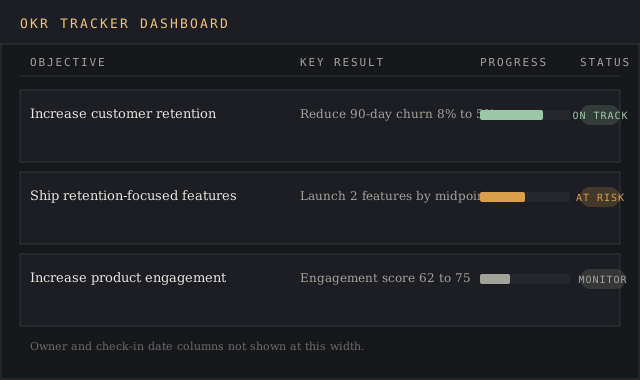
A 40-person product company sets a company OKR for the quarter: increase customer retention. Three key results support it: reduce 90-day churn from 8% to 5%, increase product engagement score from 62 to 75, and launch two retention-focused features by the midpoint of the cycle.
The product team's own OKR cascades from that company objective: ship the two retention features on schedule, with key results tied to adoption rate in the first two weeks after each launch. The customer success team's OKR cascades from the same company goal with a different angle: reduce 90-day churn directly through proactive outreach to at-risk accounts, flagged automatically inside the OKR tracker when engagement drops below a set threshold.
Weekly check-ins update all three key results in the same dashboard, color-coded green, yellow, or red. By week six, the engagement score key result flags yellow, prompting the product team to move up a planned feature.
Best OKR Software for Different Team Sizes
The best OKR software for a small team of five to twenty people is often the free tier of a purpose-built OKR tool, or a well-structured Google Sheets template, since the value of automated OKR dashboards shows up mostly once many teams need to roll up into one view.
The best OKR software for a company running many teams typically layers in Microsoft Teams or Slack integration, single sign-on, and role-based dashboards so a business unit leader sees only the OKRs relevant to their group without wading through every other department's objectives.
New users evaluating OKR tools should weigh switching cost heavily: a platform that looks feature-rich on a demo call but doesn't fit how a team already runs project management day to day tends to get abandoned within a cycle or two, leaving the previous spreadsheet as the tracker everyone quietly goes back to using.
The OKR Methodology in Plain Terms
Strip away the branding and the OKR methodology is a small set of rules: set a small number of objectives, attach measurable key results to each, review them on a fixed schedule, and score honestly at the end. Every OKR tool on the market is just a different wrapper around that same OKR methodology.
Teams new to the OKR methodology often over-build the tracker before they've run a single cycle. The OKR methodology rewards a plain structure run consistently over a complicated dashboard run once and abandoned; a two-column Google Sheet used every week beats an elaborate tool nobody opens after the second one.
The OKR methodology also assumes goal tracking stays visible to more than the objective owner. Progress tracking that only one person can see defeats the purpose: the whole point of the OKR methodology is that a whole team can measure progress against a shared target and know when to help.
Teams that stick with the OKR methodology past the first cycle tend to report the same result: goal tracking gets easier once check ins become routine, and teams stay focused because the tracker makes drifting off-target visible within a week, long before quarter's end.
Comparing OKR Tools: Tracking Depth vs Simplicity
Every set of OKR tools makes the same trade-off between tracking depth and simplicity. A lightweight spreadsheet handles basic tracking, objective, key result, owner, percent complete, in a format anyone can open without training. A dedicated OKR tools suite adds tracking layers a spreadsheet can't: automated check ins, historical tracking across past cycles, and tools for rolling up team-level tracking into a single company view.
The tracking tradeoff matters most at the point where check ins start eating real time. Weekly check ins that take five minutes per objective in a lightweight tool can take twenty in a heavier one that wasn't configured well, and that gap compounds across a team running a dozen objectives at once.
Tools built specifically for OKR tracking usually separate two views: a tracking view for the objective owner updating a key result, and a reporting view for a manager scanning tracking status across many objectives at once. Free tools rarely split those two well, which is exactly the point where a growing team decides its tracking needs have outgrown a spreadsheet.
Whatever tools a team lands on, the check ins are what make the tracking real. Tools without a built-in check ins cadence tend to decay into the same stale document a spreadsheet becomes once nobody's assigned to update it, regardless of how much tracking functionality the tools technically offer.
OKR Tracking Templates for Different Use Cases
An OKR tracking template built for a marketing team weights campaign performance metrics, like a campaign's contribution to a pipeline key result, more heavily than a template built for an engineering team, which more often tracks measurable outcomes like uptime or release cadence.
A generic OKR template works for a first attempt at the framework. A team that's run two or three cycles usually customizes its OKR tracking template with fields specific to how that team measures its own key results, a step that free, unmodified templates rarely account for out of the box.
Building an OKR Template That Fits the Team
An OKR template is only a starting point. The generic OKR template that ships free with most OKR software assumes a small team running one cycle at a time; a company running many teams at once usually needs a modified OKR template with an extra field for which department goals each objective rolls up to.
Google Sheets remains the fastest way to test an OKR template before committing to full OKR management software. Build the OKR template with five columns, objective, key result, owner, current value, target value, and run one cycle before deciding if the entire organization needs a heavier OKR management tool or if the Google Sheets version already does the job for a small team.
Company goals should sit at the top of every OKR template, visible above the team OKRs that cascade from them, so goal setting at the team level never drifts from the top priorities the leadership team already set. An OKR template missing that top-level row is missing the one piece of context that makes team OKRs make sense to anyone outside the team that wrote them.
Regular check ins are what keep an OKR template from going stale the way a one-off goal setting exercise does. A template reviewed weekly, with OKR dashboards showing progress updates in the same view as the original objective, does more for measurable outcomes and track progress than any feature list an OKR tools vendor can offer.
Track OKRs against the template consistently and the objectives and key results framework does what it was built to do: turn goal setting into a running habit, no longer a once-a-quarter event.
Free OKR tools make this easy to test cheaply. Start with a free OKR template, run one full OKR tracking cycle, and only then decide if OKR management software earns its cost against what the free OKR tracking template already delivers.
FAQ
What is an OKR tracker?
A tool or template that monitors Objectives and Key Results over a cycle, holding the objective text, its key results, an owner, and a live progress score so a team can see real progress at a glance, with no need to reconstruct it from memory.
What is the best way to track OKRs?
Set clear objectives with 3-5 measurable key results each, run regular check-ins on a fixed cadence, and use a tool sized to the team, a spreadsheet under 20 people, purpose-built OKR software once cross-team OKR dashboards become necessary.
What is the best OKR tracking software?
The best OKR software depends on team size and existing tools: smaller teams do fine with free templates in Google Sheets or Google Docs, while larger organizations benefit from purpose-built OKR management software with Microsoft integration or automated progress updates.
Is Google still using OKR?
Yes. Google is widely cited as one of the earliest and largest adopters of the OKR framework, and its continued internal use is part of why OKRs remain a standard goal-setting method across technology companies today.
Getting the Most Out of OKR Dashboards
OKR dashboards only pay off if the team OKRs on them stay current. Track progress with the same discipline that keeps project management tools useful: update the number the moment it changes, so OKR dashboards reflect real progress updates and nobody's guessing the night before the review.
Track OKRs across every objectives and key results pairing on the dashboard, including the ones that look bad this week; OKR dashboards that only surface good news stop functioning as an early-warning system, which is the entire reason team OKRs belong on a shared dashboard, out in the open, away from each owner's private notes.
Progress updates flowing into OKR dashboards automatically free check-ins to focus on what to do about a stalled key result, since the number itself is already on the screen. That shift, from reporting the number to discussing the number, is what OKR dashboards are for.
Bottom Line
A tracker only pays for itself once a team opens it every week and asks what changed since last time; a dashboard nobody opens between reviews is a spreadsheet with better formatting.
Set clear objectives, pair each with measurable key results, pick OKR tools sized to the team, track progress on dashboards the team opens every week, and run the check-ins on a schedule; the same weekly habit carries across the other templates here.