Customer Journey Map Template
 By Jan Suski. I go deep on every review, checking every number against its source and digging up details other coverage misses, a habit from six years of SEO and link building for tech companies. Bylines at Surfer, Brand24, and Senuto. How the scoring works.
· Prefer this source on Google
A customer journey map visualizes the entire customer experience from awareness to post-purchase, laid out stage by stage so a team can see exactly where customers get stuck and stop guessing. This customer journey map template gives product, marketing, and customer success teams one shared picture of how customers move through a purchase.
Customer journey maps help build empathy by visualizing customer experiences and motivations, and the practice sits next to user persona templates and customer intelligence work in the same market intelligence toolkit this site covers.
Download the Free Customer Journey Map Template
Download the customer journey map template (XLSX)One row per stage across awareness, consideration, purchase, retention, and advocacy, with columns for touchpoints, emotions, pain points, and opportunities, plus a worked example filled in.
The grid imports cleanly into Google Sheets and pairs with the user persona template tab layout, so a team building both keeps a consistent format.
What Is a Customer Journey Map?
A customer journey map outlines customer interactions with a brand across every touchpoint: the ad that created initial awareness, the website visit, the support call, the renewal email. Key components of a customer journey map include customer personas, journey stages, and touchpoints, mapped together.
Of businesses say journey maps help develop better products, and 91% report journey maps drive sales, according to Hanover Research's 2022 report on journey mapping, cited by Lucid. A map that never leaves the workshop wastes the exercise; the value shows up once product and sales teams use it.
Customer journey stages typically include awareness, consideration, purchase, retention, and advocacy, and a complete map tracks a customer through all five. Our AI customer journey mapping report covers the software that now updates those stages from behavioral data.
Key Components of a Customer Journey Map
Customer Personas
Customer personas are essential for creating effective journey maps, since different customer segments move through the buying process differently. Create customer personas before mapping the journey itself, so the map reflects one real customer type. The user persona template covers building that profile in detail.
Touchpoints
Customer touchpoints are specific interactions between customers and businesses. Touchpoints can include websites, customer service, physical store visits, and product delivery, and a customer journey map example that skips a channel customers use will misdiagnose where the real friction sits.
Customer Emotions and Pain Points
Emotions represent how customers feel at each stage of the journey, such as excitement or frustration, and 69% of consumers say emotions influence their experiences. Mapping emotions helps identify customer pain points that a purely transactional view of the journey would miss entirely.
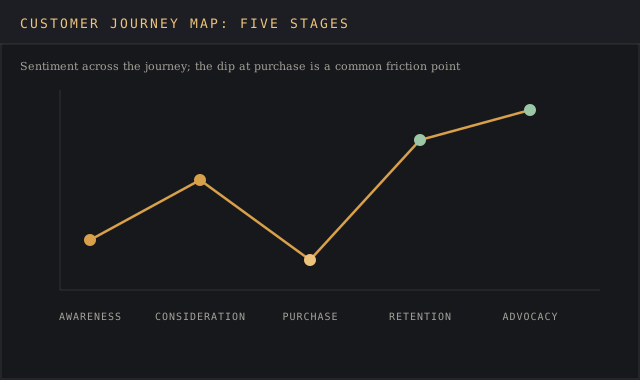
Customer journey maps highlight emotional highs and lows, and emotions at touchpoints can predict customer satisfaction before a survey ever confirms it. A dip in sentiment at one specific step is often the earliest signal of a pain point worth fixing.
Building Buyer Personas Before Mapping
Buyer personas exist to force a team into a customer's perspective before drawing a single stage on the map. A customer centric map starts with a deeper understanding of one real buying committee or household. An average of every customer type a business serves describes none of them.
Collect data for that persona from more than one source: quantitative data from web analytics and product usage, plus qualitative detail from support transcripts and sales call notes. A persona built from quantitative data alone knows what customers clicked; a persona built from both knows why.
Cross functional teams should review the persona together before mapping begins, since sales hears objections product never sees, and support sees confusion marketing never hears about. A map built to address customer needs that only one department recognizes will misjudge the touchpoints that matter most to the rest of the business.
Common Touchpoints Across the Buyer's Journey
Customers interact with a brand across more channels than most teams track: the physical store, the website, a support call, an online review someone else wrote. All the touchpoints a customer's journey passes through deserve a line on the map, including the ones the marketing team has no control over.
Different stages of the buyer's journey favor different touchpoints. Early on, customers engage mostly with content and word of mouth; at the purchase stage, the sales funnel narrows to pricing pages, checkout flows, and a final sales conversation; after the sale, touchpoints shift to support and renewal. Steps customers take between stages often skip channels a static map assumes are sequential, so a real map needs branches.
Web analytics can confirm which touchpoints customers use versus which ones a team assumes matter; user actions on a site frequently reveal that a channel treated as core in the org chart barely registers in the data, and vice versa.
Customer Retention and Brand Loyalty
A customer journey map that stops at the sale misses where brand loyalty forms. Retain customers by treating the post-purchase stages with the same rigor as awareness and consideration: what customers receive after checkout, how fast support responds, say a renewal reminder feels helpful or like a sales pitch.
Customer churn concentrates at specific, identifiable points in the existing customer base. Churn is not random across it, which is exactly what a well-built map is supposed to surface. Identify pain points in the retention stages the same way earlier stages get scrutinized, since customer engagement work that only targets new customers leaves valuable insights about the existing customer base on the table.
Marketing efforts aimed at the buyer's journey's earliest stages get most of the attention and most of the budget, but the broader context matters too: a customer who feels ignored after the sale tells other potential buyers about it long before they'd tell a company directly, which is exactly what a customer journey maps provide the visibility to catch early.
How to Create a Customer Journey Map
- Set clear objectives. Decide which customer segment and which part of the buying process this particular journey map covers.
- Create customer personas. Ground the map in a real customer, built from customer data and customer surveys.
- Identify journey stages and touchpoints. List every stage the customer takes and every touchpoint inside each one, from initial awareness through the entire customer journey to advocacy.
- Capture emotions and pain points. Mapping requires gathering data from customer feedback and analytics, support logs, and online reviews. Internal assumptions about how customers feel are the thing being tested.
- Identify gaps and opportunities. Compare the current-state map against business goals to identify opportunities where a small fix produces a large gain in customer satisfaction.
- Validate and update regularly. A customer journey map is a living document and should be updated regularly to reflect changes in customer behavior, product features, and the competitive environment.
Customer Journey Map Example
| Stage | Customer action | Common pain point |
|---|---|---|
| Awareness | Sees an ad or online review | Unclear value proposition |
| Consideration | Compares options, reads reviews | Missing pricing detail |
| Purchase | Completes checkout or signs contract | Confusing checkout flow |
| Retention | Uses the product, contacts support | Slow support response |
| Advocacy | Leaves a review, refers a friend | No easy way to refer |
A basic journey map can start with just these five rows and one persona; a more detailed customer journey map example adds a row for emotions and a row for the internal team responsible for fixing each identified gap.
What a Customer Journey Map Looks Like as a Visual
A visual representation of the journey, and no text description of it, is what makes a customer journey map useful in a meeting. Various stages get laid out left to right, a customer lifecycle in miniature, with a row underneath for touchpoints, a row for emotion, and a row for the team responsible for each identified gap.
The exercise works best when a team tries to walk in the customers shoes stage by stage: what a customer feels at checkout, on top of what the checkout page is supposed to do. Just what that customer sees, clicks, and waits for at each step is the detail a purely internal discussion tends to skip.
A finished map should make it obvious, at a glance, which stage a target audience struggles at most, without needing a paragraph of explanation underneath it. That's the whole case for drawing it as a picture; a glance does what a written list can't.
Benefits of Customer Journey Mapping
A customer journey map can reveal inconsistencies in customer experiences across different channels: a customer who gets a warm welcome online but a cold response over the phone is living two different brand experiences, and the map is what makes that visible.
Identifying pain points allows businesses to address areas of customer frustration within the journey before those pain points show up as churn. Prioritizing improvements ensures that organizations focus on the most impactful changes to improve customer satisfaction.
Analyzing touchpoints improves customer experience and satisfaction, and 1 in 3 businesses used journey maps during the pandemic specifically for the resilience planning that a sudden channel shift demanded.
Customer Journey Map Software and Tools
Teams that create a customer journey map for the first time often reach for a whiteboard or a slide deck, and both work for a single review meeting. A customer journey map that needs regular updates, the kind this template supports, holds up better as a shared spreadsheet or a diagramming tool that survives version control.
Whatever the tool, the underlying journey map should track the same core fields: the stage, what customer actions the customer takes, what customer experience each stage delivers, and what customer expectations that stage sets up for the one after it. A journey map missing any of those fields turns into a nice picture with no diagnostic power.
Customer success teams are often the first to ask for a journey map, since they see customer needs shift stage by stage more directly than any other function. Building the map with customer success input from the start produces a customer journey map the team that has to act on it trusts.
Customer Journey Map vs Service Blueprint
A customer journey map shows what the customer sees and feels; a service blueprint adds the internal processes, systems, and staff actions behind each touchpoint that the customer never sees directly. Teams building both together get a complete picture: the customer-facing journey map plus the operational blueprint that has to function correctly to deliver it.
Most customer journey mapping process work starts with the map alone, since it requires less cross-functional data collection, and adds the service blueprint once a specific stage needs deeper operational diagnosis.
Common Mistakes in Customer Journey Mapping
Building the map from internal assumptions, without real customer data, is the most common failure. A map built entirely in a conference room describes what the team believes customers do. The two diverge more than anyone expects.
Treating the map as a one-time project is the second failure, since customer behavior, product features, and competitors all keep moving after the workshop ends.
Mapping every customer segment as one journey is the third failure: different customer segments often diverge sharply after the awareness stage, and a single blended map hides exactly the differences a team needs to see.
FAQ
What are the 7 steps to map the customer journey?
Set objectives, build personas, list stages and touchpoints, gather customer data, map emotions and pain points, identify gaps, and validate the map with real customers before treating it as final.
What are the 5 stages of the customer journey map?
Awareness, consideration, purchase, retention, and advocacy, the same five customer journey stages most journey maps track from initial awareness through to a customer becoming an advocate.
What are the 5 main points of a customer journey?
Touchpoints, customer actions, emotions, pain points, and opportunities, the five elements that turn a simple stage list into a complete customer journey map.
What is the ideal customer journey map?
One built from real customer data, covering every touchpoint a customer uses, updated on a schedule.
Bottom Line
A customer journey map earns its place the same way any market intelligence template does: by turning assumptions about customer behavior into a document grounded in real customer feedback and real touchpoints. Build it from actual customer data, cover the full journey through advocacy, and revisit it as customer expectations and channels shift.