Customer Engagement Strategy Template
 By Jan Suski. I go deep on every review, checking every number against its source and digging up details other coverage misses, a habit from six years of SEO and link building for tech companies. Bylines at Surfer, Brand24, and Senuto. How the scoring works.
·
A customer engagement strategy template is a working document that names who you're engaging, which channel you'll use, how often you'll show up, and what result counts as success. Fill in the fields once, and a marketing lead, a customer success manager, and a founder can all read the same plan, replacing the three separate spreadsheets each one used to keep.
Small teams reach for this template when engagement decisions live in someone's head: a founder tracks renewal dates from memory, a support rep "just knows" which accounts are cooling off, and none of it is written down.
Larger teams use it to align sales, marketing, and customer success around one shared document, dropping the three competing calendars each team used to keep on its own. Either way, the gap it closes shows up in customer retention and repeat purchases, which is where real business growth comes from. A mission statement never moved either number.
This page covers the download, a field-by-field walkthrough of what goes in each section, a worked example with real numbers, the metrics worth tracking, and the mistakes that turn a good plan into a shelved PDF.
It's built for anyone running customer engagement without a dedicated ops team: a two-person customer success function, a marketing manager who inherited retention, or a founder building the first version by hand, working from customer insights and customer behavior data already sitting in a CRM or a support inbox. This template is part of our market intelligence templates library, free to download with no email required.
Download the free customer engagement strategy template
Download the customer engagement strategy template (DOCX)Seven sections with instructions written into each field and the Riverton Analytics example already filled in.
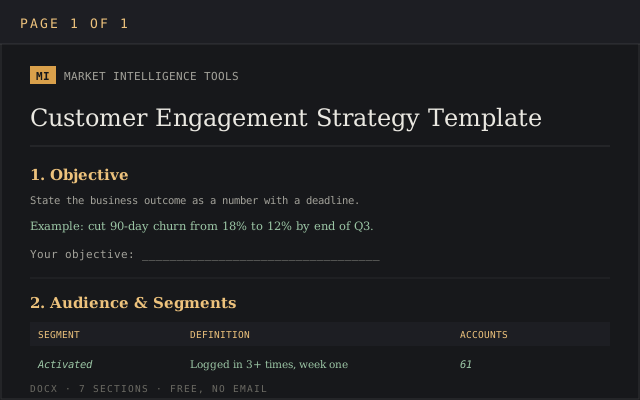
The file opens cleanly in Microsoft Word, Google Docs, and LibreOffice Writer without losing the table formatting, so the format you already use is the right one.
What a customer engagement strategy template covers
A customer engagement plan template answers five questions every team eventually has to face: who you're engaging, why, through which channel, on what cadence, and what result proves it worked. Skip one of the five, and the plan turns into a task list nobody owns.
The template differs from a marketing calendar: a calendar says an email goes out Tuesday, and stops there. An engagement plan ties that same touchpoint to a business outcome, names the customer segment receiving it, and states which customer engagement metrics move if it lands.
Why a written plan beats ad-hoc customer engagement
Companies that treat customer engagement as a discipline hold on to more customers. A string of one-off campaigns rarely produces the same result. IBM Consulting worked with MOL Group to expand the fuel retailer into car sharing and fleet management by mapping engagement to actual customer data and skipping the blanket discount other retailers lean on; the result was a documented revenue lift of 15 to 30%.
Building a successful customer engagement strategy starts with the objective. The channel list comes second. Engagement strategies built around real customer relationships tend to compound: a customer who trusts the brand early in the relationship is easier to retain later, which shows up eventually as revenue growth and better business outcomes across the board.
Effective customer engagement strategies also build customer loyalty that outlasts any single campaign. A loyalty program tied to purchase history turns loyal customers into repeat buyers, and it works best when it builds meaningful relationships that a points balance alone can't fake. The emotional connection behind that loyalty comes from consistent brand messaging and follow-through.
Gartner projects that B2B sales teams running AI-powered go-to-market enablement will close deals 40% faster than teams still coordinating engagement from memory and spreadsheets.
Gartner VP Analyst Shayne Jackson ties the shift to revenue pressure on sales leaders: enablement now has to guide seller behavior in real time, while a deal is still moving toward close.
A written engagement plan is what makes that kind of tooling useful in the first place: an AI tool has nothing to prioritize if the plan underneath it never defined the customer segments and triggers to act on.
The IBM Institute for Business Value found that 85% of CEOs expect generative AI to interact directly with customers by 2026. That raises the number of automated touchpoints a plan has to account for. Someone still has to decide which customer interactions an algorithm handles and which ones a person owns. Audit engagement efforts every quarter, since a plan that made customers feel valued in January can feel stale by April if nothing in it changes.
The sections inside the customer engagement strategy template
Seven sections make up the file. Each one is a field inventory: fill in the cells row by row.
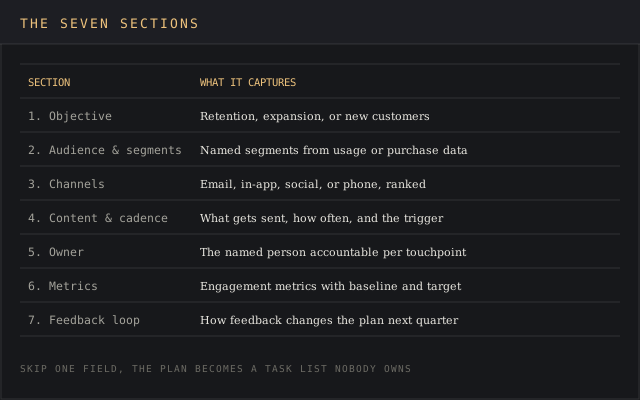
| Section | What it captures |
|---|---|
| Objective | The business outcome the plan serves: retention, expansion, or new customers acquired |
| Audience & segments | Named customer segments, built from purchase history, plan tier, or usage data |
| Channels | Email, in-app messaging, social media, phone, or a mix, ranked by where the segment responds in practice |
| Content & cadence | What gets sent, how often, and the trigger that starts it (signup, 30 days idle, renewal minus 60 days) |
| Owner | The named person accountable for the touchpoint |
| Metrics | The customer engagement metrics tied to the objective, with a baseline and a target |
| Feedback loop | How customer feedback gets collected and where it changes the plan next quarter |
How to fill in the template, step by step
Work the sections in this order. Each step below produces the input the next one needs, and skipping one is the fastest way to end up without an effective customer engagement plan.
- Name the objective first. "Improve engagement" isn't an objective. "Cut 90-day churn among accounts under 500 seats from 18% to 12%" is.
- Segment the audience. Pull three to five customer segments from data you already have: plan tier, usage frequency, time since last purchase, or support ticket volume.
- Match channels to where the segment already responds. A segment active on social media platforms like LinkedIn responds to different content than one that only opens email. Check open and click data before assuming email works.
- Set the cadence and the trigger. Write the event that starts each touchpoint: signup, day 30, 60 days before renewal. Skip fixed calendar dates, since the plan needs to scale past one cohort.
- Assign an owner to every row. A touchpoint with no named owner is the first thing that stops happening when the quarter gets busy.
- Pick two to four metrics, with a real baseline. Pull the current number before you set a target. A target with no baseline is a guess wearing a percentage sign.
- Build the feedback loop last. Decide now how customer feedback gets back into this document: a monthly review, a shared doc, a recurring meeting with the named leads from marketing, sales, and customer success.
Worked example: Riverton Analytics' 90-day churn plan
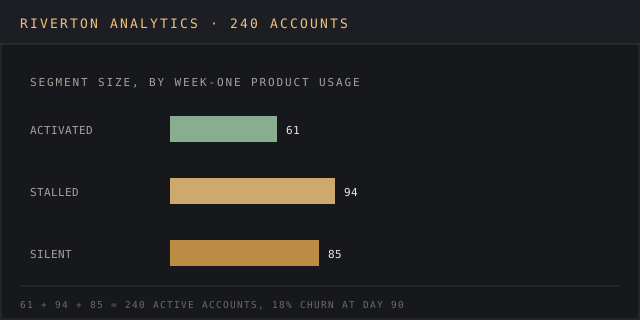
Riverton Analytics sells a reporting tool to mid-market logistics companies, with 240 active accounts and an 18% churn rate at the 90-day mark. The customer success lead built the following plan using the template above.
Objective: cut 90-day churn from 18% to 12% among accounts under 500 seats by the end of Q3.
Audience & segments: three segments, built from product usage data: "activated" (logged in 3+ times in week one, 61 accounts), "stalled" (signed up but never configured a dashboard, 94 accounts), and "silent" (no login after day 7, 85 accounts).
Channels & cadence: the stalled segment gets an in-app walkthrough prompt on day 3 and a personal email from the assigned customer success manager on day 7. The silent segment gets a phone call on day 10, since email open rates for that segment sat at 4%.
Owner: the customer success manager assigned at signup owns every touchpoint for their book of accounts; a shared inbox does not own anything.
Metrics: 90-day retention (baseline 82%, target 88%), activation rate within 7 days (baseline 41%, target 60%), and customer satisfaction score on the day-30 check-in call (baseline 7.1 out of 10).
By day 60, the stalled segment's activation rate moved from 41% to 57%, mostly from the day-3 in-app prompt. The silent segment barely moved: five phone calls connected out of 85 attempts. The customer success lead cut the day-10 call and replaced it with a text message linking to a two-minute setup video, which is the kind of change the feedback loop section exists to capture.
Customer engagement metrics worth tracking
Pick metrics the objective needs. A plan tracking eight numbers gets reviewed once and abandoned; a plan tracking three gets reviewed every month.
| Metric | What it tells you |
|---|---|
| Customer retention rate | Percentage of customers still active at a fixed interval (30, 90, 365 days) |
| Net promoter score | Willingness to recommend, scored 0-10; check it across several quarters, since a single reading tells you little |
| Customer lifetime value | Average revenue per customer across the full relationship, weighed against acquisition cost |
| Customer satisfaction score | Post-interaction rating, useful for spotting a single broken touchpoint fast |
| Repeat purchase or renewal rate | Share of customers who buy again or renew without a discount push |
Track progress in whatever tool already holds the data. A CRM covers purchase history and support tickets; Google Analytics or a product-analytics tool covers logins and feature usage. Building a sixth dashboard just to house these five numbers usually means the numbers stop getting checked.
Common mistakes when building a customer engagement plan
- No named owner. A plan that assigns each touchpoint to a department has no accountable person, and it quietly stops running the moment that department gets busy.
- Metrics with no baseline. A target of "improve customer satisfaction" with no starting number can't be checked against anything three months later.
- One plan for every segment. Existing customers on an enterprise plan and a self-serve trial user need different channels, different cadence, and different definitions of engaged customers.
- Loyalty programs bolted on without a segment fit. A well designed loyalty program built around points and perks helps a retail audience that already buys often; it does little for a B2B account that renews once a year. A loyalty program keeps customers coming back only if the reward matches what that segment values.
- No feedback loop. A plan without a scheduled review becomes the version from the quarter it was written, even after the market, the product, and the customer base have all moved.
Tools that support an engagement plan
The template itself is a document, but few teams run an engagement plan by hand once it's active. A customer relationship management system holds purchase history and customer service interactions in one place, so customer success teams see the full account picture without piecing it together from separate inboxes.
Marketing automation platforms handle the cadence: a trigger fires on day 30, day 60, or 60 days before renewal, and personalized offers or check-in emails go out without someone remembering to click send.
Feedback tools, from a two-question in-app survey to a scheduled call, feed customer insights back into the feedback loop. Google Analytics or a product analytics tool covers logins, feature use, and drop-off points a CRM alone won't show; a segment active on social media platforms like LinkedIn responds to different content than one that only opens email.
None of these tools improve customer engagement on their own. A communication strategy with named owners and a real cadence is the key component that makes the toolstack worth what it costs, and picking the key metrics that matter for the objective beats adding an eighth dashboard. Map how customers interact with the product before assigning channels: the goal of every touchpoint is to create meaningful interactions a customer remembers a week later.
Sending the day-3 prompt within an hour of signup is designed to improve customer interactions during the first week; teams that delay it by even a day see the activation bump shrink by half. Teams that increase customer engagement usually do it by fixing one channel that's already broken, and a faster response time alone can increase customer satisfaction scores without touching the rest of the plan.
Ongoing engagement depends on the feedback loop staying alive well after the first quarter ends, since engagement tools and marketing strategies built around discounts alone rarely survive contact with a customer success team asking for a real number.
The same template works for potential customers still in a trial, alongside paying accounts already renewed twice; some teams pair it with a stage-by-stage map of the buyer's path, then assign a channel and owner to each stage on that map.
Word, Excel, or Google Sheets: which format fits
The template ships as a document because most of its content is instructions and narrative fields. Word or Google Docs suits a plan one or two people own and update by hand. Teams tracking cadence and metrics for a dozen segments often rebuild the metrics table in a spreadsheet, since sorting and filtering rows beats scrolling a document.
Neither choice changes what goes in the plan, only how it gets maintained. Treat the plan as an ongoing process that gets revisited every quarter, regardless of the format it lives in.
FAQ
What is a customer engagement strategy?
A customer engagement strategy is a documented plan for how a company interacts with customers across the relationship: which channels it uses, how often it reaches out, and what business outcome each touchpoint is meant to produce. It differs from a marketing plan by covering the full customer lifecycle: onboarding, renewal, and win-back, alongside the campaigns that bring in new customers.
How do I create a customer engagement plan from scratch?
Start with one objective tied to a number, segment your existing customers using data you already have, then match channels and cadence to each segment before picking two to four metrics with a real baseline. The step-by-step section above walks through all seven fields in order.
What does a customer engagement plan example look like?
The worked example above shows a full plan: a named objective (cut 90-day churn from 18% to 12%), three customer segments built from usage data, channel and cadence choices for each one, a named owner, and three tracked metrics with baselines and targets.
How is a client engagement plan different from a customer engagement plan?
The fields are the same. "Client" tends to show up in professional-services and agency work, where a named account manager owns a handful of higher-touch relationships.
Bottom line
Reach for this template when engagement decisions live only in someone's memory, or when marketing, sales, and customer success are each running a different version of the plan. Fill in the objective and the baseline metrics before anything else. A plan with channels and cadence but no number to check against is a calendar; it never earns the word strategy.
The difference between a strong customer engagement strategy and a stalled one usually comes down to the owner column. Marketers call it a winning strategy once the metrics move and the plan survives past Q1.
Skip it if the real problem is upstream of engagement: a product with a broken onboarding flow won't retain more customers because the emails got better timed. Fix what the customer experiences first, then use this template to keep engagement consistent once that's true. None of this produces lasting customer relationships overnight; it takes two or three review cycles before the plan earns trust.