Free Market Analysis Tools: 10 Platforms Ranked for 2026
 By Jan Suski. I go deep on every review, checking every number against its source and digging up details other coverage misses, a habit from six years of SEO and link building for tech companies. Bylines at Brand24 and Senuto. How the scoring works.
Quick comparison of free market analysis tools
Published coverage is each vendor's own description of what the free plan includes, read on 13 October 2026. Every entry here keeps a working $0 tier indefinitely; none is a time-limited trial.
| # | Provider | Published coverage | Entry price | Best fit |
|---|---|---|---|---|
| 1 | Google Trends | 20+ years of search index, no signup | Free | Spotting seasonality and regional demand shifts |
| 2 | Think with Google | Benchmark reports across Google's own ad data | Free | A fast read on consumer and advertising trends |
| 3 | Similarweb | Traffic estimate for any public domain | Free | A first-pass read on a competitor's traffic and channels |
| 4 | Crunchbase | Funding, acquisition, and leadership data, CSV export | Free | Tracking funding activity and market entrants |
| 5 | SparkToro | Small number of audience searches per plan | Free | Finding the media an audience already follows |
| 6 | Statista | 1M+ statistics, every chart cites a source | Free | Pulling one sourced, citable statistic fast |
| 7 | Exploding Topics | Rotating feed of trending categories | Free | Scanning for emerging categories before they peak |
| 8 | Google Keyword Planner | Search-volume ranges, no ad spend required | Free | Validating that a category has search demand |
| 9 | AnswerThePublic | Capped daily autocomplete-question searches | Free | Mapping the questions an audience asks |
| 10 | Owler | 20M+ crowdsourced company profiles | Free | Real-time news alerts on named competitors |
Where these figures come from
Free-tier limits and coverage claims are each vendor's own published description, read on 13 October 2026. Reviewer quotes come from named, dated reviews on G2, Capterra, or TrustRadius. None of the ten publishes an accuracy figure for its free tier specifically, so no row claims one.
Looking for company and deal data, or structured research with real respondents? Our tools for market analysis ranking covers PitchBook, CB Insights, SparkToro, quantilope, and six more, most of them paid.
A search for "free market analysis tools" returns two different kinds of product: Google's own research utilities, built to drive ad spend, and commercial market-research platforms that give away a thin slice of a paid product to generate leads. Both deserve a place on this list, but they fail in different ways.
Every entry below has a genuine $0 tier that a solo founder, a student, or an agency analyst can use the same day they read this, with no seven-day trial dressed up as "free." We ranked all ten on free-tier depth, data freshness, how fast a first-time user gets to a usable answer, and if the free numbers can be checked against an outside source.
Written for the researcher who needs a real answer today and not a sales call first: a founder sizing a market before a pitch deck, a student scoping a thesis, or an analyst who needs one more data point before a number goes into a report.
None of the ten below wins on every criterion. Several well-known platforms in this space advertise a "free" plan that turns out to be a gated trial clock. None of those made this list, however often they show up in other roundups.
Evaluation criteria for free market analysis tools
Five criteria decide the ranking below, applied in this order.
- Free-tier depth. Does the free plan answer a real question on its own, or does it exist only to show a paywall? A tool that caps a user at one lookup a month does not qualify as a free market research tool in any practical sense, whatever the marketing page says.
- Data freshness. Market conditions move fast enough that a dataset more than a quarter old reads as a history lesson. Tools that update daily or weekly score higher than tools that refresh annually.
- Time to first insight. A tool nobody can learn in under twenty minutes earns a lower score, because the real cost then shows up as hours spent reading documentation.
- Export and reuse rights. Can the data leave the platform as a CSV, a CSV-adjacent table, or at minimum a screenshot a client will accept, or is it locked inside a dashboard a third party will never see?
- Independent verifiability. Where a tool's number can be checked against a second public source — a government statistics agency, a stock filing, or another tool on this list — it scored higher than a tool whose figures can only be checked against itself.
Treat any crowdsourced or modeled figure on this list, Owler's company estimates and Similarweb's small-site traffic numbers especially, as a starting hypothesis. Verify it against a second source on this list or a government statistics agency before it goes into a deck.
The 10 best free market analysis tools
Ten tools ranked on free-tier depth, data freshness, time to first insight, export rights, and independent verifiability, applied in that order.
Google Trends
Best fit
Spotting seasonality and regional demand shifts before committing budget to a new market.
Google Trends has tracked relative search interest on a 0-100 scale going back to 2004, updates within hours of a query happening, and asks for nothing beyond a browser tab: no account, no email, no credit card. That combination of a 20-plus-year archive and same-day freshness is a bar none of the other nine tools on this list clears at $0.
Google Trends doesn't report raw search volume; it normalizes every term to a 0-100 index relative to the highest point in the date range selected, which is the single biggest misunderstanding first-time users run into. Used correctly, that index is still the fastest way to answer if interest in a market is rising, falling, or seasonal, anywhere Google has meaningful search volume.
Key features
- No signup and no rate limit a casual user will hit
- Regional and sub-region breakdowns down to the city level in most countries
- "Rising queries" surfaces emerging search terms competitors may be missing
- Side-by-side comparison of up to five terms at once
- CSV export of the index values shown on screen
Pricing
Free, indefinitely, with no account required to view results.
Pros
- No signup, no rate limit a casual user will ever hit
- Regional and sub-region breakdowns down to the city level in most countries
- "Rising queries" surfaces emerging search terms competitors may not be tracking yet
Cons
- Index values, not absolute search volume: two terms can't be compared for raw traffic, only relative trend
- Low-volume niche terms return flat or missing data
- No way to export a clean multi-year dataset beyond what the UI's own CSV download allows
Why it's ranked #1. Google Trends pairs a 20-plus-year archive with same-day freshness and no signup wall, a combination none of the other nine tools matches at $0. It ranks first because every other entry here trades off one of those three.
Think with Google
Best fit
A fast read on consumer and advertising trends in a specific industry, sourced directly from Google's own research and ad-performance data.
Think with Google folds several of Google's own research products — Google Trends summaries, industry benchmark reports, and the old Consumer Barometer dataset — into one free hub built for exactly this question: what does current market data say before a campaign launches. It is the only entry on this list published directly by the company that runs the underlying search and ad data every other tool here is estimating.
The trade-off is depth per topic. Think with Google is organized as a magazine of research pieces and benchmark reports over a self-serve query tool, so a reader gets Google's own synthesis of a market over a raw dataset to slice themselves.
Key features
- Published and maintained by Google itself, with no third-party modeling layer in between
- Covers consumer behavior, device usage, and ad-performance benchmarks in one place
- Regularly refreshed with new reports tied to the current year's trends
- Industry-specific benchmark reports organized by vertical
- No account or signup required to read any report
Pricing
Free, indefinitely, with no account required.
Pros
- Published and maintained by Google itself, with no third-party modeling layer in between
- Covers consumer behavior, device usage, and ad-performance benchmarks in one place
- Regularly refreshed with new reports tied to the current year's trends
Cons
- Curated articles and reports, not a query tool: a reader can't pull a custom slice of data on demand
- Coverage is uneven across industries; some verticals get frequent new reports, others go quiet for long stretches
- No raw data export; figures have to be copied out of each report by hand
Why it's ranked #2. Think with Google is the only entry here published directly by the company behind the underlying search and ad data, which beats Google Trends on editorial synthesis. It ranks below Google Trends because it's a magazine of reports, and a reader can't point it at a new topic the way a query tool works.
Similarweb
Best fit
A first-pass read on a competitor's traffic volume, top channels, and audience geography without signing up for a trial.
Similarweb's free tier estimates traffic, audience geography, and top referral channels for any public domain, the same category of competitive intelligence that used to require a paid subscription to even a basic analytics panel. The free lookup alone answers the question most searchers for this topic have: how big is a competitor, and where is its traffic coming from.
The catch, confirmed directly by Similarweb's own reviewers, is precision. Similarweb estimates traffic without measuring it, and that estimate gets noisier the smaller the site.
Key features
- Works on any public domain, including competitors who have never heard of the tool
- Breaks traffic down by channel (search, social, direct, referral, paid) at no cost
- Audience geography and top countries included in the free lookup
- Top organic and paid keyword samples on the free lookup
- No signup required for a single domain check
Pricing
Free, indefinitely, for a limited number of lookups a day.
Pros
- Works on any public domain, including competitors who have never heard of the tool
- Breaks traffic down by channel (search, social, direct, referral, paid) at no cost
- Audience geography and top countries included in the free lookup
Cons
- Estimates get less reliable the smaller and more niche the site
- Free lookups are capped and rotate which metrics are visible
- No historical trend line on the free tier; only a current snapshot
"One problem with Similarweb is the difficulties in providing accurate raw numbers for traffic and spend."Jamie R., Strategy and Insight Director, G2, 2025
"Overall, Similarweb is an excellent solution for market research and competitive benchmarking."Caterina V., Market Research Founder and CEO, G2, 2025
"The free version is amazing as is!"Anamaria D., Freelancer, G2, 2025
Why it's ranked #3. Similarweb answers the single most common question in this category — how big is a competitor — on any public domain with no signup, which beats Think with Google's editorial-only format. It ranks below the top two because its own reviewers flag precision on smaller sites as the weak point.
Crunchbase
Best fit
Tracking funding activity, new market entrants, and leadership moves at named companies in a given category.
Crunchbase's free Basic account tracks funding rounds, acquisitions, and leadership changes across a company database built from both self-reported profiles and public filings, which makes it the strongest free source on this list for who is raising money in a market right now. The free tier alone maps a market's active investors and recent deal activity.
Key features
- Free CSV export, unusual for a database this size at $0
- Funding, acquisition, and leadership-change data updated continuously, not on a batch schedule
- Company profiles are crowd-contributed as well as pulled from filings, catching smaller raises other databases miss
- Saved-search alerts on a tracked company or category
- Browser extension for quick company lookups while browsing
Pricing
Free Basic account, indefinitely, with capped search and saved-search counts.
Pros
- Free CSV export, unusual for a database this size at $0
- Funding, acquisition, and leadership-change data updated continuously, not on a batch schedule
- Company profiles are crowd-contributed as well as scraped from filings, catching smaller raises other databases miss
Cons
- Free search results and saved-search counts are capped
- Smaller or earlier-stage companies sometimes have thin, outdated, or unverified profiles
- The jump from free to a usable Pro plan is a real price cliff, per reviewers
"The price jump is fairly substantial."Ryan A., CEO, G2, 2025
"Crunchbase is quite expensive and doesn't need to be required daily which can make the SaaS hard to justify."Lucien H., VP of Go-to-Market, G2, 2025
"The option to export is beneficial."Executive Manager, Sales, G2, 2025
Why it's ranked #4. Crunchbase's free CSV export and continuously updated funding data make it the strongest free source here for who is raising money right now, beating Similarweb on export rights specifically. It ranks below Similarweb because a market with little venture activity leaves the free tier thin fast.
SparkToro
Best fit
Finding the podcasts, newsletters, websites, and social accounts a specific audience pays attention to, as a starting point for outreach or ad placement.
SparkToro answers a question none of the other nine tools on this list are built to answer: what an audience reads, watches, listens to, and follows. It mines public social profiles and web content to reconstruct an audience's media diet, a different and complementary lens on a market than traffic or funding data.
The free plan is real but thin: enough to check if the tool fits a research workflow before anyone commits to a paid seat, short of enough to run a full campaign-planning project on.
Key features
- Audience-first data that traffic and SEO tools don't surface at all
- Searches can be scoped by job title, location, or social bio keywords
- "Also follows" and "also talks about" cross-referencing on every result
- Audience demographic and location breakdowns
- Browser extension for pulling audience data on any page
Pricing
Free tier covers a small number of searches; paid plans start at $38/mo for four full reports.
Pros
- Audience-first data that traffic and SEO tools don't surface at all
- Searches can be scoped by job title, location, or social bio keywords
- Built by a well-known, independent SEO and marketing research team with a public track record
Cons
- The free plan allows only a small number of searches before a paid plan becomes necessary
- Underlying data is modeled from public social signals, not a verified panel, so smaller or more obscure audiences return thinner results
- No historical trend view; each search is a current snapshot
Why it's ranked #5. SparkToro is the only tool on this list built around an audience's media diet, apart from traffic, funding, or search volume, which makes it a genuine complement to Crunchbase and Similarweb over a competitor to either. It ranks below the top four because the free plan's search cap is tight for anything past a first look.
Statista
Best fit
Pulling one sourced, citable statistic fast, when the exact underlying survey or report isn't the point.
Statista aggregates over a million statistics and charts pulled from government agencies, trade bodies, and market-research publishers into one searchable library, a fast first stop when a market analysis needs a single credible number with a visible source. The free account gets a real answer to a search query — a chart, a headline figure, a cited source — even when the full underlying report sits behind the paywall.
Reviewers split almost exactly on if that free preview is worth the account signup, and Statista's own paying customers report the same frustration from the other side of the paywall.
Key features
- Enormous breadth of topics and countries in a single search
- Every chart cites its original source, which satisfies independent verifiability better than most tools here
- Free account surfaces the headline number even when the full report is paywalled
- Downloadable chart image on the free preview
- Topic and industry browsing for discovery beyond a single search term
Pricing
Free account for headline figures and cited charts; paid tiers unlock the full underlying reports.
Pros
- Enormous breadth of topics and countries in a single search
- Every chart cites its original source, which satisfies the independent-verifiability criterion better than most tools here
- Free account surfaces the headline number even when the full report is paywalled
Cons
- The specific statistic a project needs is often the one locked behind the paid tier, per reviewers
- Figures sourced from third parties (government bodies, trade groups) can be older than the page's publish date suggests
- No way to cross-tabulate or build a custom chart on the free account
"Database is extensive but most of the data they sell is already available for free online."Harsh Vardhan P., Management Consulting CEO, G2, 2025
"Despite paying for their services, I was unable to find any valuable reports that met my needs."Majdi M., Logistics and Supply-Chain CEO, G2, 2025
It "sometimes did not provide information needed for my research proposals."Chariz C., Student, G2, 2025
Why it's ranked #6. Statista's every chart citing an original source clears the independent-verifiability bar better than Crunchbase's crowd-contributed profiles or SparkToro's modeled audience data. It ranks below SparkToro because the one statistic a project needs is, per its own paying customers, often the one still behind the paywall.
Exploding Topics
Best fit
A quick scan for emerging product categories and search terms before they peak, as an input into a bigger market-sizing exercise.
Exploding Topics tracks search, social, and funding signals to flag categories and products gaining momentum before they show up in a standard keyword tool, built from the same research its founders used to spot early-stage trends for their own newsletter audience before turning it into a product.
The free plan surfaces a rotating set of currently-trending topics; the full historical archive and category filters sit behind the paid tier. Our full Exploding Topics review covers the Pro plan's additional filters.
Key features
- Surfaces genuinely early-stage trends that standard keyword and trend tools haven't caught yet
- No signup required to browse the free trending-topics feed
- Each trend links back to a chart showing the growth trajectory that earned it a spot on the list
- Category tags group related rising topics together
- Weekly refresh of the free trending feed
Pricing
Free trending-topics feed, indefinitely; paid Pro tier unlocks the searchable historical archive.
Pros
- Surfaces genuinely early-stage trends that standard keyword and trend tools haven't caught yet
- No signup required to browse the free trending-topics feed
- Each trend links back to a chart showing the growth trajectory that earned it a spot on the list
Cons
- The free tier shows only a slice of currently trending topics, not the searchable historical archive
- No way to search for a specific category or product on the free plan; browsing the curated feed is the only option
- Momentum is a leading indicator, not a market-size figure; it points to where to look next, not how big the opportunity is
Why it's ranked #7. Exploding Topics is the only tool on this list built to surface a category before it has a name, which Statista and Google Trends can only confirm after the fact. It ranks below Statista because the free tier offers no search, only a curated feed a reader can't point at a specific topic.
Google Keyword Planner
Best fit
Validating that a market or product category has meaningful search demand at all, and finding related keyword ideas to widen a research query.
Google Keyword Planner is the only tool on this list that comes straight from the same system that runs Google Search Ads, which makes its demand signal as close to ground truth as a free tool gets, with one well-documented catch.
Since 2017, Google has shown only a wide search-volume range (for example, "1K-10K") in place of a precise monthly number to any account that isn't actively spending on ads, a restriction search-marketing publications have covered extensively and that every active user runs into immediately.
Key features
- Directly sourced from Google's own ad auction data, not a third-party model of it
- Keyword idea generation surfaces related terms a researcher wouldn't have thought to search for
- Completely free to use with any Google account, no credit card required to view ranges
- Historical trend charts alongside the current volume range
- Geographic and language filtering on every query
Pricing
Free with any Google account; precise volume numbers require an active ad-spending account.
Pros
- Directly sourced from Google's own ad auction data, not a third-party model of it
- Keyword idea generation surfaces related terms a researcher wouldn't have thought to search for
- Completely free to use with any Google account, no credit card required to view ranges
Cons
- Precise search-volume numbers are reserved for accounts with active ad spend; non-spending accounts see wide ranges only
- Designed for ad targeting first and market research second, so some features (bid estimates, ad group suggestions) are irrelevant noise for this use case
- Volume ranges can span an order of magnitude, too coarse for sizing a niche market precisely
Why it's ranked #8. Google Keyword Planner's demand signal comes straight from the ad auction itself, the same first-party advantage Google Trends has, but the post-2017 range restriction on non-spending accounts is a real step down in precision. It ranks below Exploding Topics because that range limit, over a free-tier cap, stands between a user and the actual number.
AnswerThePublic
Best fit
Mapping the actual questions a target audience is asking around a topic or product category, as raw material for content, positioning, or survey design.
AnswerThePublic pulls autocomplete and "people also ask" style question data from search engines and arranges it into a visual map of the exact questions, comparisons, and prepositions people search around a topic, a useful shortcut for understanding how a market talks about its own problem before any competitive data enters the picture. The free tier allows a small number of searches per day, enough to scope a new topic before committing to the unlimited version.
Key features
- Turns raw autocomplete data into a readable visual map in seconds, no manual digging through search suggestions required
- Covers questions, comparisons ("X vs Y"), and prepositions, not only keywords
- Works for almost any topic with meaningful search volume, no niche restriction
- Downloadable image of the full question map on the free tier
- Grouping by question type (who, what, why, where) on every result
Pricing
Free tier covers a capped number of searches per day; paid plans unlock unlimited daily searches.
Pros
- Turns raw autocomplete data into a readable visual map in seconds, no manual digging through search suggestions required
- Covers questions, comparisons ("X vs Y"), and prepositions, not only keywords
- Works for almost any topic with meaningful search volume, no niche restriction
Cons
- Free searches are capped per day, and the cap resets slowly enough to interrupt a real research session
- Results are a snapshot of autocomplete data, not validated survey data; popular doesn't always mean representative
- No export beyond a static image on the free tier
Why it's ranked #9. AnswerThePublic is the only tool here mapping the questions a market asks over the volume behind them, which complements Google Keyword Planner's number-first approach. It ranks below Keyword Planner because the daily search cap makes it a scoping tool first and a production one second.
Owler
Best fit
Real-time news alerts on named competitors, as a cheap early-warning layer over a source of trustworthy headcount or revenue figures.
Owler's free tier delivers crowdsourced company profiles, revenue and headcount estimates, and real-time news alerts on competitors, which in theory makes it a lightweight free alternative to a full competitive-intelligence platform. In practice, the crowdsourced model is also Owler's biggest weakness, and more than one reviewer has said so in blunt terms.
Key features
- Real-time news alerts on tracked competitors cost nothing to set up
- Covers a large number of private companies that other free tools on this list don't track at all
- Follows multiple competitors at once from a single free dashboard
- Community-sourced revenue and headcount estimates on every profile
- Browser extension for quick company lookups
Pricing
Free community tier, indefinitely, capped at a small number of actively tracked companies.
Pros
- Real-time news alerts on tracked competitors cost nothing to set up
- Covers a large number of private companies that other free tools on this list do not track at all
- Follows multiple competitors at once from a single free dashboard
Cons
- Crowdsourced headcount and revenue estimates are frequently and substantially wrong, per reviewers
- Profile completeness is inconsistent; some companies are filled in thoroughly, others are nearly blank
- Free tier limits the number of companies a user can actively follow at once
"Wildly Inaccurate, limited information, overall not worth a dime or 5 minutes of your time." The same review reported that ten test profiles came back incomplete, with one real company of roughly 130 employees listed at an estimate of 34.Commercial Insurance Broker, TrustRadius, 2025
Why it's ranked #10. Owler's free news alerts and sheer company count beat every other tool here on raw coverage, but the documented accuracy gaps in its crowdsourced estimates are the sharpest and most specific complaint on this entire list. It ranks last because that gap sits below even Similarweb's small-site estimate problem in reliability.
Free government and public data worth pairing with this list
Several free sources outside this top ten exist specifically to answer market-research needs none of the ten ranked tools cover well, worth keeping on hand as a second opinion.
- Pew Research Center provides extensive demographic research and public-opinion polling for free, useful for understanding an audience segment beyond what a search-trend tool can show.
- U.S. Census Bureau and Bureau of Labor Statistics both provide free access to raw data on population, income, and employment by industry, a public-sector counterweight to a vendor's modeled estimate.
- Google Analytics tracks website traffic and user behavior for free on a site a business already owns, the inward-facing complement to Similarweb's outward-facing competitor view.
- SurveyMonkey allows up to 10 questions and 40 responses for free, enough for a quick read on target-market sentiment before committing to a paid survey panel.
None of these four belong in a top-10 free-market-analysis-tool ranking on their own terms: Pew and the two statistical agencies research populations and the economy broadly, and Google Analytics and SurveyMonkey require an existing audience or website to analyze. They're the first call to verify a number pulled from anywhere higher on this list.
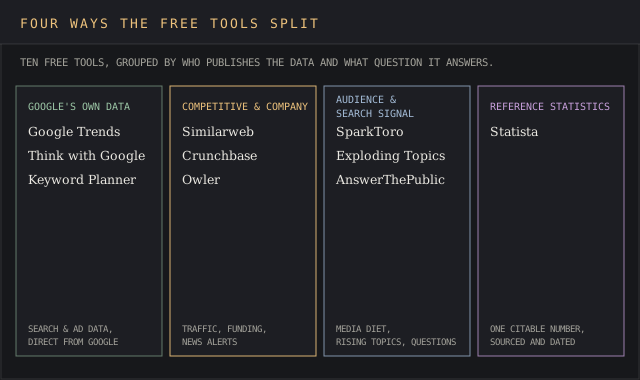
Tools on this list, Google Trends, Google Keyword Planner, Think with Google, and Statista, whose figures come from first-party data or a cited source over a crowdsourced or modeled estimate.
Free market research tools: what to use them for
No single tool in this ranking replaces a full market analysis on its own; each one answers a different slice of the question.
A practical free-tools stack for most projects looks like this: Google Trends and Think with Google for demand direction, Similarweb and Crunchbase for competitor sizing and funding activity, SparkToro for audience targeting, Statista for a cited headline statistic, and Google Keyword Planner or AnswerThePublic for the language a market uses to describe its own problem.
Owler and Exploding Topics are worth adding once the core picture exists, as an early-warning layer over a primary data source. Small businesses and solo researchers get the most value here precisely because every tool above is free at the point of use, which matters for planning on a budget that can't absorb a mid-project subscription.
Two patterns separate the tools that earned a top-five spot from the ones ranked lower. First, the top entries let a user leave with usable data on the first visit, with no account and no "request a demo" button in the way. Second, every top-five tool's free numbers can be checked against something outside the platform itself.
Red flags that a "free" market research tool isn't free at all
A handful of patterns showed up repeatedly while testing tools that didn't make the final ten, worth naming so a reader can spot them elsewhere.
- The free plan is a countdown with an expiration date, dressed up as a tier. A fourteen-day trial with full access, after which the account locks, is a sales funnel with a delay built in. Every tool ranked above keeps working at $0 indefinitely.
- "Free" means "request a demo." If getting access to the free tier requires a phone call or a sales email before any data appears, the real cost is a sales conversation.
- The free number can't be checked anywhere else. A tool whose only output is a proprietary score with no visible methodology and no way to cross-check it against a second source failed the independent-verifiability test here.
- The export button is also a paywall. A tool that lets a user see a chart on screen but blocks copying, downloading, or even a usable screenshot of it is built to push a free user toward upgrading over supporting free market research.
None of the ten tools above are perfect, and Owler and Similarweb's smaller-site estimates especially come with real accuracy caveats documented by their own reviewers in the entries above. The distinction that matters is between a tool with an honest, if limited, free tier and a tool whose "free" label is marketing copy for a trial.
Free market analysis FAQ
Can I get a free comparative market analysis for my home?
That specific phrase almost always refers to real estate, where a local agent or brokerage will run a free comparative market analysis (CMA) on a property in exchange for the chance to list it, using sold-comp data from the local multiple listing service. None of the ten tools ranked above runs that kind of comp analysis; this ranking covers business and competitive market research over residential property valuation.
Where can I find free stock-market analysis?
Most major brokerages publish free research notes for their own customers, and sites built around public filings and market data provide free charts and screeners. Statista and Google Trends can both add supporting context, such as public sentiment or search interest in a ticker or sector, but neither is a substitute for a dedicated equity-research platform.
Do realtors do market analysis for free?
Yes, typically as part of pitching for a listing, which is why it costs the homeowner nothing upfront. The realtor's compensation comes from the eventual sale commission over the research itself.
What are the four types of market analysis?
Most frameworks group market analysis into four categories: market sizing (how big the opportunity is), competitive analysis (who else is already serving it), customer analysis (who the buyer is and what they need), and trend analysis (where demand is heading). The ten tools above map unevenly across all four: Crunchbase and Owler lean competitive, SparkToro and AnswerThePublic lean customer, and Google Trends and Exploding Topics lean trend.
Are free market research tools accurate enough to use in a real business plan?
Several of them, Google Trends, Google Keyword Planner, and Think with Google in particular, pull directly from Google's own first-party data, which makes them as accurate as a paid tool built on the same underlying search activity. Crowdsourced or modeled tools such as Owler and Similarweb are a different story: their figures are estimates, worth treating as a starting point to verify.
Does Pew Research Center count as a free market research tool?
It is not on this ranking because it researches public opinion, demographics, and social trends at large, over specific markets, products, or companies. It is worth knowing about for the same reason Think with Google made this list: it is a primary research source over a modeled estimate, and it is free to search and cite directly.
Bottom line
The common thread across all ten tools in this ranking is that a real market analysis can start today, for free, with no sales team involved. Start with Google Trends or Think with Google to confirm demand direction, add Similarweb or Crunchbase once a short list of competitors exists, and bring in SparkToro or AnswerThePublic for the audience's own language.
Treat every number out of a crowdsourced or modeled tool — Owler's estimates and Similarweb's traffic figures included — as a starting hypothesis to verify, over a finished answer to report upward. Reading current market conditions correctly before spending a budget is most teams' real first step, and it's one most can finish in an afternoon with nothing more than the tools above.