BuiltWith review: technographic data, pricing and where the tech stack story ends
 By Jan Suski. I go deep on every review, checking every number against its source and digging up details other coverage misses, a habit from six years of SEO and link building for tech companies. Bylines at Surfer, Brand24, and Senuto. How the scoring works.
· Prefer this source on Google
Best for
Marketing and sales teams building technology-based lead lists, who don't need per-seat pricing to add more users.
Not for
Enterprise buyers who need dedicated support or SLAs, and anyone whose priority is contact data, since BuiltWith's strength is the technology stack.
What it costs
Basic runs $295 a month, Pro $495 and the top tier $995, all published rates billed annually.
- Detection method
- Crawler reads script references, headers, cookies, DNS records and page markup
- Site profiling
- Tech stack plus metadata such as location and traffic signals in one report
- Historical view
- When each technology was added to or removed from a given site
- Lead lists
- Every site running a chosen technology, built as an exportable list
- Filters
- Geography and estimated spend
- Aggregate reports
- Adoption rates by category and country across the whole indexed web
- Exports
- CSV or Excel
- API
- Automated technology lookups and data downloads
- CRM sync
- Salesforce, HubSpot and Zoho CRM
- Sites tracked
- Over 673 million websites, historical records included
- Active domains
- Over 370 million
- Technologies
- 113,124+ indexed, 110,000 at the active end
- History depth
- Adoption trend data back to January 1985
- Front end accuracy
- High for analytics, tag managers, CMS, ad pixels and e-commerce systems
- Server-side accuracy
- Drops for backend frameworks and stacks migrated since the last crawl
- Contact data
- Third-party sourced, inconsistent, low coverage; needs a separate enrichment tool
- Basic
- $295 a month billed annually; covers two technologies
- Pro
- $495 a month; unlimited technologies, the practical entry point
- Top tier
- $995 a month; adds multiple system logins
- Annual equivalent
- $3,540, $5,940 and $11,940 a year across the three tiers
- Seat mechanics
- No per-seat charge; the same bill for one user or five
- Tier driver
- Technology count decides the tier
- Free tier
- Free individual lookups plus a free trial for core features
- Free lookups
- Individual site lookups cost nothing; bulk exports need a paid plan
- Support
- Email only, up to 48 hours, with founder Gary Brewer answering inquiries himself
Wappalyzer
Not forA team building market-wide lists or reading historical adoption trends, where BuiltWith's larger catalogue and its record back to January 1985 decide the job.
HG Insights
Not forA buyer who wants to start today on a published rate, since BuiltWith's $295 Basic is live at signup and HG's entry runs through a demo form and a two-year term.
ZoomInfo
Not forA researcher sizing a technology market, where BuiltWith's 126,144+ technology catalogue and its published $295 entry beat a quoted per-seat contract.
Pairs well with BuiltWith
Where these rates come from, and which coverage numbers are BuiltWith's own
BuiltWith publishes all three rates, so $295, $495 and $995 are the vendor's own list prices and the annual totals are those rates multiplied out.
The 673 million sites, 370 million active domains, 113,124 technologies and the January 1985 history start are BuiltWith's own coverage claims. The contact data problems, the 48-hour support window and the account verification delays come from user reports. Checked 6 August 2026.
This BuiltWith review covers what the tech detection platform does, how accurate the technology data is, what the paid plans cost, and where the tool stops short: contact data. BuiltWith tracks over 673 million websites' technologies across 113,124+ internet technologies, with historical tech adoption trends running back to January 1985.
The short version for buyers: BuiltWith is best for identifying companies using specific technologies, its tech detection accuracy is high for front-end technologies, and BuiltWith does not provide direct contact data worth building outreach on. The rest of this builtwith review works through what each of those three sentences means for a paying account.
↑ FACT SHEETWhat is BuiltWith
BuiltWith is a technographic data platform: it detects the web technologies running on websites and sells that intelligence to sales teams, marketers, investors and researchers. Technology profiling reveals the tech stack of any website, from the CMS and analytics tools underneath a page to the e-commerce platform processing its checkout.
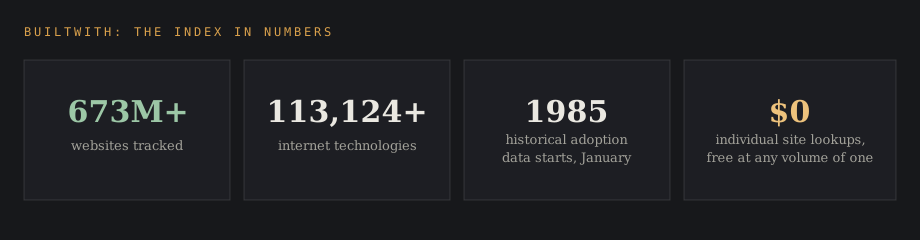
The coverage claims are the biggest in the category. BuiltWith covers over 370 million active domains and 110,000 web technologies at the active end, tracks over 673 million websites including historical records, and its adoption trend data reaches back to January 1985, long enough to watch entire technology generations arrive and leave.
The company itself stays small and founder-run. Gary Brewer founded BuiltWith in Australia and still runs it, and that shows up on both sides of the customer experience: fast product iteration and a support model where the founder personally handles customer inquiries.
↑ FACT SHEETHow tech detection works
BuiltWith detects public-facing technologies through various signals: script references, headers, cookies, DNS records and page markup that each technology leaves behind. A crawler bot reads what a site exposes publicly, so the platform sees what any visitor's browser could see, indexed at a scale no manual check could reach.
That method sets the accuracy boundaries. BuiltWith excels in detecting JavaScript-based technologies, and its technology detection accuracy is high for front-end technologies: analytics tools, tag managers, CMS platforms, advertising pixels and e-commerce systems.
Accuracy drops for server-side technologies and recently migrated stacks. A backend framework that never announces itself to the browser is invisible to this method, and a site that migrated off a technology last month can still show it until the next crawl catches up. Buyers should treat the tech stack data as current-quarter evidence for front end technologies and as a lagging indicator for everything behind the server line.
↑ FACT SHEETBuiltWith features
Technology and website profiling
The core lookup takes a domain and returns its tech stack. The platform allows for website profiling providing metadata alongside tech info, so a single site report carries the technologies plus context like location and traffic signals.
BuiltWith identifies technologies used for e-commerce and analytics, and BuiltWith identifies software frameworks and services used by websites across every layer the crawl can see. For a one site check, the lookup is free, which is how most users first meet the tool.
Historical technology data
BuiltWith reveals historical data showing when a technology was added or removed from a site. It tracks technology shifts allowing users to see changes in providers, which turns a static stack snapshot into a story: which analytics platform a competitor dropped, when they added a personalization tool, how long a migration took.
Competitive intelligence teams lean on that timeline view to track competitors' technology changes, since a rival's tech decisions often show in the crawl before any announcement. Investors read the same data as adoption evidence, watching a vendor's install base grow or shrink across the whole indexed web.
Lead lists and technographic targeting
Lead generation involves creating lists based on specific technologies: every site running a competitor's product, every store on a given e-commerce platform, every publisher on a given ad stack. Sales teams customize prospect lists based on technology usage, and detailed filtering of leads can occur by geography and estimated spend.
That technographic targeting is the commercial core of the product. A sales team selling a Shopify app wants Shopify stores; a team migrating customers off a rival wants that rival's install base, ranked by estimated spend, and BuiltWith is the fastest way to get that list at market scale.
Reports, API access and CRM sync
Reports can be exported in CSV or Excel formats for analysis, and market trend analysis provides reports on technology adoption rates across categories and countries. Users turn to BuiltWith for competitive research and market analysis as much as for prospecting, and the market research side runs on those aggregate reports.
API access allows automation of technology lookups and data downloads, so an engineering team can wire tech detection into an internal tool. BuiltWith integrates with Salesforce, HubSpot, and Zoho CRM, and BuiltWith helps businesses sync technographic data into CRM systems so a rep sees a prospect's stack inside the record they already work from.
↑ FACT SHEETBuiltWith pricing
BuiltWith publishes three paid tiers: Basic at $295 per month, Pro at $495 per month, and a top tier at $995 per month, all billed annually. Most reviews mention only two. Individual site lookups stay free, and BuiltWith offers a free trial for core features, while bulk exports require a paid subscription.
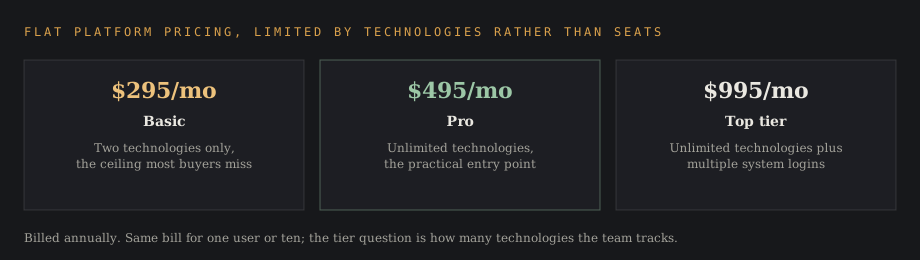
The limit that decides which tier a team needs is technology count. The Basic plan at $295 covers just two technologies, so a team tracking one competitor's install base and one platform hits the ceiling immediately. Pro at $495 lifts that to unlimited technologies, which is why most teams upgrade.
The $995 tier adds multiple system logins on top of unlimited technologies. Two things make the pricing unusual for this market, in the buyer's favor: the rates are published, and there's no per-seat multiplication, so the cost stays flat as a team grows.
Anyone weighing when to buy builtwith should run the free lookups first against ten accounts they know well. If the front end reads come back right, the paid tiers scale that accuracy, and the second question to answer before signing is how many technologies the team needs to track, since that single number decides if $295 or $495 is the real price.
What a 5-person team pays
The math stays simple because the pricing is flat. Basic at $295 per month runs $3,540 a year, Pro at $495 runs $5,940, and the $995 tier runs $11,940, the same bill for one user or five on any of them.
Against per-seat tools, that flatness compounds. A five-person team paying $79 per user per month elsewhere spends $4,740 a year on seats alone, and doubles it as the team doubles; the same team on BuiltWith Pro pays $5,940 at five people and still $5,940 at ten. Teams that expect headcount growth should price the platform on next year's team size, where the flat model wins by a widening margin.
What does scale is technology coverage. A team that starts on Basic to watch two technologies and then adds a third competitor to the list is buying the Pro upgrade, and that is the step most buyers under-budget for.
The other spend that scales is the stack around it. The contact enrichment subscription a team pairs with BuiltWith prices per seat or per credit, so the total technographic-plus-contacts budget grows with the team even while the BuiltWith line stays fixed.
Setting up BuiltWith in a sales stack
The working setup follows the companies-first logic. A team starts with a technology thesis, every account on a competitor's platform, every store above an estimated spend threshold, and builds the list in BuiltWith with geography and spend filters narrowing it to territory.
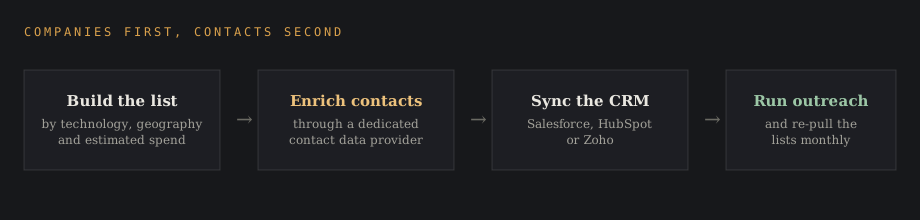
The second step is enrichment: the exported list runs through a contact data platform to attach verified people to the company domains, since the stack data answers who to target and the enrichment layer answers who to call. The third step is sync, pushing the enriched records into Salesforce, HubSpot or Zoho CRM so the technographic fields ride along with the contact record.
Run in that order, the tool feeds outreach without ever being the outreach system. Teams that skip the enrichment step and send against raw exports see the bounce rates the contact data section below warns about, and teams that skip the CRM sync end up with stack intelligence trapped in spreadsheets nobody reopens.
The maintenance habit that separates strong setups from stale ones is re-running the lists on a schedule. Stacks change, sites migrate, and a list built last quarter drifts; a monthly re-pull catches the accounts that just adopted the technology a team sells against, which are the hot accounts worth calling first, while the interest is fresh.
Reading a BuiltWith report
A site report reads in layers. The top carries the current detected technologies grouped by category, analytics, advertising, CMS, e-commerce, hosting, with the metadata beside them; the history view below shows when each technology was added or removed, which is where the migration stories live.
Aggregate reports work the other way around: one technology, every site running it, with adoption trend lines showing the install base's direction. A vendor watching its own market share, an investor sizing a category, and a sales team ranking a competitor's install base are all reading the same report with different columns sorted first.
The contact data gap
BuiltWith does not provide direct contact data of the quality an outreach campaign needs. Contact records from BuiltWith are often inconsistent, contact data accuracy in BuiltWith is inconsistent and sourced from third parties, and users report low contact coverage from BuiltWith-sourced lists.
The pattern in practice: a technology-filtered list comes back with company domains nailed down and people data spotty. BuiltWith's data may include outdated contact information, names attached to companies they left, and generic addresses where verified emails should be, so bounce rates climb when a list goes straight from export to send.
BuiltWith requires additional tools for contact enrichment, and that's the honest architecture: use BuiltWith to decide which companies belong on the list, then run contact enrichment through a dedicated provider to find the people. Pairing the technographic layer with a contact data platform gives a team verified emails and phone numbers on top of the stack intelligence, at the cost of a second subscription.
Treat the two jobs as separate purchases and the tool makes sense; expect one tool to do both and the disappointment is predictable. The companies-first, contacts-second workflow is where BuiltWith delivers real value, and it's impossible to get the same market-wide stack coverage from the contact-first platforms.
↑ FACT SHEETSupport and the small-company experience
BuiltWith's customer support is primarily via email, and response times for BuiltWith support can take up to 48 hours. Users reported difficulties with account verification and unresponsive support in stretches, and some users hit delays in account setup and verification before their first list ever exported.
The counterweight is unusual: Gary Brewer, the founder, personally handles customer inquiries, which reviewers describe as either charming or alarming depending on the week. A small company with published pricing, a flat structure and email-only support is a different vendor relationship than an enterprise platform with a CSM, and a team that needs same-day support guarantees should weigh that before making the platform load-bearing.
Who uses BuiltWith
The platform is commonly used by sales teams, marketers, and researchers, and the use cases split cleanly. Sales teams run technographic targeting: lists of companies on specific technologies, filtered by geography and estimated spend, synced to the CRM for outreach.
Marketers and competitive intelligence teams track competitors' technology changes and category adoption trends, watching who adopts what across the market. Investors use the adoption data as market research: install-base growth for a vendor they're evaluating is evidence no pitch deck provides.
Researchers and analysts pull the aggregate reports for technology market analysis, and the SEO and advertising crowd checks which analytics and ad stacks run where. Across all of them, the shared habit is using the tool to answer which companies run what.
BuiltWith alternatives
Wappalyzer is the comparison users ask about most, and both sides of it are worth stating properly. Wappalyzer's paid tiers run $250 a month for Pro with two lead lists, $450 for Business with five users, unlimited lead lists, CRM integration and 20,000 API credits, and from $850 for Enterprise. Founded by Elbert Alias, it operates at a similar small-company scale, with third-party trackers putting it near $18 million in annual recurring revenue.
| Tool | Entry price | The limit that binds |
|---|---|---|
| BuiltWith | $295/mo (Basic) | Two technologies on Basic; unlimited from Pro at $495 |
| Wappalyzer | $250/mo (Pro) | Two lead lists on Pro; unlimited from Business at $450 |
| HG Insights | Quoted | Enterprise contracts; spend estimates and market sizing included |
So the two ladders overlap. Wappalyzer's entry price is lower, but its Pro tier caps lead lists at two while BuiltWith's Pro removes the technology limit entirely; a team building market-wide lists usually finds BuiltWith's index deeper on historical data and total coverage, and a team doing occasional lookups finds Wappalyzer cheaper to start.
For teams whose real need is contact-ready prospect lists, the sales intelligence platforms are the practical builtwith alternative: they carry technographic filters on top of contact databases, weaker on tech depth but sold with the people data attached. HG Insights competes at the enterprise end of technographics, with spend estimates and analyst-grade market sizing sold on quoted contracts.
A team choosing between them is usually choosing between BuiltWith's self-serve breadth and HG's managed depth.
Verdict: is BuiltWith worth it
For the job it's built for, yes. BuiltWith is best for identifying companies using specific technologies, and at $295 to $995 a month on published pricing with no per-seat math, it's one of the cheaper ways to see the whole market's tech stack at once. The free lookups, the free trial and the flat pricing make the evaluation cheap, and the front end detection holds up.
The is builtwith worth it question turns negative only when the expectation is wrong: as a contact data source it disappoints, as a server-side stack oracle it lags, and as a supported enterprise platform it's a small email-first company.
Buy it as the technographic layer in a stack, size the tier on how many technologies you need to track, pair it with contact enrichment, and read server-side claims with the crawl lag in mind.
Frequently asked questions
Is it BuiltWith or Built With?
BuiltWith, one word with a capital W in the middle, matching the builtwith.com domain. Built With as two words and the misspelling biltwith both appear in search data for this page.
How reliable is BuiltWith?
Reliable for front-end technology detection: analytics, CMS, e-commerce and JavaScript-based technologies are where accuracy is high. Reliability drops for server-side technologies and recently migrated stacks, and its third-party contact data is inconsistent enough to need a separate enrichment tool.
How does BuiltWith pricing work?
Published monthly rates, billed annually: Basic at $295, Pro at $495 and a top tier at $995. Pricing is per platform, so a 5-person team pays the same as a solo user. The variable that moves you up a tier is technology count: Basic covers two technologies, Pro removes the limit.
How many technologies does the BuiltWith Basic plan cover?
Two. That is the constraint most buyers discover after signing, and it's the reason the $495 Pro tier is the practical entry point for anyone tracking more than a single competitor.
Is there a free version of BuiltWith?
Individual site lookups are free, and BuiltWith offers a free trial for core features. Bulk exports, lists and automation require a paid subscription.
Who owns BuiltWith?
Gary Brewer, who founded the company in Australia and still runs it. BuiltWith remains small, founder-led and independent, with no outside acquisition or parent company behind it.
Is built.com legit?
Built.com is a different company; the technographic platform reviewed here lives at builtwith.com. BuiltWith itself is a legitimate, long-running Australian company with published pricing and a founder-run support model.
What are the best BuiltWith alternatives?
Wappalyzer from $250 a month for cheaper lookups, HG Insights for enterprise technographics with spend estimates, and sales intelligence platforms for teams that need contact-ready lists with technographic filters attached.
What is the difference between Wappalyzer and BuiltWith?
Both detect web technologies. Wappalyzer starts lower at $250 a month against $295, rising to $450 and $850, but caps lead lists on its entry tier; BuiltWith caps technologies instead, at two on Basic and unlimited on Pro. BuiltWith carries the deeper index: over 673 million websites tracked, 113,124+ technologies and historical adoption data back to January 1985. List builders tend toward BuiltWith; casual lookup users tend toward Wappalyzer.
Is BuiltWith accurate?
Accuracy is high for front-end and JavaScript-based technologies, and lower for server-side stacks and sites that migrated recently, since the crawler reads public-facing signals and needs a fresh crawl to catch changes.
What is BuiltWith used for?
Identifying which companies use specific technologies: sales teams build technographic prospect lists, competitive intelligence teams track rivals' stack changes, investors measure adoption for market analysis, and researchers pull technology trend reports across 673 million websites.