TrendMiner vs Seeq: pattern search for process engineers or an analytics workbench with Python
 By Jan Suski. I go deep on every review, checking every number against its source and digging up details other coverage misses, a habit from six years of SEO and link building for tech companies. Bylines at Brand24 and Senuto. How the scoring works.
| WHAT EACH ONE DOES | TRENDMINER | SEEQ |
|---|---|---|
| Core job | Pattern search, monitors | Conditions, capsules |
| Built for | Process engineers | Engineers + data sci |
| Analysis model | Fingerprint search | Capsule overlay |
| Python | Built-in notebook | Data Lab + SPy |
| Alerting | 24/7 monitors, email | Organizer schedules |
| Data platforms | Snowflake, Fabric, S3 | Databricks |
| SQL databases | 4 named | None named |
| AI assistant | Agent, own LLM | Seeq AI, Agent Q |
| Skip it if | You need ISO paperwork | No Python on the team |
| WHAT YOU GET | TRENDMINER | SEEQ |
|---|---|---|
| Price | Quote only | Quote only |
| Support plans | None published | 3 tiers published |
| Training discount | None published | 25% to 35% |
| Deployment | On-prem, cloud, SaaS | SaaS, on-prem |
| ISO 27001 | None named | 27001:2022, 27018 |
| SOC 2 | None named | SOC 2, C5, CSA STAR |
| Owner | Vercore (Proemion) | Independent, VC |
| Last change | Sold Apr 2024 | $50M Series D 2024 |
| G2 ease of use | 8.8 (182) | 8.5 (128) |
StrongerWeakerNo edge
Twenty-seven further documented limits sit behind the button below: release-by-release changes, connector names, Data Lab’s Python and R support, and Seeq’s trust-center paperwork. The test case is a plant on AVEVA PI picking one analytics tool for its engineers. Figures come from the two vendors’ own sites and G2’s comparison page, read 21 November 2026; neither vendor publishes a price, and no Vendr figure is used.
| TrendMiner | WHAT IT DOCUMENTS |
|---|---|
| Offices | US, Germany, Spain, Netherlands |
| Strategic partners | Amazon, Microsoft, SAP, GE Digital, Siemens, Aveva |
| IoT connector | AWS IoT SiteWise |
| Industrial sources | ABB, Siemens PCS7, Cumulocity, Viewport |
| On-prem install | Single node, pre-packed VM or manual |
| Plant connectors | .NET-based |
| Calculated tags | Nest 20 levels deep (was 2), 2026.R2 |
| Proficy Cloud | Direct REST API connection, 2026.R2 |
| Mobile limits | Editing stays desktop-only |
| Agent LLMs | Azure AI Foundry, Anthropic; Bedrock, OpenAI planned |
| Agent access | On request, 2026.R3 |
| Licence format | New format required before 2026.R4.0 |
| Query Designer | ODBC/JDBC query drafts, preview and test |
| Homepage claims | 48% of the top 50 chemical makers (2024 list) |
| Seeq | WHAT IT DOCUMENTS |
|---|---|
| Browser apps | 3: Workbench, Organizer, Data Lab |
| Data Lab Python | 3.11 default; 3.8 removed 7 Oct 2025 |
| R support | Documented in Data Lab |
| SPy functions | Search, pull, push, asset models, permissions, jobs |
| Industries | 7 listed on the products page |
| Single sign-on | Azure AD, Okta, Ping |
| Quality cert | ISO 9001:2015 |
| AI management | ISO/IEC 42001:2023; EU AI Act listed |
| Self-assessments | CAIQ, VPAT |
| Pentest report | Listed on the trust center |
| Customer success | Designated CSM; senior on Ultimate |
| Other investors | Insight Partners, Altira, Second Avenue, Saudi Aramco Energy Ventures |
| Countries | 36 (August 2024) |
Where each TrendMiner and Seeq row comes from, and what neither publishes
TrendMiner’s rows come from its FAQ, connections page, deployment page, homepage and the 2026.R2 and 2026.R3 release notes, each linked in the article below. Seeq’s come from the Knowledge Base’s getting-started and Data Lab pages, the SPy documentation, the products, partners and Success Plans pages, the “Seeq is SaaS” blog, the Series D release and its trust center, all read 21 November 2026.
The trust center lists SOC 2 without a type. Seeq’s SaaS blog says Type 2, and a 2020 summary page describes the Type 1 audit that came first, so the block above says SOC 2 and stops there.
Neither vendor publishes a list price, a rate card, a contract median, a customer count or its SaaS hosting regions. TrendMiner publishes no support tiers, no SLA and no security certification; Seeq publishes no licence unit. No row claims any of them.
TrendMiner vs Seeq comes down to who sits at the keyboard. Both are self-service industrial analytics software that reads time-series process data from the historians a plant already runs, and both quote every price privately. TrendMiner is built around visual pattern search for process engineers on the unit. Seeq is built around conditions, capsules and a Python environment for users who work beside data scientists.
This page is for the reliability lead, process engineer or digital manager with both vendors on a shortlist, and for the users who will analyze plant data in the winner every day. Other users, such as IT and security staff, get their own section further down.
The choice matters because neither vendor publishes a price, so the workflow and the contract terms are the only fair basis for comparison. This page compares process data sources, how analysis works in each tool, what each vendor publishes about price and support, security paperwork and ownership. Every vendor figure links to the vendor's own page, read on 21 November 2026.
The short answer by buyer
| Buyer | Better fit | Deciding fact |
|---|---|---|
| Frontline process engineers troubleshooting their own unit | TrendMiner | G2 ease of use 8.8 against 8.5, from 182 and 128 responses |
| Teams with data scientists writing Python | Seeq | Data Lab runs Jupyter notebooks with the SPy library |
| Buyers who need ISO 27001 paperwork for a SaaS deal | Seeq | ISO/IEC 27001:2022 and ISO 27018:2019, completed 11 December 2025 |
| Plants feeding Snowflake, Microsoft Fabric or SAP Digital Manufacturing | TrendMiner | All three on its connections page |
| Buyers who want support terms in writing before the quote | Seeq | Three Success Plans with published inclusions |
| One site that needs trends and reports at a list price | Canary | $3,980 a year at 3,500 tags |
G2 rates both products at 4.6 stars (G2, 179 TrendMiner and 150 Seeq reviews), so the star average decides nothing. The analysis workflow, the contract paperwork and who owns the vendor decide the purchase, and each section below covers one of them.
↑ COMPARISONData sources: which historians and platforms each one reads
Both platforms connect to the major industrial data historians and IIoT platforms through connectors, so users analyze the same data sources their control room already trusts.
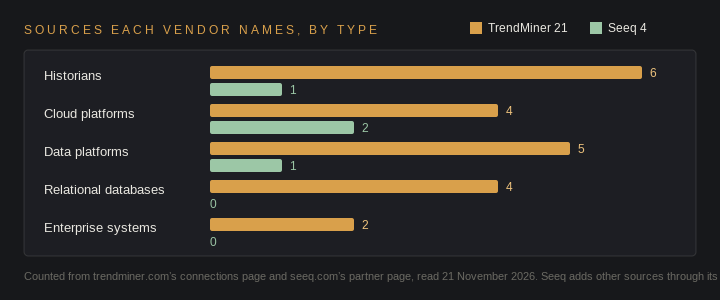
The TrendMiner connections page names the PI System with CONNECT Data Services, Aspen IP21 and APRM, Canary, Yokogawa, Wonderware, Siemens PCS7, ABB and Cumulocity, and the TrendMiner FAQ adds Honeywell PHD, GE Proficy Historian and Yokogawa Exaquantum. The same connections page lists PostgreSQL among four relational databases and SAP Digital Manufacturing among enterprise systems.
Seeq's connectivity partners page names fewer sources and describes its AVEVA link as "tightly integrated for over a decade", which covers OSIsoft's PI Server, the historian AVEVA now sells as AVEVA PI. For everything else, Seeq allows integration of various data sources through its API: the SPy library can "Calculate new data in Python and push it into Seeq" (SPy documentation).
| Source type | TrendMiner | Seeq |
|---|---|---|
| Historians | PI System, IP21, Canary, PHD, Proficy, Exaquantum | AVEVA PI, plus historians by connector |
| Cloud platforms | AWS, Microsoft Azure, Microsoft Fabric, ADX | AWS, Microsoft Azure |
| Data platforms | Databricks, Snowflake, Redshift, S3, Timestream | Databricks |
| Relational databases | SQL Server, MySQL, Oracle, PostgreSQL | Not named on the partner page |
| Enterprise systems | SAP Digital Manufacturing, Shiftconnector | Not named on the partner page |
| Programmatic access | MCP Server for Copilot, ChatGPT and Claude | Seeq API and SPy through Data Lab |
TrendMiner's list is longer, and the 2026.R2 release added a direct REST API connection to Proficy Cloud (release notes, 27 July 2026). A plant that pulls from multiple sources outside the historian will find more ready connectors on the TrendMiner side. Seeq users with an unlisted source write the connection in Python, which suits teams with Python skills and slows teams without them.
↑ COMPARISONHow analysis works in each tool
TrendMiner users start with search. The product page frames analysis as "Search & Correlations": search years of historical data for a pattern, then save a good or bad period as a fingerprint to "Define golden scenarios". The TrendMiner FAQ calls it "self-service, low-code data analysis for time series and event data", and that pattern-based search is the center of the product.
Fingerprints run as background detections 24/7, and monitors send alerts to a mailbox, the notification center or third-party apps. That loop of trending and diagnostic analysis plus real time monitoring is the core of the product, and it turns one engineer's root cause analysis into a watch the whole shift can use.
The trend view is where most data visualization happens, and it carries the basic features engineers expect. dataPARC's comparison of PI ProcessBook replacements credits TrendMiner with tag browsing, trend overlays and data filtering, and the 2026.R3 release added a logarithmic scale to TrendHub.
Since 2026.R2, calculated tags nest 20 levels deep, up from 2, and the mobile dashboard overview keeps basic functionalities such as search and time-frame switching. Editing stays on desktop, so certain functionalities wait until users are back at a workstation.
Predictive analytics in TrendMiner runs through a built-in Python notebook and external model inference, which brings forecasts and anomaly detection results back from tools like Databricks. Analysts can work there, though the product page pitches the interface as a "user-friendly platform for everyone", and that interface is what G2 users score higher.
Seeq users start with conditions. The workflow is more formal. The getting-started guide lists "3 browser-based apps": Workbench for "trending & data analytics", Organizer, a dedicated module for "auto-updating reports & dashboards", and Data Lab to "deploy Python scripts". All three run in the browser. In Workbench an engineer defines a condition, such as a pump running above a set load, and Seeq marks every period it held as a capsule.
The capsule view "overlays the capsules within your conditions" (Seeq Knowledge Base), so twenty batch runs line up from their start time and users can analyze them as one set. That model handles more advanced analysis than a trend overlay: comparisons across runs, statistics per capsule and calculations reused across assets. For diagnostic analytics on batch process performance, it is the stronger fit.
Seeq's advanced analytics capabilities sit in Data Lab, which pairs Jupyter notebooks with the Seeq API, and its own FAQ calls it "best suited for general purpose computing", short of a full machine learning platform. One licensing detail matters: SPy runs in any Python project, but using it outside Data Lab still requires a Data Lab license.
| Job | TrendMiner | Seeq |
|---|---|---|
| Root cause analysis | Search and correlations over years of history | Conditions and capsules in Workbench |
| Anomaly detection | Fingerprints, plus external model inference | No-code ML Add-ons in Data Lab |
| Predictive analytics | Built-in Python notebook, forecasting functions | Data Lab Python with SPy |
| Reports and key performance indexes | Dashboards, mobile overview since 2026.R2 | Organizer, updated on demand or on a schedule |
| AI assistant | TrendMiner Agent, runs on the customer's own LLM | Seeq AI and Agent Q |
| Outside AI access | MCP Server, three tools added in 2026.R3 | Agents integrated with Amazon Quick |
The TrendMiner Agent works "alongside you in the browser" and supports Azure AI Foundry and Anthropic at launch, with AWS Bedrock and OpenAI planned, so the model bill lands on the customer's own cloud account.
Seeq's products page names Seeq Intelligence and Agent Q as its agentic layer. TrendMiner's MCP Server also exposes certain functions to outside assistants, and the three 2026.R3 tools return detailed information on context items and monitor triggers. Neither vendor's product pages claim prescriptive analytics, so treat any demo of it as a custom build.
↑ COMPARISONPrice and support: what each vendor publishes
Neither vendor publishes a price, so a buyer compares structure. TrendMiner's licence now carries "the contractual boundaries covering user types and system quotas" (2026.R3 notes), which means the order form defines both. Seeq publishes its support layer instead: the Success Plans page lists three tiers with inclusions and hides the dollar amounts behind a form.
| Seeq Success Plan | Premium | Premium Plus | Ultimate |
|---|---|---|---|
| Analytics Engineer | Shared resource | Designated | Designated senior |
| Software Support Engineer | None | None | Designated |
| Executive Business Review | Virtual | Annual on-site | Biannual on-site |
| Workshops, sessions, consultations | Up to 2 each | Up to 4 each | Up to 8 each |
| Private training discount | 25% | 30% | 35% |
TrendMiner publishes no equivalent table, and its FAQ routes pricing questions to "Talk to an expert". Both deals start with a call. Our TrendMiner pricing report and Seeq pricing report list the quote drivers and what users report paying. Bite the bullet in the first call and ask each rep for the licence unit in writing.
↑ COMPARISONDeployment, secure log in and personally identifiable data
Both platforms can be deployed on-premises or in the cloud. TrendMiner's deployment page offers a single node in your own data center, a single node in your own cloud account, or SaaS "Hosted and operated by TrendMiner", each as a containerized application on Linux. Seeq "launched as an on-premise software product" and now calls itself "an enterprise SaaS platform" (Seeq blog), with Cloud and On-Premise tabs across its knowledge base.
On security paperwork, Seeq is ahead of the curve. It completed ISO/IEC 27001:2022 and ISO 27018:2019 on 11 December 2025 (Seeq press release, 29 January 2026), and the 27018 scope covers personally identifiable information Seeq handles as a cloud processor. Its trust center lists SOC 2, C5 and CSA STAR Level 1, and its SaaS blog lists Azure as an identity provider for single sign-on, providing secure log in through the customer's own directory.
TrendMiner's FAQ describes "role-based access control, data encryption, and secure communications", and neither the FAQ nor the deployment page names a certification. Tag values carry no names, but user accounts, annotations and login records do, so a SaaS buyer should request TrendMiner's certificate list in writing.
↑ COMPARISONOwnership and funding: who signs the contract
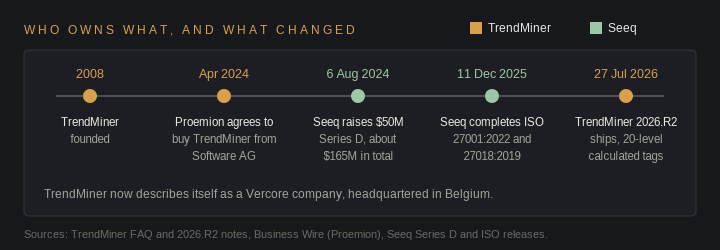
| Date | Event | Source |
|---|---|---|
| 2008 | TrendMiner founded | TrendMiner FAQ |
| April 2024 | Proemion agrees to acquire TrendMiner NV from Software AG | Business Wire |
| 6 August 2024 | Seeq raises a $50 million Series D led by Sixth Street Growth, about $165 million in total | Seeq |
| 2026 | TrendMiner describes itself as "a Vercore company", headquartered in Belgium | TrendMiner FAQ |
Seeq was independent and venture-backed at that round, with customers in 36 countries per the same release. TrendMiner moved from Software AG to Proemion in 2024 and now trades as a Vercore company, so a contract signed today names a different owner than one signed in 2023. Read the assignment clause before a multi-year term and ask which entity signs the order form, since a stitch in time saves nine at renewal.
The third option: PI Vision, dataPARC's PARCview and Canary
Many plants on this shortlist already own PI Vision with their historian, and data visualization of trends alone may cover their need in day-to-day operations. dataPARC's blog pitches dataPARC's PARCview as a PI Vision and ProcessBook replacement with "XY plots, histograms, Pareto charts, and more", and notes that Canary has an Excel Add-in for more advanced analysis while PI Vision has none. All three are visualization tools first.
Canary is the one vendor here with a public price, and its Axiom client handles data visualization for operations staff who only need trends. Its pricing page lists a $3,980 a year subscription at 3,500 tags, or $11,765 perpetual, both with unlimited Axiom and Excel clients.
Canary's page also advertises unlimited users, which it lists as those unlimited clients. These data visualization tools cover trending at a list price, and TrendMiner and Seeq sit a layer above them for advanced analytics across sites and data sources. Our industrial data analytics ranking covers the other alternatives, including vendors that sell advanced analytics with a lighter interface.
↑ COMPARISONFrequently asked questions
Is TrendMiner easier to use than Seeq?
On G2, users rate it higher by a small margin: ease of use 8.8 against 8.5 and ease of setup 8.6 against 8.1, which points to a faster learning curve on TrendMiner. Each figure comes from 76 to 182 reviewer responses on the G2 comparison page.
Do TrendMiner and Seeq work with the PI System?
Yes. TrendMiner lists AVEVA PI and CONNECT Data Services, and Seeq says it has been integrated with AVEVA for over a decade.
Which one is better for predictive analytics?
Seeq, for teams with Python skills, since Data Lab and SPy put notebooks on the same process data and the results flow back into Workbench for engineers to analyze. TrendMiner covers forecasts through its notebook and external model inference.
How much do TrendMiner and Seeq cost?
Both are quote-only. Seeq publishes its Success Plan inclusions; TrendMiner publishes none.
↑ COMPARISONVerdict
Buy TrendMiner if process engineers will analyze their own units, create monitors from what they find and act on the insights within a shift, with data spread across several historians and cloud stores. That helps plants optimize operations without a data science queue. Its connector list is longer, and G2 users rate it easier to set up and to analyze with.
Buy Seeq if analysts will build models next to engineers and turn the insights into data driven decisions across sites, you need ISO 27001 and SOC 2 paperwork for a SaaS deal, and you want support terms published before the quote.
Run both on the same historian for the same weeks, ask each team to find the root cause of one known upset, and compare the insights and the hours it took. A side-by-side pilot cuts to the chase on what a demo leaves open, and it lets your own users create the evidence for the purchase.