Best customer satisfaction survey software for 2026
 By Jan Suski. I go deep on every review, checking every number against its source and digging up details other coverage misses, a habit from six years of SEO and link building for tech companies. Bylines at Surfer, Brand24, and Senuto. How the scoring works.
· Prefer this source on Google
Quick comparison of customer satisfaction survey software
Ten customer satisfaction survey tools in ranked order, with each one’s third-party review volume, its entry price and the buyer it fits.
| # | Provider | Reviews (platform) | Entry price | Best fit |
|---|---|---|---|---|
| 1 | Qualtrics | 4.4, 3,019 reviews (G2) | Custom quote; $30,000/yr median* | Enterprise XM programs spanning customer, employee and brand experience |
| 2 | SurveyMonkey | 4.4, 24,040 reviews (G2) | $39/user/month (Advantage, annual) | Teams that want a self-serve survey tool with the widest review base in the category |
| 3 | Medallia | 8.9/10, 44 reviews (TrustRadius) | Custom quote; $13,338/yr median* | Enterprise CX programs already running Salesforce-integrated case management |
| 4 | Zonka Feedback | 4.8, 68 reviews (Capterra) | $199/month flat rate | CX teams that need email, SMS, web and in-app coverage without enterprise overhead |
| 5 | Typeform | 4.7, 983 reviews (Capterra) | €25/month (Basic, annual) | Marketing and product teams that want conversational, design-forward surveys |
| 6 | SurveySparrow | 4.4, 123 reviews (Capterra) | €19/month (Basic, annual) | Budget-conscious teams that still want a conversational survey experience |
| 7 | Qualaroo | 4.7, 22 reviews (Capterra) | $0 forever free (50 responses/mo) | Product and UX teams running in-app or on-site micro-surveys |
| 8 | Survicate | 4.6, 99 reviews (Capterra) | £89/month (Growth, annual) | Product and CX teams running always-on in-product surveys into a shared dashboard |
| 9 | Hotjar | 4.6, 545 reviews (Capterra) | $39/month (Contentsquare’s Hotjar plan) | Teams that want CSAT/NPS paired with heatmaps and session recordings |
| 10 | Nicereply | 4.7, 283 reviews (Capterra) | $59/month (Starter, annual) | Support teams that want helpdesk-native CSAT, CES and NPS tied to individual agents |
Figures marked * are anonymized buyer-reported contract values published by Vendr; every other price is the vendor’s own published entry tier. Review scores and counts read from each platform’s own listing, 13 October 2026.
Customer satisfaction survey software turns a single question, “how did we do,” into a number a team can track every week as part of a broader customer experience program.
The category covers three jobs that often get treated as one: sending a CSAT or CES survey after a support ticket closes, running an NPS program across the whole customer base, and catching in-the-moment feedback on a website or inside a product. A tool built for the first job rarely does the third one well, and the reverse is just as true.
This page covers ten tools that sell themselves on customer satisfaction measurement, from enterprise experience-management suites that run customer, employee and brand programs on one platform down to single-purpose CSAT widgets that plug into a helpdesk and nothing else. Each entry names a real price, a real review count, and at least one verbatim complaint or compliment from someone who bought the thing.
This list is for the buyer comparing named vendors. A buyer still deciding if it should measure satisfaction at all wants a different page. If a support team already knows it wants CSAT scores tied to individual agents, or a product team already knows it wants an in-app micro-survey triggered by a page event, the entries below name which tool fits which job and what it costs to find out.
Why now: several of the vendors below changed hands or changed pricing models in the past two years. Hotjar’s survey tool now sits inside Contentsquare’s pricing page, and Delighted shut down entirely, pushing its former customers toward the tools ranked here. A list built on last year’s pricing or last year’s ownership gets a buyer a quote that no longer applies.
Evaluation criteria for customer satisfaction survey software
Five criteria decide the shortlist, and the ranking below applies them in this order.
Published pricing
A criterion only counts if a buyer can test it without a sales call. Does the vendor’s own pricing page show a dollar, euro or pound figure a buyer can budget against today, or does the page end at “contact us”? Six of the ten tools here publish a number; three (Qualtrics, Medallia, and Zonka Feedback above $199/month) require a quote.
Distribution channel breadth
How many delivery channels does the vendor itself name on its pricing or product page: email, SMS, website pop-up, in-app, kiosk, QR code, chatbot? Zonka Feedback names four on its own marketing copy (email, SMS, web, in-app); Survicate’s feature grid names ten.
Third-party review volume
A buyer can open G2, Capterra or TrustRadius and count the reviews behind a score. SurveyMonkey carries 24,040 G2 reviews; Zonka Feedback carries 68 on Capterra. Volume does not settle which tool is better, but it tells a buyer how much independent signal backs the star rating.
Native integration count
How many integrations does the vendor list on its own integrations page, counted by name and never by category? Typeform lists 500-plus through Zapier alone, plus direct connections to Salesforce, HubSpot and Slack; Nicereply’s own pricing page lists four named helpdesks (Zendesk, Front, HelpScout, Pipedrive) across every tier.
Documented response-rate or benchmark data
Does the vendor, or an independent benchmark, publish a measured response rate for its delivery channel, with a sample size or a date attached? Survicate’s 2025 benchmark reports a 9.98% median response rate for in-product surveys; SurveyMonkey’s own use-case page cites a 49.17% average for email surveys against a 3.65% average for website pop-ups.
The ranking
Qualtrics
Best fit
Enterprise experience-management teams running customer, employee, product and brand programs on one platform. A single CSAT widget can't cover that much ground.
Qualtrics started as survey software and has since folded itself into an XM, or customer experience management, suite with five separate product families: Customer XM, Employee XM, Product XM, Brand XM, and XM for Strategy & Research. Each is billed on its own combination of named users and response volume, and Qualtrics does not publish list pricing for any of them.
Vendr’s anonymized transaction data puts the median buyer at $30,000 a year across 322 purchases, with a range from $7,020 to $138,884 and an average discount of 11.28% off the initial quote.
Key features
- Five separate product families (Customer XM, Employee XM, Product XM, Brand XM, Strategy & Research) sold individually or bundled
- ExpertReview, an AI-driven check on survey quality and methodology at the point of design
- Stats iQ and Text iQ for statistical analysis and open-text customer sentiment
- Synthetic panels that pre-test survey designs before a human respondent sees them
- Integrations with Salesforce, Snowflake, Tableau and Power BI
Pricing
Custom quote only. Vendr’s dataset shows small deployments (10-25 users, one product family) landing in the low five figures annually, while enterprise deployments with multiple product families commonly reach six or seven figures. Professional services alone can add 10-30% to the contract.
Pros
- The only platform in this list that connects customer, employee and brand feedback to the same operational data, by Qualtrics’s own account
- Advanced methodology (Conjoint, MaxDiff, Van Westendorp) built in, not farmed out to a market research agency
- Named a Strong Performer in Forrester’s Wave for Experience Research Platforms
Cons
- No published pricing anywhere in the product; every quote starts from zero
- Steep onboarding curve for advanced research modules
- Professional services and support-tier fees can add 10-30% on top of the platform fee
“Our one complaint is that the price has crept up over the years to the point that it’s significantly higher than we were paying 4-5 years ago”
A Qualtrics user, on G2, 1 August 2026
Why it’s ranked #1. Qualtrics is the only tool here that bundles customer, employee, product and brand feedback under one contract, and its $30,000 Vendr median sits inside a 322-purchase sample large enough to trust; SurveyMonkey’s self-serve $39/month can’t match that breadth, and Qualtrics loses to nobody above it because there is no tool above it.
SurveyMonkey
Best fit
Teams that want a widely adopted, self-serve survey tool and the deepest independent review base in the category to check it against.
SurveyMonkey’s own use-case page for customer satisfaction calls it “the world’s most popular platform for surveys,” and its G2 listing backs that claim with scale no other tool here matches: 24,040 reviews at a 4.4 average. Team plans start at 3 seats and scale response caps by tier; G2’s own pricing panel lists the Advantage tier at $39 per user per month and Premier at $139, both billed annually.
Key features
- Unlimited surveys and questions on every team tier, with response volume as the paid lever
- AI-assisted survey creation and “Analyze with AI” for spotting trends in open-text responses
- Statistical significance testing and multi-survey analysis on the Advantage tier and above
- Crosstabs, block randomization and multilingual surveys on Premier
- SurveyMonkey Audience, a paid panel add-on for recruiting outside respondents
Pricing
Advantage at $39/user/month (3+ users, 50,000 responses/year, billed annually), Premier at $139/user/month (100,000 responses/year), Enterprise by custom quote with SSO and centralized billing.
Pros
- Deepest third-party review base of any tool on this list, at 24,040 G2 reviews
- A reviewer who has run NPS studies on the platform since 2018 praised how it “handles the mathematics of counting averages and presents the data in a good visual format” (G2, 27 July 2026)
- Stripe payment collection built into the survey, letting one tool handle both the form and the transaction
Cons
- Response caps mean occasional users pay for capacity they rarely use; one reviewer who runs “3-5 surveys per year” called the price “high” for that usage pattern
- Licenses tie to individual end-user devices, a friction point for anyone switching laptops often
- Enterprise pricing requires a sales call, same as the custom-quote tools above and below it
“3-5 surveys per year”… the price is “high” for that usage pattern
A SurveyMonkey user, on G2, 22 September 2026
Why it’s ranked #2. SurveyMonkey’s 24,040 G2 reviews outnumber every other tool on this list by more than 20 to 1, and its $39/month self-serve entry beats Qualtrics’s quote-only model on the published-pricing criterion; it loses to Qualtrics on breadth, since SurveyMonkey has no employee-experience or brand-tracking product family to bundle alongside CSAT.
Medallia
Best fit
Large enterprises already running Salesforce-integrated case management who want survey data to trigger the same workflow.
Medallia competes directly with Qualtrics in enterprise experience management, with one structural difference: Medallia prices around “signals,” its term for individual feedback records, and skips per-response tiers entirely. Vendr’s dataset puts the median contract at $13,338 a year across 32 purchases, with a range from $6,739 to $112,044, well below Qualtrics’s median but still a custom-quote product with no self-serve tier.
Key features
- Signal-based pricing tied to feedback volume, not named-user seats alone
- Real-time dashboards with customizable survey design and automated alert triggers
- Salesforce integration deep enough that account teams can view a tailored dashboard inside Salesforce itself, with each response written back to the customer record automatically
- Text analytics and AI-driven generation of actionable insights across open-text responses
- Case management workflow that lets a manager assign, track and close out individual pieces of feedback
Pricing
Custom quote only. Vendr’s benchmark shows professional services commonly adding 15-35% to the contract, higher than the 10-30% typical at Qualtrics, reflecting Medallia’s heavier implementation footprint.
Pros
- Deep, two-way Salesforce integration that several reviewers single out by name as the reason they chose it
- Automated alert triggers that flag a detractor response to the right team in real time
- A 2,000-plus customer count the company states publicly, spanning retail, hospitality and financial services
Cons
- No self-serve tier or published price at any level
- A real measurement bias a gym manager flagged on the next line
- Implementation and professional services run higher than Qualtrics’s already-steep range
“I do feel that it wasn’t a clear depiction of the status of our business based on the fact that it was mostly just the angry members who took the time to complete the surveys”
A gym manager using Medallia for member surveys, on TrustRadius, 3 December 2021
Why it’s ranked #3. Medallia’s $13,338 Vendr median undercuts Qualtrics’s $30,000 by more than half on the published-pricing-transparency criterion (both still quote-only, but Medallia’s observed contracts run cheaper), yet it loses the top two spots because its own sample, at 32 Vendr purchases against Qualtrics’s 322, is a tenth the size and it carries no self-serve option the way SurveyMonkey does.
Zonka Feedback
Best fit
CX teams that need email, SMS, web and in-app survey coverage in one contract without an enterprise sales cycle.
Zonka Feedback is the clearest omnichannel play on this list below the enterprise tier: its own site states it collects feedback “via email, SMS, web, and in-app channels,” a four-channel spread that none of the self-serve tools ranked below it match outright. Capterra lists its starting price at $199 a month flat rate, with no vendor-published tier structure beyond that; everything past the entry tier runs through a custom quote.
Key features
- Four native channels (email, SMS, web, in-app), where most tools in this list offer only email and a share link
- NPS, CSAT and CES measurement built into the same survey builder
- Real-time dashboards with role-based reporting and automated alerts
- Multilingual surveys and white-label branding on paid tiers
- CRM and helpdesk integrations the vendor says it will build custom on request
Pricing
$199/month flat rate (Capterra-listed starting price); every tier above that is a custom quote with no published ceiling.
Pros
- One customer named the dashboards specifically: “Dollar for dollar, this is the best review software. The dashboards are clean and simple to understand. They’re already all setup as well!” (Capterra, 3 February 2025)
- Four-channel distribution without needing an enterprise contract
- A 4.8 Capterra rating across 68 reviews, with 97% of sentiment logged as positive
Cons
- A paying customer reported losing data outright after upgrading, as the next quote shows
- No published pricing beyond the single $199 entry tier
- Smaller third-party review base than Typeform or SurveyMonkey, at 68 reviews against 983 and 24,040
“Once I have paid the plan ‘Starter’ my survey started work incorrectly and I have lost many responses… when I contacted the support team they didn’t want to give me a refund”
A Zonka Feedback customer, on Capterra, 19 November 2024
Why it’s ranked #4. Zonka’s four confirmed channels beat SurveySparrow’s and Typeform’s email-and-link-centric distribution on the channel-breadth criterion, and its $199 entry tier is a real number where Qualtrics and Medallia above it have none; it loses to Medallia because its review base, at 68, is a fraction of Medallia’s enterprise footprint and it has no published ceiling once a buyer needs more than the entry tier.
Typeform
Best fit
Marketing and product teams that want a conversational, design-forward survey and the largest integration marketplace in this list.
Typeform turns a CSAT survey into a one-question-at-a-time conversational form, and backs that design choice with the deepest integration marketplace here: 500-plus apps through Zapier alone, on top of direct connections to Salesforce, HubSpot, Slack and Google Analytics.
Its own pricing page lists Basic at €25/month (100 responses included, 1 user), Plus at €49/month (1,000 responses, 3 users), and Business at €84/month (10,000 responses, 5 users), all billed annually.
Key features
- Conversational, one-question-per-screen form design with AI-assisted question generation
- 500-plus Zapier integrations plus native Salesforce, HubSpot and Slack connections
- Drop-off rate and conversion tracking on the Business tier and above
- A dedicated Talent plan (from $119/month) and Research Flow module for recruiting and running studies
- Multilingual forms and a 25,000-contact database on the Contacts & Automations add-on
Pricing
Basic €25/month (100 responses/mo, 1 user), Plus €49/month (1,000 responses/mo, 3 users), Business €84/month (10,000 responses/mo, 5 users), Enterprise by custom quote.
Pros
- A long-time user who compared it directly to a competitor on this list: “I much prefer it to SurveyMonkey / Google forms etc as it is so customisable but still easy to use” (Capterra, 14 March 2025)
- The widest named integration count of any tool ranked here
- 95% of Fortune 500 companies use Typeform, by the vendor’s own stated figure
Cons
- A small-business founder named the recurring cost directly, quoted below
- The response-based pricing model means a low-volume survey still costs the same as a high-volume one within a tier
- SSO, HIPAA compliance and custom data-center choice are Enterprise-only, pushing security-conscious buyers into a custom quote
“Price! It is an expensive product for a small business and every year I do seriously consider cancelling”
A Typeform customer, on Capterra, 21 May 2026
Why it’s ranked #5. Typeform’s 500-plus integrations beat Zonka Feedback’s custom-built connections on the integration-count criterion outright, but its €25 entry tier caps out at 100 responses a month against Zonka’s four full channels at a flat $199, so it drops below Zonka on the channel-breadth test and above SurveySparrow on integration depth.
SurveySparrow
Best fit
Budget-conscious teams that still want a conversational, chat-style survey. A static form won't give them that.
SurveySparrow’s paid plans start at €19/month for 2,500 responses a year and a single user, undercutting Typeform’s €25 for 100 responses a month (1,200 a year) while keeping the same conversational format. The Business tier, its most popular, runs €79/month for 36,000 responses a year across 3 users, with PowerBI and 25-plus integrations reserved for Enterprise.
Key features
- Conversational, chat-style survey format matching Typeform’s core pitch at a lower published price
- 360 Assessment and CX Suite modules (NPS, CSAT, CES) sold as separate products under the same account
- Auto-translation to 130-plus languages on the Enterprise tier
- Key Driver Analysis (branded CogniVue) for identifying which survey factors move the overall score
- HIPAA compliance available on Enterprise
Pricing
Basic €19/month (2,500 responses/yr, 1 user), Starter €39/month (15,000 responses/yr), Business €79/month (36,000 responses/yr, 3 users), Enterprise by custom quote.
Pros
- A reviewer called out the conversational format by name as the reason surveys felt “more engaging and less like traditional questionnaires” with “plenty of options for customization, branching logic, recurring surveys” (Capterra, 8 September 2026)
- Lower entry price than Typeform for a comparable conversational format
- 90% positive sentiment across 123 Capterra reviews
Cons
- A long-time user flagged a real integration gap against a named category, quoted below
- Smaller review base than Typeform (123 against 983) means less independent signal to check the star rating against
- Advanced reporting and customization sit behind the higher-priced tiers, the same complaint the same reviewer raised about rising costs as needs grow
“I wish Survey Sparrow offered an audience purchase option. I’m currently using another vendor to fill this gap”
A SurveySparrow customer, on Capterra, 27 June 2025
Why it’s ranked #6. SurveySparrow’s €19 entry tier undercuts Typeform’s €25 on the published-pricing criterion, but Typeform’s 500-plus integrations and 983 Capterra reviews against SurveySparrow’s 123 keep SurveySparrow one slot below; it ranks above Qualaroo because SurveySparrow’s paid tiers scale to 36,000 responses a year, where Qualaroo’s free tier caps at 50 total.
Qualaroo
Best fit
Product and UX teams that want in-app or on-site micro-surveys triggered by real user behavior, without paying until volume grows.
Qualaroo (built by ProProfs) calls its core unit a “Nudge,” a targeted pop-up survey triggered by exit intent, page-level behavior or a mobile app event. Its free tier is a genuine forever-free plan, not a time-limited trial: $0 for 50 responses, 500 email sends and 10,000 tracked pageviews, with every premium feature unlocked, not gated behind a paywall.
Key features
- Behavior-based targeting: exit intent, page-level rules, and mobile in-app nudges for iOS and Android
- AI-powered sentiment analysis on open-text responses, built on IBM Watson
- Branching and skip logic available on the free tier, not reserved for paid plans
- A separate Survey Maker product (worth $1,200 standalone, per the vendor) bundled into every Qualaroo plan
- Customer Delight and Customer Growth suites starting at $499/month, bundling Qualaroo with live chat, helpdesk and CRM
Pricing
Free forever at $0 (50 responses/mo, 500 email sends, 10,000 pageviews); Business tier pricing requires viewing the plan page directly; bundled suites start at $499/month.
Pros
- A product-team reviewer praised the specificity of its targeting: “Using behavior-based targeting, branching logic, and partial response collection techniques enables collecting customer feedback without disturbing the user experience” (Capterra, 18 September 2026)
- The only tool in this list offering every premium feature on a genuinely free, non-expiring tier
- 100% positive sentiment across 22 Capterra reviews, the highest ratio on this list (on a small sample)
Cons
- A reviewer flagged the targeting setup’s real cost, quoted below
- Smallest third-party review base in this list at 22 Capterra reviews, the thinnest independent signal here
- Business-tier pricing is not published; a buyer has to click through to a separate plan page; the pricing page itself shows no number for it
“Creating audience rules can take some trial and error, particularly when multiple segments of users are involved”
A Qualaroo customer, on Capterra, 18 September 2026
Why it’s ranked #7. Qualaroo’s genuinely free, feature-complete tier beats every paid entry price on this list on the published-pricing criterion, but its 22-review Capterra base is the thinnest signal in the category; it sits below SurveySparrow because SurveySparrow’s response ceiling scales into the tens of thousands a year while Qualaroo’s free tier caps at 50 total responses a month.
Survicate
Best fit
Product and CX teams who want always-on, multichannel in-product surveys feeding a shared research dashboard. A one-off campaign tool won't do that job.
Survicate pitches itself as a feedback platform built for continuous collection over single campaigns, with a Research Hub and an AI chat assistant layered on top of the survey tool itself. Growth, its entry paid tier, runs £89/month billed annually for 250 survey responses and 1,000 data points, with 25-plus native integrations; Pro and Enterprise scale both response volume and integration depth on custom quotes.
Key features
- Multichannel surveys spanning email, website pop-up, in-product, mobile SDK, kiosk mode and QR code, more delivery methods than any other tool in this list states by name
- A Research Hub and AI-powered categorization and sentiment analysis across open-text responses
- 25-plus native integrations on Growth, rising to 40-plus on Pro, including Salesforce, HubSpot and Segment
- A published 2025 benchmark reporting a 9.98% median response rate for in-product surveys
- A free 10-day trial with full feature access, no card required
Pricing
Growth from £89/month (250 responses/mo, 1,000 data points, billed annually); Pro and Enterprise by custom quote with custom response pools.
Pros
- A product lead credited the platform directly with research speed: “Our feature validation became twice as fast! Before, we had to wait for weeks before we could reach out to customers” (Survicate customer story)
- Published, dated response-rate benchmark data most competitors on this list don’t disclose
- 95% positive sentiment across 99 Capterra reviews
Cons
- A legacy customer described a real cost shock on a plan change, quoted below
- The same reviewer flagged a data-quality gap: duplicate survey responses captured separately by the chatbot channel, with no built-in way to merge them
- £89 (roughly $113) sits above Typeform’s and SurveySparrow’s entry tiers for a comparable response cap
“We are currently on a legacy pricing plan, which restricts our access to many features. Survicate requires us to upgrade to access these features, effectively doubling our current costs”
A Survicate customer, on Capterra, 21 October 2024
Why it’s ranked #8. Survicate’s named channel list, which runs to ten delivery methods including kiosk mode and QR codes, is the broadest on this list by the channel-breadth criterion, and its dated 9.98% response-rate benchmark is published data most rivals don’t disclose.
It ranks below Qualaroo because Qualaroo’s entry tier is free where Survicate’s starts at £89, and below SurveySparrow because Survicate’s 99 Capterra reviews are a smaller base than SurveySparrow’s combined review footprint across platforms.
Hotjar
Best fit
Teams that want CSAT and NPS surveys paired with heatmaps and session recordings. A standalone survey tool won't give them the heatmap half.
Hotjar’s survey feature sits inside a broader behavior-analytics product now owned by Contentsquare, and its pricing page redirects to Contentsquare’s plan structure; a standalone Hotjar rate card no longer exists.
The entry Observe plan runs from $39/month, with session-recording caps and a 20-queries-an-hour AI ceiling. The help center documents those limits inconsistently across two different page variants, a known gap this site’s own review of the product has already flagged.
Key features
- On-page surveys and feedback tabs alongside heatmaps, scroll maps and session recordings in the same product
- A user-frustration score attached to recordings, letting a team sort the worst experiences first
- Funnels for tracking where users drop off during a conversion flow
- SOC 2 Type II certification carried over from the Contentsquare acquisition
- A Capterra rating of 4.6 across 545 reviews, the second-largest review base in this list
Pricing
Observe plan from $39/month (Contentsquare’s current Hotjar plan, per the August 2026 update to this site’s own Hotjar review); higher tiers scale replay capture rate and retention.
Pros
- A CRO analyst called it “a must-have tool” and said “nothing compares to the simplicity of hot jar at the end of the day” when set against Crazy Egg (Capterra, 11 August 2026)
- Pairs quantitative CSAT/NPS scoring with qualitative session replay in one product, a combination none of the other nine tools here offer
- Second-largest third-party review base in this list at 545 Capterra reviews
Cons
- A senior product manager described the exact failure mode of an acquisition on pricing, quoted below
- Survey functionality is secondary to heatmaps and recordings in the product’s own positioning, so a buyer who wants CSAT alone is paying for tools they won’t use
- The help center’s own pages disagree on retention and tier names, a documentation gap this site’s existing Hotjar review has already flagged
“After the product was acquired the price was instantly increased while the pricing tiers became extremely hard to follow which added additional friction and made me move to other tools and services”
A senior product manager, on Capterra, 25 October 2024
Why it’s ranked #9. Hotjar’s 545 Capterra reviews beat every tool below it and most above it on the review-volume criterion, but survey collection is a secondary feature bolted onto a heatmap product, well behind Hotjar’s core pitch, the way it is for the other nine tools.
It ranks below Survicate because Survicate’s named channel list and published response-rate benchmark are both survey-specific, where Hotjar’s strongest data (session recordings) sits outside this category entirely.
Nicereply
Best fit
Support teams that want simple, helpdesk-native CSAT, CES and NPS surveys tied to individual agents, nothing broader.
Nicereply is the narrowest tool on this list by design: one-click CSAT, CES and NPS surveys that attach to a support ticket or an email signature, built to measure individual agent performance over running a company-wide research program. Starter runs $59/month billed annually for 100 responses and 3 users; Growth, its most popular tier, runs $239/month for 1,000 responses and 25 users.
Key features
- One-click CSAT, CES and NPS surveys embedded in post-resolution emails, email signatures, link surveys and website pop-ups
- Native integrations with Zendesk, Front, HelpScout and Pipedrive on every tier, not gated to higher plans
- Feedback Analytics for tracking scores per agent, team or country
- Unlimited active surveys on every paid tier, with response volume as the only scaling lever
- 98% satisfaction claimed across G2, Capterra and Zendesk’s own marketplace, by the vendor’s stated figure
Pricing
Starter $59/month (100 responses/mo, 3 users), Essential $119/month (250 responses/mo, 10 users), Growth $239/month (1,000 responses/mo, 25 users), Business $359/month (2,500 responses/mo, 50 users), all billed annually with a 20% discount against monthly billing.
Pros
- A wholesale-industry director credited the Zendesk integration directly: “It integrates seamlessly with Zendesk, which has expanded our ability to measure our CSAT scores. It’s a very affordable solution” (Capterra, 8 January 2019)
- Simplest setup of any tool in this list for a support team that only needs agent-level CSAT
- 1,600-plus companies trust the platform, per Nicereply’s own stated figure, with 98% satisfaction across three review platforms
Cons
- A reviewer documented a concrete data-integrity problem with real numbers, quoted below
- No multichannel in-app or on-site survey capability; Nicereply only reaches customers through a resolved ticket, an email signature or a link
- The smallest response cap of any entry-tier plan in this list at 100 responses a month for $59
“scores are changed a bit so graph doesn’t look to ‘bumpy’”
Nicereply support, explaining to a customer why setting the date range to “May 1st - May 31st” showed an average score of 5.93 while widening it to “May 1st - June 23rd” changed the May 1st figure to 6.1, on Capterra, 2 July 2018
Why it’s ranked #10. Nicereply’s $59 entry price and native helpdesk integrations make it the cheapest way onto this list for a support team that only wants agent-level CSAT, but it has no in-app, website or SMS channel at all, the opposite of Zonka Feedback’s four-channel spread at #4, and the date-range scoring discrepancy one reviewer documented with real numbers is a data-integrity gap none of the nine tools above it carry on the record.
How customer satisfaction surveys get used
A customer satisfaction survey does one of three jobs: measuring a single transaction (CSAT, asked right after a purchase or support ticket), measuring ease of getting something done (CES, the customer effort score), or measuring long-term loyalty (NPS, the net promoter score), each one a checkpoint against customer expectations at a different point in the customer journey. Vendors on this list rarely ship only one.
Zonka Feedback, Qualtrics and Nicereply all support CSAT, CES and NPS from the same survey builder, which means the real differentiator is where and how often the survey can be triggered. None of the three ever has to be built from scratch.
Timing changes the number more than the tool does. Teams that gather feedback immediately after a customer interaction consistently see higher response rates than those that wait, and a survey mixing a rating scale with one open-ended question tends to out-collect either format alone.
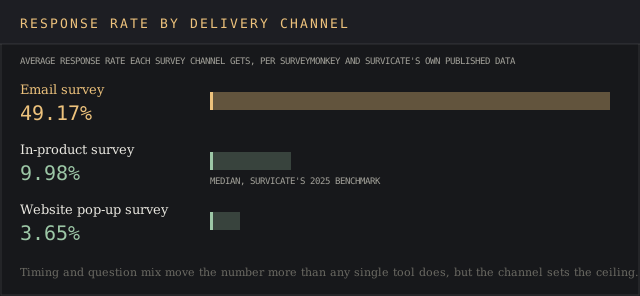
Response rate also swings hard on channel: an email survey averages a 49.17% response rate against a website pop-up’s 3.65%, both figures drawn from the same source data the vendors in this category cite about themselves. Survicate’s own 2025 benchmark puts in-product surveys at a 9.98% median, a middle ground between the two.
Pricing across the category
Pricing in this category splits into two tiers with almost nothing in between.
Six of the ten tools here publish a self-serve number: Qualaroo’s forever-free plan at $0, SurveySparrow at €19/month, Typeform at €25/month, Nicereply at $59/month, Hotjar at $39/month (under Contentsquare’s current rate card), and Survicate at £89/month. Three (Qualtrics, Medallia, and Zonka Feedback past its single $199 tier) require a sales call before a buyer sees a number at all.

The hidden cost inside the self-serve tier is the response cap. The headline price hides it. Nicereply’s $59/month Starter plan caps at 100 responses; stepping up to 1,000 responses a month means jumping to its $239 Growth tier, a four-fold price increase for a ten-fold response increase.
Typeform’s response-based pricing works the same way: a survey that collects 101 responses in a month on the €25 Basic plan needs the €49 Plus plan, even though nothing else about the survey changed. A buyer should model peak-month response volume before picking a tier, past the average-month figure.
Common buying mistakes
The most common mistake in this category is picking a tool for its CSAT feature alone, without mapping it to actual customer needs, and discovering later that the channel it needs isn’t supported. A support team that wants agent-level CSAT inside Zendesk should look at Nicereply or a helpdesk-native tool first, ahead of an enterprise XM suite built for cross-functional research programs.
Going the other way breaks just as fast: an enterprise buyer trying to run a brand-tracking study on a $59/month helpdesk tool hits its response cap within the first survey.
The second-most common mistake is reading a star rating without reading the sample size behind it. A 4.8 rating on 68 Capterra reviews (Zonka Feedback) and a 4.4 rating on 24,040 G2 reviews (SurveyMonkey) are not comparable signals, even though the first number looks stronger. A thin sample can swing hard on five or six reviews either way, which is why this page lists the review count next to every score in the comparison table above.
Frequently asked questions
What survey tool is used to measure customer satisfaction?
CSAT-specific tools like Nicereply and Zonka Feedback measure it directly with a one-click or emoji-scale survey; general-purpose online survey platforms like SurveyMonkey, Typeform and Qualtrics measure it as one survey type among several.
What is the best customer feedback software?
There’s no single best answer across every use case: this list ranks Qualtrics first for breadth across customer, employee and brand programs, but a support team measuring agent performance is often better served by Nicereply at a tenth of the cost.
How do I create a customer satisfaction survey?
Every tool on this list includes CSAT templates; the harder decision is channel and timing. Question wording matters far less. Send immediately after the interaction, mix a rating scale with one open-ended question, and pick the channel (email, in-app, pop-up) that matches where the customer already is.
What is the best app for conducting customer surveys on mobile?
Qualaroo’s mobile in-app Nudges for iOS and Android, and Survicate’s mobile SDK, are the two tools in this list built specifically for triggering a survey inside a native mobile app, past a browser window.
Bottom line
Qualtrics wins this ranking for the buyer running, or planning to run, more than one experience program. No other tool here bundles customer, employee, product and brand feedback under one contract, even at a $30,000 median annual cost with no published price.
SurveyMonkey is the better call for a team that wants a name every stakeholder already recognizes and a self-serve price they can see today; its 24,040 G2 reviews are the deepest independent signal in the category.
For a narrower job, skip the top of this list entirely. A support team measuring agent-level CSAT inside an existing helpdesk gets more value from Nicereply’s $59/month native Zendesk integration than from any enterprise suite above it. A product team that wants to trigger a micro-survey on exit intent, and doesn’t want to pay until volume grows, should start with Qualaroo’s genuinely free tier before evaluating anything else on this page.