AgencyAnalytics review: one Core plan, $20 a client, unlimited everything else
 By Jan Suski. I go deep on every review, checking every number against its source and digging up details other coverage misses, a habit from six years of SEO and link building for tech companies. Bylines at Surfer, Brand24, and Senuto. How the scoring works.
· Prefer this source on Google
Best for
Agencies running 10 to 25 active client accounts that want one dashboard, one login, and one bill in place of Looker Studio, a rank tracker, and an export tool stitched together by hand.
Not for
A solo consultant with one or two clients, where a $20 to $25 per-client rate on top of ad-platform and email subscriptions costs more than Looker Studio's free tier.
What it costs
One Core plan at $20 per client per month billed annually, or $25 billed monthly, every feature unlocked at every client count, plus a custom Enterprise rate once a roster passes 25 clients.
- Core plan
- $20/client/mo billed annually, $25/mo billed monthly
- Feature gate
- None: every feature unlocked on Core at any client count
- Enterprise
- Custom pricing past 25 clients, volume discounts, dedicated training
- AI Tracker add-on
- $20.83/mo per 250 credits, billed annually
- Rank Tracker add-on
- $41.67/mo per 500 keywords, billed annually
- Free trial
- 14 days, no credit card required
- Money-back guarantee
- 30 days, no questions asked
- Contract terms
- Monthly cancels anytime; annual locks a 1-year commitment
- Slidedeck & document reports
- Unlimited on every plan
- Smart Reports
- Automated narrative summary built from the connected data
- White-label branding
- Custom logo, color scheme, own domain, and email sending address
- Client Portal
- Branded live-dashboard login, web and mobile
- Integrations
- 85+ sources across SEO, PPC, social, email & call tracking
- User seats
- Unlimited staff & client seats on every plan, including Core
- API access
- Included on Core, no add-on required
- OAuth reconnect
- 2 to 5 minutes by hand after a dropped connection
Reviews & company
- G2
- 4.7/5 across 460 reviews, as of Aug 28, 2026
- Capterra
- 4.8/5 across 116 reviews, as of Aug 26, 2026
- TrustRadius
- 8.9/10 across 37 reviews
- Headquarters
- Toronto; G2 lists Joe Kindness as co-owner
- Customer base
- 7,000+ agencies, per the vendor's own pricing page
Alternatives to AgencyAnalytics
Whatagraph
Not forTeams that only need recurring PDF exports with no rank tracking.
Databox
Not forAn agency whose deliverable is a client-facing branded report, the opposite of Databox's internal-dashboard focus.
Pairs well with AgencyAnalytics
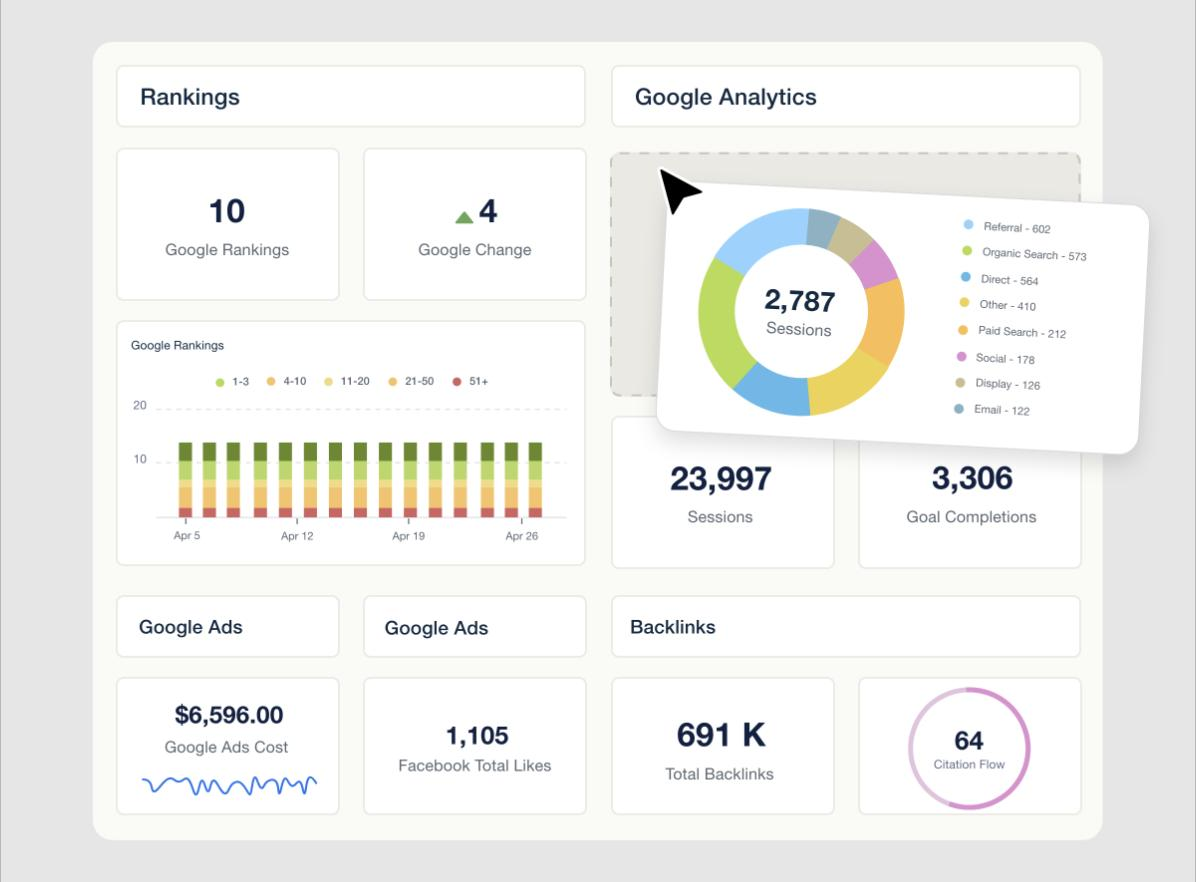
AgencyAnalytics is a client-reporting platform built for marketing agencies: it pulls ad, SEO, social & email data from 85+ integrations into white-labeled dashboards a client can log into directly. The pitch hasn't changed since agencies started switching off spreadsheets a decade ago. The pricing has, and that's the part most 2026 write-ups still get wrong.
This AgencyAnalytics review pulls figures from the vendor's own pricing page, from 460 G2 ratings dated August 28, 2026, and from 116 Capterra reviews dated August 26, 2026. Every number here comes straight from the horse's mouth: the vendor's own pricing page or a named reviewer. It doesn't lean on the four-tier Freelancer/Agency/Agency Pro/Enterprise structure that a stack of third-party buying guides still describe.
AgencyAnalytics collapsed that structure into one plan sometime in 2026: a single Core tier at $20 per client per month, priced by client count, with every feature already unlocked.
What follows covers how that pricing model scales, if the 85+ integrations hold up under daily use, and what building a report looks like week to week. It also covers how the platform reads against Looker Studio, Whatagraph, and Databox. Every figure below traces to the vendor's own site or to a named review on G2, Capterra, or TrustRadius.
The read is aimed at an agency owner or account manager who already sends clients some kind of monthly report & hasn't decided if automating it is worth the switch. Manage three clients from one spreadsheet, and most of this won't apply yet. Manage fifteen, and the math in the next section will.
↑ FACT SHEETWhat AgencyAnalytics does
The platform has four working parts: dashboards, automated reports, a client portal & a set of built-in SEO tools sold as add-ons. In practice AgencyAnalytics plays jack of all trades across those four jobs, covering reporting, client access, and SEO research under one roof. Dashboards pull live data from connected accounts and refresh on a schedule the agency sets; reports package that same data into a scheduled PDF, slidedeck, or shared link.
Custom metrics let an agency blend two data sources into one number, like cost per lead calculated from ad spend and CRM conversions. Goal tracking, benchmarks, trend forecasting, and anomaly detection sit under "Data Analysis" on the vendor's own feature list, and none of them require an add-on purchase on the Core plan.
The vendor's own "key features" list on the pricing page names automated reporting, white label branding, the client portal, goals and anomaly detection, API access, and 85+ data sources as the built-in set every Core client gets. Client dashboards can be pulled as shared reports or a scheduled export, and the built-in SEO tools add rank tracking and a site audit alongside core SEO metrics like backlinks and domain authority, on top of the marketing data pull.
David V., a lead developer at an IT services firm, put it plainly in an August 11, 2026 Capterra review:
This was the reporting tool we were looking for that delivered everything we were trying to do with Looker Studio for multiple clients. The level of customization and speed here are the best we've seen in a dashboarding software.
↑ FACT SHEETHow the 2026 pricing change works
Before this year, AgencyAnalytics sold four named tiers, and most SEO blogs covering "AgencyAnalytics pricing" still quote them: a $59 Freelancer plan for 5 clients, a $179 Agency plan for 10, a $349 Agency Pro plan for 15, and a negotiated Enterprise tier above that. The current pricing page, fetched directly from agencyanalytics.com, shows none of that. It shows one plan.
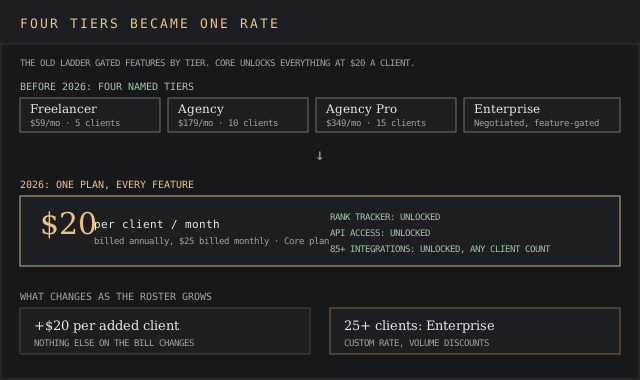
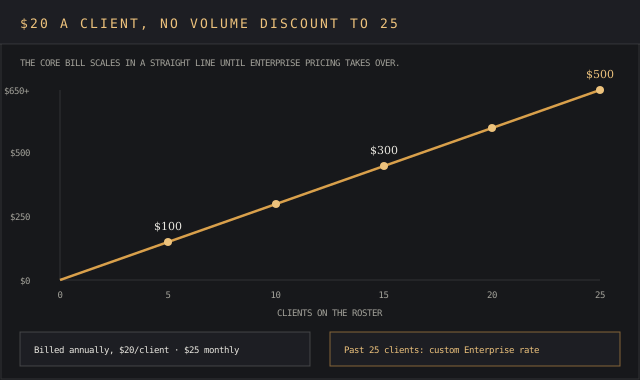
Core costs $20 per client per month billed annually, or $25 per client billed monthly, and it unlocks unlimited data sources, unlimited reports and dashboards, and unlimited staff and client user seats, at any client count. That's every feature with no strings attached, the same unlocked toolset for an agency running five clients or twenty-four.
Add a sixteenth client and the bill goes up by $20 for that additional client; nothing else changes. Cross 25 clients and AgencyAnalytics moves the account to a custom Enterprise rate with volume discounts and dedicated training.
The trial runs 14 days with no credit card required, and a 30-day money-back guarantee covers a paid plan that doesn't work out. Monthly billing cancels anytime; the annual discount comes with a 1-year commitment, which is the one place a buyer should read the fine print before clicking "Save 20% annually."
A flat per-client rate also avoids the kind of usage-based billing surprises that come with per-data-source pricing elsewhere in the category, since adding a fourth or fifth integration to an existing client costs nothing extra. The old higher tiers routinely locked rank tracking and API access behind a paywall; Core removes that gate for every client, whatever the count.
The vendor's FAQ answers "how many clients" a plan supports with a simple rule: Core includes as many as you add, one at a time, with no cap. Some integrations also let an account connect multiple accounts per client, up to 10 on approved data sources, useful for a franchise running several locations under one contract.
Cross into Enterprise and the added client comes with priority support & database connectors, the upgrade path every reviewer asking about scale eventually runs into.
Not every reviewer reads the new model as fair pricing. Shaikat R., CEO of a marketing agency, wrote in a January 21, 2023 Capterra review, back when tiered pricing was still live:
Expensive. Pricing could be lower per client, and I wish they had a free plan or a lifetime deal.
A G2 review titled "Beware of Agency Analytics' Unethical Billing Practices" raises a sharper complaint: a client account kept billing after the reviewer deleted it from the platform. Getting billed for a client you already removed adds insult to injury on a platform built to save you from manual bookkeeping.
AgencyAnalytics's own FAQ says multiple accounts can be removed at any time. That gap between the stated policy and one reviewer's bill is worth checking against your own invoice before you offboard a client.
↑ FACT SHEETData sources and integration reliability
85+ integrations is the number on both the vendor's site and every third-party review that's checked it, spanning Google Ads, Google Analytics, Search Console, Reddit Ads, Meta, LinkedIn, TikTok & dozens of smaller platforms. Connections run over OAuth tokens, and a dropped connection takes 2 to 5 minutes to reconnect by hand, per reviewer-reported figures cited across whatagraph.com and nextgrowth.ai.
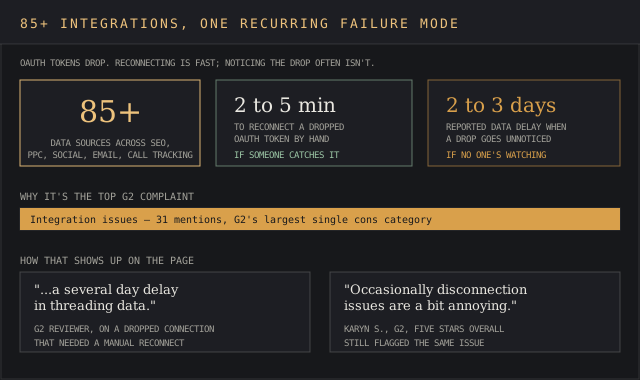
Integration issues are G2's single largest complaint category: 31 mentions in G2's own AI-summarized cons breakdown, ahead of every other named con. Candice d., a five-star reviewer, still flagged it:
I've had situations where clients want to carry on using AgencyAnalytics for their internal reporting after offboarding, but the platform doesn't offer that.
A separate verified G2 user wrote: "Some integrations are limited, and deeper customization or more flexible reporting options would be helpful."
Some users report data delays of 2 to 3 days when an integration breaks and no one catches it, per the same reviewer-sourced figures. That's exactly why it pays to keep an eye on a client's account between billing cycles. Check a client's dashboard on a set day each week. Don't trust the automation to flag its own failures.
Charles Fashana, chief operating officer at a marketing agency, raised the same limit from a different platform in an August 2020 TrustRadius review: "Customization of imported data is limited," alongside goal tracking he called thinner than competing tools. His agency still chose AgencyAnalytics for the backlink research and site-audit automation nothing else on their shortlist covered at the time.
↑ FACT SHEETBuilding and automating reports
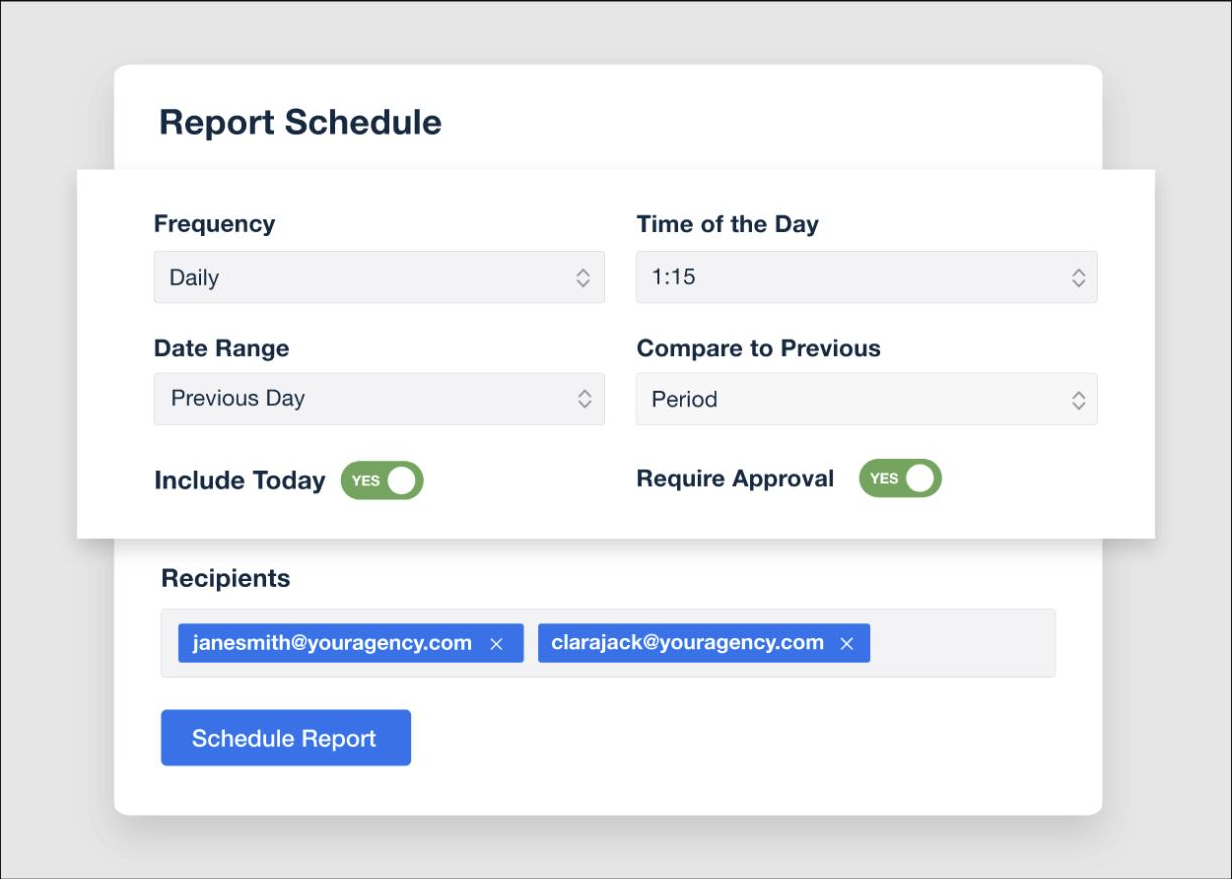
Smart Reports write an automated narrative summary around the connected data, a paragraph explaining what moved and why, generated without a human opening the report first. It exists specifically to cut the manual work of building a report by hand every month. The vendor's own site claims users save 75% of the time they used to spend building reports by hand; no independent figure disputes it, though no third party has measured it either.
That claim covers building one report. It doesn't cover updating fifty of them. The devil's in the details for this particular gap, since nothing propagates a single edit across every report a client has.
Whatagraph's 2026 review of the platform describes AgencyAnalytics as lacking master templates or linked reporting: adding a KPI or adjusting a date range across reports for 10, 20, or 50+ clients means opening and editing each report individually, since a change to one dashboard doesn't propagate to the reports built from it.
Carolyn M., a marketing manager, confirmed the same friction from the user side in a September 12, 2024 G2 review, naming what she disliked most: "Having to create new links for reports for any edits that are made." AgencyAnalytics's own product team replied on that same review with a workaround: edit the last version from a report's Activity tab. That skips generating a fresh link every time.
The report cover, what AgencyAnalytics calls the title page, drew the sharpest complaint on record. Sam M., a director at a marketing and advertising agency, wrote in a December 13, 2021 Capterra review:
The cover page of the reports is super ugly, like unbelievably ugly and they offer no options to customize this.
Every cloud has a silver lining, and this platform proves it. The same reviewer still called the rest of the platform "light years above the alternatives," and praised the pricing directly:
Really cost-effective. Open and transparent pricing, which is super easy to scale up and down as needed.
Colin M., managing director at a marketing agency, described the practical upside in a November 19, 2020 Capterra review, four years into using the tool:
A lot of agencies only send monthly reports, often late, whereas with Agency Analytics our clients can always see their results and ROI anytime of the day or month without having to wait.
Nicole Q., director of brand marketing, wrote a similar result in a November 16, 2020 Capterra review after less than six months on the platform:
The report templates and auto-send feature cut my monthly reporting time in half, and the reports also look really nice.
She named the customizable dashboards specifically, calling out being able to "select the data points I want, and removing what I don't need" as a real advantage of the platform.
↑ FACT SHEETCustom dashboards and metrics
Dashboards ship with pre-built templates for every connected channel, and an agency can rebuild one from scratch with drag-and-drop widgets. Goals, alerts, benchmarks, trend forecasting, and anomaly detection were the platform's headline 2026 additions, layered on top of the existing dashboard builder. None of them ship as a separate module.
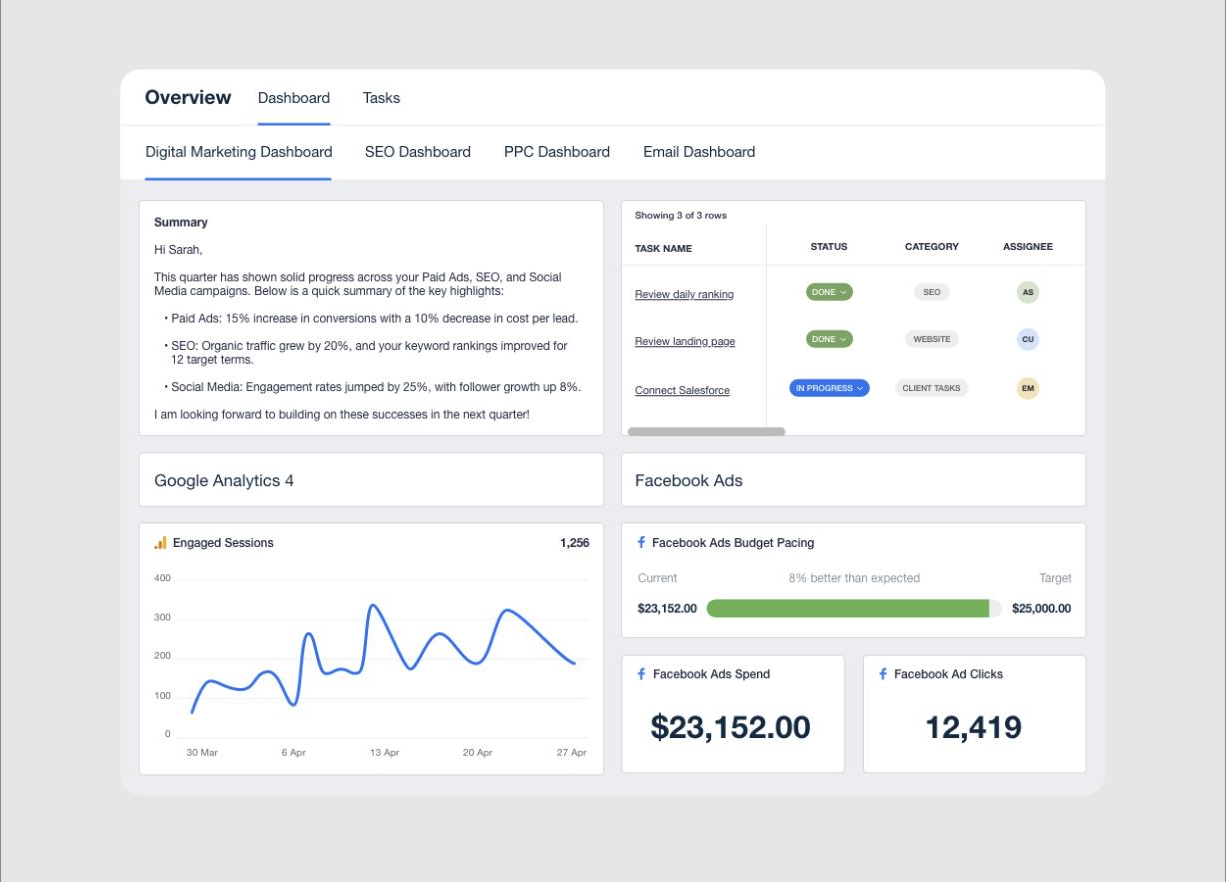
The learning curve shows up here more than anywhere else on the platform. Nick H., a G2 reviewer managing dozens of client accounts, described AgencyAnalytics as easy to organize data with but flagged the mapping tools as needing work. David V.'s own cons note the same tension:
There's a lot to learn here. While it's easy to get up and going, there are so many options that you really need some dedicated time every week to learn what they are.
Josh R., CEO of a marketing agency, knew the ropes by then and described the long-run payoff in an April 3, 2019 Capterra review after three years on the platform:
They've constantly improved their software, integrated more and more tools, and have been super responsive when we've needed support and have ideas.
Glenn L., managing director at a UK agency, made the same point about accuracy in an October 3, 2019 review:
Accuracy of the reporting is paramount when reporting to clients. Agency Analytics allows us to build highly accurate rankings reports, while pulling in data from Google Analytics, Ads, Search Console and MyBusiness.
The client portal and white-label branding
Every plan includes a custom domain, custom email sending address, and full white-label branding: an agency's logo and color scheme replace AgencyAnalytics's own on every page a client sees. The portal's whole job is to swap a static PDF for a live number a client can check anytime. Christopher S., president of a marketing and advertising agency, wrote in a May 25, 2020 Capterra review: "Their white labeling is excellent. I love showing the dashboard to new clients!"
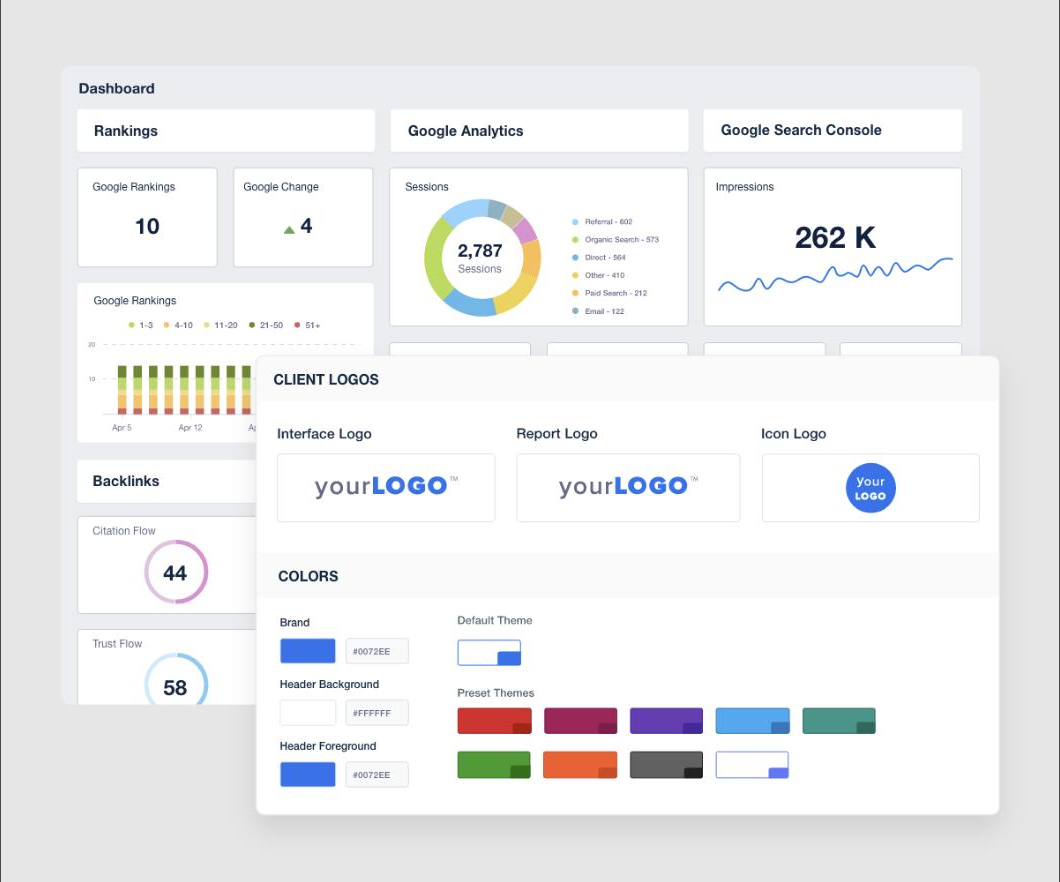
The branding isn't infinitely flexible. Glenn M., a Capterra reviewer using the platform since 2018, asked for branding controls set per client. One agency-wide look wasn't enough:
ONly a single white-label option for logos etc. We would much rather personalise it to each customer so they then get an even stronger sense of ownership of the data.
That's a fair trade for most agencies running one brand across all clients, and a real limitation for a white-label reseller running several.
Built-in SEO tools: rank tracker and site auditor
Rank Tracker and Site Auditor sit outside the Core plan as paid add-ons: $41.67 a month per 500 keywords for rank tracking, billed annually. Stack enough add-ons like this on top of the flat per-client rate and the total can start to cost an arm and a leg for a heavy SEO user.
Shaikat R.'s January 2023 Capterra review called out one specific feature: "The rank tracker supports Bing, which is an excellent feature." For agencies that only need keyword tracking without full client reporting, a point solution like SE Ranking or a dedicated rank tracker usually costs less per keyword.
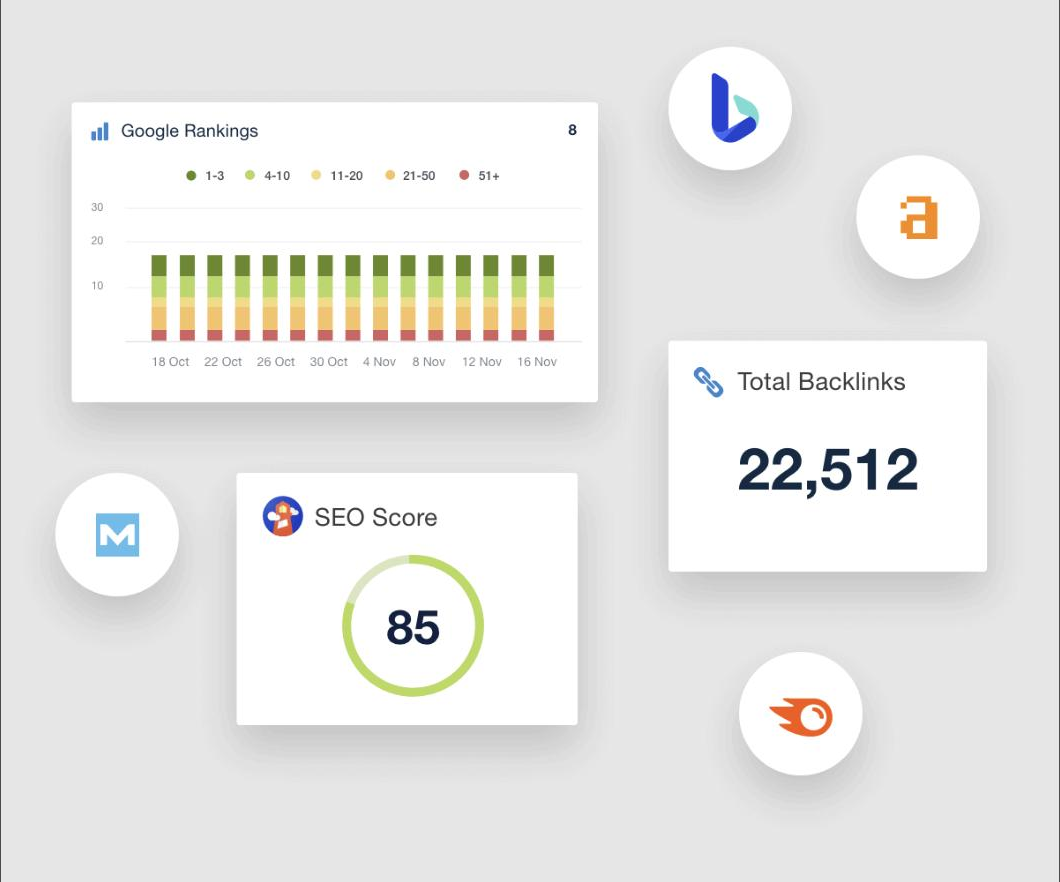
Muhammad T., a digital marketing manager, wrote in an April 7, 2020 Capterra review after two years on the platform: "It was the best tool for tracking keywords rankings. The rankings were very accurate as compared to another tool." He also flagged the trade-off directly: "It is a bit expensive than other tools but I think they deserve this price for the tool."
AI features: Ask AI, AI Tracker, and the MCP server
Ask AI lets a user query connected client data in natural language. No one has to build a chart by hand first, and AI Insights surfaces changes worth a human's attention without a manual review. Between the two, Ask AI and AI Insights kill two birds with one stone: an instant answer and an automatic flag on what changed.
AI Tracker, still in beta, is priced separately at $20.83 a month per 250 credits and monitors a brand's visibility, sentiment, and citations across ChatGPT, Google AI Overviews, Google AI Mode, and Claude.
The MCP server, launched in 2026 and named directly on the pricing page as "MCP access (ChatGPT & Claude)," lets an agency pull live client data straight into an AI tool it already runs elsewhere. No CSV export first. None of the reviews collected for this piece mention the MCP server yet; it's new enough that user sentiment on it hasn't formed.
Customer support response times
Support opinion splits harder than almost any other line item in these reviews. G2's own AI-summarized pros list customer support as the third most-mentioned advantage, at 48 mentions, and multiple reviewers describe it as fast and effective. Allison K., a G2 reviewer, described a serious integration failure the support team resolved quickly during a live client onboarding.
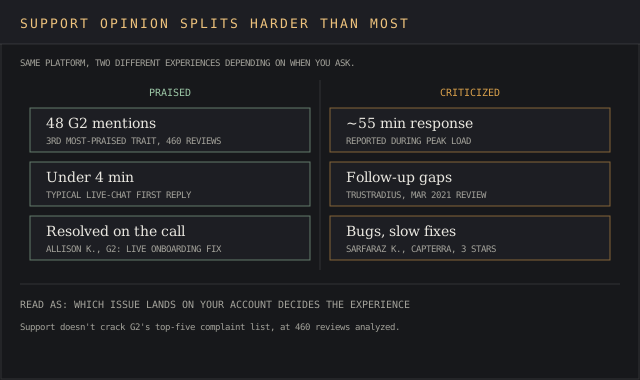
Other users report the opposite. Sarfaraz K.'s January 2023 Capterra review, three stars overall, cited "quite a few occasions where I encountered bugs in their software or had difficulty getting technical support for my issues." Response times can stretch close to an hour during peak load, per figures cited by both whatagraph.com and reportingninja.com, and a handful of reviewers describe a lack of follow-up once a ticket is opened.
A director in sales, reviewing on TrustRadius in March 2021, split the difference: "Customer support, they follow up on issues and want to get to the bottom of challenges clients are having," while flagging a separate password-reset bug the same review called out by name. Read enough of these side by side and the deciding factor looks like which specific issue lands on a given account. The jury's still out on which experience a new customer gets.
What users complain about most
G2's AI-summarized cons, ranked by mention count across its 460 reviews: integration issues (31 mentions), limited features for deeper analysis (14), a tricky reporting workflow tied to the learning curve (13), connection drops (12), and the dashboard learning curve itself (12).
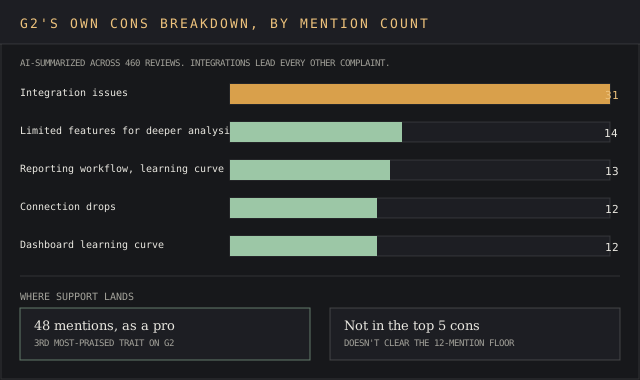
Two short, clean complaints capture the pattern. Karyn S., a five-star G2 reviewer overall, still noted: "Occasionally disconnection issues are a bit annoying." Lauren N., a 4.5-star Capterra reviewer, put the learning curve more bluntly: "It is NOT user friendly and required a lot of training."
The negative reviews cluster hardest around third-party data behind those same integrations: when a source like Meta or TikTok changes its API, AgencyAnalytics has to update the connector before any client-facing widget pulling that data works again.
What users praise most
G2's AI-summarized pros run in this order: ease of use (64 mentions), time savings (49), customer support (48), a user-friendly interface (42), and integration capabilities (39).
Capterra's own subscore agrees on the first point: Ease of Use rates 4.8 out of 5 on Capterra, matching the platform's overall rating there. Kendra S., a small-business G2 reviewer, hits the nail on the head, tying the first two together:
Save us so much time on the first of the month when we need to pull reports for clients. Love that there are templates as well that are already set up.
Alex W. connected integrations directly to daily SEO work in a G2 review:
I love using AgencyAnalytics for managing SEO projects, especially with its numerous integrations that make producing regular reports and monitoring rankings straightforward.
Both users are describing the same 85+ integration count that also drives the platform's top complaint: the cost of building on that many third-party connections at once.
Setup time and the learning curve
New users hit the ground running on basic reporting. The learning curve appears once an agency moves past a template and starts building custom dashboards. Maulik R., a technical analyst, described a fast start in an April 6, 2019 Capterra review: "Reliable and intuitive up and running within 5 minutes."
David V.'s August 2026 review lands closer to what a serious agency user should expect: fast to start, slow to master. Between those two data points sits a real onboarding cost. A free onboarding call is included on Core, and it's the fastest way to close the gap between a five-minute setup and the deeper customization the platform is built for.
↑ FACT SHEETAgencyAnalytics vs the alternatives
Looker Studio is the free comparison every agency runs first, because it costs nothing and connects to most Google properties out of the box. David V.'s own review names it directly: his team switched away because "our Looker dashboards were always breaking," and rebuilding a broken connector by hand is a cost Looker's price tag doesn't show.
Looker wins on price for a one- or two-client operation. It loses the moment an agency needs a client-facing login. A shared internal link stops being enough.
Whatagraph carries a 4.5-out-of-5 rating across 283 G2 reviews, close behind AgencyAnalytics's own 4.7. That's close but no cigar next to AgencyAnalytics's rating, though a fraction of a point rarely decides a real shortlist. It's built around the same white-label dashboard model & competes hardest on template variety over integration count.
Databox sits at 4.4 out of 5 across 194 G2 reviews and leans further toward internal business dashboards than client-facing reporting, which makes it the weaker fit for an agency whose main job is proving ROI to an outside client over tracking its own KPIs.
DashThis rates 4.7 out of 5 across 94 G2 reviews, a few tenths off AgencyAnalytics's own 4.7-out-of-460 average and close enough to call it a tie on satisfaction. It's the simpler tool of the two: fewer built-in SEO extras, a narrower integration list, and a lower learning curve as a direct result. An agency that only needs clean, recurring PDF reports without rank tracking or an AI layer gets there faster on DashThis.
Pairs well with Semrush. Agencies running AgencyAnalytics for client-facing dashboards commonly keep Semrush or a similar SEO research tool running underneath it. Semrush brings deep keyword research and technical audits to the table, work this reporting platform was never built to replace. AgencyAnalytics reports on ranking and traffic data; it doesn't generate the keyword research and site audits that feed the strategy behind those numbers.
FAQ
How much does AgencyAnalytics cost?
$20 per client per month billed annually, or $25 billed monthly, on the single Core plan. That covers every feature at any client count up to 25, past which AgencyAnalytics negotiates a custom Enterprise rate; Enterprise is the only one of AgencyAnalytics's plans that still requires a sales call. Rank Tracker and AI Tracker cost extra as add-ons.
Who is AgencyAnalytics for?
G2's own product description frames its focus as marketing agencies specifically, and TrustRadius reviewer Tyson Downs confirmed the same split from the buyer's side: a strong fit for an agency, a poor one for a solo freelancer. AgencyAnalytics is Toronto-headquartered and lists Joe Kindness as co-owner on its G2 profile; the vendor's own pricing page puts the customer base at 7,000+ agencies.
How does AgencyAnalytics compare to Swydo?
Swydo starts at $69 a month for its base plan and then charges per connected data source once an account passes ten sources, per ReportingNinja's 2026 pricing breakdown: $4.50 each from 11 to 100 sources, dropping to $2 each past 500.
That model rewards a small agency running few integrations per client and penalizes one running many, the opposite of AgencyAnalytics's flat per-client rate. An agency connecting five or six data sources per client, which is typical for a full-service account, usually lands cheaper on AgencyAnalytics once it passes a handful of clients.
Verdict
AgencyAnalytics is built for an agency juggling ten or more client accounts across several channels. It wants one branded login in place of five separate tool exports. The $20-per-client Core plan makes that math simple: every feature is included from client one, so the only number that changes month to month is the client count.
It's not built for a freelancer with one or two clients. Looker Studio is free at that scale, and TrustRadius reviewer Tyson Downs, owner of Titan Web Agency, said as much directly in a December 2, 2022 review: "It wouldn't be ideal for a freelancer IMO, but great for an Agency." A team that needs deeper analytics than dashboarding, or true business-intelligence-grade custom queries, will also outgrow what a reporting-first platform like this is built to do.
An agency in between, five to nine clients and growing, is the harder call. The ball is in your court on that decision, so weigh the numbers above before signing on for a year.
The per-client rate is transparent, but it climbs in a straight line with no volume discount until 25 clients, and the 12-mention learning curve around dashboard building means the first month costs more staff time than the marketing promises. Budget for that ramp, use the free onboarding call, and the fit becomes clear inside the 14-day trial, before the first invoice arrives.