Action Plan Template
 By Jan Suski. I go deep on every review, checking every number against its source and digging up details other coverage misses, a habit from six years of SEO and link building for tech companies. Bylines at Brand24 and Senuto. How the scoring works.
Get the action plan template
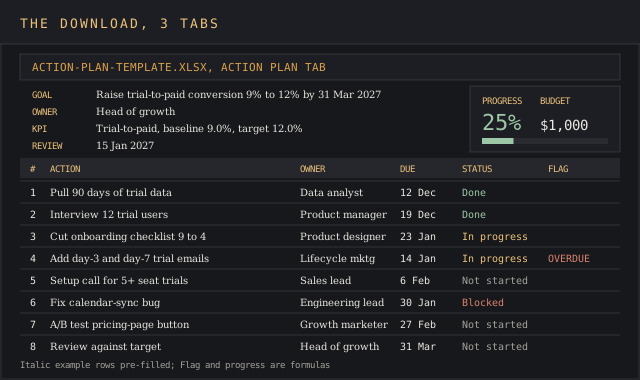
An Excel workbook with a goal header, an eight-row action table that flags overdue steps against a review date, a monthly KPI tracker and a progress figure that counts finished actions.
Download XLSXAn action plan template turns one goal into a dated list of actions, each with an owner, a due date, the resources it needs and a status someone updates every week. It sits one level below a strategy deck and carries a measurable goal at the top, with every step needed to reach it assigned and dated underneath.
This article covers the free XLSX download, the parts of the file and the actions and goals each one holds, how to fill it in step by step, a worked example built around a trial-to-paid conversion goal, the mistakes that stall most plans, and when a spreadsheet stops being the right space for one.
It's for team leads, project managers and founders who've agreed a goal in a meeting and need a form or one-page plan the whole team can read in two minutes. Personal and workplace goals fit the same columns. Teams use it to agree the activities behind each of their objectives before anyone starts writing tasks into a project tool, and a 90-day plan for a new hire uses the identical layout with one owner on every row.
Talk is cheap until a step has a name and a date next to it. The goal row follows George T. Doran's SMART test from the November 1981 issue of Management Review, and Doran's original "A" stood for assignable, per the SMART criteria history. The Owner column enforces that letter on every row, and the goal header carries the other four.
Download the free action plan template
Download the action plan template (XLSX)Three tabs hold the action plan with a goal header and an eight-row action table, a monthly KPI tracker and a how-to sheet, all pre-filled with the trial conversion worked example.
The file opens in Excel, Google Sheets and LibreOffice Calc. Every formula uses IF, AND, COUNTIF, COUNTA and SUM, so nothing breaks on import, and the Status column is a drop-down list with four values.
Action plan definition and purpose
An action plan is a list of actions with five attributes each: the step itself, who owns it, when it starts and ends, what it needs, and how anyone can check it's done. Atlassian's action plan guide names the same five components: tasks, timelines, responsible parties, resources needed and progress tracking.
Its purpose is to name, for every row, the person who'll deliver it and the date they'll deliver it by. Each row should be relevant to the KPI in the header, and anything else belongs on a different list.
A project plan covers one deliverable with a fixed end date and phases. An action plan covers a goal, and its rows can come from several projects at once: a pricing test, a bug fix, a round of customer interviews.
A strategic plan sits a level higher. It sets the vision, the company values and the focus areas for a year or more, and each focus area can carry its own action plan underneath with objectives the team can finish in a quarter. Explore the strategic plan first if the focus areas aren't set, then develop one action plan per area. Understanding which document you're writing decides the header, since an action plan carries one goal.
Parts of the action plan template
The Action Plan tab has a goal header and an action table. Here's what goes in each field, with the value from the worked example further down.
| Field | What to enter | Example value |
|---|---|---|
| Goal | One sentence with a measurable target and a date | Raise trial-to-paid conversion from 9% to 12% by 31 March 2027 |
| Goal owner | One person who answers for the result and signs off the plan | Head of growth |
| KPI, baseline, target | The metric the goal moves, its value today and the target value | Trial-to-paid conversion, 9.0%, 12.0% |
| Review date | The date the overdue flag checks against, changed at every review | 15 January 2027 |
| Action | One row per step, verb first | Interview 12 trial users who didn't convert |
| Owner | One name or role per row | Product manager |
| Start and due | Two dates per row | 2 Dec 2026, 19 Dec 2026 |
| Status | Not started, In progress, Blocked or Done | Done |
| Depends on | Row numbers that must finish first | 1, 2 |
| Resources and budget | People hours, tools and cash, budget in USD | 12 × $50 gift cards, $600 |
| Success measure | What done looks like, in a form someone can check | 12 interviews logged |
| Flag | A formula that shows Overdue when the due date falls before the review date and the status isn't Done | Overdue |
The column headed Depends on is the one most free action plan templates drop. A team that starts row 5 before row 2 finishes builds on guesses, and the delay shows up three rows further down when the interview findings contradict the work.
How to create an action plan, step by step
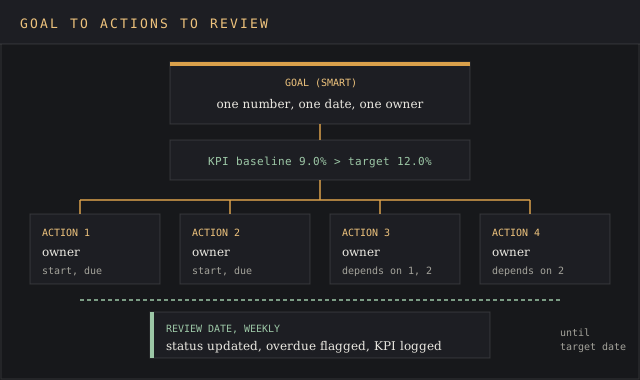
Seven steps take a goal from a meeting note to a plan the team can track. The first two happen before writing a single action, because the goal and its baseline decide which actions are worth the time.
- Write the goal as one SMART objective. Check it against the vision so the goal points where the business is headed. One sentence, one number, one date, such as "raise trial-to-paid conversion from 9% to 12% by 31 March".
- Set the KPI and enter its baseline. Record today's value before work starts, or the plan has nothing to measure progress against.
- Explore what stands between the baseline and the target. Data pulls and customer interviews provide the reasons behind the numbers. They go at the top of the plan to get the ball rolling, since every later row depends on what they find.
- Break the goal into actions. Write each one verb first and small enough to finish in two to four weeks. Ask what the team must do to achieve the target, then list the actions that answer it.
- Assign one owner per row and agree the dates in the same meeting. Get everyone on the same page with the owner in the room, so nobody learns a deadline from a calendar invite.
- Map dependencies and resources. Fill Depends on and Budget for every row, and write the obstacle plus a fallback in Notes for any row that carries a known risk.
- Set the review process. Update Status weekly in one of the team's standing meetings and change the review date cell each time so the overdue flag stays current.
Sort the actions by expected impact on the KPI before you share the plan by email or in the team space. With more than a dozen candidate actions, score them first in the prioritization matrix template and carry the top of the ranked list across. The top three rows get time in every review, and rows seven and eight get it when they're due.
Worked example for a trial conversion goal
Say a 45-person business sells scheduling software on a 14-day free trial, and 9% of trial sign-ups convert to paid. Most sign-ups come through the pricing page form. The head of growth wants 12% by 31 March 2027. Interviews and product data come first, fixes second, a pricing-page test third and the review last.
| # | Action | Owner | Due | Status | Depends on | Budget |
|---|---|---|---|---|---|---|
| 1 | Pull 90 days of trial data and tag the drop-off step | Data analyst | 12 Dec 2026 | Done | $0 | |
| 2 | Interview 12 trial users who didn't convert | Product manager | 19 Dec 2026 | Done | $600 | |
| 3 | Cut the onboarding checklist from 9 steps to 4 | Product designer | 23 Jan 2027 | In progress | 1, 2 | $0 |
| 4 | Add day-3 and day-7 trial emails | Lifecycle marketer | 14 Jan 2027 | In progress | 2 | $0 |
| 5 | Offer a 20-minute setup call to trials with 5+ seats | Sales lead | 6 Feb 2027 | Not started | 4 | $0 |
| 6 | Fix the calendar-sync bug raised in interviews | Engineering lead | 30 Jan 2027 | Blocked | 2 | $0 |
| 7 | A/B test the trial button on the pricing page | Growth marketer | 27 Feb 2027 | Not started | 3 | $400 |
| 8 | Review conversion against target and set next quarter's plan | Head of growth | 31 Mar 2027 | Not started | 3, 4, 5, 6, 7 | $0 |
At the 15 January review, two of eight actions are done, so the progress cell reads 25% and the budget total reads $1,000. Row 4 shows Overdue, because its due date was 14 January and the emails aren't live yet. Row 6 is Blocked.
The KPI tab, designed as a monthly log with a formula for the gap, puts December conversion at 9.4% and January to date at 10.1%, a gap of 1.9 points to the 12% target. Anyone on the team can read both values off one tab and see how far the plan is from what it set out to achieve.
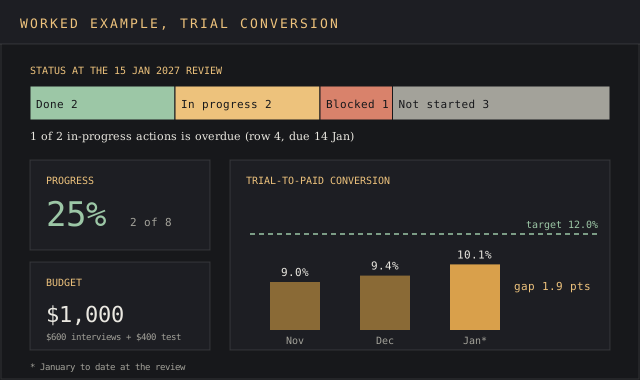
The blocked row goes first on the agenda. Row 6 has no dependants in the plan, but the interviews named the sync bug as the most common reason trials stalled, and 7 of the 12 users raised it unprompted. To nip it in the bud, the engineering lead enters the blocker and a fallback date into Notes before the meeting ends, and the head of growth signs off the new date.
Common action plan mistakes
Most plans that stall share one of five defects, and each has a fix that takes a few minutes in the file.
- A goal with no baseline. "Improve conversion" can't fail, so it can't be tracked either. Enter the current number before the first action, and write the target the team agreed to achieve.
- Two owners on one row. Doran designed the assignable test for this. Shared rows go stale first, since each owner waits for the other. Split the row or pick one name.
- Actions too big to finish in a month. Large actions hide slow progress across areas nobody owns. Split "Redesign onboarding" into actions like "Cut the checklist from 9 steps to 4", which one person can deliver by a date.
- A review missing from the calendar. Atlassian's guide says to review and update the plan regularly to reflect changes. Add a 15-minute slot to a weekly meeting the team already holds.
- Risks kept in people's heads. Any Blocked row needs the obstacle and the fallback written in Notes, or the next review goes back to square one.
Plans also drop the ball at handover. When an owner changes teams, reassign the row the same day and keep the old name in Notes for context. The Notes column serves two jobs, risks and handover history, and it's the fastest way for a new owner to get up to speed.
Excel, Google Sheets, Word or project software
Excel and Google Sheets suit a single goal with up to a few dozen actions. The overdue flag, the progress cell and the budget total all need formulas, and a spreadsheet keeps them live as statuses change.
Word suits a plan that people read and rarely update: a one-page plan attached to a board email, or a personal development plan for a performance review. Copy the table into a Word document and the formulas drop out, so fill the Flag column by hand. Email the PDF version to anyone outside the team who needs to sign the plan off.
Project software such as Asana, Trello or Jira, designed for sub-tasks and notifications, takes over once actions carry sub-tasks, several teams share dependencies, or owners need automatic reminders. Asana publishes its own action plan template, and the column logic carries over unchanged. For quarterly goals scored from 0 to 1.0 across a whole team, the OKR tracker template fits better than an action plan.
FAQ
What are the four key elements of an action plan?
A goal with a measurable target, the actions needed to reach it, an owner for each action and a deadline for each action. Most templates add two more columns, resources and a progress measure, and the action plan template on this page carries all six.
What should a good action plan include?
A SMART goal tied to the vision, a KPI with its baseline and target, one row per action with an owner, start and due dates, status, dependencies, budget and a success measure, plus a review date the team updates at every check-in.
How do you write an action plan?
Create the goal as one sentence with a number and a date, record the baseline, list the actions verb first, assign one owner per row, add dates and dependencies, then review the status weekly. The step-by-step section above walks through all seven steps.
What are the 5 steps to developing an action plan?
Set a SMART goal, break it into actions, assign owners and deadlines, identify the resources each action needs, and monitor progress at a fixed review rhythm. The seven-step version on this page splits goal setting and cause-finding into their own steps.
What is the difference between an action plan and a project plan?
A project plan covers one deliverable with phases and a fixed end date. An action plan covers a goal, and its actions can belong to several projects at once.
How do I create a work plan in Excel?
Explore the goal and KPI first, then put both in a header block, build a table with columns for action, owner, start, due, status and dependencies, add a data validation list on Status, and use COUNTIF on Status to track progress and calculate the share of actions marked Done. The template above has all of this built.
Bottom line
Reach for the action plan template when the team agrees a goal and the steps to reach it span several people and a few months. Three of its columns do the work most to-do lists skip. Owner, Depends on and Status, checked against a review date, show at each meeting who is late, who is waiting and why.
For goals scored quarterly across a whole team, the OKR tracker covers the scoring. A launch with a fixed date fits the product launch checklist. When a problem needs a diagnosis before anyone plans fixes, start with the root cause analysis report template and bring its findings into this file as rows.