Business Model Canvas Template
 By Jan Suski. I go deep on every review, checking every number against its source and digging up details other coverage misses, a habit from six years of SEO and link building for tech companies. Bylines at Surfer, Brand24, and Senuto. How the scoring works.
Get the business model canvas template
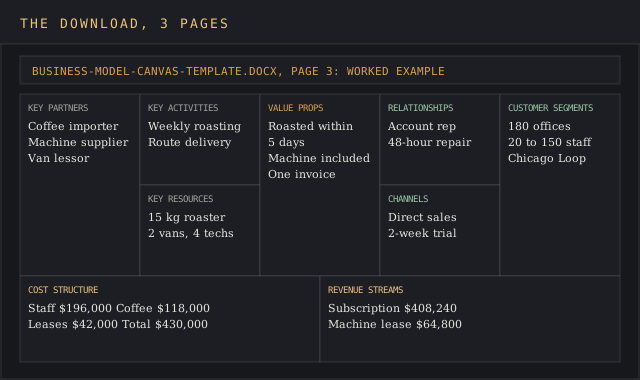
A Word document with the nine-block canvas on one landscape page, a prompt sheet with the question every block answers, and a filled-in worked example.
Download DOCXA business model canvas template is a one-page sheet split into nine blocks, each one a question about how a company makes money: who it serves, what it offers them, how it reaches them, what it charges, and what it costs to run. Alexander Osterwalder designed the layout from his 2004 PhD work at the University of Lausanne, and it became the standard way to sketch a business model on a single page.
This page covers what each of the nine boxes asks, the order to fill them in, a full worked example for a coffee subscription company with real income and cost figures, six business model canvas examples from real companies, and how the business model canvas compares with Lean Canvas.
It's built for founders testing an idea before writing a business plan, product teams pitching a new line inside an existing company, and anyone who needs stakeholders to agree on how the business works before arguing about what it should do next.
The business model canvas earns its place by forcing every part of the business model onto one page. A slide deck can hide a missing source of income behind ten pages of market data; a business model canvas with an empty bottom-right box is caught red-handed.
Download the free business model canvas template
Download the business model canvas template (DOCX)Three landscape pages: the prompt sheet, the blank nine-block canvas, and the Kettle & Co. worked example filled in.
The Word file carries three landscape pages: a prompt sheet with the questions each block should answer, the blank nine-block canvas, and the canvas filled in with the worked example from this page, so you can see what a finished one looks like before you start your own from scratch.
It opens in Microsoft Word, Google Docs and LibreOffice Writer, and prints on one A4 or US Letter sheet per page. The blocks are table cells, so typing into one doesn't push the layout out of shape.
What a business model canvas is
A business model canvas is a strategic management tool for describing, testing and changing a business model on one page. According to the Wikipedia entry, Alex Osterwalder first proposed the nine building blocks in 2005, based on his 2004 thesis supervised by Yves Pigneur.
The 2010 book Business Model Generation, by Osterwalder, Pigneur and Tim Clark, carried "contributions from 470 practitioners from 45 countries" and took the model canvas from a thesis diagram to a workshop staple. Strategyzer, the company Osterwalder co-founded, calls it "the most used tool in the world for innovation and entrepreneurship" and offers it free to download and share.
The business model canvas describes how a business creates, delivers and captures value. Its job is to make the logic visible, so a team can zero in on the block that doesn't add up, swap one assumption and see what else moves. A business model canvas is a popular tool for that reason: nine boxes are few enough to complete in an afternoon, and the template's prompt sheet carries no external links, so a group can work through it offline.
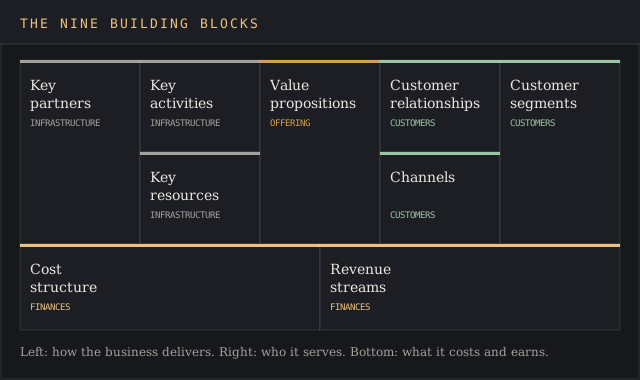
The nine building blocks
The nine blocks fall into four groups: infrastructure on the left, the offering in the middle, customers on the right, and finances along the bottom. The table gives each block's question and a sample entry from the worked example further down.
| Block | Group | The question it answers | Sample entry |
|---|---|---|---|
| Customer segments | Customers | Which groups do we serve? | Offices of 20 to 150 staff in downtown Chicago |
| Value propositions | Offering | What problem do we solve for each segment? | Coffee delivered within five days of roasting, machine included |
| Channels | Customers | How do we reach and deliver to them? | Direct sales, a two-week free trial, referrals |
| Customer relationships | Customers | What kind of relationship does each segment expect? | A named account rep and 48-hour machine repair |
| Revenue streams | Finances | What do customers pay for, and how? | Monthly subscription plus a machine lease |
| Key resources | Infrastructure | What assets does the model depend on? | A 15 kg roaster, two vans, four service techs |
| Key activities | Infrastructure | What must we do well to deliver the offer? | Weekly roasting, route delivery, machine maintenance |
| Key partners | Infrastructure | Who supplies or does what we don't? | Green-coffee importer, machine supplier, van lessor |
| Cost structure | Finances | What are the biggest costs of operating the model? | Staff, green coffee, leases, vans, rent |
The customer side: segments, channels and relationships
Customer segments are the distinct groups of customers a company aims to reach and serve. CFI defines the block as "the different groups of customers that your company interacts with." A niche segment with a clear need beats a broad one with none, because every other block gets written for it, and a vague segment sends the rest of the canvas on a wild goose chase. A user persona template fills in who sits inside each segment.
Channels are how the company delivers its offer and services to customers: sales, website, stores, partners, distribution channels of every kind. Customer relationships define what each segment expects once it's signed: self-service, a dedicated rep, a community, a support line. The block answers how the business will establish and keep the relationship, and what level of support it gives.
The offering: value propositions
Value propositions describe the products and services that create value for a specific customer segment, and they're the focus of most canvas workshops. CFI calls it "the fundamental need that your company is trying to fulfill for its customers." One canvas can carry several value propositions, one per segment, and the strongest business model canvas examples write each one as a problem solved for customers, never as a feature list.
A positioning statement template turns the strongest one into a single sentence.
The infrastructure: resources, activities and partners
Key resources are the main inputs that keep operations running: physical assets, people, intellectual property, data, money. Key activities are the tasks and processes that implement the business model, from production to problem-solving to running a platform or a delivery system. Key partners, which some versions label key partnerships, are the outside companies that supply resources or carry out activities the business chooses to outsource.
The finances: cost structure and revenue streams
Cost structure covers every cost incurred to operate the model, and Wikipedia's entry splits businesses into cost-driven and value-driven ones.
Revenue streams describe how the business generates money from each segment: one-off sales, subscriptions, usage fees, licensing, leasing. The monetization strategy template works out the pricing behind each stream.
The bottom row is where a business model canvas proves the business model works, and where most operating problems show up first, since income minus costs is the only number on the page that a bank will ask about.
How to fill in a business model canvas, step by step
Start with customer segments. Name the groups of customers the company serves, with a size attached where you have one. Focus beats breadth here, and success depends on it. Every other block is written for these customers.
Write one value proposition per segment. State the problem the business solves and why this group would pay for the fix.
Fill channels and customer relationships. How each segment hears about the product, buys it and gets support afterwards.
Fill revenue streams. What each segment pays for, the price, and the payment model. Put a number on it.
Move left: key resources, key activities, key partners. What the company needs to own, do and outsource to deliver the value propositions.
Finish with the costs. List the big costs each left-hand block creates, then subtract them from revenue.
Use one sticky note per idea, then test the weakest one. A sticky note per entry makes it cheap to move ideas between blocks. Mark the assumption you're least sure of and plan how to check it with real customers, straight from the horse's mouth.
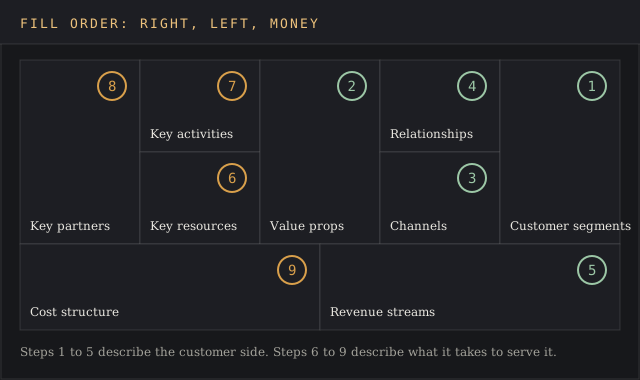
Right side first, left side second, money last. That order works for any business model canvas template. Working in that order keeps anyone from designing a factory before it knows who buys from it.
Worked example: a coffee subscription company on one canvas
Kettle & Co., a fictional company built for this example, roasts specialty coffee and delivers it to offices in Chicago on a subscription, with an espresso machine included. It serves 180 office clients. This is its business model canvas, the same example that ships filled in on page three of the template, and the business model behind it fits on one page.
| Block | Kettle & Co. |
|---|---|
| Customer segments | 180 offices of 20 to 150 staff in Chicago's Loop and River North |
| Value propositions | Coffee delivered within five days of roasting; an espresso machine at no upfront cost; one invoice a month |
| Channels | Direct sales calls to office managers; a two-week free trial booked on the website; client referrals |
| Customer relationships | A named account rep per office; quarterly tasting sessions; 48-hour machine repair |
| Revenue streams | Subscription averaging $189 per office per month, $408,240 a year; machine lease at $45 per month on 120 offices, $64,800 a year |
| Key resources | A 15 kg drum roaster; two delivery vans; four trained service techs; the client list |
| Key activities | Sourcing green coffee; weekly roasting; route delivery; machine maintenance |
| Key partners | A green-coffee importer; an espresso-machine supplier that finances the leases; a van-leasing company |
| Cost structure | Staff $196,000; green coffee $118,000; machine leases $42,000; vans and fuel $38,000; roastery rent $36,000; total $430,000 |
Sales come to $473,040 against $430,000 of costs, an operating margin of $43,040, or 9.1%. The subscription carries 86.3% of sales. The machine lease brings in $64,800 against $42,000 of lease costs, so the machines pay for themselves with $22,800 to spare.
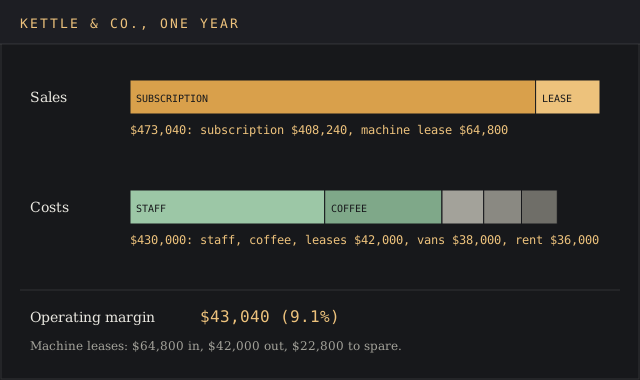
The canvas also shows the gap, and a picture is worth a thousand words here: 60 of the 180 offices have no machine. Each one that takes the $45 lease adds $540 a year for a machine the supplier already finances. That's the first idea the team tests, because it touches one box on the income side and none of the operations, and success shows up in the next month's invoice.
Business model canvas examples from real companies
These six business model canvas examples each lean on one box more than the rest, and each one shows a different company strategy at work. Two to three lines per company is enough to show which block carries the model.
- Patagonia: value propositions. Durable outdoor gear sold on lower environmental impact. In September 2022 the company moved 98% of its stock to the nonprofit Holdfast Collective and 2% to the Patagonia Purpose Trust, which Patagonia says means "Earth is now our only shareholder."
- Carvana: channels. A fully online car-buying process with home delivery, so the channel block replaces the dealer lot the rest of the industry runs on.
- Udemy: partner network. Independent instructors create and market the courses, so outside teachers supply the product its customers buy.
- AliExpress: partner network and customer segments. An Alibaba-owned marketplace linking consumers worldwide with manufacturers and sellers in low-cost regions.
- Cainiao: key activities. Alibaba's logistics arm sells smart supply chain services to e-commerce platforms, so its strength sits in the work it does: routing, warehousing and delivery data.
- Amazon: resources. One of the largest e-commerce companies, whose fulfillment network and third-party seller marketplace are resources rivals can't copy in a quarter.
The first five examples come from Business Model Hacking's list of business model canvas examples, and CFI carries an Amazon canvas in its own business model canvas examples. More business model canvas examples sit in Strategyzer's library, in innovation courses and in planning tools, though the useful exercise is redrawing one for a company you know well and comparing notes.
Business model canvas examples by business type
A business model canvas template is only as useful as the examples behind it. The business model canvas examples in this section are sketches for four kinds of business, written to help a reader generate a first draft fast.
Real-company business model canvas examples, like the ones above, show what a finished canvas looks like. These four business model canvas examples by business type show how the same nine boxes shift between different types of company, and each is short enough to align a group before it opens its own business model canvas template.
| Business type | Customer segments | Value propositions | Revenue streams | Key resources |
|---|---|---|---|---|
| SaaS company | Finance teams at mid-size organizations | Software tools that automate a manual process | Monthly or annual subscription | Code, customer data, the engineering team |
| Marketplace | Buyers and sellers, two sides of one market | A place to find each other, with trust built into the system | Commission on each sale | The listing platform and the customer base on both sides |
| Agency or consultancy | Clients with a niche problem | Specialist knowledge on demand; staff who provide services the client can't hire for | Retainers and project fees | Senior staff and their processes |
| Nonprofit | Beneficiaries and donors, two segments | Impact for one, proof of it for the other | Grants and donations | Volunteers and partner organizations |
The four business model canvas examples above differ most on the bottom row, which is why business model canvas examples are worth reading row by row. A SaaS business model runs on recurring fees and high upfront costs; an agency business model runs on fees and margins that grow with headcount. Laying business model canvas examples side by side is the quickest way to accept that one template fits a company of any size or kind.
Business model canvas vs Lean Canvas and other canvases
Three one-page canvases get confused. Ash Maurya, quoted on Wikipedia, calls Lean Canvas "my adaptation of Alex Osterwalder's Business Model Canvas," aimed at startups. The value proposition canvas zooms in on one pair of boxes.
| Business model canvas | Lean Canvas | Value proposition canvas | |
|---|---|---|---|
| Built for | Any business, new or existing | Early-stage startups | One product and one customer segment |
| Blocks | Nine | Nine, several replaced | Two halves: customer profile and value map |
| Main focus | How the whole model fits together | Problem, solution and riskiest assumptions | Fit between customer needs and the offer |
| Created by | Alexander Osterwalder | Ash Maurya | Strategyzer |
Use the business model canvas for the full picture, the customer-fit canvas when one segment is the open question, and Lean Canvas when the business doesn't exist yet and the problem itself is unproven.
Common mistakes with a business model canvas
- Listing everyone as a customer segment. "Small businesses" is a whole market. A segment names the size, place and need, for example "accounting firms of 5 to 20 staff in Ohio."
- Writing features in the value propositions block. Customers buy outcomes, and a feature list misses the mark. "Cloud dashboard" is a feature; "see every unpaid invoice in one place" is a value proposition.
- Leaving revenue streams and the cost structure without numbers. A business model canvas with no figures in the bottom row can't show if the business model works, and the costs block is where wishful planning hides.
- Treating the template as a one-off. Wikipedia's entry notes the main criticism: the canvas is static and doesn't capture how a model changes. Date each version and redraw it when a block moves; a canvas isn't set in stone.
Word, Miro, Canva or a whiteboard?
A whiteboard and a pad of sticky notes is the fastest way to run a first workshop, and online whiteboard tools do the same job for a remote team. Miro lists 35 editable business model canvas templates for remote teams, and Canva offers free customizable ones for a canvas that needs to look polished in a deck. Both tools export to PDF, and both carry a business model canvas template you can copy.
The Word business model canvas template on this page suits the step after the workshop, when the ideas turn into a plan: the version with numbers in it that gets emailed, printed and signed off. Typed cells hold an income figure better than a note does, and the file sits beside the other planning tools a company already uses.
The canvas pairs with a SWOT analysis template for the strengths behind the resources block, and a customer segmentation template for sizing the segments before they go on the right-hand side.
FAQ
What are the 9 components of the business model canvas?
Customer segments, value propositions, channels, customer relationships, revenue streams, key resources, key activities, key partners and cost structure. Every one of the business model canvas examples on this page uses those nine.
What is a business model canvas and how is it used?
It's a one-page template that describes how a business makes, delivers and sells its offer across nine boxes. Companies use it to sketch a new business model, test assumptions, and compare different business models side by side as the company plans its future growth.
How do I create a business model canvas?
Fill the five customer-facing boxes on the right first, then the three infrastructure boxes on the left, then costs, and put numbers on both financial boxes.
Is the business model canvas still relevant?
Yes. The business model canvas is still distributed free by Strategyzer, and it's still the default one-page format in strategy and startup courses. Its known limit is that it's static, so date each version of the template, redraw it as the business strategy changes, and align it with the services you sell today.
What are the 9 elements of the BMC?
The same nine building blocks: four on the customer and offering side, three on infrastructure, and two on finances.
What's the difference between Lean Canvas and business model canvas?
Lean Canvas is Ash Maurya's adaptation for startups. It swaps several infrastructure blocks for problem, solution and metrics boxes, so it focuses on proving an idea where the business model canvas describes a working model.
What are the four types of business models?
There's no single official list. A common four-way split goes by who sells to whom: business to business, business to consumer, consumer to consumer, and business to government. The canvas works for all of them; only the customer segments and pricing change.
Bottom line
Reach for the business model canvas template when a team needs to agree on how a business makes money before deciding what to create or change. It fits a new venture, a new product line inside an existing company, or an annual review of a business model that has drifted as the market and its customers changed.
If the open question is one segment's fit, Strategyzer's narrower customer-fit canvas goes deeper. If the business doesn't exist yet, Lean Canvas asks the harder startup questions. Once the model holds, the Ansoff matrix template sorts where it grows next. For everything else, a business model canvas with numbers in the bottom row is the shortest honest description of a business model there is.