Customer Research Template
 By Jan Suski. I go deep on every review, checking every number against its source and digging up details other coverage misses, a habit from six years of SEO and link building for tech companies. Bylines at Brand24 and Senuto. How the scoring works.
Get the customer research template
A Word file that carries one study from plan to findings: research plan, screener, a 30-minute interview guide, a notes sheet and a findings summary, plus an Excel log that counts themes across every interview.
Download DOCX Synthesis log (XLSX)A customer research template is a set of fill-in documents that takes one research study from the decision it serves to the findings that answer it. The file on this page is a Word document with five parts (a research plan, a recruiting screener, an interview guide, an interview notes sheet and a findings summary) plus an Excel synthesis log that counts how many users raised each theme across the qualitative research.
This page walks through each part, how many customer interviews to run, how to write interview questions that don't lead, and a worked example: a hypothetical software company running ten user interviews to identify why small finance teams abandon its free trial. The same example is pre-filled in both files.
It's built for product managers, founders and marketing teams who talk to customers a few times a year and lose the thread between studies, and for UX researchers who want one process every team member can follow. Agencies running discovery for clients can hand the same file to the client team so both sides work off one plan. The same file works as a user research template for usability sessions and as a customer interview template for discovery calls.
The reason to use one is that qualitative research usually fails in the planning, before anyone asks a question. User Interviews' UX research field guide lists no-show participants, goals nobody agreed on and missing buy-in among the pitfalls a written plan prevents.
Download the free customer research template
Download the customer research template (DOCX)Five pages: research plan, five-question screener with recruiting message, consent script, 12-question interview guide, interview notes sheet and findings summary, pre-filled with the Tallyline example in grey italic.
Download the synthesis log (XLSX)Three tabs: an evidence log with one row per observation, a theme matrix that counts participants per theme by segment, and instructions.
The Word file opens in Microsoft Word, Google Docs and LibreOffice Writer, and every table is a plain table, so nothing shifts on import. The Excel log uses SUM, SUMIF, COUNTIF and COUNTIFS only, so it runs the same in Google Sheets.
What a customer research template covers
One study, start to finish. Most free customer research templates and user research tools cover a single piece of the work: Atlassian's Confluence template is an interview report, Notion's user research gallery leans toward meeting notes, and the NN/g list of free UX templates splits planning, recruiting and reporting into separate downloads. This file keeps them in one document, so the research questions written on page one are the ones the findings answer on page five.
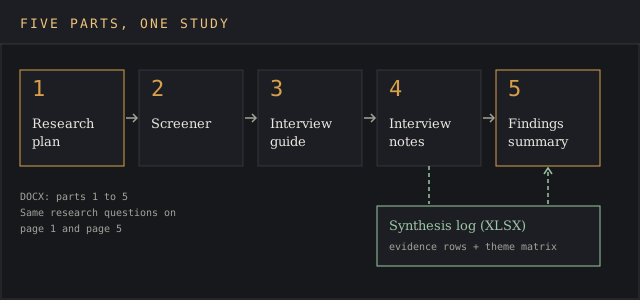
The order carries the research process. A plan without a screener recruits whoever answers the email first. A guide without the plan's questions drifts into related topics that feel productive and answer nothing; the plan keeps the focus on two or three. Notes without a shared log turn into scattered information across five notebooks, and the summary quotes whoever spoke last.
The template also fixes the shape of the output. Every finding in the summary carries a participant count (6 of 10) and the evidence log rows behind it, so key stakeholders can check a claim against the raw notes in a minute.
Research planning before the first interview
A research plan is half a page that names the business decision, the research questions and the logistics, and it's the most valuable half page in the file. User Interviews' field guide breaks it into what (research questions and goals), why (business goals in stakeholders' own language), how (methods and tools), who (participant criteria, recruiting and compensation) and when (schedule and roles), followed by expected deliverables.
The why line does the most work. Write the decision and its date: "Pick the Q2 onboarding project at March planning" gives a study a finish line, where "understand our users better" gives it none. Research efforts without a decision attached tend to end as a slide deck nobody reopens. A dated decision is also how the study gets resources: a product manager can defend two weeks of user interviews that inform decisions on the roadmap, and can't defend open-ended curiosity.
Define the research questions before choosing the research method. Three questions is a good ceiling for a 10-interview study, and each one should be something a participant can answer from their own past experience.
The plan is also the buy-in document. Share it with the person who owns the decision before recruiting starts, and ask them one thing: if the findings say X, will you act on it? A no at that point costs an email. A no after the readout costs four weeks of everyone's time, so get the decision owner on the same page first.
The five parts of the template
Research plan
Page one. Eleven rows, each with a prompt and a space for the answer.
| Field | What goes in it |
|---|---|
| Business decision and date | The choice the study feeds and when it gets made |
| Research questions | Two or three questions the study must answer |
| Hypotheses | What the team believes now, written down so it can be checked |
| Research method | Interviews, usability test, survey or a mix, with session length |
| Participants and quotas | Who qualifies, how many, and how they split by segment |
| Recruiting and incentive | Source list, screener link, incentive amount |
| Secondary sources | Analytics, support tickets, survey responses, earlier studies |
| Timeline | Recruiting, sessions, synthesis and readout dates |
| Deliverables | Findings summary, slide deck, evidence log |
| Team roles | Moderator, note-taker, decision owner |
| Consent and recording | How consent is captured and where recordings live |
Screener
Five questions that sort applicants into qualified and not, the cheapest of all recruiting strategies. Qualified applicants book a slot through a scheduling link; Maguire uses Calendly for booking and Zoom for the calls. The User Interviews guide puts a screener at under 10 questions, ideally. Every question maps to a quota in the plan; a question that maps to nothing gets cut.
Interview guide
Twelve questions in five blocks: consent and introduction (2 minutes), warm-up (3 minutes), past behavior (15 minutes), wrap-up (8 minutes) and close (2 minutes). That sits inside the range copywriter Annie Maguire uses in her customer interview guide: 10 to 15 questions in a 20 to 30 minute call, with users tiring around the 45 to 60 minute mark. Templates with 25 questions turn a discovery call into a survey read aloud.
Interview notes sheet
One page per participant, created by the note-taker during the call and cleaned up within the hour. It records the participant's context, a timeline of what they did, their pain points in their own words, the workarounds they use (where a good note-taker reads between the lines), who else was involved, and the theme codes the note-taker assigns. Record every session as well; Maguire sends recordings out for transcription because live notes miss fast talkers.
Findings summary
The last page answers the research questions from page one in a format product managers can read in five minutes, one block per question, with the participant count, the evidence log rows and a recommendation. Open questions the study couldn't answer get their own list, so the next study starts from them.
Synthesis log (Excel)
The companion workbook carries the counting the Word file can't do. The Evidence Log tab takes one row per observation: participant ID, segment, theme code and a paraphrase. The Theme Matrix tab marks which participants raised each theme and computes totals and shares by segment with SUM and SUMIF, so the gap between segments shows up as a number.
Customer research methods and when each fits
Pick the research method from the research question, never the other way round. Qualitative research methods (user interviews, usability tests, diary studies) answer why and how; a survey answers how many; secondary research answers what already happened. Most UX research plans mix two, and the template's plan has a row for each.
| Method | What it answers | Typical participants |
|---|---|---|
| User interviews | Why customers act as they do, in their own words | 3 to 10 |
| Usability testing | Where users get stuck in a product | 5, or 3 to 4 per user group |
| Focus groups | How a group reacts to an idea or message | 5 to 10 per group |
| Diary study | Behavior that unfolds over weeks | 10 to 15 |
| Survey | How many customers share a view or behavior | At least 100 |
| Secondary research | What the company's own data already shows | None, uses existing data |
The ranges in the table come from the User Interviews field guide, except usability testing, which follows Nielsen.
Of the research methodologies above, interviews are the default for an early question because they're cheap to run, need no build and surface the pain points a survey wouldn't know to ask about. The survey comes second, to measure how far a theme spreads across the customer base, turn survey responses into a share, and track trends from one quarter to the next.
How many customer interviews to run
Fewer than most teams expect, as long as the users are alike. Qualitative research looks for patterns; percentages come from a survey. Three published numbers anchor the answer, and they come from different kinds of research.
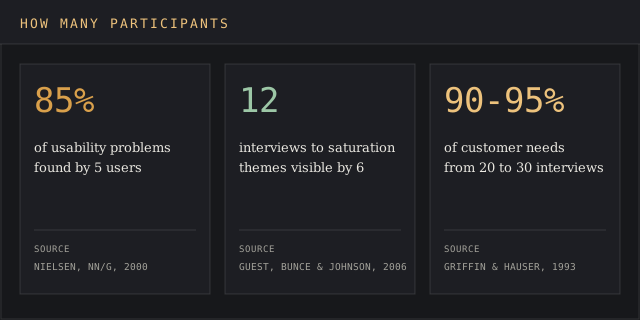
- Usability testing: Jakob Nielsen's 2000 article Why You Only Need to Test with 5 Users says five participants find about 85% of usability issues, with 3 to 4 users per group when the audience splits.
- Interview themes: Greg Guest, Arwen Bunce and Laura Johnson coded 60 interviews in Field Methods in 2006 and found saturation within the first 12, with the basic elements of the main themes present after 6.
- Customer needs: Abbie Griffin and John Hauser's 1993 paper The Voice of the Customer estimated that 20 to 30 interviews capture 90 to 95% of customer needs, per Maria Rosala's summary for NN/g in How Many Participants for a UX Interview?
Practitioner guidance for qualitative research lands in the same band. Maguire aims for 7 to 10 interviews from a list of 10 to 20 or more people, and the User Interviews guide gives 3 to 10 participants for interviews, 5 to 10 per focus group, and at least 100 for a survey.
The template's plan defaults to 10: enough to reach the 6-interview mark in each of two segments when they're close in size, small enough to run in two weeks. Rosala's advice is to start with 5 or 6, analyze as you go, and keep recruiting until new interviews stop adding themes, so write the participant count as a range in the plan.
How to fill in the template, step by step
- Write the business decision, its owner and its date in the plan. Get the owner to agree to it in writing.
- Do the secondary research first: product analytics, support tickets, past survey responses and earlier research findings. Note what's already known so the interviews skip it.
- Create two or three research questions and record the current hypotheses. Pick the research method that can answer them.
- Set quotas, create the screener against them, and send it to a list at least twice the size of the target count.
- Adapt the interview guide to your users: keep the block structure, rewrite the past-behavior questions around your product, and run one practice session with a colleague.
- Start conducting sessions with a moderator and a note-taker. Fill one notes sheet per participant the same day.
- Log every observation in the Excel evidence log, mark the theme matrix, then create the findings summary against the plan's questions.
Steps 1 to 4 take about a week for a 10-interview study, so get the ball rolling on recruiting the day the plan is signed. The secondary research step can run long: User Interviews puts a full literature review at roughly 20 to 80 hours, which is why the template caps it to sources the team already owns.
Download the synthesis log (XLSX)
Writing interview questions that get usable answers
Ask about the past. Rob Fitzpatrick's book The Mom Test reduces customer conversations to three rules: talk about their life and leave your idea out of it; ask about specific past events and skip opinions about the future; talk less and listen more. Users can describe last Tuesday's invoice run with accuracy. Asked if they'd pay for a feature, they're guessing politely. Talk is cheap, and a yes to a would-you question costs the participant nothing.
| Weak question | Problem | Better version |
|---|---|---|
| Would you use automatic bank matching? | Future, yes/no, leading | Walk me through the last time you matched payments to bills. |
| Was setup too hard? | Leading, plants the answer | Tell me about the first day of the trial. What did you try first? |
| How often do you pay bills? | Invites an average, not an event | How many bills did the team pay last month? |
| What features do you want? | Asks the user to design the product | What did you do when the tool couldn't do that? |
Open ended questions start with what, how, tell me or walk me through. Leading questions put the answer in the question, and users agree with it to be polite. The guide's three follow up questions work on any answer: What happened next? Who else was involved? What did that cost you? Moderators who memorize them don't need a script past minute five.
A standard guide also asks every participant the same core questions in the same order, which keeps the moderator's own bias out of the comparison and saves rewriting the guide for each study.
The talk ratio is the other half. Kromatic's guide to customer discovery questions gives the 80/20 rule: the customer speaks 80% of the time and the interviewer 20%. Silence after an answer counts toward the 80; most customers fill it with the detail you needed.
Worked example: why small finance teams drop the trial
Tallyline is a hypothetical 85-person company selling accounts-payable software. Its 14-day trial converts well with finance teams at mid-size customers and poorly with companies under 50 employees, the segment its growth plan depends on. The product manager has to pick the Q2 onboarding project at March planning, and the plan states that decision on its first line.
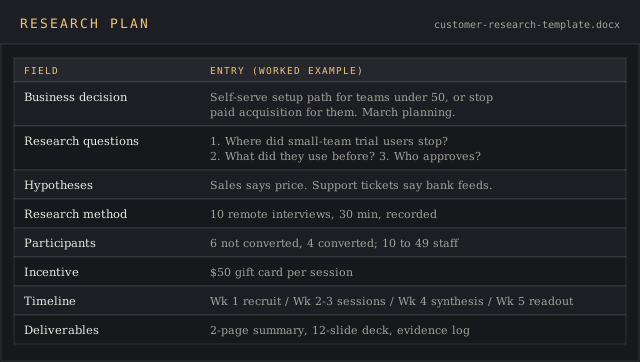
| Plan field | Tallyline entry |
|---|---|
| Decision | Build a self-serve setup path for companies under 50 employees, or stop paid acquisition for them, at March planning |
| Research questions | 1. What did small-team trial users try in week one, and where did they stop? 2. What did they use before, and what made them look? 3. Who else had to approve a purchase? |
| Method | 10 remote interviews, 30 minutes, recorded and transcribed |
| Participants | Owner, finance lead or bookkeeper at a company of 10 to 49 people, trial started in the last 60 days: 6 who didn't convert, 4 who did |
| Incentive | $50 gift card |
| Secondary sources | 90 days of support tickets tagged trial, the trial funnel from the analytics team |
| Timeline | Week 1 recruiting, weeks 2 and 3 sessions, week 4 synthesis, week 5 readout |
| Deliverables | Two-page findings summary, 12-slide deck, evidence log |
After ten sessions with trial users, the note-taker logged six themes. The theme matrix counts participants per theme and splits them by segment.
| Theme | Not converted (6) | Converted (4) | Gap |
|---|---|---|---|
| T1 Bank feed setup stalled | 5 (83%) | 1 (25%) | +58 pts |
| T2 Approver sits outside finance | 4 (67%) | 1 (25%) | +42 pts |
| T3 Already pays bills in accounting software | 3 (50%) | 1 (25%) | +25 pts |
| T4 Per-user price too high for two users | 2 (33%) | 1 (25%) | +8 pts |
| T5 Invoice scanning misreads totals | 1 (17%) | 3 (75%) | -58 pts |
| T6 Wanted a setup call | 2 (33%) | 0 (0%) | +33 pts |
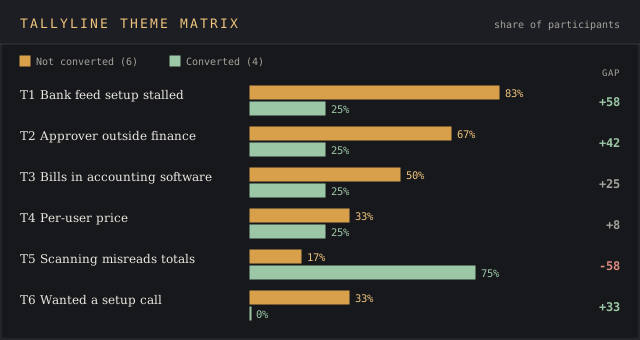
The counts point at one project, which is the point of conducting the synthesis in a matrix. Five of six non-converters stalled on connecting a bank feed against one of four converters, a 58-point gap, and that's the only theme with a gap that size in the right direction. Price, which the sales team had blamed, shows an 8-point gap, so that theory misses the mark.
T5 runs the other way. Scanning errors bother the users who stayed, because they're the ones scanning invoices, so the summary flags it for the retention team. T2 goes on the open-questions list: four of six non-converters needed an owner's sign-off, and a follow-up study with company owners is the only way to learn what that person checks.
The findings summary recommends a guided bank connection with an optional 15-minute setup call, and a re-test of small-team conversion in Q3. The decision owner gets two pages, each claim with its count, and the evidence log rows if she wants the account straight from the horse's mouth.
Secondary research and analytics before the interviews
Secondary research is every source of customer data the company already has: product analytics, support tickets, satisfaction and loyalty scores such as NPS, survey responses, sales call notes and past research insights. It's cheap, and it keeps interviews from turning into a wild goose chase after a question a dashboard answers in one minute.
The User Interviews guide pairs each source with a use. Analytics shows user flows and in-app behavior, and bug reports and support tickets surface usability issues. Analytics teams already track the trial funnel, and that funnel tells the moderator which step to zero in on. In the Tallyline example, the ticket tags pointed at bank feeds before the first interview was booked, so the guide gave that step its own question.
Numbers and user interviews answer different questions. The funnel says how many users stopped at bank setup; the interviews say why, and what they did next. Combining qualitative and quantitative sources is how the findings get both the count and the reason, and how the summary turns into actionable insights with a size attached. For larger samples, the research survey template handles the quantitative side.
Practical tips for conducting user interviews
Most of what separates a good session from a wasted one happens in the ten minutes around it. These practical defaults are built into the template's guide.
- Send the consent form with the calendar invite, and ask again on the recording before the first question.
- Give the note-taker the theme codes from the plan's hypotheses so they can tag observations live; new codes get added as they appear.
- Keep the decision owner on mute in at least two sessions. Ten minutes of watching users struggle does more for buy-in than any readout.
- Leave 15 minutes between sessions for a debrief: the three most relevant insights, anything that contradicts a hypothesis, and follow-up questions for the next participant.
- Stop recruiting when two interviews in a row add no new theme to the matrix, and note the count in the plan.
UX researchers who run sessions weekly develop their own variations. These tips suit product managers and marketers conducting their first studies, where the usual challenges are rushed synthesis and lost quality, and where clear insights matter more than polish.
Common mistakes with customer research
- Recruiting from the friendliest accounts. Customers who answer every email are the least likely to have churned or to name the real challenges, so quotas in the plan should name the hard-to-reach segment.
- Asking about the future. Would-you questions produce yeses that never show up in the data customers generate.
- Pitching during the session. Once the moderator demos a feature, the cat is out of the bag, and the rest of the call is feedback on the demo.
- Skipping the recording. Live notes drop whole sentences when a participant talks fast; the transcript keeps them.
- Synthesizing from memory. Without the evidence log, the loudest participant becomes the finding.
- Running qualitative research to settle a number. Ten users can show that a problem exists and why; only survey responses from a larger sample can say what share of users has it.
- Reporting themes without counts. 3 of 10 and 8 of 10 lead to different decisions, and a summary with no numbers is a red flag for any decision owner.
Most of these come down to the plan, and to strategies agreed before conducting the first session. A team that wrote the decision and the quotas down on page one rarely ends up barking up the wrong tree in week four.
Word, Excel or a dedicated research tool
For one research study a quarter, Word and Excel are the only tools needed. The plan, guide and summary are documents people read and comment on; the log is a table people sort and count. Google Docs and Sheets add shared editing, which helps when the moderator and note-taker work on the same user research file at the same time.
UX research teams conducting studies every week usually move to a research repository, one of the user research tools built to keep knowledge from getting lost between projects. It stores recordings and transcripts, tags highlights and searches across studies.
Notion and Confluence both publish free user interview templates, and dedicated repository tools add transcription and tagging on top, which saves researchers hours per study. The structure in this template carries over to any of them: the plan fields become page properties and the theme codes become tags.
Other templates pick up where the findings stop. A user persona template turns them into a profile of the users studied, a customer journey map lays the pain points along the stages and touchpoints of buying and using the product, and the jobs-to-be-done template rewrites them as the job the customer hired the product for. When the question is about rivals, the competitive analysis template applies Porter's five forces to the market signals the interviews turn up.
FAQ
How do you do a customer interview?
Define the decision and two or three research questions, recruit 6 to 10 users or customers with a screener, and run 30-minute recorded calls with a moderator and a note-taker. Ask about specific past events, follow up with what happened next, and log every observation the same day so themes can be counted across interviews.
What is the 30-60-90 rule in an interview?
In job interviews, it's the 30/60/90 question, a request for the candidate's plan for their first 30, 60 and 90 days, as Fortune described it in 2017. It has no standard meaning in customer research; the nearest equivalent is the time box in the interview guide, which splits a 30-minute call into intro, past behavior and wrap-up blocks.
What are 5 qualities of a good customer interview question?
It's open ended, it asks about one thing (so the answer yields one insight), it refers to a specific past event, it doesn't suggest an answer, and it connects to one of the plan's research questions. A question that fails the last test gets cut, however interesting the answer would be.
What is the 80/20 rule in interviewing?
The participant talks 80% of the time and the interviewer 20%, a rule product managers and UX researchers quote from customer discovery guides. The interviewer's share goes to short open questions and follow-ups; anything longer, especially explaining the product, eats the time the study needs for the customer's account of events.
What is the difference between a user research template and a customer research template?
Mostly the participants. A user research template is built around users of a product, often for usability testing; a customer research template also covers buyers, approvers and people who left. The file here handles both, along with interviews for clients' customers: change the screener quotas and the past-behavior block.
How many questions should a customer interview guide have?
Ten to fifteen for a 20 to 30 minute call, per Annie Maguire's guide. The template's guide has 12 in five timed blocks, and the moderator doesn't need to ask every one if follow-ups run long.
Bottom line
Use this customer research template when a team has a decision on the calendar and limited resources, and needs a few hours of customer conversations to make it. The plan keeps the study tied to that decision, the guide keeps the questions about past behavior, and the log turns ten calls into insights with counts a decision owner can check.
For a quantitative read on a large sample, start with the research survey template. For commissioning the study from an outside agency, write a research brief first, and once the findings are in, the market research report template carries them to a wider audience.