RACI Matrix Template
 By Jan Suski. I go deep on every review, checking every number against its source and digging up details other coverage misses, a habit from six years of SEO and link building for tech companies. Bylines at Brand24 and Senuto. How the scoring works.
Get the RACI matrix template
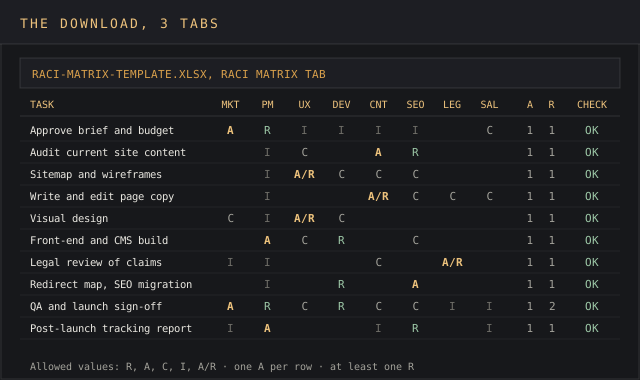
An Excel workbook with the RACI matrix, a Check column that flags any row without exactly one A or at least one R, and a Role Load tab that counts every role's assignments.
Download XLSXA RACI matrix is a grid that lists a project's tasks down the first column and the people or roles across the top, with one letter in each cell: R for Responsible, A for Accountable, C for Consulted, I for Informed. Read across a row and you see who does a task, who signs it off, who gets asked and who gets told. Read down a column and you see one person's whole workload, every responsibility they carry on the project.
This page gives you a free RACI matrix template in Excel for any specific project, the RACI definitions with the rules that keep the grid honest, a step by step guide to filling it in, and a RACI matrix example: a nine-week website redesign project with ten tasks and eight roles, where the built-in checks catch a row with two Accountable names.
It's written for project managers, team leads and operations people managing projects that cross departments, where a marketing manager, a developer and a lawyer all touch the same deliverable. A team of three at one desk can settle ownership by talking. Once a project spans several functions, one missing letter is how somebody drops the ball.
The matrix answers the question every shared project eventually hits: whose job is this? A responsibility assignment matrix puts that answer in writing before anyone can pass the buck, and the RACI chart is its most common form.
Download the free RACI matrix template
Download the RACI matrix template (XLSX)Three tabs: instructions with the RACI definitions, the RACI matrix with live row checks for up to 40 tasks, and a role-load sheet, pre-filled with the website redesign example.
The RACI matrix template is one Excel workbook with three tabs: an instructions sheet, the RACI matrix with live row checks, and a role-load sheet that counts every person's R, A, C and I assignments. It ships pre-filled with the website redesign example below, so you can see the checks working before you clear the RACI matrix template for your next project. Click the download template button, then overwrite the example rows.
The RACI matrix template opens in Excel, Google Sheets and LibreOffice Calc. The checks use COUNTIF and COUNTA only, so nothing breaks on import.
What a RACI matrix is
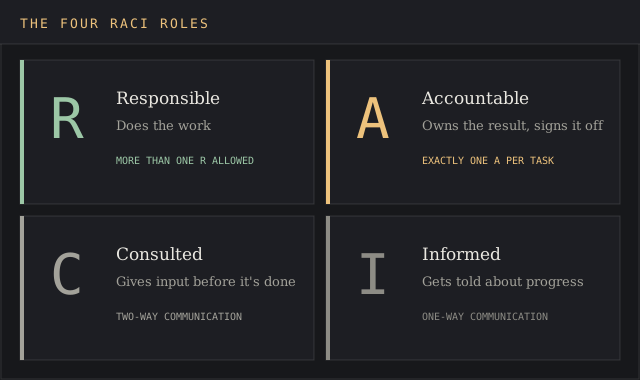
The acronym RACI stands for Responsible, Accountable, Consulted and Informed. Those four RACI roles are the whole RACI framework, and each one describes a different kind of responsibility. Cornell University's IT service management office publishes the RACI definitions most teams copy, and they read like this:
- Responsible: the person or team that does the work. Cornell's wording is "responsible for correct execution of the task/deliverable/decision." A task can have more than one responsible party, and each one reports progress to the A.
- Accountable: the one person who owns the result and signs it off. Cornell's rule is blunt: "You can only have one A for an item in the RACI."
- Consulted: people whose opinions are sought before the work is finished. This is two way communication: they provide input and the team member doing the work listens.
- Informed: people kept up to date on progress and decisions. This is one way communication: they get the update and nobody waits for their reply.
All four definitions come from Cornell IT's RACI and RASCI definitions page, which also covers the RASCI variant: an extra S for Support, the people who assist the responsible person without owning the task.
The RACI model is a type of responsibility assignment matrix, the generic name the project management literature uses, and it can clarify roles at any point in the project lifecycle. PMI's ProjectManagement.com RACI wiki cites the PMBOK Guide, Sixth Edition (2017) alongside it, and describes it as a quick way in project management for a project team to lay out roles and responsibilities so people can discuss and agree on them.
Why project managers use a RACI matrix
A RACI matrix exists to clarify roles and responsibilities before the work starts, so every team member knows their role on day one. Project managers use it at kickoff because the cheapest moment to settle roles and responsibilities is before anyone has done the task twice. Two team members who both think they own the homepage copy produce duplicated efforts; two who both think the other owns it produce nothing.
The RACI matrix gives four concrete benefits in the project management process:
- It eliminates ambiguity on ownership. Every row names one accountable person, so a single task never has two owners or none.
- It shows the stakeholders who need to hear about each decision. Legal, sales and finance stakeholders appear as C or I on the rows that touch them, and nowhere else.
- It sets the communication load. Counting the C's tells you how many reviews each deliverable waits on, and how many stakeholders each team member has to update.
- It carries over. A finished RACI matrix becomes the starting point for the next project of the same shape, and a record of who held which responsibilities on this one.
Where it adds the least is small teams running one specific project with no outside reviewers, a simple tool for a simple job. There, a task list with an owner column does the same work. The RACI matrix earns its place once key stakeholders sit outside the team: a legal reviewer, a sales lead who needs launch dates, a finance approver. Those are the people who end up surprised, and the I column is how you define roles for them in advance.
The RACI matrix also changes how the project team talks about roles and responsibilities, which is where project success starts for cross-functional work. "Who's doing this?" becomes "who has the R?", and that question has one answer you can point to. For managing projects across departments, that shared vocabulary is what lets team members settle ownership in one message, and it costs one spreadsheet.
The four rules that make a RACI chart work
A RACI chart is a simple tool to clarify roles and responsibilities, and that's why the rules matter: a RACI matrix with no rules fills up with letters and settles nothing. The RACI matrix template checks the first two on every row automatically.
| Rule | What breaks without it | Template check |
|---|---|---|
| Exactly one A per task | Two Accountable names means two people who each assume the other signed off | Check column reads "Fix A" |
| At least one R per task | A task with no responsible party is a task nobody does | Check column reads "Add R" |
| Keep C short | Every Consulted name is a person whose input the work waits for | Role Load tab counts C per role |
| No one carries everything | One person holding R or A on most rows becomes the bottleneck | Role Load tab flags anyone on more than half the rows |
The one-A rule shows up in every source: Cornell's page, the ProjectManagement.com wiki, and Atlassian's RACI chart guide, which asks for "exactly one accountable individual per task." Sources split on R. Atlassian allows several Responsible people per task; the ProjectManagement.com wiki calls more than one R an overlap. The RACI matrix template accepts several and flags zero, which suits cross-functional work where two team members split one deliverable.
Atlassian also warns that too many Consulted names produce conflicting opinions. That's the practical cost of C: each one adds a review step to the project workflow.
What's in the RACI matrix template
The RACI matrix template has three tabs, each with one job:
- Instructions. The RACI definitions, the four rules, and the allowed cell values: R, A, C, I, and A/R for a person who does the work and signs it off.
- RACI Matrix. Project tasks in the first column, up to eight role columns, then an A count, an R count and a Check column. Rows run to 40 tasks.
- Role Load. One row per role, counting that role's R, A, C and I cells, the number of tasks where they hold R or A, and a flag for anyone overloaded or unused.
The Check column formula is the core of the RACI matrix template. It reads =IF(COUNTA(C6:J6)=0,"",IF(COUNTIF(C6:J6,"A")+COUNTIF(C6:J6,"A/R")<>1,"Fix A",IF(COUNTIF(C6:J6,"R")+COUNTIF(C6:J6,"A/R")=0,"Add R","OK"))), and conditional formatting turns any row that isn't OK amber.
How to fill in a RACI matrix template: a step by step guide
Creating a RACI matrix is a straightforward process once the task list exists. Atlassian's guide follows the same order, and it's the order that keeps the RACI matrix short:
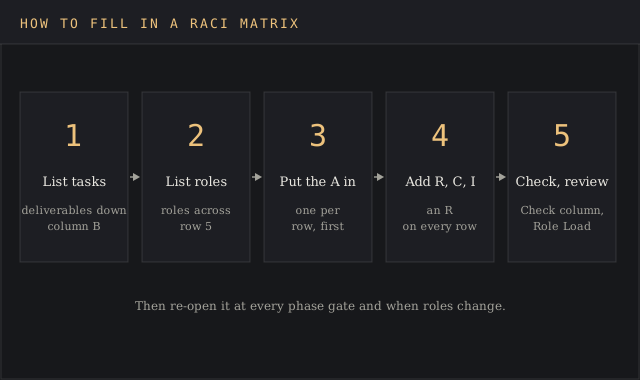
- List the key tasks. Write deliverables and decisions down column B, one per row. A product launch checklist or a go-to-market plan already lists most of them for a launch. The template holds 40 rows; specific tasks below deliverable level belong in the project plan, where you track progress day to day.
- List the roles involved. Put roles across the top and write each person's name in brackets under the role, so the RACI template survives a reassignment. Add tasks and roles as rows and columns; the checks extend to row 45.
- Assign RACI roles row by row. Give each task its RACI roles: put the A in first, then the R, then C and I. Leave a cell blank when a role has nothing to do with a particular task.
- Read the Check column. Fix every "Fix A" and "Add R" before the matrix goes out.
- Read the Role Load tab. Look for one name carrying most of the A cells, and for roles with no letters at all.
- Review with the team. Walk the RACI matrix with every person on it, so the whole project team is on the same page before work starts.
- Keep it up to date. Re-open it when scope changes, when new team members join, and at each phase gate of the project lifecycle. Add tasks as they appear.
That last step is the one that gets skipped. Atlassian's guide says to document each change to the chart with the date, the person responsible and the reason, which turns the RACI chart into a living document with an audit trail.
RACI matrix example: a website redesign project
The RACI matrix template ships filled with this practical example. A 60-person B2B software company is rebuilding its marketing site in nine weeks. Eight team members, one per role, touch the work: marketing director, project manager, UX designer, front-end developer, content lead, SEO specialist, legal counsel and sales lead. Ten tasks run from approving the brief to the post-launch report.
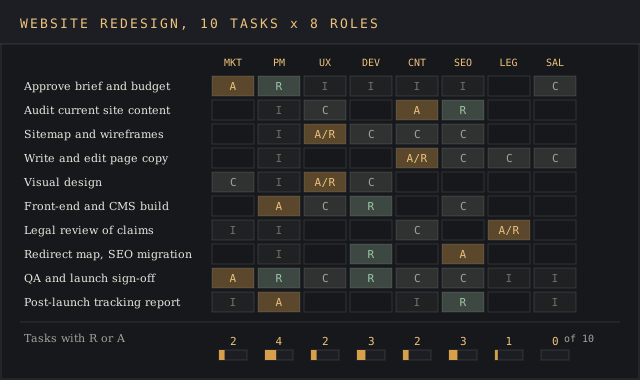
| Task | Mkt dir | PM | UX | Dev | Content | SEO | Legal | Sales |
|---|---|---|---|---|---|---|---|---|
| Approve brief and budget | A | R | I | I | I | I | C | |
| Audit current site content | I | C | A | R | ||||
| Sitemap and wireframes | I | A/R | C | C | C | |||
| Write and edit page copy | I | A/R | C | C | C | |||
| Visual design | C | I | A/R | C | ||||
| Front-end and CMS build | A | C | R | C | ||||
| Legal review of claims and privacy pages | I | I | C | A/R | ||||
| Redirect map and SEO migration | I | R | A | |||||
| QA and launch sign-off | A | R | C | R | C | C | I | I |
| Post-launch tracking report | I | A | I | R | I |
On the QA row, the first draft of this RACI matrix example had a red flag. Both the marketing director and the project manager were marked A for launch sign-off, so the Check column read "Fix A". The fix took one conversation: the director keeps the A because she owns the budget, and the project manager moves to R because he runs the QA pass.
The Role Load tab then tells the rest of the story. The project manager holds R or A on 4 of 10 tasks and appears on every row, which is normal for the role. The front-end developer is Responsible on 3 tasks and Accountable on none. The sales lead carries no R or A anywhere, only C on 2 rows and I on 2, so sales can provide input without anyone waiting on them to finish work. Those are responsibilities a sales lead can carry next to a full quota.
No role crosses the five-task line, so nobody gets flagged as overloaded. If the director had taken the A on every row, she'd hold it on all ten tasks, and every decision in the project would queue behind one calendar.
RACI model variants: RASCI, DACI and RAPID
RACI maps who does which task. Two other models map who makes which decision, and who calls the shots on a decision is a separate question from who does the work.
- RASCI adds S for Support, per Cornell. Use it when helpers outnumber doers.
- DACI stands for Driver, Approver, Contributor, Informed. Atlassian describes it as a decision-making model and suggests settling key decisions with DACI, then mapping task ownership with RACI.
- RAPID stands for Recommend, Agree, Perform, Input, Decide, and Atlassian files it as a decision-making model too.
Use the RACI model for task assignments and one of the others for decision making processes that keep stalling. On complex projects with many stakeholders, a team can run both side by side.
Common RACI mistakes
Most broken RACI charts fail in one of five ways, and the RACI matrix template catches the first two:
- Two A's on one row. Each accountable person assumes the other signed off. The RACI matrix flags it.
- No R on a row. The task sits in the RACI matrix and no one picks it up. The template flags it.
- Confusing R and A. The responsible person does the work; the accountable person owns the result and its responsibilities to the sponsor. On larger projects the ProjectManagement.com wiki says they should usually be separate people.
- Consulting everyone. Each C adds a review the work waits on. Ask people to provide input only where it changes the work, and move the rest of the team members to I.
- Setting it in stone. A matrix written in week one and never opened again describes a project that no longer exists.
Names in cells cause a quieter problem. When a person leaves, a RACI matrix built on names has to be rebuilt, while one built on project roles needs one line changed. That's also what makes the RACI matrix useful for onboarding new team members: they read their role's column and know their responsibilities on day one.
Excel, Google Sheets or project management tools
A spreadsheet is the right home for a RACI matrix on most projects. It's one RACI chart, it prints on one page, and every team member already has the software.
- Excel runs the RACI matrix template as shipped, including the conditional formatting on the Check column.
- Google Sheets imports the RACI matrix template with the formulas intact and adds shared editing, which suits remote project teams. Both export to other tools as CSV.
- Task trackers such as Jira, Asana or Monday store an owner per task, which covers R. They rarely store A, C and I as separate fields, so most teams keep the RACI matrix as a linked sheet beside the task board.
Some other project management tools sell a RACI board or a RACI diagram view. Check that it enforces one A per row before paying for it, since the one-A rule carries most of the value.
FAQ
What is a responsibility matrix?
A responsibility matrix, or responsibility assignment matrix, is a tool project managers use to define roles and responsibilities: a grid with tasks in rows and people or roles in columns, where each cell says how that person is involved. The RACI chart is the most common format, using R, A, C and I as the cell values.
How do you create a RACI chart?
List the tasks in the left column and the roles across the top. Put exactly one A on each row, at least one R, then add C and I where needed. Check every row, then review the RACI chart with the team and the key stakeholders on it before you share it.
How do you make a RACI chart in Excel?
Type tasks in column B and roles in row 5, enter R, A, C or I in the cells, and add a COUNTIF column that counts the A's on each row. The RACI matrix template above has that check built, plus a role-load tab.
What is a RACI diagram?
It's another name for a RACI matrix or RACI chart: the same task-by-role grid that a RACI chart template lays out. Some tools draw it as a board with cards, but the content is identical.
Is the RACI matrix outdated?
The RACI matrix still appears in current project management guidance from PMI's ProjectManagement.com and Atlassian, and project managers still use it on complex projects. Teams that find it slow usually have too many C's or a RACI matrix template nobody updates, both fixable in the file.
What has replaced RACI?
RACI is still the default grid for task ownership. For decisions, DACI and RAPID are the common alternatives to Responsible, Accountable, Consulted and Informed, and Atlassian suggests using DACI for decisions and RACI for tasks on the same project.
Bottom line
Reach for a RACI matrix template, or any RACI template with a one-A check, when project work crosses three or more functions, when stakeholders outside the team need updates, and the same question keeps coming up in standups: who owns this? Put the A's in first to get the ball rolling, let the checks catch the gaps, and keep the file up to date at every phase gate.
For mapping how much influence each person has over a project, the stakeholder map template fits better. For what could go wrong once the roles are set, the risk register template picks up where the RACI chart leaves off, and each risk's owner should match an A in your matrix.