Risk Register Template
 By Jan Suski. I go deep on every review, checking every number against its source and digging up details other coverage misses, a habit from six years of SEO and link building for tech companies. Bylines at Brand24 and Senuto. How the scoring works.
Get the risk register template
An Excel workbook with a 17-column risk register, likelihood and impact scoring that rates each risk Low to Critical, a scoring key and a heat map of open risks.
Download XLSXA risk register is a table of the risks that could hurt a project or business operations, one risk per row, with a likelihood score, an impact score, a risk owner and a response plan for each. Project managers and organizations of every size use it as the working document behind risk management and the main template for risk management reporting: the place where potential risks get written down, scored, assigned and tracked until the risks are closed.
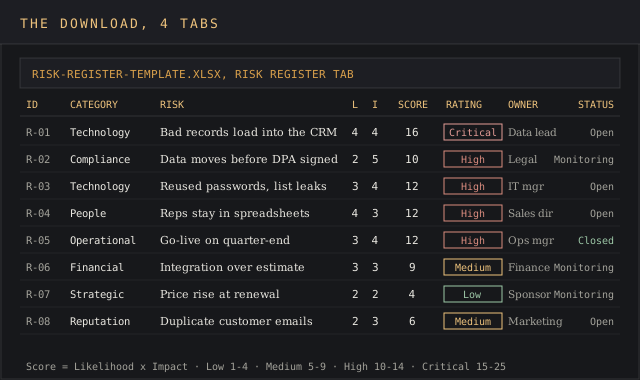
This page gives you a free risk register template (an Excel template with four tabs), the columns it carries and why, the scoring method, a step-by-step fill-in, and a worked example: an industrial distributor moving its sales team from spreadsheets to a cloud CRM in 12 weeks, with eight risks scored and assigned.
It's for project managers running a delivery, operations leads tracking operational risks across a site, and compliance teams in organizations that need to document how risks are handled. The same risk register template works for a project risk register and for operational risks; the categories change, the columns don't.
A risk register earns its keep early, when risks are still cheap to handle. A stitch in time saves nine: a record-quality risk caught in week two is a cleanup task, and the same risk found at go-live is a rollback.
Download the free risk register template
Download the risk register template (XLSX)Four tabs: instructions, the risk register with live scores and ratings for up to 100 risks, the scoring key, and a 5x5 heat map, pre-filled with the CRM migration example.
The risk register template is one Excel workbook with four tabs: instructions, the risk register itself, a scoring key with the 1-to-5 likelihood and impact scales, and a heat map that counts open risks in each cell of a 5x5 risk matrix. It ships filled with the CRM migration example below, so you can see the formulas work before you create your own register.
The free template opens in Excel 2016 and later, Excel for Mac, Google Sheets and LibreOffice Calc. Scores, ratings and the heat map use plain multiplication, IF and COUNTIFS, and the rating colors come from conditional formatting, so all of it survives an import.
What a risk register is
ISO 31000:2018 defines risk as "the effect of uncertainty on objectives," and the Institute of Risk Management's guide to the standard describes the process that follows: identify the risks, analyse them, evaluate them, treat them, then monitor, review and report. The risk register is where the results of each step are recorded.
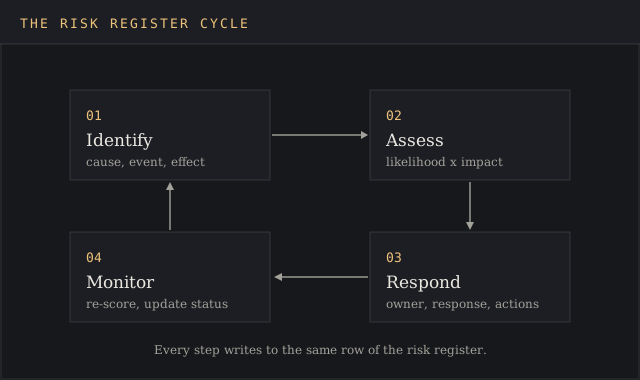
In practice that makes the register three things at once:
- A list of identified risks, each with a clear risk description.
- A ranking, so the team can focus on critical risks and the highest-scoring potential risks first.
- An accountability record of who owns which risks and what they've done about them.
For project management, Atlassian's risk register guide calls it "a project management tool where you list every known risk that could affect your project." For enterprise risk management across a whole organization the scope of management is wider, but the row format for risks is identical.
Risk vs issue
The difference is time. A risk is still uncertain; an issue is already under way.
PMI's interview with NK Shrivastava, PMI-RMP puts it in one line: risk is an event that has not happened yet but may, and an issue is something that already has happened. Risks live in the risk register with a probability. Issues go to an issue log and get resolved, and the risks that turned into issues get flagged for the lessons-learned session, where management sees which risks were scored too low.
When a risk materializes, close the row in the register, open an issue, and note the link between the two so the post-project retrospective can see which risks the team called correctly and which risks it missed.
Why teams keep a risk register
A risk register turns risk management from a conversation into a document organizations can audit. Without one, potential risks live in meeting notes and people's heads, and the first written record of a risk is the incident report. With one, every risk has a row, a score, an owner and a date, and anyone can open the file and see the current state.
The benefit shows up in four places:
- Ownership. Each row names one risk owner, so ownership of all risks is visible and nobody can assume someone else is watching a row.
- Prioritization. Scoring every risk on the same scale lets teams assess risks side by side, then assign mitigation strategies and resources to the critical risks first, where money spent cuts the most exposure.
- Documentation. Auditors, sponsors and regulators ask how risks were handled. The risk register is the document that answers, with dates, and the risk management record organizations keep for compliance.
- Memory. A closed risk register template from the last project, with its risks and owners, is the starting list for the next one, and the cheapest resource a new team can explore, which is how organizations stay ahead of risks they've already seen once.
That's what proactive risk management looks like in a document: team members identify risks, decide how to respond, and implement the response before the risk becomes an issue. Effective risk management is this discipline repeated at every meeting, and project success and business success both depend on it. Teams that keep an eye on the risk register weekly spot new risks while they're still cheap to fix, and nip them in the bud.
Operational risks and project risks in one register
A project risk register tracks risks to one delivery: a date, a budget, a scope. An operational risk register tracks operational risks to ongoing business operations: the warehouse, the order system, the payroll run. The columns are the same. What changes is the time horizon and the categories.
Operational risks don't end when a project closes. A supplier going under, a key system outage, a single person who knows how the month-end close works: these operational risks stay on the register for years and get re-scored each quarter. Managing operational risks well means managing them as standing rows with dates, and managing project risks means closing rows as the project moves. Both are managing risks with the same structured approach.
Common operational risks fall into a few groups, and the risk register template's categories cover them:
- Technology: outages, failed upgrades, lost records, and cybersecurity threats such as phishing and credential theft.
- People: key-person dependency, turnover, missing skills, risks that grow as organizations grow.
- Regulatory compliance: privacy rules, safety rules, industry licences.
- Operational: supplier failure, process errors, capacity limits.
Many organizations keep both kinds of risks in one risk register with a Type column, so operational risks that a project creates, such as a new system the support team must run, carry over to the operational register when the project closes. That structured approach to managing risks means no risk data gets lost in the handover.
Risk register columns, and what each one is for
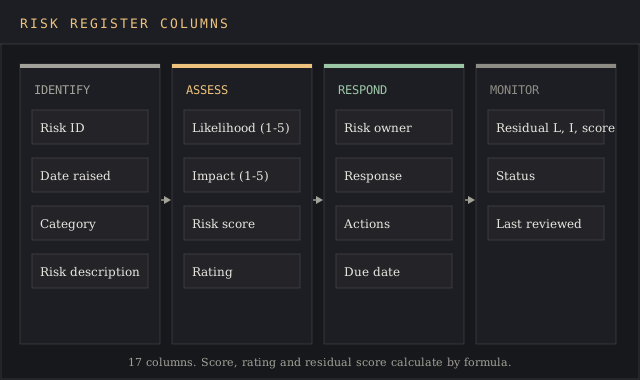
Every column in the risk register template, our free template for Excel, answers one question an auditor or sponsor will ask. The set below follows the fields PRINCE2's guidance and the Queensland Audit Office both list, with the residual score added so the register shows what the response is worth.
| Column | What goes in it |
|---|---|
| Risk ID | A unique code, R-01, R-02, so a risk can be referenced in meetings and reports |
| Date raised | When the risk entered the register |
| Category | Strategic, financial, operational, regulatory compliance, reputation, people or technology |
| Risk description | Cause, event and effect in one sentence |
| Likelihood (1-5) | How probable the event is, from the scoring key |
| Impact (1-5) | How much damage it does if it occurs |
| Risk score | Likelihood multiplied by impact, 1 to 25 |
| Rating | Low, Medium, High or Critical, set by formula from the score |
| Risk owner | One named person accountable for the risk |
| Response | Avoid, Reduce, Transfer, Share or Accept |
| Actions | The specific mitigation steps |
| Due date | When the actions should be done |
| Residual likelihood, impact and score | The scores expected once the actions are done |
| Status | Open, Monitoring or Closed |
| Last reviewed | The date the owner last checked the row |
The template's category list is the Queensland Audit Office's: its guidance on what to include in a risk register gives strategic, financial, operational, regulatory compliance, reputation, people and technology as example categories. PRINCE2's risk register guidance supplies the description format (cause, event, effect), the five responses, and the split between the owner and the person carrying out the actions.
How risk scoring works
The risk score is probability multiplied by impact, each on a 1-to-5 scale. Atlassian's guide uses the same product, and so does the ONES guide; it ranks risks in seconds and anyone can check the arithmetic.
| Score | Rating | What it means in the template |
|---|---|---|
| 1 to 4 | Low | Accept or watch; re-score monthly |
| 5 to 9 | Medium | Owner plans a response |
| 10 to 14 | High | Response with a due date, reported at every status meeting |
| 15 to 25 | Critical | Escalated to the sponsor until the residual score drops |
In the template, the Rating column formula is =IF(G6="","",IF(G6>=15,"Critical",IF(G6>=10,"High",IF(G6>=5,"Medium","Low")))), and conditional formatting colors each band. The bands are the risk register template's own; set yours to match your organization's risk appetite and keep them identical across every project risk register, so a 12 means the same thing on every team.
Consistent scoring is the essential part of the risk assessment process, and its importance grows with the number of risk owners. Two risk owners who read "likely" differently will rank the same risk five points apart, so the Scoring Key tab defines each level in plain terms: a likelihood of 4 means "more likely than not this quarter," an impact of 4 means "misses a milestone or costs over 5% of budget."
Edit those definitions once in the template, then leave them alone so every set of risks is scored on the same scale, and new owners score their risks the way the last ones did.
How to fill in a risk register, step by step
- Identify the risks. Create the list in a short workshop with the people closest to the work; a stakeholder map shows who to invite. Risk identification works best from each workstream's point of view: what could stop people, systems or suppliers from doing their job. Explore past projects' registers to identify risks that came up before.
- Write each risk as cause, event, effect. "Duplicate records in the source files (cause) load into the CRM (event), so reps stop trusting it (effect)." A vague row such as "CRM problems" can't be scored.
- Assess each risk with the scoring key: likelihood and impact from 1 to 5. The risk score and rating fill in by formula.
- Assign a risk owner to each row. One person, by name.
- Pick a response and write the actions. Assign mitigation strategies to the highest risks first, each with a due date, then estimate the residual scores.
- Check progress on a schedule. Walk the risk register at every status meeting, update scores, close what's done and log fresh risks as the plan changes.
The ONES guide to building a risk register in Excel says you "can have a working template in under 30 minutes." With this risk register template pre-built, the half hour goes on the risks themselves.
Risk register example: a CRM migration
The risk register template ships with this example filled in, and it's a practical model to copy. A 140-person industrial distributor is moving 40 sales reps from shared spreadsheets to a cloud CRM in 12 weeks. The project manager ran a one-hour workshop with sales, IT, legal, finance and operations, and the team logged eight risks.
| ID | Category | Risk | L x I | Rating | Owner | Response | Status |
|---|---|---|---|---|---|---|---|
| R-01 | Technology | Duplicate and blank customer records load into the CRM, so reps stop trusting it | 4 x 4 = 16 | Critical | Data lead | Reduce | Open |
| R-02 | Regulatory compliance | Customer contact data moves to the vendor before a data processing agreement is signed | 2 x 5 = 10 | High | Legal counsel | Reduce | Monitoring |
| R-03 | Technology | Reused passwords let an outsider into the CRM and the customer list leaks | 3 x 4 = 12 | High | IT manager | Reduce | Open |
| R-04 | People | Reps keep working in spreadsheets, so pipeline reports come out incomplete | 4 x 3 = 12 | High | Sales director | Reduce | Open |
| R-05 | Operational | Go-live lands on quarter-end, order entry slows and shipments go out late | 3 x 4 = 12 | High | Operations manager | Avoid | Closed |
| R-06 | Financial | Integration work runs past the fixed-fee estimate | 3 x 3 = 9 | Medium | Finance controller | Transfer | Monitoring |
| R-07 | Strategic | The vendor raises prices at the first renewal | 2 x 2 = 4 | Low | Project sponsor | Accept | Monitoring |
| R-08 | Reputation | Customers get duplicate emails during the data sync and complain | 2 x 3 = 6 | Medium | Marketing manager | Reduce | Open |
Sort the risks by score in Excel, an ability every reviewer already has, and the register sets the agenda. R-01 is the only Critical row, so the data lead's dedupe pass and field-completeness check run before any load. Four risks sit at High, and those risks get a line in every status report. R-05 was avoided outright: moving go-live two weeks past quarter close cost nothing and took the risk off the table, so its status is Closed and it drops out of the heat map.
R-03 covers cybersecurity threats, which the template files under Technology risks, and the response is concrete: single sign-on and multi-factor login enforced on day one, which takes the residual score from 12 to 4. R-06 is a transfer: the integrator, picked with a vendor evaluation scorecard, signed a fixed-price statement of work, so the overrun lands on their books. Of the eight risks, five carry a Reduce response.
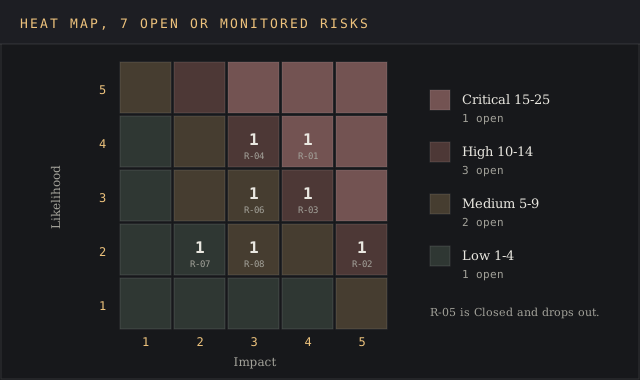
The template's Heat Map tab plots the seven open or monitored risks on the 5x5 grid with one COUNTIFS per cell, and closed risks drop off automatically. One cell sits in the top-right band, which is where the sponsor's attention goes first.
Risks to log first, by team
A blank register is the hardest part of risk management, so the risk register template lists starter risks for risk identification by team. These starter risks give each team something to score in the first workshop; delete the ones that don't apply and add your own.
| Team | Starter risks |
|---|---|
| Project management | Scope creep, a late dependency from another team, a key person on leave during a critical phase, an underestimated budget line |
| IT and security | Cybersecurity threats such as phishing and credential theft, an unpatched system, a failed backup restore, a vendor outage |
| Operations | Operational risks from a single supplier, a capacity limit at peak, a manual process with no backup person |
| Finance | Currency swings on a foreign contract, a customer concentration risk, a cost overrun on a fixed-fee job |
| Legal and compliance | Regulatory compliance risks from a new privacy rule, an expired licence, a contract clause nobody checked |
Operational risks and cybersecurity risks stay open longest, because the potential threats behind them never fully go away. Project risks close faster, and project success depends on closing those risks on schedule. A healthy register shows both: risks closing as the project moves through business operations milestones, and standing operational risks re-scored on schedule so the team can stay ahead of them.
Risk responses: avoid, reduce, transfer, share, accept
PRINCE2 lists five responses to threats and other risks, and the template's Response column uses the same five mitigation strategies:
- Avoid: change the plan to remove the risk, as R-05 does by moving the go-live date.
- Reduce: cut the probability or the impact. Most risks land here, and the mitigation strategies go in the Actions column.
- Transfer: move the financial impact of risks to a third party through a contract or insurance, keeping ownership of the row in-house.
- Share: split the risks and the reward with a partner, along with the resources to manage them.
- Accept: record the risk, watch it, and spend nothing until its score moves.
Accepting risks is a decision, so each one needs an owner and a review date like every other row. Accepted risks with no owner drift: nobody re-scores them when the current state of the project changes.
Common risk register mistakes
The risk register template's formulas catch arithmetic errors. These five mistakes need a person, and they're the practices that separate a working register from a list of risks nobody reads:
- Vague descriptions. "Budget risk" can't be scored. Write the cause and the effect so risks can be compared.
- Committees as owners. A department can't be responsible for a risk. Put one responsible person's name in the column.
- Scoring by feel. Without the scoring key, the same risk scores 6 for one owner and 16 for the next, and the risk assessment loses its importance as a ranking.
- A register that never changes. Risks move. The ONES guide recommends a review at least weekly, and daily before a major milestone.
- Burying your head in the sand on closed rows. Close a risk only when the actions are done and the residual score is accepted, and keep the row for the post-project retrospective, where project managers can assess what the register caught.
Excel risk register template or risk management software
An Excel template, and this risk register template in particular, covers a project risk register up to a few dozen risks and a handful of risk owners, which is most projects that project managers run. It's free, every sponsor can open it, the formulas are visible, and the ability to add a column for your own risks takes ten seconds.
Dedicated risk management software, built for enterprise-wide practices and essential for some regulated organizations, earns its cost when risks run into the hundreds, when organizations need an audit trail for regulatory compliance in an industry such as finance or healthcare, or when one register rolls up into group-level reporting.
COSO's 2017 framework, Enterprise Risk Management: Integrating with Strategy and Performance, sets the five components that kind of reporting sits inside: governance and culture; strategy and objective-setting; performance; review and revision; and information, communication and reporting, per NC State's ERM Initiative.
FAQ
How do I make a risk register?
List the risks as cause, event and effect, score each on probability and impact, multiply for the risk score, assign one owner, choose a response, and set a review date. The risk register template above has every column and formula built.
What is the difference between a risk and an issue?
A risk is a future event that carries a probability. An issue is a current problem that needs resolving now. Risks go in the risk register; issues go in an issue log.
What are the 5 components of ERM?
COSO's 2017 framework lists governance and culture; strategy and objective-setting; performance; review and revision; and information, communication and reporting.
What are the 7 risk categories?
There's no single standard list. The Queensland Audit Office uses strategic, financial, operational, regulatory compliance, reputation, people and technology, and the risk register template's Category column uses those seven.
How often should a risk register be updated?
At every status meeting at minimum, so new and changed risks get scored while they're current. The ONES guide recommends weekly as the floor and daily before a major milestone.
Bottom line
Use the risk register template to create one source of truth when a project or business operation has more risks than one person can hold in their head, and when someone outside the team will ask how they're being handled. Score the risks the same way every time, give each of the risks a single owner, and review the register on a fixed schedule. Managing risks this way is what keeps the template useful past week one.
For a one-off scoring of a short list of hazards, the risk assessment matrix template is lighter. For weighing if a project is worth its risks at all, the risk-benefit analysis template fits better, and the RACI matrix template sets out who owns the work each risk threatens.