X-Bar R Chart Template
 By Jan Suski. I go deep on every review, checking every number against its source and digging up details other coverage misses, a habit from six years of SEO and link building for tech companies. Bylines at Surfer, Brand24, and Senuto. How the scoring works.
Get the X-bar R chart template
An Excel workbook that turns subgroups of two to ten readings into a paired X-bar chart and R chart, with the control limits calculated live from the A2, D3 and D4 constants.
Download XLSXAn X-bar R chart is a pair of control charts for continuous data collected in small subgroups at regular intervals. The top control chart tracks each subgroup's average and the bottom one tracks each subgroup's range. Together the two charts monitor process stability in one Xbar-R chart: where a process is centered and how much variation it carries, sample by sample, against control limits calculated from the process's own data values.
This page covers the formulas behind the center line and control limits of x bar and r charts, the control chart constants table, when an S chart fits better, a step-by-step fill-in, and a worked example: 20 hourly samples of bottle fill volume from a contract packer, one of which lands out of control.
It's for the people who receive measurement data and have to say what it means: a quality engineer on a production line, a supplier quality manager reading a vendor's certificate data, a procurement analyst checking that a co-packer's fill weights hold steady before a contract renewal.
A picture is worth a thousand words here: a spreadsheet of 100 readings hides a shift that a plot shows in seconds. Walter Shewhart proposed the control chart in a one-page memo to his superiors at Western Electric on 16 May 1924, per the American Society for Quality, and the X-bar and R pair is still the default chart for small subgroups a century later.
Download the free X-bar R chart template
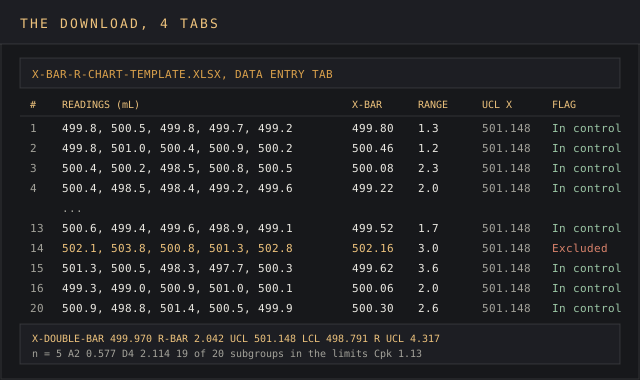
Download the X-bar R chart template (XLSX)Four tabs and two live charts: instructions, a data entry sheet with live subgroup averages, ranges and control limits, the paired X-bar and R charts, and a constants table for subgroup sizes 2 to 10, pre-filled with the Corvane Packaging worked example.
The file opens in Excel, Google Sheets and LibreOffice Calc. Every calculation uses AVERAGE, MAX, MIN, AVERAGEIF and INDEX/MATCH, so nothing breaks on import, and both charts are native line charts that redraw when you paste in new data.
What an X-bar R chart is
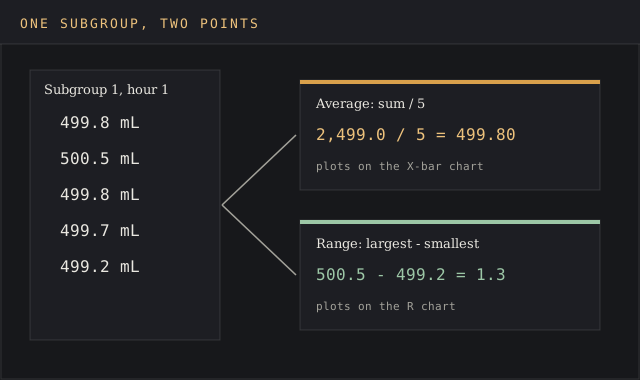
The xbar r chart is two control charts on one time axis. The X-bar control chart (also written x chart or Xbar chart) tracks the process average from one subgroup to the next. The range chart, or R control chart, tracks the variation inside each subgroup: the largest reading minus the smallest.
Both charts plot subgroups in time order: the R chart plots one range per subgroup and the x chart shows one average, so each subgroup adds one data point to each of the two charts.
Each control chart carries three lines, and the range chart reads exactly like the X-bar one. The center line is the grand average of the plotted values. The upper control limit and lower control limit sit three standard errors either side of it, the spread Shewhart's model expects from common-cause variation alone, the random noise every production process carries.
NIST's Engineering Statistics Handbook notes that three-sigma limits "have become an accepted standard in industry."
A point outside the control limits points to special causes: something assignable changed, such as a new operator, a worn nozzle or a different raw-material lot. The chart shows when the process changes. The root cause still has to be found on the floor, and the devil's in the details of the line log for that hour.
Because the charts follow time order, X-bar and R charts are a method for detecting process shifts in the mean before they show up as defects. A slow drift across six subgroups is invisible in a pass/fail inspection log and obvious on the plot.
When to use X-bar R, and when an S chart fits better
Use x bar and r charts in the following situations. An x chart on its own shows the average and leaves the spread unwatched, which is why the range chart rides along:
- The measurements are continuous data: weights, lengths, temperatures, cycle times, fill volumes. Count data such as defects per batch needs a different control chart.
- Readings can be grouped into rational subgroups, items made under the same conditions a few minutes apart, so the variation within subgroups is as small as the process allows.
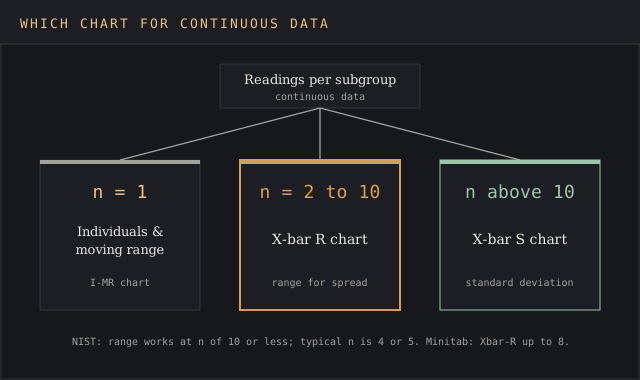
- The subgroup size is small and constant, from 2 to 10 readings per subgroup, the range where X-bar and R charts are the default.
- The calculations may be done by hand or in a spreadsheet, where the range is quicker to compute than a standard deviation.
The subgroup size cut-off for xbar r charts varies by source. NIST says the range works "if the sample size is relatively small (say equal to or less than 10)" and that "a typical sample size is 4 or 5." Minitab draws the line lower: Xbar-R for subgroups of 8 or less, Xbar-S for 9 or more.
The reason the charts split at ten is efficiency. The range uses two readings out of each subgroup and ignores the rest, which costs little at five readings and a lot at fifteen.
Above ten, the s chart, which tracks each subgroup's standard deviation, is the appropriate control chart. With one reading per interval, use an individuals and moving range control chart. Manufacturers use the pair, in AlisQI's words, "to visualize continuous data collected at regular intervals in sample subgroups."
X-bar R chart formulas
Every line on X-bar and R charts is calculated from two averages and three control chart constants. With k subgroups of size n:
| Line | X-bar chart | R chart |
|---|---|---|
| Plotted point | Subgroup average: sum of the n readings / n | Sample range: largest reading - smallest reading |
| Center line | X̿ (X-double-bar): average of the k subgroup averages | R̄ (R-bar): average range of the k subgroups |
| Upper control limit (UCL) | X̿ + A2 × R̄ | D4 × R̄ |
| Lower control limit (LCL) | X̿ - A2 × R̄ | D3 × R̄ |
The formula for x-bar of one subgroup is plain arithmetic: add the readings, divide by how many there are. The difference between the X-bar and R charts is only in what gets averaged across the subgroups. The same R-bar sets the limits on both charts, which is why the R chart has to be in statistical control before the X-bar control chart's limits mean anything.
R-bar also gives an estimate of the process standard deviation: sigma-hat = R̄ / d2, per NIST section 6.3.2.1. That estimate is what feeds the process capability indices, Cp and Cpk, once the process is stable. Out-of-control subgroups distort these parameters, so exclude them first.
Control chart constants for subgroup sizes 2 to 10
A2, D3 and D4 depend only on the subgroup size, which is why the same constants serve every pair of X-bar and R charts at that size. A2 equals 3 / (d2 × √n), and d2 is the expected range of n readings drawn from a normal distribution with a standard deviation of 1. The values below come from Wikipedia's x̄ and R chart table (A2, D3, D4) and SPC for Excel (d2).
| Subgroup size n | A2 | D3 | D4 | d2 |
|---|---|---|---|---|
| 2 | 1.886 | 0 | 3.268 | 1.128 |
| 3 | 1.023 | 0 | 2.574 | 1.693 |
| 4 | 0.729 | 0 | 2.282 | 2.059 |
| 5 | 0.577 | 0 | 2.114 | 2.326 |
| 6 | 0.483 | 0 | 2.004 | 2.534 |
| 7 | 0.419 | 0.076 | 1.924 | 2.704 |
| 8 | 0.373 | 0.136 | 1.864 | 2.847 |
| 9 | 0.337 | 0.184 | 1.816 | 2.970 |
| 10 | 0.308 | 0.223 | 1.777 | 3.078 |
D3 is zero up to six readings, so the R chart has no lower limit for small subgroups; a range can't fall below zero anyway. The template looks the constants up from the subgroup size you enter, so a change from five to four readings resets every limit on both charts.
The four tabs inside the template
| Tab | What it holds | Key formula |
|---|---|---|
| Instructions | How to fill each tab, the subgroup-size rule and the four Western Electric run rules | None |
| Data Entry | One row per subgroup: timestamp, up to 10 readings, an Exclude flag, subgroup average, range, both sets of limits and an out-of-control flag | =AVERAGEIF(Exclude,"<>Yes",Xbar) |
| Charts | The X-bar chart and R chart, each with its center line and control limits as flat series | None |
| Constants | A2, D3, D4 and d2 for subgroup sizes 2 to 10 | =INDEX(A2col,MATCH(n,ncol,0)) |
The Exclude column keeps the charts honest. Once a point's assignable cause is found and fixed, type Yes in its Exclude cell and the limits recalculate from the remaining data without deleting a row of history.
How to create an X-bar R chart, step by step
Pick the characteristic and the subgroup size. Determine what the charts should answer first. One measurable value, one sample size, held constant. Four or five readings taken back to back is the usual choice.
Collect at least 20 subgroups at regular intervals. Hourly, per shift or per batch. Minitab's own example uses 20 subgroups of 5. Fewer subgroups make R-bar too rough an estimate to identify a shift. Twenty subgroups of five give the charts 100 readings to work from.
Enter each subgroup on one row of the Data Entry tab. The template computes the subgroup average and sample range as you type, the same calculations the charts are built from, and both control charts redraw as each row is added.
Read the R chart first. If any range sits above D4 × R-bar, investigate it and nip it in the bud before trusting the X-bar limits. Minitab puts it plainly: "If the R chart is not in control, then the control limits on the Xbar chart are not accurate."
Then read the averages chart. With the R chart stable, the averages on the second of the two control charts hold. Look for points outside the control limits and for the run patterns listed below. Analyze each flagged point before moving on, and identify which subgroups share a shift, an operator or a lot.
Find the cause, then exclude and recalculate. Flag the subgroup, note the cause in the comment column, and let the limits reset.
Freeze the calculation and monitor. Once the charts are stable, keep the lines fixed and plot new subgroups against them. Recalculate after a deliberate process improvement, and use the frozen lines to monitor every new shift. A Cpk target set in an OKR tracker gives the review a number to hit.
Worked example: 20 hourly samples of bottle fill volume
Corvane Packaging, a fictional contract packer built for this example, fills 500 mL bottles for a beverage brand. The brand's supplier quality manager asks for five bottles measured every hour across 20 hours of production, and charts the data in the template before the quarterly vendor review. The example below lists every subgroup so the calculations can be checked by hand, and the download ships with these 20 rows filled in and subgroup 14 already marked Yes.
| Subgroup | Readings (mL) | Average | Range |
|---|---|---|---|
| 1 | 499.8, 500.5, 499.8, 499.7, 499.2 | 499.80 | 1.3 |
| 2 | 499.8, 501.0, 500.4, 500.9, 500.2 | 500.46 | 1.2 |
| 3 | 500.4, 500.2, 498.5, 500.8, 500.5 | 500.08 | 2.3 |
| 4 | 500.4, 498.5, 498.4, 499.2, 499.6 | 499.22 | 2.0 |
| 5 | 500.3, 500.0, 500.5, 499.4, 500.3 | 500.10 | 1.1 |
| 6 | 500.4, 499.4, 501.5, 500.5, 501.1 | 500.58 | 2.1 |
| 7 | 499.4, 499.3, 499.7, 499.9, 500.6 | 499.78 | 1.3 |
| 8 | 500.2, 499.6, 499.1, 499.5, 501.1 | 499.90 | 2.0 |
| 9 | 499.3, 500.2, 500.4, 498.7, 500.0 | 499.72 | 1.7 |
| 10 | 501.2, 498.2, 499.7, 499.9, 499.3 | 499.66 | 3.0 |
| 11 | 500.4, 499.9, 498.7, 500.7, 500.6 | 500.06 | 2.0 |
| 12 | 500.9, 501.3, 500.3, 500.1, 498.8 | 500.28 | 2.5 |
| 13 | 500.6, 499.4, 499.6, 498.9, 499.1 | 499.52 | 1.7 |
| 14 | 502.1, 503.8, 500.8, 501.3, 502.8 | 502.16 | 3.0 |
| 15 | 501.3, 500.5, 498.3, 497.7, 500.3 | 499.62 | 3.6 |
| 16 | 499.3, 499.0, 500.9, 501.0, 500.1 | 500.06 | 2.0 |
| 17 | 500.2, 500.4, 501.4, 500.6, 500.5 | 500.62 | 1.2 |
| 18 | 500.5, 498.6, 501.2, 500.9, 500.5 | 500.34 | 2.6 |
| 19 | 498.2, 499.4, 500.8, 498.4, 499.8 | 499.32 | 2.6 |
| 20 | 500.9, 498.8, 501.4, 500.5, 499.9 | 500.30 | 2.6 |
With all 20 subgroups in, the grand average is 500.079 mL and the average range is 2.090 mL. At n = 5, A2 is 0.577 and D4 is 2.114:
- X-bar chart: center line 500.079, upper control limit 501.285, lower control limit 498.873.
- R chart: center line 2.090, UCL 4.418, LCL 0.
Every range across the 20 subgroups sits under 4.418, so the R chart shows process stability on the spread side. On the X-bar chart, subgroup 14 is the red flag: it averages 502.16 mL, 0.875 mL above the UCL. The packer's line log shows a filler nozzle was swapped at that hour's shift change and recalibrated an hour later: an assignable cause, found and fixed.
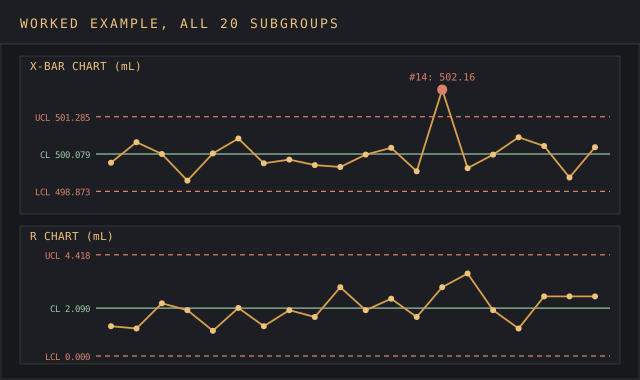
Marking subgroup 14 as excluded leaves 19 subgroups. The grand average drops to 499.970 mL and R-bar to 2.042 mL, which moves the X-bar limits to 498.791 and 501.148 and the R chart's UCL to 4.317. No remaining point breaks a limit or a run rule, so both charts now show a process in statistical control.
The revised R-bar gives a process standard deviation of 2.042 / 2.326 = 0.878 mL. Against the brand's contract spec of 497 to 503 mL, that's a Cp of 1.14 and a Cpk of 1.13: in control, centered, with little room to spare. The supplier quality manager files both charts with the vendor evaluation scorecard and asks for the nozzle-change procedure in writing.
How to interpret X-bar and R charts
A point beyond a control limit is the loudest of the out-of-control warnings on X-bar and R charts. The Western Electric Company's Statistical Quality Control Handbook (1956) added zone rules that catch smaller shifts, listed on Wikipedia and in NIST's handbook:
- One data point beyond the 3-sigma limit.
- Two of three consecutive points beyond 2 sigma, on the same side of the center line.
- Four of five consecutive points beyond 1 sigma, on the same side.
- Eight consecutive points on the same side of the center line.
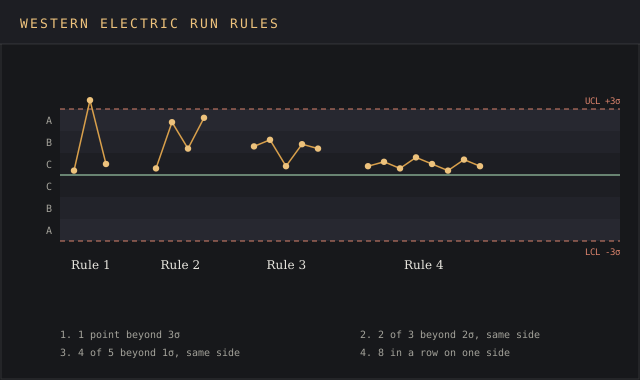
The extra rules make the charts more sensitive, at a cost. NIST puts the false-alarm rate of the 3-sigma rule alone at about one in 371 points and the full WECO set at about one in 92. On a chart plotted every hour, that's a false alarm roughly every four days of round-the-clock production, and each one sends someone on a wild goose chase through the line log.
To interpret the R chart, apply the same rules. A range above its UCL means the spread inside one subgroup blew out, which points at the measurement system, a mixed batch or one bad station. A run of small ranges after an improvement is good news and the reason to recalculate. Special causes on the R chart and special causes on the X-bar chart often share one source, so check both charts for the same subgroups.
X-bar R charts in supplier and operations data
Control charts were built for the factory floor, and the same pair of control charts works on any continuous data that arrives in small groups.
A buyer running a bid comparison across three co-packers can run one pair of charts per supplier from the certificate-of-analysis values each one ships, and the charts identify which supplier's process is stable before price enters the discussion. Monitor each supplier's subgroups as they arrive, and the charts become a running record of their variation.
The same control charts monitor order cycle times sampled five orders a day, call-handling times per shift and delivery lead times per week. Each case needs the same setup: a fixed subgroup size, readings in time order, and control limits calculated from a stable baseline of subgroups. Determine the baseline first, then monitor new subgroups against it, and log any shift the same way a trend tracker template logs a market signal.
Charts from several suppliers belong side by side, on the same scale, so the variation in each supplier's subgroups is comparable at a glance. A supplier whose range chart runs twice as high as its rivals' carries twice the variation, and that difference shows up in the charts long before it shows up in a complaint log. Feed the results into a benchmarking report or a risk assessment matrix so the charts drive a decision.
Common mistakes with X-bar R charts
- Reading the X-bar chart before the R chart. The X-bar limits are calculated from R-bar, so an unstable R chart makes them meaningless.
- Sorting readings before charting. Control charts assume time order. Sorted values hide every shift, and both charts go flat.
- Using specification limits as control limits. Specs are set by the customer's drawing or contract, and control limits are calculated from the process data. A process can sit inside spec and still be out of control.
- Mixing streams in one subgroup. Five bottles from five filler heads inflate every range and widen the control bands until special causes never show. Chart each head on its own control chart.
- Recalculating the charts every week. Lines that move with the data stop showing change. Freeze them once the process is stable and keep an eye on new points against the frozen lines.
- Deleting out-of-control rows. Exclude those subgroups from the calculations and keep the record, with the cause noted, so the charts keep their history.
Excel, Google Sheets or SPC software
A spreadsheet handles an Xbar-R chart for one characteristic on one line, and a spreadsheet is the quickest place to create a first pair of control charts. Anyone with access to Excel can create one from the template by pasting readings into the Data Entry tab. The template works the same in Excel and Google Sheets, and the charts update as rows are added.
Dedicated SPC software such as Minitab, SigmaXL or JMP earns its price when dozens of characteristics need charts at once, across hundreds of subgroups, when the run rules have to alert automatically, or when an auditor wants a validated calculation trail. For a monthly supplier review or a quick and dirty first look at a production process, the spreadsheet is enough.
In any tool, the charts only work if the subgroups are rational and the readings arrive in time order.
FAQ
What does an Xbar-R chart tell you?
It tells you if a process is stable: the X-bar chart shows the process average over time and the R chart shows the variation inside each subgroup. Points outside the control limits, or non-random runs, mark special causes to investigate, and the next job is to determine their source.
How do you calculate an Xbar-R chart?
Average each subgroup and take its range. Average those to get X̿ and R̄. The X-bar limits are X̿ plus and minus A2 × R̄; the R chart limits are D3 × R̄ and D4 × R̄, with the constants taken from the subgroup size.
What is the difference between an Xbar-R and an Xbar-S chart?
The R chart measures variation with the subgroup range, and the Xbar-S version measures it with the subgroup standard deviation. Both charts sit under the same X-bar chart. Use X-bar R charts for subgroups of 2 to 10 readings and X-bar S charts above that, where the range throws away too much information.
What is the difference between an X-bar chart and an R chart?
The X-bar chart tracks subgroup averages and watches the process center. The R chart tracks subgroup ranges and watches the spread. Both charts are read as a pair, R chart first.
How do you determine upper and lower control limits?
Calculate them from the process data the charts display. For the X-bar chart, UCL = X̿ + A2 × R̄ and LCL = X̿ - A2 × R̄. For the R chart, D4 × R̄ and D3 × R̄.
How do you interpret an X-bar and R chart?
Interpret the R chart first: if every range sits inside its limits, the variation is stable and the X-bar limits are valid. Then analyze the X-bar chart for points outside the control limits and for the Western Electric run patterns. Both charts in control is what process stability looks like on paper.
What is the rule of 7 in a control chart?
It's a run rule for control charts: it flags seven consecutive points on one side of the center line as a non-random run, even with no point beyond UCL or LCL, per PM Study Circle. The Western Electric version of the rule uses eight points.
How do you make an X-bar and R chart in Excel?
To create one, enter one subgroup per row, compute each row's AVERAGE and MAX minus MIN, average both columns, apply the A2, D3 and D4 constants, and plot the averages and ranges as two line charts with UCL, LCL and center line as flat series. The template above has both charts built.
Bottom line
Reach for the X-bar R chart template when you have continuous measurements taken in small, equal subgroups and need to know if the process is stable before you judge it against a spec or a supplier against a contract. A stitch in time saves nine: a shift caught on hour 14 is one recalibrated nozzle, and the same shift found at the customer's goods-in check is a rejected shipment.
Above ten readings per subgroup, switch to an Xbar-S pair. With one reading per interval, the subgroups collapse to single points and an individuals chart takes over. For tracing a signal back to its cause, the root cause analysis report template picks up where the chart leaves off.