Bid Comparison Template
 By Jan Suski. I go deep on every review, checking every number against its source and digging up details other coverage misses, a habit from six years of SEO and link building for tech companies. Bylines at Surfer, Brand24, and Senuto. How the scoring works.

Get the bid comparison template
An Excel workbook that tabulates bids line by line, prices each bidder's exclusions back in, screens out noncompliant bids and ranks the rest on weighted scores.
Download XLSXA bid comparison template is a spreadsheet that lines up all the submitted bids for one job in the same rows, so the project owner reads price, scope and terms across bidders one line at a time. Procore's bid tabulation guide calls the base bid price "the most important column in the bid tab sheet." This spreadsheet starts there and keeps going, from base bids to exclusions, gates and weighted scores.
This page covers the five tabs of the free download, how to normalize bids for exclusions, the pass/fail gates that come before any scoring, and a weighted method that ranks bids on a 1 to 5 scale. A worked example runs three contractor bids for a 9,000 sq ft office fit-out through every tab. The lowest of the three base bids finishes second on price.
The target audience is the buy side: project owners, facilities leads, project managers and procurement teams holding three to five bids for a construction project, an IT rollout or a services contract. Contractors pricing their own work want a free estimate template, and vendors writing proposals want the RFP response template. Project managers who compare bids for a business unit's software or services purchase use the same tabs.
Getting the comparison wrong costs real money. McKinsey's analysis of construction projects by Agarwal, Chandrasekaran and Sridhar found that large projects "typically take 20 percent longer to finish than scheduled" and run "up to 80 percent over budget." A bid that looks $16,110 cheaper than the other bids while leaving out $18,600 of scope is how cost overruns start.
Download the free bid comparison template
Download the bid comparison template (XLSX)Five tabs: project and bidder details with pass/fail gates, an 11-line bid tab, an exclusions sheet that normalizes the bids, and a scoring tab that ranks them, pre-filled with the worked example on this page.
The download opens in Excel, Google Sheets and LibreOffice Calc without reformatting, with no account or email needed to access it. Every formula uses SUM, MIN, IF, COUNTIF, SUMIF, SUMPRODUCT and RANK, all of which Google Sheets runs under the same names, so the bid comparison excel template and a Sheets copy compute the same totals for the same bids. To create a working copy, save the file under the project name and keep the original blank for the next round of bids.
What a bid comparison template does
The template turns a stack of project proposals, each with its bid details in its bidder's own layout, into one structured format: the same item description, unit and quantity on every row, with each bidder's unit price beside it. Downtobid's bid comparison template guide argues that a standardized format lets evaluators compare bids quickly and save time over reading multiple proposals laid out three different ways.
The same structure keeps the evaluation fair, a level playing field where every bidder is judged on identical rows. Procore notes that on a public project "the bid tabulation document is shared with the public," so every bidder can check where its bid landed against the other bids.
A private owner who publishes its scoring rules up front gets the same benefit, and that transparency builds trust with the contractors it wants bidding again next year. Publishing the weights puts the whole decision making process on the record.

Three neighbouring files cover the stages before and after this one. The difference is who fills each in, and when:
| File | Who fills it in | When | What comes out |
|---|---|---|---|
| Free job estimate template | The contractor | Before bidding | One price for one job |
| Bid comparison template | The project owner or buyer | After the bids arrive | A ranked list of bidders |
| RFP response template | The vendor | While answering an RFP | A written proposal |
| Vendor evaluation scorecard | The buyer | After work starts | A recurring supplier performance score |
An RFP comparison template is this same file with the line items swapped: requirement rows replace cost categories, and each vendor's price and answer sit beside them. The bid comparison is one stage of the vendor selection cycle laid out in our procurement market intelligence guide.
Benefits of a bid comparison template
The case for the file rests on four benefits, each one a mechanism in the workbook:
- Fewer arithmetic errors. Extended prices, totals and scores are formulas, so nobody multiplies 14,200 sq ft by a unit price on a calculator.
- Exposed scope gaps. An excluded line shows up as a 0 shaded amber, which helps a reviewer identify potential risks before a bid wins on a missing line and its costs land later as change orders.
- A clear audit trail. Each exclusion, allowance and score sits in its own cell with its source, which supports informed decision making when an award gets challenged.
- Data that travels. The Scoring tab turns the bid data into a bar chart, ready to paste into a slide for the business leads who sign off.
Each benefit comes from the same structure: identical rows for all bids, filled from the same bid form. That's what turns a pile of PDFs into data a decision making process can stand on.
Key features: the five tabs of the bid comparison spreadsheet
Each tab of the bid comparison template does one job. Formulas carry the bid details from one tab to the next, so no data gets retyped.
| Tab | What it holds | What it calculates |
|---|---|---|
| How to use | The order to fill the tabs, a colour key, the worked example summary | Nothing |
| Project & Bidders | Project name, location, bid due date, addenda issued; per bidder: company, contact, submission date, proposed schedule, four gate answers | PASS or FAIL per bidder |
| Bid Tab | Item number, cost category, line description, unit, quantity, the owner's estimate, each bidder's unit price | Extended price per line, base bid totals, % against the owner's estimate, lowest total highlighted |
| Normalization | One row per exclusion with the owner's allowance | Normalized total, gap to the lowest in dollars and percent |
| Scoring | Four criteria, their weights, two evaluator scores | Price and schedule scores, weighted total, rank, a bar chart |
Five bids fit across every tab, contact details included, and blank bidder columns stay blank. The Bid Tab also carries an owner's estimate column, the same reference Smartsheet's bid tabulation template keeps for the engineer's estimate. It doubles as the price list for every exclusion allowance and as a check on pricing that lands far from the owner's own cost estimates.
Normalize bids before you compare bids
A total only means something next to another total when both cover the entire project scope. Smartsheet describes its bid tabulation file as built for bids "based on a common scope of work," and real bids rarely arrive that way: one bidder leaves out permit fees, another carves fire alarm work out of its electrical price.
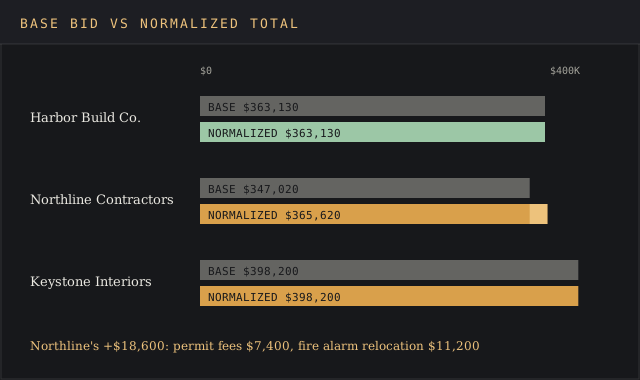
Normalization fixes that before any comparison. For each exclusion, the owner prices the missing scope at an allowance, usually the matching line from its own estimate, and adds it to that bid. The Normalization tab logs one row per exclusion and runs a SUMIF per bidder, so the adjusted total sits next to the original with the audit trail intact.
The devil's in the details. Exclusions hide in cover letters, qualification lists and footnotes on the bid form, so read every page of the various bids to identify each one and log it before totals get compared. Owners without an in-house estimator can build cost estimates for each allowance, benchmarking unit prices and labor costs with the methods in our pricing intelligence guide.
Additive and deductive alternates get their own columns, the layout Downtobid's template uses. An alternate is an optional price, such as an upgraded floor finish. It stays out of the base bid total, so nobody compares one bidder's base price against another's base-plus-alternate.
Other costs that sit outside the bid form, such as the owner's own design fees or furniture, stay out of the comparison too. Those costs are the same for all bids and change nothing in the rank.
Pass/fail gates come before any scoring
Some project requirements aren't worth points in a bid comparison; a bid meets them or it's out. PMWorld 360's bid evaluation matrix template says to "Use mandatory gates before weighted scoring so noncompliant bids are identified clearly," and adds that "A pass/fail requirement should not be diluted by high scores elsewhere."
The Project & Bidders tab carries four gates that all bids must clear. The first three come from the invitation-to-bid checks Procore lists; the license check is the template's own addition:
- Bid bond received with the bid
- Insurance certificate covering general liability and workers' compensation
- Every addendum acknowledged on the bid form
- Contractor license on file for the project location
One "No" turns that bidder's gate result to FAIL, and the Scoring tab prints EXCLUDED in place of a weighted total. Procore's own example shows why the order matters: three bids came in at similar prices, and the bidder that submitted all the required paperwork ranked first.
Risk flags that don't disqualify bids belong in the scoring. Downtobid names two risks worth surfacing in submitted bids, heavy reliance on subcontractors and limited insurance coverage. For a project whose risks need more than one score, a risk assessment matrix rates each on likelihood and impact.
Weighted scoring for data driven decisions
All bids that pass the gates get scored on four criteria, each on a 1 to 5 scale. Weights sum to 100%, and a check cell on the Scoring tab turns red if they don't.
| Criterion | Default weight | How the score is set |
|---|---|---|
| Price (normalized total) | 40% | Formula: 5 × lowest normalized total ÷ this bidder's normalized total |
| Schedule | 25% | Formula: 5 × shortest proposed duration ÷ this bidder's duration |
| Relevant experience | 20% | Evaluator, 1 to 5: comparable projects in the last five years, references checked |
| Terms & risk | 15% | Evaluator, 1 to 5: payment terms, retainage, deposit requested, subcontractor reliance, insurance limits |
Price and schedule run on formulas, so the two criteria evaluators argue about most can't be nudged by hand. Schedule matters because schedule delays carry costs: delivery timelines slipping by weeks keep a business paying rent on the old space. The weights are the owner's call, and that call is set in stone before the first of the bids is opened.
PMWorld 360 is blunt on this: "Do not change weights after seeing supplier responses unless governance requires a documented reset." Federal buyers face the same choice in regulation. Under sealed bidding, FAR 14.408-1 awards to the responsible bidder whose conforming bid is most advantageous "considering only price and the price-related factors" in the invitation.
The FAR 15.101-1 tradeoff process "allows the Government to accept other than the lowest priced proposal." The lowest price technically acceptable route in FAR 15.101-2 goes the other way: "Tradeoffs are not permitted." Public owners who buy by the book under either rule will find more in our public sector market intelligence guide.
Set price at 100% and this spreadsheet picks the lowest price. Set it at 40% and it picks the best value, the bid with the highest total value across all four criteria. Choose on purpose, and write the weights into the bid documents so everyone preparing bids knows the rules.
How to compare bids, step by step
The bidding process runs in seven steps, and the spreadsheet's tabs follow the same order:
- Create the bid form first. Write the line items, units and quantities into the Bid Tab before the invitation goes out, and send every bidder that form so the bid information comes back in one layout and everyone is on the same page.
- Enter the project name, location, bid due date and addenda count on the Project & Bidders tab.
- Log the bids on arrival: submission date, proposed schedule in weeks and the four gate answers.
- Type each bidder's unit price data into the Bid Tab. Extended prices and base bid totals calculate, and the lowest total turns green.
- List every exclusion found in the bids on the Normalization tab, with the owner's allowance.
- Score the bids that passed on experience and terms on the Scoring tab; the weighted total and rank fill in.
- Paste the Scoring tab's chart into the award memo, with one sentence per bidder on why it ranked where it did, so the decision making process is on paper.
Bid leveling for subcontractor trades follows the same steps at a finer grain. Procore draws the line by user: owners use bid tabulation to evaluate bids from general contractors, and general contractors level specialty trade bids in a larger, more detailed spreadsheet.
Worked example: three bids on a 9,000 sq ft construction project
The downloaded file comes filled in with this scenario. A regional distributor is fitting out 9,000 sq ft of office space inside its warehouse, a mid-size construction job, with an owner's estimate of $378,370 across 11 bid lines. Three general contractors submitted bids on the same form. Company names and figures are illustrative, built to show the mechanics.
All three bids pass the gates. On base price, Northline Contractors comes in $16,110 under the next bidder, and at 8.3% below the owner's estimate it's the bid that deserves the closest read. Northline excluded two lines: permit fees and fire alarm device relocation. That's a red flag: identify what the low price leaves out and ask for a written clarification.
| Bidder | Base bid | Exclusions priced back in | Normalized total | Gap to lowest |
|---|---|---|---|---|
| Harbor Build Co. | $363,130 | $0 | $363,130 | Lowest |
| Northline Contractors | $347,020 | $18,600 (permits $7,400, fire alarm relocation $11,200) | $365,620 | +$2,490 (0.7%) |
| Keystone Interiors | $398,200 | $0 | $398,200 | +$35,070 (9.7%) |
Priced at the owner's allowances, the two exclusions move Northline from lowest to second, $2,490 behind Harbor Build Co. The saving on the base bid was missing scope. Then the scoring:
| Criterion | Weight | Harbor | Northline | Keystone |
|---|---|---|---|---|
| Price | 40% | 5.00 | 4.97 | 4.56 |
| Schedule | 25% | 3.93 (14 weeks) | 4.58 (12 weeks) | 5.00 (11 weeks) |
| Relevant experience | 20% | 3 | 4 | 5 |
| Terms & risk | 15% | 4 | 3 | 4 |
| Weighted total | 100% | 4.18 | 4.38 | 4.67 |
| Rank | 3 | 2 | 1 |
Keystone Interiors ranks first at 4.67 with the highest normalized total, $35,070 above Harbor. Its 11-week schedule, four comparable fit-outs in five years, and acceptance of 10% retainage on net-30 payment terms outscore a 9.7% price premium at a 40% price weight. Northline asked for a 20% deposit on signing, which cost it a point on terms.

Run the same bids with price at 100% and Harbor wins outright. Both results follow from the inputs; the weights decide which bidder counts as the right contractor, which is why they get set before bids open.
An owner who bites the bullet on the $35,070 buys a schedule three weeks shorter than Harbor's 14. Owners setting the estimate in the first place can track material costs across the construction industry with the sources in our construction market intelligence guide.
How to customize the template for other projects
The construction rows in the bid comparison template are a starting point. To create a bid comparison sheet for a different job, customize three things and leave the formulas alone:
- Line items. Replace the 11 construction lines with the scope of the new job: license tiers and implementation days for software, or routes and rates for a logistics contract.
- Gates. Swap the bond and license checks for whatever the new bid documents demand, such as a security questionnaire for an IT vendor.
- Criteria. Rename experience and terms to fit the business, keeping the weights at 100%.
Teams running several bid rounds a year can create one master copy per category of spend. Those who need to compare specific aspects across past awards, such as how often the cheapest of the bids excluded permits, can stack the Normalization tabs into one log. Customize a copy per category and the data from one round of bids lines up with the next.
Common bid comparison mistakes
Most errors in a construction bid comparison come from comparing totals that measure different things. Five turn up again and again:
- Awarding on the lowest bid before normalizing. Northline's $16,110 lead in the example was $18,600 of scope costs it left out.
- Changing weights after opening the bids, which turns the score into a justification for a pick already made.
- Scoring compliance. A missing bid bond is a gate FAIL; scoring it a 2 out of 5 lets a strong price buy back a missing requirement.
- Comparing bids where one bidder's base bid includes an alternate and another's doesn't.
- Retyping totals by hand between tabs. The template links every total by formula, which removes the transcription errors a copied number brings.
Each fix is structural. Project management teams that reuse the same file on specific projects across a year end up with an audit trail for every award: who bid, what each bidder excluded, which weights applied, and the bid details behind each score.
Excel or Google Sheets for bid management
Either one handles a single award with three to five bids. A guide from Elyx AI builds a bid comparison spreadsheet from headers such as Vendor Name, Unit Price, Quantity, Total Cost, Delivery Time and Payment Terms, then highlights the lowest bid with a conditional formatting rule. This template uses the same mechanics to create each total:
- Extended price (Bid Tab, I7):
=IF(H7="","",$E7*H7) - Base bid total (Bid Tab, I18):
=IF(COUNT(H7:H17)=0,"",SUM(I7:I17)) - Gate result (Project & Bidders, B21):
=IF(B12="","",IF(COUNTIF(B17:B20,"No")=0,"PASS","FAIL")) - Normalized total (Normalization, D18):
=IF(OR(A18="",B18=""),"",B18+C18) - Price score (Scoring, C6):
=IF(C16="","",5*MIN($C$16:$G$16)/C16) - Weighted total (Scoring, C12):
=IF(C11="","",IF(C11<>"PASS","EXCLUDED",SUMPRODUCT($B$6:$B$9,C6:C9))) - Rank (Scoring, C13):
=IF(ISNUMBER(C12),RANK(C12,$C$12:$G$12),"")
Google Sheets wins when three evaluators enter score data at once from different offices. Excel wins offline, on a job site with no signal. Both let you customize the line items without touching a formula. Conditional formatting is a great tool for one job in both: making the lowest total impossible to miss.
When awards stack up week after week under tight deadlines, a spreadsheet starts to drop the ball on version control and bidder messages, and project management tools start to earn their place. That's the point where dedicated bid management software, or one of the tools in our AI procurement software ranking, earns its subscription.
FAQ
How do I make a bid sheet for construction?
List the construction scope as line items with a description, unit and quantity, send that bid form to every contractor, and collect their bids as unit pricing against it. Add rows for permits and general conditions so nobody can leave them out silently, then total each column. The Bid Tab in this template is that sheet with 11 lines filled in.
How do you make a comparison sheet in Excel?
To create one, put the options in columns and the comparison points in rows, keep units identical down each row, and total with SUM. Add a conditional formatting rule built on MIN to highlight the lowest value, and a SUMPRODUCT over a weights column if non-price criteria count. The bid comparison template on this page has all three built in.
Is there a free Excel template for cost comparisons?
Yes. The bid comparison template on this page is a free XLSX you can access with no email gate. Its Bid Tab works as a plain cost comparison spreadsheet when only price matters: set the price weight to 100% and the other three weights to 0%.
What's the difference between bid tabulation and bid leveling?
Procore separates them by user. Owners use bid tabulation to compare general contractors' bids; general contractors use bid leveling to compare specialty trade bids in a larger, more detailed sheet. Both rely on identical scope rows and normalized totals.
Does the lowest bid have to win?
Only when the rules say so. Federal sealed bidding under FAR 14.408-1 awards on price and price-related factors alone, while the FAR 15.101-1 tradeoff process lets an agency accept a higher price for better non-price factors. Private owners choose their own rule, and the price weight is where that choice gets written down.
Where can I find free construction Excel templates?
Procore and Smartsheet both publish free bid tab files, and Smartsheet's set includes a bid tabulation template with an engineer's estimate column. The file on this page adds normalization, pass/fail gates and weighted scoring in linked tabs.
Bottom line
Reach for this bid comparison template when three or more bids are in hand for one defined scope and someone has to sign an award memo. Fill the gates, price the exclusions and set the weights before opening anything, and the rank row gives decision makers a result they can trace back line by line.
It's the wrong file before the bids exist or after work starts. Contractors pricing a job want an estimate template, and a supplier already delivering gets scored on the vendor scorecard.
When the decision still on the table is the project itself, a risk-benefit analysis template fits better than a bid tab. Bidders on the losing end of this spreadsheet can log the result in a win-loss analysis template.