TOWS Analysis Template
 By Jan Suski. I go deep on every review, checking every number against its source and digging up details other coverage misses, a habit from six years of SEO and link building for tech companies. Bylines at Brand24 and Senuto. How the scoring works.
Get the TOWS analysis template
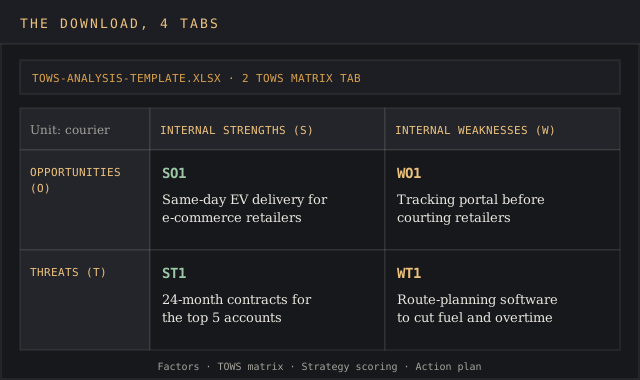
An Excel workbook that lists your strengths, weaknesses, opportunities and threats, crosses them in a 3x3 TOWS matrix, scores each strategy on impact and feasibility, and ends on an action plan with owners and dates.
Download XLSXA TOWS analysis template turns the four lists from a SWOT analysis into strategies. It pairs each external opportunity and threat with the internal strengths and weaknesses that bear on it, and each pairing produces one action a team can own.
The grid is Heinz Weihrich's. He published the TOWS matrix in Long Range Planning in April 1982, and the free Excel file below keeps his four strategy cells, adds a scoring tab, and ends on an action plan with owners and dates.
This page covers what a TOWS matrix is, how SWOT and TOWS differ, the four strategy types, a step-by-step fill-in, a worked example for a 40-vehicle courier, and the mistakes that leave the grid unused. It's written for founders, strategy leads and marketing managers who already hold a SWOT analysis and need a plan out of it, the step in strategic planning where most free templates stop.
Download the free TOWS analysis template
Download the TOWS analysis template (XLSX)Four tabs: the factor list, the 3x3 TOWS matrix, strategy scoring with a Do now, Plan or Park verdict, and an action plan. The courier example ships in italic.
The workbook opens in Excel, Google Sheets and LibreOffice Calc. The scoring formulas are plain multiplication and a nested IF, so nothing breaks on import, and Sheets users can share one copy with the whole group.
What a TOWS matrix is, and where it came from
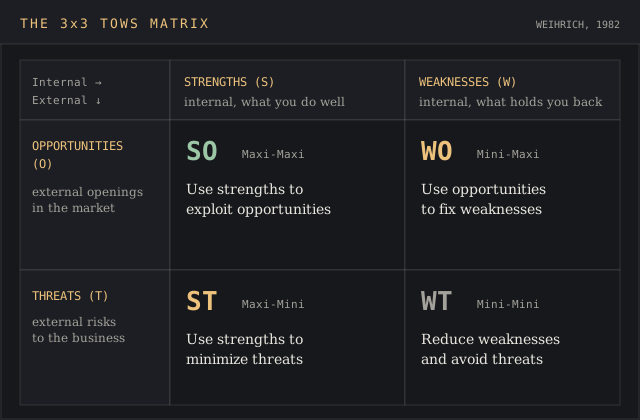
A TOWS matrix is a 3x3 grid. The top row holds internal strengths and internal weaknesses, the left column holds external opportunities and external threats, and the four cells where they cross hold strategies. The top-left corner names the unit being analysed.
Weihrich set it out in "The TOWS Matrix: A Tool for Situational Analysis", Long Range Planning 15(2), pages 54 to 66. The paper's aim was a structured method for matching external threats and opportunities with internal weaknesses and strengths, so an organisation's strategy rests on named relationships and a clear objective. Every TOWS matrix template since, including this one, copies that layout, and the technique hasn't changed in four decades.
SWOT is older. Richard Puyt, Finn Birger Lie and Celeste Wilderom traced it in a 2023 Long Range Planning paper to Robert Franklin Stewart's SOFT approach at the Stanford Research Institute, where every manager wrote down 8 to 10 planning issues for their unit.
SOFT became SWOT in 1967. Weihrich added the matrix 15 years later, and it's been the go-to strategy planning grid ever since. The two now travel together as one technique: SWOT analysis to list, TOWS to decide.
SWOT and TOWS: same four lists, different output
SWOT analysis and TOWS analysis use identical inputs and the same four elements. The difference is the order of work and what comes out the far end, which is why this template treats the TOWS technique as the second half of one method.
| SWOT analysis | TOWS analysis | |
|---|---|---|
| Starts with | Internal strengths and weaknesses | External opportunities and threats |
| Output | Four lists of factors | Four sets of strategies, each tied to named factors |
| Layout | 2x2 grid | 3x3 grid with strategy cells |
| Question it answers | What's true about us and our market right now? | What do we do about it, and who owns it? |
| Typical failure | Lists nobody uses afterward | Strategies with no owner or deadline |
The SWOT failure is documented. Terry Hill and Roy Westbrook reviewed 50 companies for a 1997 Long Range Planning paper; more than 20 had run a SWOT, and they found no-one used the outputs later in the strategy process. They titled the paper "SWOT Analysis: It's Time for a Product Recall".
A SWOT analysis is a powerful tool for listing internal and external factors and a weak one for deciding. TOWS closes that gap by forcing a strategy into every cell, so the four lists can't end up on the back burner. Mind Tools frames the same split: SWOT emphasises the internal environment, TOWS makes you start with the external factors and the focus stays on what the business can act on.
The four TOWS strategies
Each cell of the TOWS matrix crosses one internal row with one external column. Weihrich gave each a name, and the names still describe the move.
| Cell | Weihrich's name | Pairs | The strategy |
|---|---|---|---|
| SO | Maxi-Maxi | Strengths with opportunities | Use strengths to exploit opportunities |
| ST | Maxi-Mini | Strengths with threats | Use strengths to minimize threats |
| WO | Mini-Maxi | Weaknesses with opportunities | Use opportunities to fix weaknesses |
| WT | Mini-Mini | Weaknesses with threats | Reduce weaknesses and avoid threats |
SO: use strengths to exploit opportunities
The offensive cell. A company that's good at something the market has started asking for should push there first, since the competitive advantage is already paid for and the demand is already there.
ST: use strengths to minimize threats
A strength can block external threats before they land. A firm with a 98% on-time record can turn that competitive advantage into longer contracts before a cheaper rival calls its customers.
WO: use opportunities to fix weaknesses
An opening in the market is often the reason to fix an internal gap now. The opportunity funds the fix, sets its deadline and turns a disadvantage into a project with a business case.
WT: reduce weaknesses and avoid threats
The defensive cell. Mind Tools calls WT options defensive strategies that protect against loss but shouldn't be relied on to create success. Use it to fix current problems and stop the bleeding, then move resources back to SO.
The framework lets a team run offensive and defensive moves at the same time. Strategic decision-making gets easier when the SO and WT cells sit on one sheet: the board sees what it's betting on and what it's protecting in the same view.
What's in the TOWS matrix template
Four tabs, in the order you fill them. Each tab feeds the next, so a factor typed on tab one carries its ID into the matrix and the scoring sheet. The elements match Weihrich's grid; the scoring and action plan are this template's additions.
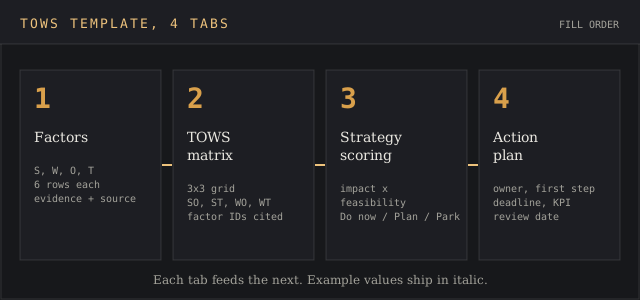
- Factors. One row per factor with an ID (S1, W2, O3, T1), the type, a one-line description, the evidence behind it, and its source. Room for 6 of each type.
- TOWS matrix. The 3x3 grid. Strengths and weaknesses pull automatically from the Factors tab; you write strategies into the four cells and cite the factor IDs each one uses.
- Strategy scoring. Each strategy gets an impact score and a feasibility score from 1 to 5. The sheet multiplies them and sorts the result into Do now (16 to 25), Plan (9 to 15) or Park (8 or less).
- Action plan. Do now and Plan strategies get an owner, a first action, a deadline, a KPI and a review date.
The scoring tab follows the last of Mind Tools' four steps, which tells you to evaluate options by benefit and by fit with the organisation's mission. Impact stands in for benefit and feasibility for fit, because a number per cell is easier to argue about in a review meeting than an adjective. The complexity stays low: two scores, one product, three bands.
How to do a TOWS analysis, step by step
List the external factors first. Opportunities and threats come from the market, so pull them from a PEST scan, a competitor analysis and customer requests. Write each as a measurable statement with a source.
List the internal factors. Strengths and weaknesses describe the current state of the business: numbers from your own books, delivery logs, churn reports and staff turnover. Cap each list at five or six.
Cross every pair. For each opportunity, read down the strengths and ask which ones let you grab it. Repeat for threats, then for weaknesses. Not every pair produces an idea, and that's fine; strengths with nothing to pair against are still worth knowing.
Write one strategy per useful pair. Create a strategy line, start it with a verb and cite the factor IDs, for example "Launch same-day EV delivery for regional retailers (S2, S3, O1)".
Score and sort. Rate impact and feasibility from 1 to 5, counting the resources each idea needs. The template does the multiplication and the sorting.
Assign owners and dates. A strategy without a name next to it reverts to a list. One owner per row, one first action, one deadline.
The matrix is an effective tool only when the people who own the budgets fill it in. Run it with the team that will carry out the work. Stewart's original SOFT process at SRI asked every manager to submit planning issues for their own unit, and a brainstorm with the people who own the budgets beats a deck written by one analyst.
TOWS analysis example: a 40-vehicle regional courier
The example in the file is a regional courier company with 40 vans, 12 of them electric, running same-day routes in three metro areas. The owner has a SWOT from last quarter and wants a plan for the next 12 months. The figures are the scenario's own, chosen so every cell in the template has a real value you can use to create a first draft of your own.
| ID | Factor | Evidence |
|---|---|---|
| S1 | 98.2% on-time rate | 61,000 deliveries in the last 12 months |
| S2 | Same-day coverage in 3 metro areas | Route map, current contracts |
| S3 | 12 of 40 vans are electric | Fleet register |
| W1 | No customer-facing tracking | Customers phone dispatch for status |
| W2 | 58% of revenue from 5 accounts | Revenue by account report |
| W3 | Dispatch planned in spreadsheets | 2 planners, no routing software |
| O1 | Regional e-commerce retailers want same-day delivery | 14 inbound requests in Q3 |
| O2 | A national carrier dropped regional B2B routes | Three of its former customers called in October |
| T1 | Fuel spend up 11% year on year | Fuel card statements |
| T2 | Gig-delivery apps quoting 20% below our rates | Lost two quotes in Q3 |
| T3 | Driver turnover | 9 of 46 drivers left in 12 months |
Crossing those 11 factors gave five strategies worth scoring, and each one names the points it draws on. The filled matrix below is the second tab of the download, and the scores are the third.
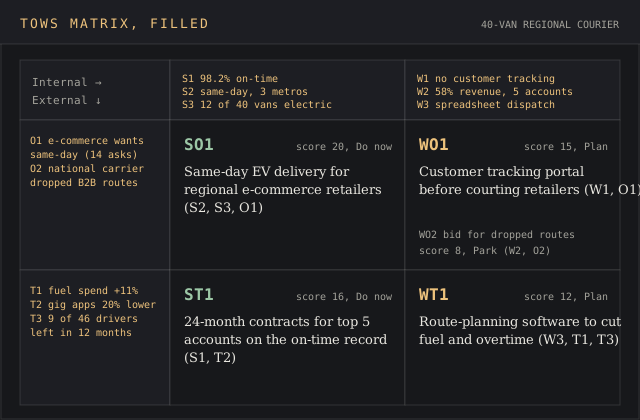
| Cell | Strategy | Factors | Impact | Feasibility | Score | Priority |
|---|---|---|---|---|---|---|
| SO | Launch same-day EV delivery for regional e-commerce retailers | S2, S3, O1 | 5 | 4 | 20 | Do now |
| ST | Offer the top 5 accounts 24-month contracts backed by the on-time record | S1, T2 | 4 | 4 | 16 | Do now |
| WO | Build a customer tracking portal before courting e-commerce retailers | W1, O1 | 5 | 3 | 15 | Plan |
| WT | Replace spreadsheet dispatch with route-planning software to cut fuel and overtime | W3, T1, T3 | 3 | 4 | 12 | Plan |
| WO | Bid for the routes the national carrier dropped | W2, O2 | 4 | 2 | 8 | Park |
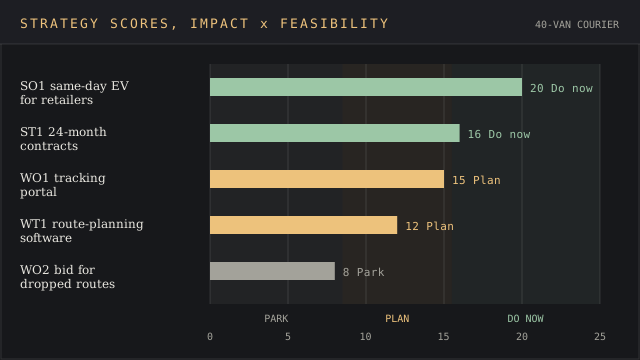
The ST contract play scores 16 and lands in Do now with the SO launch. That's the point of the grid: the owner went in wanting e-commerce growth and came out with a defensive contract move that protects 58% of revenue first, which kills two birds with one stone against T2 and W2.
The WO tracking portal scores 15, one point under the line. It still gets a Q1 start date, since the SO launch depends on it; retailers expect tracking from day one. The bid for the dropped routes is parked at 8 because chasing them would put even more eggs in the five-account basket.
Internal and external factors: where the inputs come from
The framework is only as good as its inputs, and garbage in, garbage out applies to every cell. The template's evidence column exists because a factor without a source is an opinion, and an opinion in a TOWS matrix becomes a strategy nobody can defend.
External opportunities and threats come from outside the business venture, and they're the part of the analysis users most often fill from memory. A PEST analysis covers political, economic, social and technological shifts; a competitive analysis template covers rival pricing and positioning; inbound requests and lost quotes in the CRM cover demand.
The University of Hertfordshire's TOWS guide adds Porter's Five Forces for the external review and notes the unit can be an entire organisation, a department, a team, a process or a campaign.
Internal strengths and internal weaknesses come from the internal environment: finance, operations, staff and product data. Write them in numbers where you can, the same way you'd write strengths for a new business venture's pitch to a bank. "Good service" is a SWOT point; "98.2% on-time across 61,000 deliveries" is a strength you can build a contract on.
Feeding a competitor analysis into the matrix
Rivals show up in the threats column most often, and a thin competitor analysis is where most TOWS matrices go wrong, since an organisation's view of its rivals is usually a year out of date. "Competitor X is cheaper" needs the price gap, the accounts at risk and the date you saw it.
A competitor battlecard gives each rival a one-page record of pricing, claims and weak spots. Copy the two or three lines that hit your revenue into the factor list, and leave the rest on the card. A rival's advantage on price is a threat; its disadvantage on coverage is your opportunity.
Common TOWS mistakes
- Starting inside. Weihrich put threats and opportunities first in the name for a reason: the focus belongs on the market. Strengths listed before the market is mapped tend to describe what the team is proud of, and the reasons customers pay get skipped.
- Too many factors. Ten of each type gives 100 pairings per cell and 400 across the grid. Five or six per list keeps the cross-matching to an afternoon.
- Strategies with no factor IDs. If a strategy cites no strength, weakness, opportunity or threat, it came from somewhere else and belongs in a different meeting.
- Filling all four cells evenly. Some quadrants will hold one idea and some four. Forcing symmetry adds filler, and a business with no real WO play shouldn't invent one.
- No owner, no date. This is the Hill and Westbrook failure in a new grid. The action plan tab exists to stop it.
- Treating WT as the plan. Defensive moves protect the downside. A matrix where every Do now row sits in WT describes a company in retreat.
Excel, Word, PowerPoint or diagram software
A spreadsheet is the right home for TOWS once the strategies need scoring, and it's the format most business templates for strategy work ship in. Free SWOT analysis templates in Word or PowerPoint stop at the four boxes, and SWOT diagrams look good in a presentation but can't multiply impact by feasibility.
- Excel or Google Sheets. This template. Formulas, sorting, an action plan you can filter by owner, and a layout you can paste into a presentation.
- Word. Fine for a one-off. Insert a 3x3 table, label the headers and type the strategies in. The site's SWOT analysis template is a DOCX with a TOWS page built in.
- PowerPoint. SmartArt's Basic Matrix layout draws a 2x2 grid; add a row and a column of text boxes for the 3x3 version. Build the analysis in a spreadsheet and use the slide to present the result.
- Diagram software. ConceptDraw's SWOT library carries 16 SWOT and TOWS matrix templates and exports to PowerPoint, PDF and image files. Useful when the matrix goes into a printed strategy document; the software runs on a paid licence after a free trial.
Most free SWOT analysis templates online are layout-only. That's fine for a workshop handout and thin for a plan, since nothing in a blank 2x2 tells you which idea to fund first. Templates are a dime a dozen; scored templates with owners aren't, and the scoring is what lets a company defend its choice.
FAQ
What is TOWS and SWOT analysis?
Both use strengths, weaknesses, opportunities and threats, and both are planning techniques for a business or an organisation. SWOT lists them; TOWS pairs them in a 3x3 matrix to produce SO, ST, WO and WT strategies. TOWS starts with the external factors and ends with actions.
What is the meaning of TOWS matrix?
TOWS is SWOT spelled backward, with threats and opportunities first. Heinz Weihrich introduced the TOWS matrix in 1982 as a tool for situational analysis that matches external opportunities and threats to internal strengths and weaknesses.
How to do a SWOT matrix?
Draw a 2x2 grid, label it strengths, weaknesses, opportunities and threats, and write three to six evidence-backed points in each box. To turn it into a TOWS matrix, add the four strategy cells and cross every pair.
What are 5 examples of threats in SWOT analysis?
A cheaper competitor entering your market, rising input costs such as fuel or cloud hosting, a regulation that adds compliance work, the loss of a supplier, and staff turnover in a hard-to-hire role. The courier example uses three: fuel spend up 11%, gig apps quoting 20% lower, and 9 of 46 drivers gone in a year.
How to build a SWOT analysis in Word?
Insert a 2x2 table, shade the four cells, and type a heading into each. For TOWS, use a 3x3 table and leave the top-left cell for the unit's name. The SWOT template on this site is a ready-made Word file, and other SWOT analysis templates in the hub cover personal and team versions.
Does PowerPoint have a SWOT analysis template?
PowerPoint's SmartArt gallery includes matrix layouts that draw a four-box grid in two clicks. It has no scoring or action plan, so build the analysis in a spreadsheet and paste the result onto a slide.
Bottom line
Reach for the TOWS template when a SWOT analysis already exists and the next meeting has to end with decisions. It turns 15 to 20 factors into a handful of scored strategies with owners, which is the step Hill and Westbrook found most companies skipped. The understanding you need to achieve with it is simple: what you'll do in the next 12 months and who does it, with a review date in the future.
If the four lists don't exist yet, start with the SWOT analysis template and come back. If the question is which market to enter, a market analysis template fits better, and if it's how to grow an existing product, the Ansoff matrix template does that job with a different grid.