
The numbers Per-seat list prices, checked 8 September 2026
Every seat multiplies the plan rate, so the sticker price is the smallest number in the quote.
Adding two Advanced seats mid-year costs more than a full year of one Standard seat.
Social Listening, Premium Analytics and Employee Advocacy price separately, so two teams on the same plan run different stacks.
Count the seats you'll be paying for in month twelve, then price each add-on as its own line before signing.
Social teams price seats before every renewal. Send the vendor and the team size and I'll source a version you own.
This Sprout Social pricing breakdown covers every plan, the paid add-on modules, the billing mechanics, and the negotiation levers that move the number. The short version: the Essentials plan starts at $79 per seat/month, the Standard plan costs $199 per seat/month, the Professional plan $299, the Advanced plan $399, and the Enterprise plan carries custom pricing, so the Sprout Social cost depends on who needs access and which tiers they need and add-ons.
Sprout Social pricing at a glance
Sprout Social pricing is structured on a per-seat per-month model across five tiers: Essentials, Standard, Professional, Advanced and Enterprise. Every paid seat multiplies the plan price, so a three-person team on Standard pays $597 per month before any add-ons.
Annual billing cuts the per-seat rate, and Sprout Social offers a 30-day free trial across the self-serve plans. There's no free plan beyond that trial.
TrustRadius's synthesis of 33 verified reviews published in the last 18 months found 64% of reviewers naming post scheduling across multiple platforms as the standout, with reporting and analytics close behind for tracking campaign effectiveness. The same synthesis found 30% of reviewers calling the pricing structure expensive, pointing at add-ons and multi year contracts as the reason.
Read between the lines of that complaint, and it lines up with the add-on structure below: Social Listening and Premium Analytics both carry a price beyond the seat rate, so the plan page alone doesn't show the full bill.
| Plan | Price | Profiles | Standout features |
|---|---|---|---|
| Essentials | $79 per seat/month annually, $99 monthly | Up to 5 | Basic publishing |
| Standard | $199 per seat/month | 5 | Smart inbox, social reporting |
| Professional | $299 per seat/month | Unlimited | Competitive reports, engagement metrics |
| Advanced | $399 per seat/month | Unlimited | Sentiment analysis, chatbots, API, spike alerts |
| Enterprise | Custom pricing | Custom | White glove onboarding, account management |
Copy these lines into an email, fill them in and send. I reply with scope and a price within 2 to 3 business days.
Open the email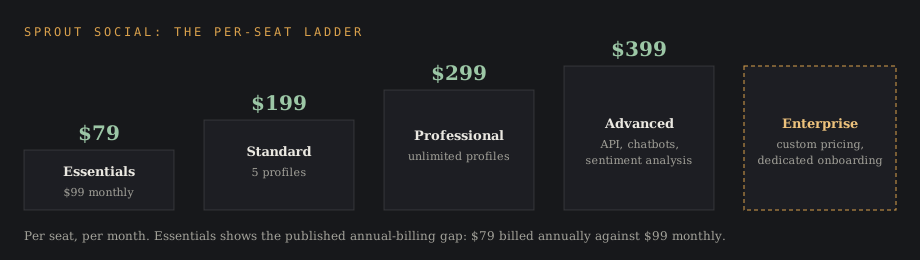
The Sprout Social plans
Essentials plan
The Essentials plan is the entry point at $79 per seat per month billed annually, or $99 billed monthly, allowing up to 5 social media profiles across the major social media platforms. It suits small teams focused on basic publishing across multiple social networks, and Sprout's own plan guide pitches it at solo practitioners who want a platform "without a steep learning curve or a price tag that doesn't fit your margins."
That $79 against $99 gap is the clearest published example of what annual billing saves: about 20% on this tier, which is worth checking against the quote on any plan.
Standard plan
The Standard plan costs $199 per user per month and allows management of five social profiles. It covers the core social media management tool set: publishing, a smart inbox for messages across networks, keyword and location monitoring, and baseline social reporting that supports basic brand monitoring and community management for a small team.
For small teams managing one brand, this is the practical tier. The five-profile cap is the constraint that pushes teams managing multiple brands up a tier, and it's par for the course that the same cap trips up any team that grows faster than its plan.
Professional plan
Sprout Social's Professional plan costs $299 per user per month and offers unlimited social profiles. The professional plan adds competitive reports and deeper engagement metrics on top of the Standard feature set, turning raw numbers into actionable insights a manager can bring to a Monday meeting.
Unlimited social profiles is the headline: agencies managing multiple brands and a growing agency managing multiple client accounts both stop counting connections here. The competitive reports also feed competitive intelligence work, benchmarking follower growth and engagement against rival accounts and giving a team the competitive context leadership asks for before approving next quarter's budget.
Advanced plan
The Advanced plan costs $399 per user per month and includes API integrations and chatbots. The advanced tier layers on message spike alerts, sentiment analysis in the inbox, customer care automation, and external approval workflows for approvers outside the platform.
Higher tier plans provide advanced analytics and workflow management capabilities, and the advanced tier is where custom workflows, custom dashboards and customer care tools reach their full depth. Teams running social as a support channel usually land here, where raising the bar on response time shows up directly in the renewal conversation.
Enterprise plan
The Enterprise plan provides custom pricing and white glove onboarding, the label Sprout uses on its own pricing page for the dedicated implementation team it assigns to large enterprises. Pricing requires sales contact, and the conversation typically covers dedicated account management, dedicated support, custom integrations into the wider tech stack, and consulting services pitched on the strategic guidance a named account specialist brings to the rollout.
Billing: annual against monthly
Sprout quotes each plan per user per month, and the annual commitment carries a lower per-seat rate than month-to-month. Essentials is the tier where both numbers are published, at $79 annually against $99 monthly, and Sprout's own FAQ calls annual billing "the more cost-effective option for most teams" once a trial confirms the platform is a keeper.
The 30-day free trial runs on the self-serve plans, so a team can test the smart inbox and reporting before committing to annual billing. Teams that expect to switch plans mid-year should start monthly, confirm the tier, then move to annual.
What per-seat pricing does to the annual cost
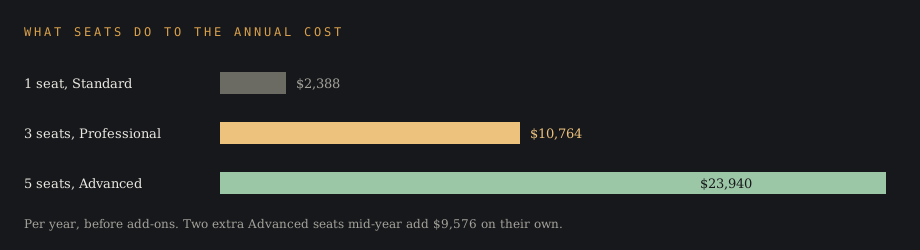
Per-user pricing means costs can scale rapidly as the team grows. One seat on Standard runs $2,388 a year; three seats on the professional plan run $10,764 a year; five seats on the advanced tier run $23,940 a year, all before add-ons.
Want a seat-scaling chart like this for your team sizes? Send the vendor and the headcounts.
Email a briefThat per seat multiplication is the single biggest driver of Sprout Social cost. A team that adds two seats mid-year on the Advanced plan has added $9,576 to the annual cost without touching its plan or add-ons, and at that rate the seat count can cost an arm and a leg before anyone notices the add-ons.
Paid add-on modules
Premium tools like Social Listening and Premium Analytics require additional purchases on top of the per-seat price. The separate add ons structure means the marketed feature list and the delivered feature list can differ at the same tier, and a buyer who skips this section is reading half the contract.
Cutting corners on this section to land a lower quote pushes the cost into a change order later, once Social Listening or Premium Analytics turns out to be required after all.
Social Listening
Social listening is the module that monitors brand mentions, topics and sentiment analysis across social media beyond the accounts a team owns. It's priced separately, requires a sales conversation, and is the add-on serious research teams budget for first.
Premium Analytics
Premium Analytics extends social reporting with custom dashboards, advanced analytics and deeper comparative data, and Sprout's own feature page pitches it on proving ROI "in interactive charts and graphs" a brand manager can hand straight to finance. Like social listening, it's a paid add-on, so two companies on the same Sprout Social plan can run different stacks.
Employee Advocacy
The employee advocacy module pushes approved content through employee networks, turning staff accounts into a distribution channel. Employee advocacy sells as its own line item, and it's the add-on marketing teams weigh against paid reach.
Key features by tier
The key features ladder up: basic publishing at Essentials, the smart inbox and social reporting at Standard, competitive reports and unlimited social profiles at Professional, and message spike alerts, sentiment analysis, chatbots and API access at Advanced. Message approval workflows exist across tiers, but external approval workflows, the ones that loop in clients or legal without a paid seat, sit in the advanced tier.
Google Business Profile support sits alongside the major networks, which matters for local businesses managing reviews as part of social media management across multiple channels. The publishing and content management workflow (drafting, tagging, scheduling, approving) is where most of a team's day-to-day time goes.
Collaboration tools and approval workflows are the team productivity layer that lets multiple people work the same account without stepping on each other's drafts. A solo operator pays for them at every tier without needing them.
One TrustRadius reviewer at a comedy studio put a number on the ceiling: her team ran 55+ active social accounts and published 1,500 pieces of content a month through Sprout, with every direct message across every platform landing in one Smart Inbox. A PR agency reviewer described the same feature from the other side, using it to manage multiple clients' social media accounts under one login, with multiple people approving posts before they go out.
Can you use Sprout Social for free?
There's no free plan. The 30-day free trial is the only no-cost access, and getting Sprout Social for free beyond that window means winning it in an Enterprise negotiation as a concession, which is rare.
Hootsuite offers a free subscription option, which is the honest answer for teams that need a $0 social media management platform. The trade-off is depth: the free tools cover scheduling, and little of the inbox, listening or reporting work Sprout sells. A small business running two or three accounts pays full price for headroom it may never use.
Starting on Hootsuite's free tier gets the ball rolling on social publishing before a team has budget approved for anything paid, even though the ceiling arrives sooner than the seat-priced alternative.
Choosing a Sprout Social plan by scenario
A solo operator publishing across a handful of social media profiles should price Essentials first at $79 a seat, and only step up to Standard when the smart inbox and social reporting become the reason to log in. Team size is the fastest filter: one person rarely needs what a five-person desk needs.
A small team managing one brand with active audiences fits Standard until the inbox volume argues for sentiment analysis and automation. At that point the jump is usually straight to the advanced tier, and it's the moment to bite the bullet on the upgrade before a plan that's already too small starts costing more in missed messages than the higher seat rate would.
Teams managing multiple brands fit the professional plan, because unlimited social profiles remove the connection math and competitive reports cover the benchmarking work. The per user rate stings at $299, but profile-cap workarounds cost more in labor.
Agencies managing multiple brands fit Professional or Advanced depending on client approval needs. External approval workflows, the ones that let a client sign off without a paid seat, are the advanced tier feature that pays for itself first.
Support-heavy teams fit the advanced tier for customer care automation, chatbots and message spike alerts. Social as a service channel is a different job than social as a marketing channel, and the tooling gap between the tiers reflects it.
Making the free trial count
The 30-day free trial runs on the self-serve tiers, so start it on the plan above the one budgeted. Testing the advanced tier features for a month answers the upgrade question with usage data, no sales deck required, and a team can hit the ground running on day one of a live campaign.
Connect the real accounts, run the real approval workflows, and pull one real report before the window closes. A trial spent on demo content answers nothing, and the renewal conversation lands in 30 days either way.
Negotiating Sprout Social pricing
The published rates move more than the pricing page suggests. Negotiating multi-year terms often yields lower per-user pricing, and engaging early in negotiations, before a renewal deadline compresses the timeline, can secure better pricing.
Buyers who reference competitive quotes often land a better deal, so a Hootsuite or Sprinklr quote belongs in the folder even for a team set on Sprout. Bundling add-ons can lead to better pricing during negotiations, since social listening and premium analytics carry more margin room than seats. Anchoring the conversation to the budget approved internally keeps the ball in the buyer's court for the rest of the call.
Capping annual price increases can prevent unexpected costs at renewal. Enterprise buyers should put the cap in writing alongside professional services commitments, because uncapped renewals are where a manageable annual cost turns into a budget problem.
How Sprout Social compares on price
Sprout Social sits at the premium end of the social media management market. Zoho Social is cheaper than Sprout Social across the board, and Turrboo Team costs $59/month for 3 users on a flat rate, which is a different pricing philosophy aimed at small teams.
| Tool | Pricing model | Entry point |
|---|---|---|
| Sprout Social | Per seat/month | $79 per seat on Essentials |
| Hootsuite | Tiered, free option | Free subscription available |
| Zoho Social | Tiered | Cheaper than Sprout across the board |
| Turrboo | Flat rate | Team at $59/month for 3 users |
| Sprinklr | Enterprise, custom | Sales-led, founded 2009 |
- The tools and team sizes to compare
- Regions, years and segments
- Where it runs: blog, white-label, gated or lead magnet
- Whose byline goes on it
- Deadline
- 2,500+ words, human-written
- Every figure linked to its source
- Yours to publish, under your name or none
- Hosting here for +$200, with your sponsored links
Sprinklr is a top-tier enterprise platform founded in 2009, and it competes for the same Enterprise deals where custom pricing rules. Hootsuite competes across the middle of the market with its free subscription option at the bottom, and either one belongs on the shortlist of sprout social alternatives before a renewal conversation starts.
How Sprout Social compares beyond price is a feature question: the smart inbox, sentiment analysis and social listening depth are the case for the premium, and the per seat model is the case against it for growing teams. The wider category of social media management tools sits in our social listening tools ranking, with Brandwatch reviewed separately for teams weighing enterprise listening depth against Sprout's all-in-one approach.
Ironing out the details of what per-seat pricing includes at each tier matters more than the sticker price, since Turrboo's flat $59 rate and Sprout's $79 entry point aren't pricing the same feature set.
Is Sprout Social worth the investment?
For small teams focused on one brand, the Standard plan's $199 per seat/month buys a working social media management tool with room to grow, and the practical tier question is only about the five-profile cap. Teams that only publish should check if Essentials at $79 covers the job before paying for the inbox. For teams managing multiple brands, the professional plan's unlimited social profiles usually justify the step to $299.
Agencies managing multiple brands and support teams live in the advanced tier, where approval workflows, message spike alerts and customer care automation earn the $399 per seat/month. The teams that regret the purchase are usually the ones that bought the tier for one feature and paid for seats that use a tenth of it.
Delivered for your site and your byline. Hosting here is optional.
Sprout Social pricing FAQ
How much does Sprout Social cost?
Sprout Social pricing runs from $79 per seat per month on Essentials, through $199 on the Standard plan, $299 on the Professional plan and $399 on the Advanced plan, to custom pricing on the Enterprise plan. Annual billing carries a lower per-seat rate than monthly, and add-ons like social listening and premium analytics require separate purchases.
Can I use Sprout Social for free?
No. Sprout Social offers a 30-day free trial but no free plan. Hootsuite offers a free subscription option for teams that need a permanent $0 tier.
Is Sprout Social expensive?
Against the category, yes above the entry tier: Zoho Social is cheaper, and flat-rate tools like Turrboo undercut the per-user model for small teams. Against enterprise platforms like Sprinklr, Sprout's published rates read as mid-premium.
Is Sprout Social better than Hootsuite?
They split on depth against price. Sprout Social's features run deeper in the inbox, sentiment analysis and reporting; Hootsuite covers more price points, including free. A team choosing between them should trial both against one week of real workload.
What are the cons of Sprout Social?
The per-seat model scales cost quickly, the five-profile cap on Standard pushes multi-brand teams up a tier, and premium tools like Social Listening and Premium Analytics require additional purchases beyond the plan price. One TrustRadius reviewer flagged the social inbox itself as a cost center: a community manager missed comments and DMs because the inbox got complex to sort through.
Pricing for Enterprise requires sales contact, so budgeting takes a conversation, and advanced features that sound included often turn out to be the next tier up.
How much is a Sprout Social membership for a team?
Multiply the plan rate by seats: three users on Essentials run $237 per month, three on Standard $597, three on Professional $897, and three on Advanced $1,197, before any paid add on modules.
Do you have to pay for Sprout Social?
Yes, after the 30-day free trial ends. Every tier is paid, starting at $79 per seat per month on Essentials, and the trial requires picking a plan to test.
How much is Sprout per month?
Per seat: $79 on Essentials, $199 on Standard, $299 on Professional, $399 on Advanced. The monthly bill is that rate times the number of users, and annual billing lowers the per-seat rate.
How to get Sprout Social for free?
The 30-day free trial is the only route. Beyond that, the free options are competitors: Hootsuite offers a free subscription option, and Turrboo runs a free plan on a flat-rate model. Waiting until the trial runs down to the wire before connecting real accounts wastes the exact data that's supposed to settle the upgrade question.
Social media tools, agencies and procurement advisers use reports like this one in sales calls and seat planning.
A report on your topic for a blog page, gated content or a lead magnet.
Written for your client and published under their brand, with my name left off.
Your report on marketintelligencetools.com, with 2 to 3 CTAs carrying your sponsored links.
Default terms: the report is yours to publish, and I keep the right to republish it on this site behind a gate, outside Google's index.