folk CRM MCP review: one endpoint, 16 named tools, and a deals gate at $48
 By Jan Suski. I go deep on every review, checking every number against its source and digging up details other coverage misses, a habit from six years of SEO and link building for tech companies. Bylines at Surfer, Brand24, and Senuto. How the scoring works.
Best for
A small team already paying for folk Premium at $48 a member a month that wants Claude, ChatGPT or Cursor to search contacts, log calls and move deals without opening the CRM.
Not for
A Standard-plan team expecting its AI tools to manage deals, since custom objects and Deals sit behind Premium, or anyone who needs the CRM to react on its own when a reply lands.
What it costs
Nothing on top of a folk seat: $24 a member a month billed yearly on Standard, $48 on Premium and $80 and up on Enterprise, with a 14-day trial and no card.
- Endpoint
- https://mcp.folk.app/mcp, hosted by folk
- Sign-in
- OAuth on first use
- Documented clients
- 6: Claude Desktop, Claude Code, ChatGPT, Cursor, VS Code, Windsurf
- Permissions
- Same access as the connecting folk account
- Status
- Open beta since 1 July 2026 per the developer changelog; no general-availability date announced
- Standard
- $24 a member a month yearly, $30 monthly
- Premium
- $48 yearly, $60 monthly
- Enterprise
- From $80 yearly, $100 monthly
- Deals, REST API, Zapier
- Premium and up
- Trial
- 14 days on Premium features, no card
- Magic fields
- 2,000 a month Standard, 5,000 Premium
- Named tools
- 16 across folk’s MCP use-case articles
- REST API ceiling
- 600 requests a minute
- Workflow Assistant
- 1,500 a month Standard, 10,000 Premium
- Enrichment
- 500 a month Standard, 1,000 Premium
- Interaction sharing
- Last 30 on Standard, full history on Premium
- Research Assistant
- 200 runs a month on Standard and Premium
- Certification
- SOC 2 Type 1, pursuing Type 2
- Hosting
- AWS us-east-1, North Virginia
- G2 rating
- 4.5 out of 5 from 341 reviews
- Capterra rating
- 4.5 out of 5 from 46 reviews
- Customer claim
- 3,000+, 4,000+ and 5,000+ across three folk-written listings
Attio MCP
Not forA team whose leads come from LinkedIn and that wants one-click capture into the CRM before the MCP reads it.
Capsule CRM MCP
Not forA team that works in ChatGPT, VS Code or Windsurf; Capsule’s beta reaches Claude and Cursor only.
folk CRM MCP is folk’s hosted Model Context Protocol server, the connector that lets an AI assistant read and change the records inside a folk workspace. MCP itself is the open standard AI models use to call external tools; folk’s version turns plain-language requests into searches, record updates and pipeline moves.
Its status depends on which folk page you read. The developer changelog opened it as an “open beta” on July 1, 2026, and no later entry announces general availability. The July 9 product announcement and the pricing page carry no beta label at all and list the MCP as a standard feature on every plan. folk hasn’t settled the question, so this review treats it as a beta that any paying seat can use today.
This review covers what the server can reach for AI assistants, how the MCP connection works in each of the six AI clients folk documents, which folk plan unlocks which tools, where the connector falls short, and how it compares with the MCP servers from Attio, Capsule CRM and HubSpot. It sits alongside our full folk CRM review, which covers the base product.
The audience is narrow on purpose. folk’s focus is service businesses, agencies and founder-led sales teams, and the MCP matters most to a user who already lives in an AI chat window and treats the CRM as the record underneath its daily workflows.
Search for “folk MCP” today and much of what comes back was written by folk itself, including a “folk CRM MCP Review” signed by its own co-founder. This review checks those claims against folk’s own documentation, with every price verified on folk’s pages on September 23, 2026. This site earns a commission when a reader signs up for folk through the buttons on this page; each score above traces to a fact in the section it links to.
↑ FACT SHEETWhat the folk MCP server reads and writes
folk’s help center describes four jobs: searching contacts by person, company and group; creating and updating contacts, notes and custom fields from natural language; moving deals through pipelines; and generating relationship summaries and pipeline reports. Every one of them runs on the live workspace, so the CRM data an assistant quotes back is the same data a teammate sees in the app.
The tool names are spread across 13 use-case articles in folk’s MCP collection. Counted together, they name 16 tools: eight that read, such as search_notes and list_past_interactions, and eight that write, such as create_interaction and update_object.
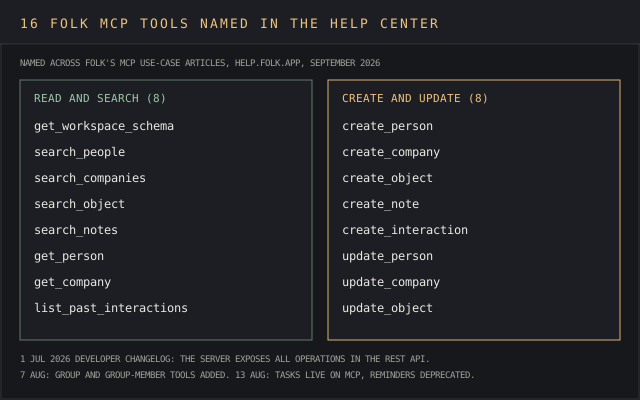
The developer changelog goes further than the help center. Its July 1 entry says the server “exposes all the operations already available in the REST API,” group and group-member tools arrived on August 7, and Tasks went live on MCP on August 13, when folk also deprecated reminders ahead of their removal on February 13, 2027. A team with automation built on Reminders has until then to move it to tasks created through the new endpoints.
A bulk request works the way folk’s bulk-update article describes: the agent finds matching records, resolves owners and group IDs, then applies the change to each record in sequence and reports what it skipped. Its example prompt reassigns every unowned deal in one group to a named rep, a job that takes tens of clicks in the app.
The deal article’s own example is a €40k deal created at the Qualified stage, linked to its company and contacts in the same request.
Read access is where the MCP earns its keep. A September 1 changelog entry, “folk MCP turns interactions into insight,” opened the full interaction history to AI tools, with sample questions such as “Which objections come up most often?” and “What messages consistently resonate with your customers?”
That lands on an old complaint. Pete T., a managing partner in investment management, praised folk’s design on Capterra in April 2025 and then named its cost:
The clean UX is great, but it’s so clean that it feels like I’m not making the best use of that deep network/relationship data
Pete T., Managing Partner, Capterra, April 10, 2025
Verna T., an operations specialist, asked in February 2024 for “Being able to export notes from contacts on a bulk csv.” A search_notes call over every note, including notes created by the agent itself, now covers most of what that export was for, inside the chat, and the answer links back to each contact and company it read.
The pre-call recap in folk’s use-case list works the same way: an overview of the relationship history for a person, built from notes and past interactions, the CRM context a rep used to rebuild by hand before each call. Another use case logs a call by voice, with the interaction created against the right person from a sentence such as “Just wrapped a call with Sara at Ramp.”
The research use case goes the other way. Ask the agent to research a company and it saves a company record created with industry, employee range and funding, plus a note with its findings. The agent gathers those firmographics itself, so their accuracy depends on the AI tool doing the research, which is a difference worth knowing before a team leans on it for account planning.
↑ FACT SHEETSetting up the MCP connection in six AI clients
Every client points at one URL, https://mcp.folk.app/mcp, and signs in through OAuth the first time the tool calls folk. folk’s own guides for Claude, ChatGPT and other MCP clients cover six compatible AI clients between them.
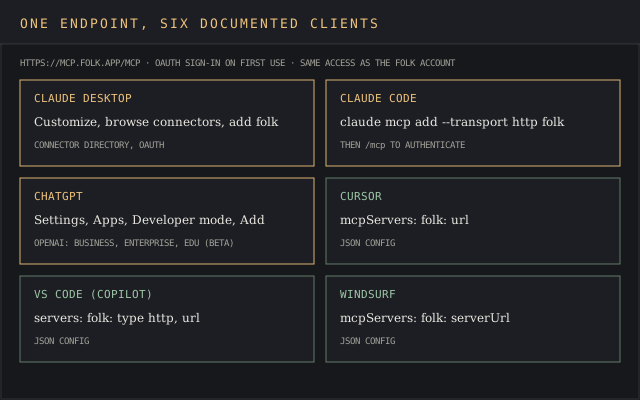
Claude Desktop is the shortest path for most users of AI assistants: open Customize, browse connectors, add folk, finish the OAuth flow. Claude Code takes one terminal command, claude mcp add --transport http folk https://mcp.folk.app/mcp, followed by /mcp to authenticate.
Cursor, VS Code with GitHub Copilot and Windsurf each take a two-line JSON block, which suits a developer who scripts CRM workflows next to code. The endpoint is the same in all three.
ChatGPT has a catch folk’s guide leaves to OpenAI. The connector goes in through Settings, Apps and Developer mode, and OpenAI’s own help article states that full MCP support with write actions is “rolling out in beta to ChatGPT Business, Enterprise, and Edu plans.” A solo consultant on a personal ChatGPT plan should check that line before planning around it.
Demand was there before the server was. Commenting on co-founder Simo Lemhandez’s launch post on LinkedIn, which drew 223 reactions and 62 comments, Philipp Hartmann wrote that he’d “Just researched if a connection exists already a week ago and couldn’t find one.” The same post handed out access by comment: “Just comment below and I’ll give you access.”
↑ FACT SHEETWhat each folk plan unlocks through MCP
The MCP itself is on every plan. folk’s pricing page lists it in the Standard column at $24 a member a month billed yearly, or $30 monthly. The objects it’s meant to move through a pipeline are another matter: custom objects and Deals, the REST API, dashboards and the Zapier and Make integrations all start at Premium, $48 a member a month yearly or $60 monthly. Enterprise runs from $80 yearly or $100 monthly.
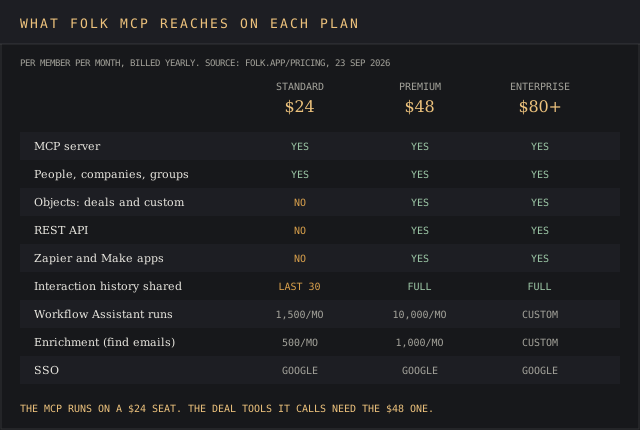
That split changes what a Standard seat can do. The deal tools in folk’s own examples, create_object and update_object, work on objects a Standard workspace doesn’t have, so a Standard team’s MCP covers people, companies, groups, notes and interactions, while pipeline management on deal records waits for the upgrade.
Steven K., an engineer, named the underlying problem on Capterra in August 2025:
It wasn’t super clear which features were premium and which were in the free tier when I started the trial.
Steven K., Engineer, Capterra, August 24, 2025
The trial runs 14 days on Premium features with no card, so a team can build MCP workflows on deal records created during the trial that stop working the day it picks Standard.
Two more Standard caps reach the MCP. Interaction sharing stops at the last 30 team interactions on a record, and the connector gets the same access as the account using it, so an agent mining a Standard workspace sees that shorter history. The Workflow Assistant, folk’s in-app automation for repeatable workflows, allows 1,500 runs a month on Standard against 10,000 on Premium, and enrichment runs 500 lookups a month against 1,000.
folk’s own AI assistants sit next to the MCP and don’t count against it. The Follow-up Assistant, which surfaces suggested follow-ups for contacts going quiet, and the Recap Assistant come with every plan, and the Research Assistant gets 200 runs a month on Standard and Premium.
Magic fields, columns created by AI for each person or company, allow 2,000 a month on Standard and 5,000 on Premium. The developer changelog notes the old magicField custom field type was deprecated on March 4, 2026, and migrated to text fields with AI settings.
Seat math stays simple, which is a point in folk’s favor. Billing counts workspace members, members are unlimited on every tier, and an extra member is prorated into the next invoice. A five-person team pays $120 a month on Standard yearly, or $240 on Premium, for the CRM & its MCP together, a price that holds on every AI platform the team connects.

MCP on every plan
Try folk
The 14-day trial runs on Premium features, the tier where the MCP’s deal tools work, no card required.
 Start folk’s free trial →
May earn a commission if you sign up through this link, at no extra cost to you. Full affiliate disclosure.
↑ FACT SHEETWhere folk MCP falls short
The first gap showed up in week one, from a person trying to add fields to contacts. Paul Himmelstein, replying to the July launch post on LinkedIn, wrote: “I cannot add custom columns through my MCP. Hope this changes soon.” Lemhandez answered that it would change “soon (through MCP and API),” and the August 7 developer update added group custom-field tools to the server.
The second gap is structural, and it’s the biggest of folk MCP’s limitations for sales automation. The server acts when a user sends a prompt or a scheduled prompt fires in the client, so a reply landing in Gmail changes nothing in folk until someone asks. Carly, a competing scheduling assistant, makes the same point in a July 2026 post on the folk integration, so read it with that interest in mind.
folk’s reviewers asked for event-driven automation and follow-up workflows long before MCP existed. Cullom W., a finance director in oil and energy, wrote on Capterra in June 2025:
Lack of visibility into number of opens and clicks on email sequences, as well as timestamps. Also, no ability to automate follow-up emails based on email clicks/opens.
Cullom W., Director of Finance and Investor Relations, Capterra, June 4, 2025
The MCP drafts follow-ups on request, from the last call notes and past interactions, per folk’s personalized follow-up guide, and logs the interaction once the rep sends it.
The server doesn’t send email, so follow-ups leave from the rep’s own inbox. Email outreach at volume runs through folk’s own campaign tools, 2,000 messages a member a month on Standard, with sequences reserved for Premium. The MCP handles personalized outreach one message at a time, and the campaign engine handles the list.
folk admits one more limitation itself. Its own ranking of MCP CRMs lists “Limited advanced forecasting features” and “Less adapted for enterprise organizations” as folk’s cons, so larger organizations that rely on forecasting and reporting depth are better served by a heavier CRM.
↑ FACT SHEETData quality and enrichment through the MCP
Data quality is the third gap, and it’s the one the MCP amplifies. An agent that imports a speaker list or standardizes job titles writes into the same contacts folk’s own tools already struggle to keep clean, and every profile created twice doubles the follow-ups a rep has to sort out. Dimitar M., a COO in marketing, described the duplicate problem on Capterra in April 2025:
Double profiles. When we use folk on Sales Navigator for example, it takes all the leads even though some leads are already in the system.. And we have to check for every lead if it’s a duplicate or not manually.
Dimitar M., COO, Capterra, April 3, 2025
folk’s import article says the agent deduplicates against existing records before creating contacts, with missing companies created along the way, which addresses Dimitar’s case on paper.
Giuseppe T., a managing director, flagged a subtler one in February 2025: a company added from LinkedIn “sometimes name of Company is written in block letters (i.e. Tecnimont or TECNIMONT),” sending the contact into the wrong group. folk’s clean-up article pitches exactly that fix, so it’s a fair first test for any team trialing the MCP.
Enrichment has its own history. Francisco O., a marketing director, gave folk one star on Capterra in April 2025 with “Enrichment is not working, custom senders are not available, we can only connect Gsuite accounts.”
folk’s MCP enrichment article suggests pairing the server with “a web-research or company-data MCP” to fill firmographics, which puts a second data provider into the loop and a second bill on the invoice. A team that wants to enrich contacts at scale is paying twice for the same person record. The vendors worth comparing for that second source are in our data enrichment tools ranking.
↑ FACT SHEETSecurity, permissions and where CRM data goes
The connector inherits the connecting user’s role and permissions, per folk’s setup guides. There’s no MCP-specific scope screen: an agent can do whatever that folk account can do, which for an admin includes bulk updates across every group. Workspace roles start at Premium, and group-level permissions, which fence part of a workspace off, start at Enterprise.
folk’s security page states it is “SOC 2 Type 1 certified and is pursuing SOC 2 Type 2,” hosts on AWS in North Virginia, us-east-1, and never uses customer data to train AI models; its own AI features run through OpenAI’s APIs. Once an MCP client reads a record, though, that data sits under the AI provider’s terms, which folk’s promise doesn’t cover.
folk’s security advice for the MCP is short and sensible: connect only to the official endpoint, use MCP clients “from sources you trust,” watch for “malicious instructions in untrusted content,” and “enable human confirmation so you can review and approve each step before it runs.”
OpenAI’s own documentation warns that untrusted MCP servers raise the risk of prompt injection. For a bulk update across contacts, keep confirmation on, and spot-check a sample of each person and company record created or changed in the run.
↑ FACT SHEETZapier and a community server: two other routes in
folk’s official server is the cheapest route by a distance, because the two alternatives both lean on Premium features. Both suit workflows that already run on automation platforms.
Zapier’s folk MCP offers eight actions, create, update, find and get for a person or a company, and “One MCP tool call uses 2 tasks from your plan’s quota.” Zapier’s folk app itself needs folk Premium, per the pricing table, as do all of folk’s Zapier and Make integrations.
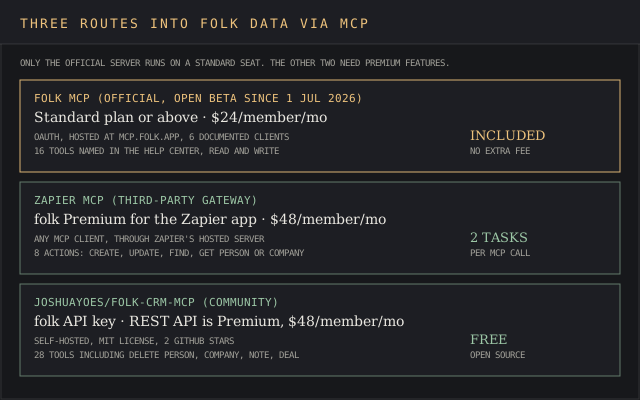
The community option, joshuayoes/folk-crm-mcp, predates folk’s own server and ships 28 tools under an MIT license, including delete tools for people, companies, notes and deals. It needs a folk API key, so a Premium seat, and it had 2 GitHub stars at review time. With folk’s hosted server live, it’s a fallback for a developer who wants delete operations scripted, and little else.
↑ FACT SHEETWhat folk publishes about its own MCP
Four of the top eight Google results for “folk crm mcp” on September 23, 2026 sat on folk’s own domains. The top-ranking “folk CRM MCP Review” on folk.app is written by co-founder Simo Lemhandez and carries a five-star G2 badge. His September 8 ranking of the best MCP CRMs puts folk first, ahead of HubSpot, Pipedrive, Microsoft Dataverse and Affinity.
The customer count moves between pages. folk’s help center introduction says “over 4000+ award-winning service businesses,” its G2 listing says “over 3000+ award-winning service businesses,” and its homepage says 5,000+ companies. The pricing page’s browser title advertises a “Free” plan that doesn’t exist, and its cancellation FAQ still tells users to click “downgrade” on the free plan.
None of that changes what the server does. It does mean the independent evidence is thin: on the review sites, folk scores 4.5 out of 5 from 341 reviews on G2 and 4.5 from 46 on Capterra, and almost all of those reviews predate the July 2026 MCP launch. Our Capterra legitimacy report covers how those ratings are collected.
↑ FACT SHEETfolk MCP against Attio, Capsule CRM and HubSpot
Attio is the closest match and the one to beat. Its MCP server went live on February 19, 2026, per Attio’s changelog, and Attio’s pricing page ships the MCP server and API on every plan, including a Free tier for up to 3 seats. Plus runs $35 a seat a month yearly, $44 monthly.
Each has a clear buyer. Attio wins for a team that wants custom objects and API access without paying $48 a seat. folk wins for a team that captures leads from LinkedIn through the folkX Chrome extension and wants a lighter data model. Our Attio review covers its data model in depth.
Capsule CRM is a step behind both. Its MCP server was still in an early-access beta on Capsule’s pricing page on September 23, 2026, and our Capsule CRM MCP review found it limited to Claude and Cursor on the $36-a-user Growth plan or above. Capsule wins for a team already running projects and support cases inside it; folk wins on client breadth and a lower MCP entry price. The base product is in our Capsule CRM review.
HubSpot is the scale option. Its remote MCP server gives read and write access to contacts, companies, deals, tickets and more, from any client that supports OAuth with PKCE, and HubSpot’s free CRM covers 2 users and 1,000 contacts.
HubSpot wins on object depth and a free floor. It loses on configuration weight, and a folk user who switched says so. Thomas B., a cofounder in transportation, wrote on Capterra in September 2025 that folk “is much easier to configurate, to track clients and deals” than HubSpot.
| CRM | MCP status | Cheapest seat with MCP | Clients documented | G2 rating |
|---|---|---|---|---|
| folk | Open beta since 1 July 2026 | $24/member/mo, Standard, yearly | 6 | 4.5 (341) |
| Attio | Live since 19 Feb 2026 | $0, Free, up to 3 seats | Any MCP client | 4.3 (592) |
| Capsule CRM | Early-access beta | $36/user/mo, Growth | 2 | 4.7 (520) |
| HubSpot | Remote server, revenue objects in beta | $0, free CRM, 2 users | Any client with OAuth and PKCE | Not compared |
Two MCP servers pair well with folk’s, and folk’s own enrichment article points in that direction. A company-data server such as the one in our Lusha MCP review, or a web-research server like Bright Data’s MCP, can fill the firmographics folk’s 500-a-month enrichment allowance doesn’t reach.
The wider field is tracked in our list of 75 confirmed MCP servers. Teams building prospecting workflows around folk can compare data sources in our sales intelligence ranking.
↑ FACT SHEETFAQ
What is folk AI?
In overview, folk AI is the set of assistants built into folk CRM, each one working on a person or company record: Follow-up, Recap, Research and Workflow Assistants, plus Magic fields that fill columns with AI-generated data. The MCP is separate: it hands folk’s data to an outside AI tool such as Claude or ChatGPT.
Is folk MCP still in beta?
folk hasn’t said. Its developer changelog opened the server as an open beta on July 1, 2026, and no later entry announces general availability, while its pricing page and product changelog list the MCP on every plan with no beta label. Any paying seat can connect today through OAuth, with no access request.
What is the folk app?
folk is a CRM for small teams and service businesses, built around contact management: person and company records, groups, pipelines and email outreach, with the folkX Chrome extension for capturing LinkedIn profiles and contact details such as emails and phone numbers. Email, calendar and WhatsApp sync come with every plan, and the pricing page counts 5,000+ integrations.
How much does folk CRM cost per user monthly?
Standard costs $24 a member a month billed yearly or $30 monthly, Premium $48 or $60, and Enterprise from $80 or $100, per folk’s pricing page on September 23, 2026. The MCP is included on all three.
Is folk.com free?
folk.com is a different product, an AI accountability partner that works inside messaging apps and is free to start. folk CRM lives at folk.app and has no free plan, only a 14-day trial.
Does folk have a mobile app?
Yes. Contacts by folk launched on July 16, 2026, per folk’s changelog, with a business-card scanner added July 31 and voice capture on August 25.
Is folk CRM good?
For a small team that values setup speed, the reviews say yes: 4.5 out of 5 on both G2 and Capterra. Racine G., a co-founder in consumer goods, wrote on Capterra in March 2025 that folk’s team is “super responsive and have implemented multiple enhancements I requested.” Deal automation, dashboards and forecasting are the recurring weak spots.
Support is the recurring complaint. Chris O., a training provider who used ACT for over 30 years before switching, wrote on G2 in April 2026 that two tickets about Outlook accounts sat without an answer: “I have not received a resolution or update for over a month.” The same review gives folk five stars:
Folk does everything I need without the complexity or cost of a traditional CRM, and in some areas it goes further.
Chris O., Training Provider, G2, April 7, 2026
Who owns folk CRM?
folk is an independent company whose co-founder, Simo Lemhandez, signs its MCP announcements and articles. The company’s focus stays on small teams: every seat is priced per member, and group-level permissions for larger rollouts start at Enterprise.
Will CRM be replaced by AI?
folk’s own position, from its MCP review, is that “The CRM remains the system of record while the chosen AI client becomes a practical command layer for daily sales work.” The MCP fits that description: the records stay in folk, and the chat window becomes the place a rep reads and edits them.
$24 to $80 a seat
Test folk MCP on a trial
Connect Claude or ChatGPT to a 14-day Premium trial and check the deal tools before picking a tier.
Start folk’s free trial →
May earn a commission if you sign up through this link, at no extra cost to you. Full affiliate disclosure.
↑ FACT SHEETVerdict
folk’s MCP server is for a team already paying for folk Premium, $48 a member a month yearly, that works inside Claude or ChatGPT and wants deal moves, call logs and relationship recaps without switching tabs. For that team, the 16 named tools, the six documented clients and the September interaction-history update cover most daily CRM activity, from follow-ups to pipeline reviews, and the connector costs nothing extra on top of the seat price.
It isn’t for a Standard-plan team counting on AI tools and automation platforms to run its pipeline, since Deals sit behind Premium, and it isn’t for a team that needs the CRM to act on events without a prompt. Personal ChatGPT plans fall outside OpenAI’s own write-action rollout, which lists Business, Enterprise and Edu.
It might suit a Standard team whose sales focus is contacts, notes and follow-ups over deal stages, provided someone checks duplicates after every import and keeps human confirmation on for bulk edits to contacts and company records. The scores in the fact sheet trace to those facts: the 52 for Standard reflects the Deals gate, and the 46 on write controls reflects account-level permissions with no MCP-specific scope.