Capsule CRM review: what the free plan doesn't do, and what Growth costs to fix it
 By Jan Suski. I go deep on every review, checking every number against its source and digging up details other coverage misses, a habit from six years of SEO and link building for tech companies. Bylines at Surfer, Brand24, and Senuto. How the scoring works.
Best for
A consultant or a 2 to 10 person team that wants one contact database, one sales pipeline, and Gmail or Outlook sync without a setup project; one agency runs 17 client instances from it.
Not for
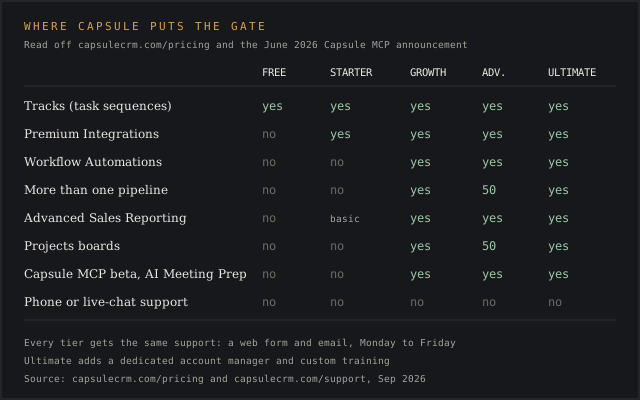
A team that needs workflow automation or real reporting on day one. Workflow Automations, Advanced Sales Reporting, and multiple pipelines all start at the $36 Growth tier.
What it costs
Free for 2 users and 250 contacts; $18, $36, $54 or $72 per user a month billed annually, with annual billing saving up to 14%.
- Free
- $0/mo, 2 users, 250 contacts, 1 pipeline, 5 custom fields
- Starter
- $18/user/mo annual, 30,000 contacts, Premium Integrations, basic reporting
- Growth
- $36/user/mo annual, 60,000 contacts, Workflow Automations, multiple pipelines
- Advanced
- $54/user/mo annual, 120,000 contacts, 50 pipelines and project boards
- Ultimate
- $72/user/mo annual, 240,000 contacts, dedicated account manager
- Transpond add-on
- Email marketing, from $11/month
- Tracks
- Reusable task sequences; each step fires once the one before it closes
- Projects
- Kanban delivery boards, Growth and above
- Multiple pipelines
- Growth and above only
- REST API v2
- 50 records a page by default, 100 max, no published rate limit
- Integrations
- Roughly 75 to 80 apps, split between native syncs and Zapier bridges
- Single sign-on
- Through Google Workspace or Microsoft 365
- Channels
- Web contact form and email; no phone, no live chat
- Hours
- Monday to Friday
- Response claim
- 80% of responses within 12 hours, per Capsule's own feature page
- Uptime
- 99.99% claimed on Capsule's public status page
- Legal operator
- Zestia Ltd, UK company 06418281, incorporated 5 November 2007, Manchester
- Hosting
- AWS, encrypted in transit and at rest; PCI-DSS for payments, no stored card numbers
- Missing features
- Mainly workflows and archiving: 20 reviews
- Limited customization
- 15 reviews
- Integration gaps
- Microsoft Teams and marketing tools: 12 reviews
Pipedrive
Not forA two-person team that wants to run a CRM for free before paying anything.
HubSpot CRM
Not forA team that needs Professional-tier features but can't absorb $90 to $100 a seat plus a one-time onboarding fee.
Pairs well with Capsule CRM
Capsule CRM is a contact-and-pipeline tool built by Zestia Ltd, a company incorporated in Manchester, England in November 2007.
It positions itself against Salesforce and HubSpot on the same pitch every "simple CRM" makes: fewer screens, a shorter setup, and a free tier built for two people. Capsule pitches itself as a lightweight solution for small businesses and agencies serving several clients at once. The pitch holds up for exactly as long as a team doesn't need automation, multiple pipelines, or reporting deeper than a pie chart.
This review works from Capsule's own pricing and feature pages, its public API documentation, its UK Companies House filing, and 12 verbatim user reviews pulled from G2 and Capterra, a sourcing choice worth flagging given Capterra's own numbers on review reliability and the same vendor-pay dynamics behind sites like Software Advice.
It covers what each tier gates, what Capsule shipped in the last year (a private-beta AI integration among them), and where G2's own aggregated complaint data disagrees with Capsule's marketing copy. The rest of this Capsule CRM review breaks down where that upgrade path bites, plus what real users say Capsule's own site doesn't mention.
Two things make now a reasonable time to look at Capsule closely. Capsule opened a private beta for an MCP (Model Context Protocol) integration in June 2026, letting Claude and Cursor query a company's CRM data in plain language. And G2's pros-and-cons aggregation, refreshed continuously from live reviews, gives a rare structured count of what users complain about.
↑ FACT SHEETWhat Capsule CRM does
Capsule organizes work around three record types Capsule calls Parties, Opportunities, and Cases: people and companies, deals in a pipeline, and support or project threads. Every Party carries custom tags, custom fields (five on Free), and a full activity log of calls, emails, and notes, so every conversation thread with a contact lives in one place.
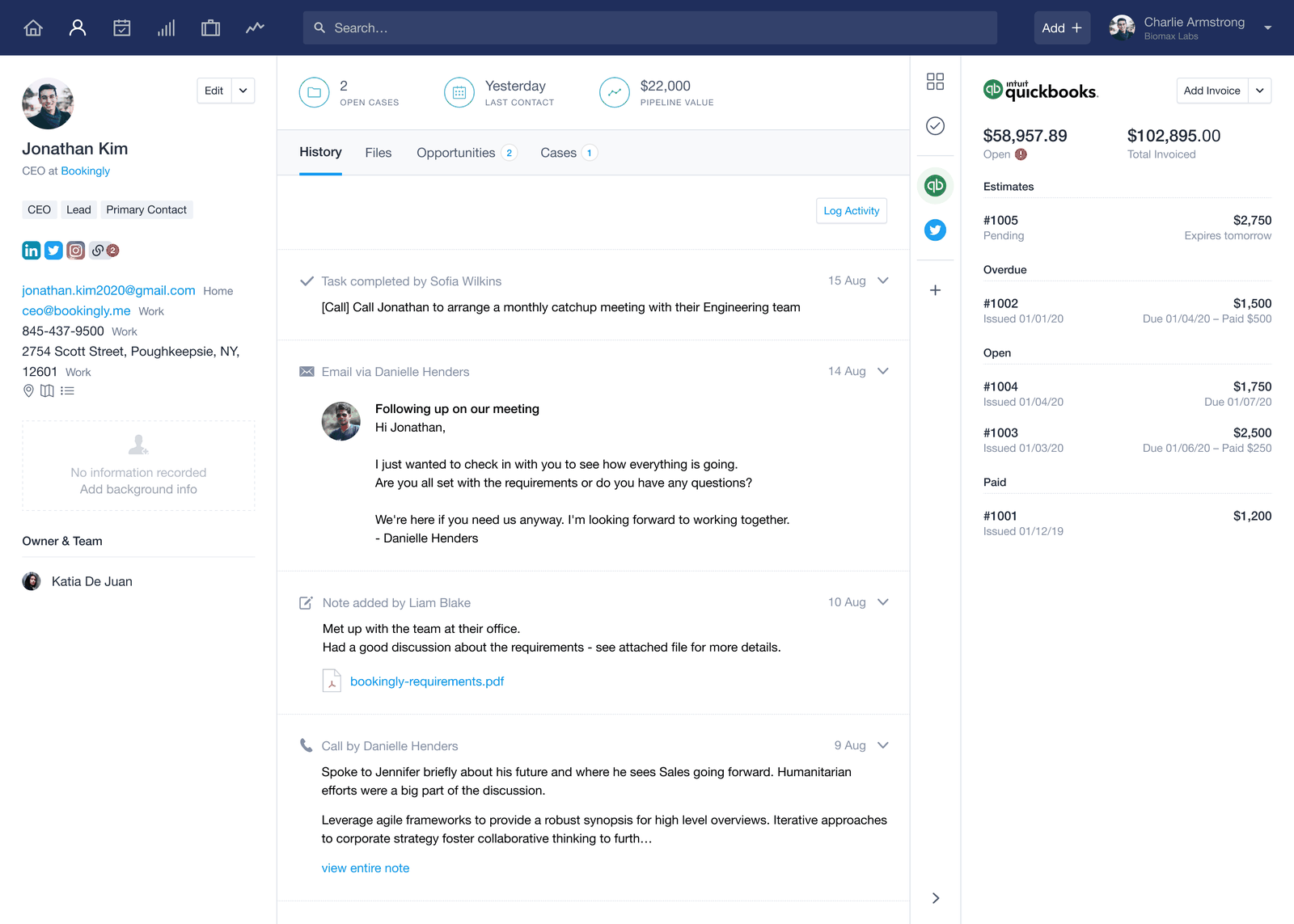
Tracks handle the automation. A Track is a reusable task sequence: log a demo, and Capsule activates a follow-up task, then a proposal task, then a check-in task, each firing only once the one before it closes. Projects extend the same Kanban logic past the sale, tracking delivery work on boards, though Projects itself requires Growth or above.
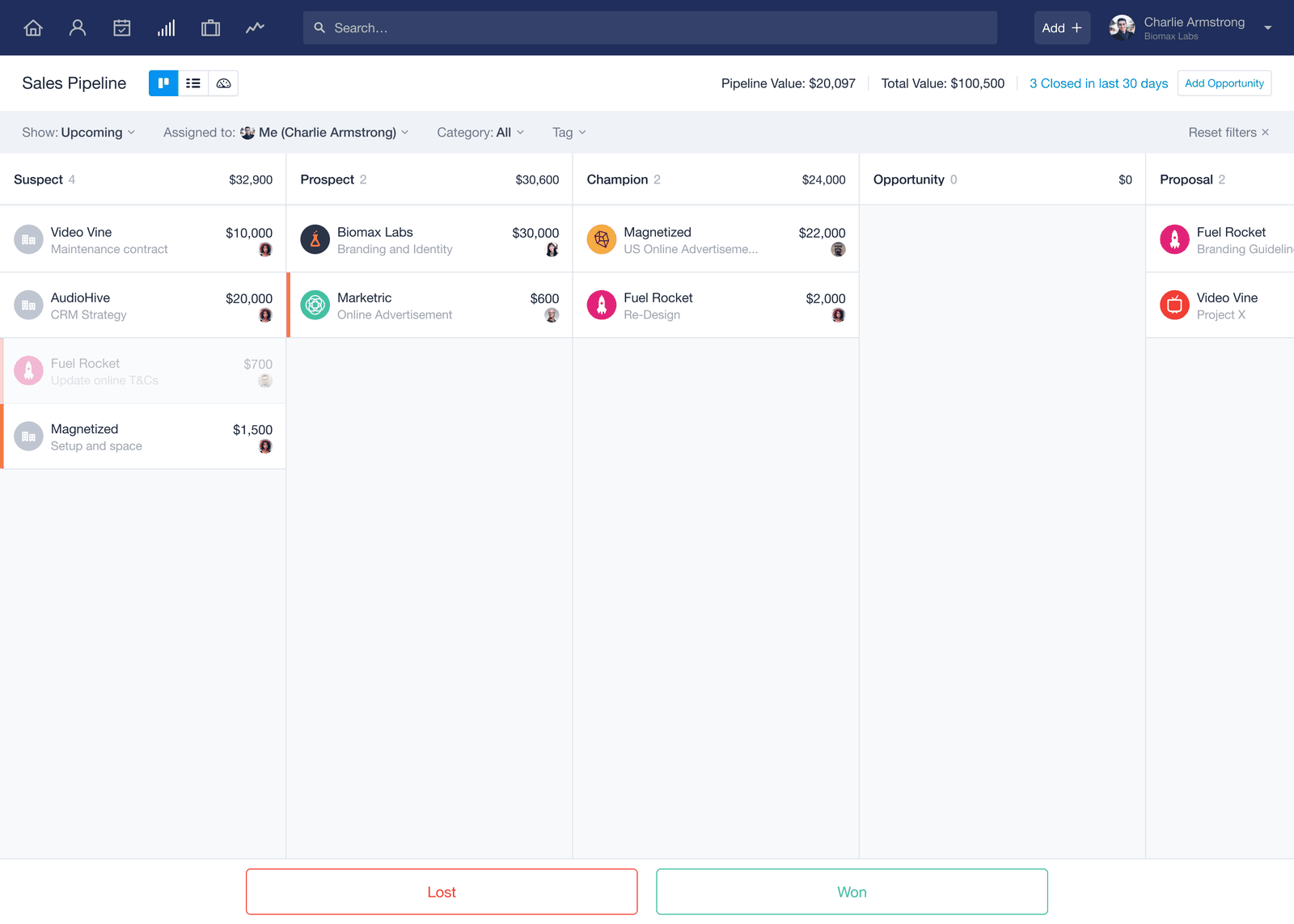
Opportunities, what most other CRMs call deals, sit inside one or more sales pipelines. Free and Starter customers get exactly one pipeline each; a consultancy running separate pipelines for new business and renewals needs Growth's $36-a-month tier to split them apart.
↑ FACT SHEETThe free plan and what's off-limits
Free costs nothing for up to two users and 250 contacts, with one pipeline, five custom fields to customize a contact record, and custom sales milestones. It's a real product: the same contact record, the same activity log, the same mobile app, and no separate desktop application required on either tier.
What it doesn't include is Capsule's own "Advanced Mail Connection," meaning professional mail servers beyond Gmail and Outlook don't sync. Custom task categories are also off the table. Neither restriction matters to a freelancer running everything through a Gmail inbox; both matter the moment a firm's mail runs through a hosted Exchange server.
The ceiling that binds first is the 250-contact cap. A two-person shop that adds a 251st contact has to upgrade to Starter at $18 per user a month, with or without a third user.

Free for two users
Try Capsule CRM
The Free plan covers 2 users, 250 contacts and one pipeline, with the same contact record, activity log and mobile app the paid tiers use.
 Start free on Capsule →
May earn a commission if you sign up through this link, at no extra cost to you. Full affiliate disclosure.
↑ FACT SHEETPricing and the limit that binds per tier
Capsule publishes all five tiers, including Free, directly on its pricing page, with no "Contact us" pricing anywhere in the paid lineup. That's rarer than it sounds; plenty of vendors in adjacent categories hide their top tier behind a sales call.
Panjiva publishes no rate card at all, LeadIQ publishes pricing right up to the enterprise tier before switching to a quote, and Seamless.AI keeps its higher tiers quote-only despite advertising a free plan.
| Plan | Price (annual, per user/mo) | Contact cap | What it unlocks |
|---|---|---|---|
| Free | $0 | 250 | 1 pipeline, 5 custom fields |
| Starter | $18 | 30,000 | Premium Integrations (Xero, Zendesk, Import2), basic reporting |
| Growth | $36 | 60,000 | Workflow Automations, multiple pipelines, Advanced Sales Reporting |
| Advanced | $54 | 120,000 | 50 pipelines, 50 project boards |
| Ultimate | $72 | 240,000 | Dedicated account manager, custom training |
Vendor list prices from capsulecrm.com/pricing, billed annually, checked September 2026.
Automation is the limit that binds for most buyers before the contact cap ever does. Capsule requires a Growth-tier subscription or higher before Workflow Automations exist at all.
A five-person team automating follow-ups pays $36 per user a month, or $2,160 a year for five seats, to stop manually retyping the same reminder, per Capsule's own pricing page.
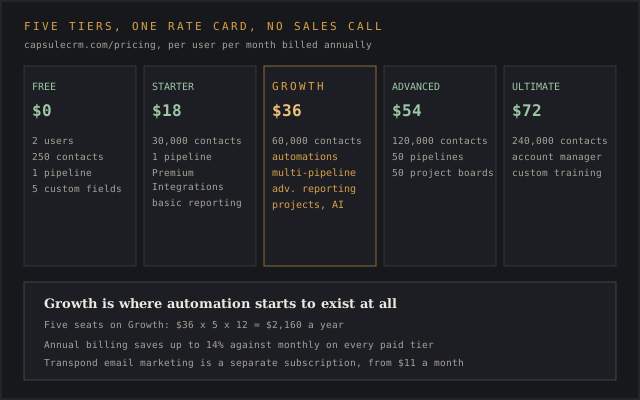
Advanced and Ultimate exist for power users who need 50 pipelines or a dedicated account manager. A team still deciding if it needs automation at all belongs on Growth or below.
Annual billing saves up to 14% against paying month to month, per Capsule's own pricing page, and the discount applies across all four paid tiers. A separate marketing add-on, Transpond, starts from $11 a month and isn't bundled into any CRM tier.
↑ FACT SHEETSales pipeline and Tracks in practice
The sales pipeline is a Kanban board: opportunities move left to right as a rep drags them, with currency support and filtering by owner or close date. Multiple pipelines don't exist below Growth, so a two-pipeline setup (say, new business and account expansion) costs the $36 upgrade even for a two-person team.
Tracks are Capsule's answer to workflow automation, available on every tier, and the most-cited feature in third-party reviews. A crm.org article named Tracks and the pipeline view among Capsule's strongest features, and Capsule's own feature page describes the mechanism plainly: "Use Tracks to set up a series of tasks that each become active one after the other."
Michael L., a management consultancy CEO who'd run Salesforce Platform for over two years before switching, put the limitation bluntly in a Capterra review from March 2024:
They don't understand the mission critical relationship between logging an activity and a related task generation... It has to be done entirely manually with no auto reminders or follow-ups.
Capterra review, CEO, management consultancy, March 2024
That complaint and the Tracks feature aren't contradictory. Tracks handles sequenced tasks; activity-triggered reminders sit outside it, and the gap between the two is exactly where that reviewer got stuck.
↑ FACT SHEETUsing Capsule day to day
Day-to-day use centers on managing contacts and the search bar. Krum K., a financial operations analyst, described the workflow in concrete terms in a March 2026 G2 review: "I can effortlessly find contacts, update deals, add notes, and check follow-ups... access a contact or a company in just two clicks."
Jesse J., who tried HubSpot and Monday before settling on Capsule, called it simpler than either in a December 2021 Capterra review: "I tried several CRMs (Hubspot, Monday, etc) but none were as simple to use as Capsule."
Search retrieves notes and emails inside a contact's timeline; reviewers on G2 called it helpful for pulling up a record fast. Users can add contacts manually, via CSV import, or through the Gmail and Outlook extensions, and send emails straight from the contact record without leaving Capsule.
Not every account has the same experience: G2's aggregated complaint tally lists search issues on 5 reviews, mostly tied to slow loading on larger contact databases (4 reviews cite the same slowness separately). Both counts are small against Capsule's total review volume, but they're real enough to note here.
Adding tasks is fast by most accounts; two separate Capterra reviewers, independently, praised how quickly a task can be logged against a contact mid-call.
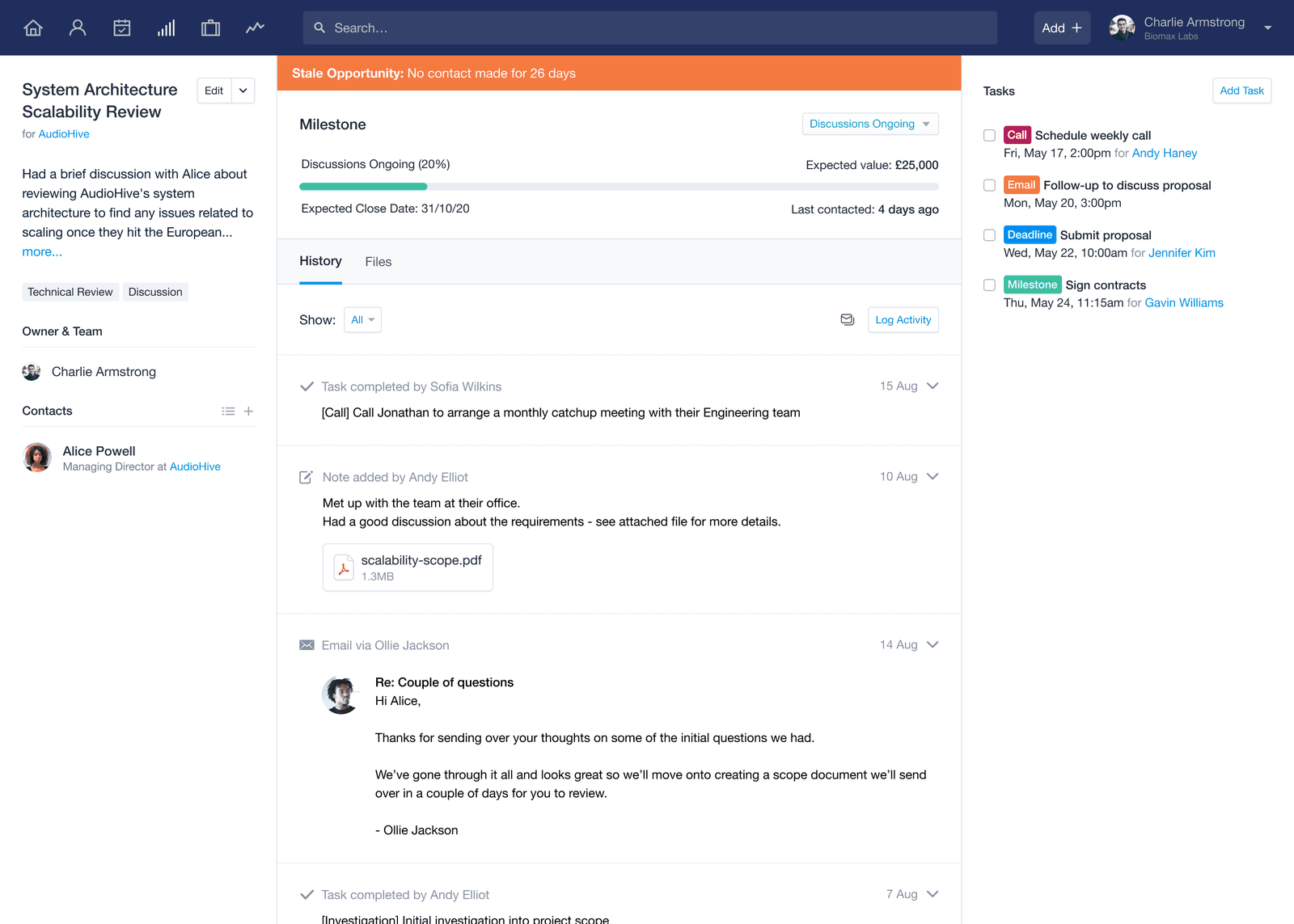
The rougher edge is document handling. A managing partner at a software company, reviewing on Capterra in December 2017 after more than two years of use, wrote that "I can only upload one document at a time which is annoying," a limitation that hasn't come up in Capsule's own feature documentation.
↑ FACT SHEETGoogle Workspace and Microsoft 365 integrations
Capsule ships dedicated integration hubs to integrate with both major productivity suites: Google Workspace (formerly G Suite) and Microsoft 365. Both support single sign-on, so a company already provisioning accounts through Google Workspace or Microsoft 365 doesn't need a separate Capsule login for every employee.
The calendar integration syncs two-way with both Google Calendar and Outlook Calendar, meaning a meeting booked in Capsule shows up on the calendar a rep already checks, and vice versa. Google Contacts syncs on the Google Workspace side specifically, though Capsule's documentation doesn't claim the same for the Microsoft 365 contacts list.
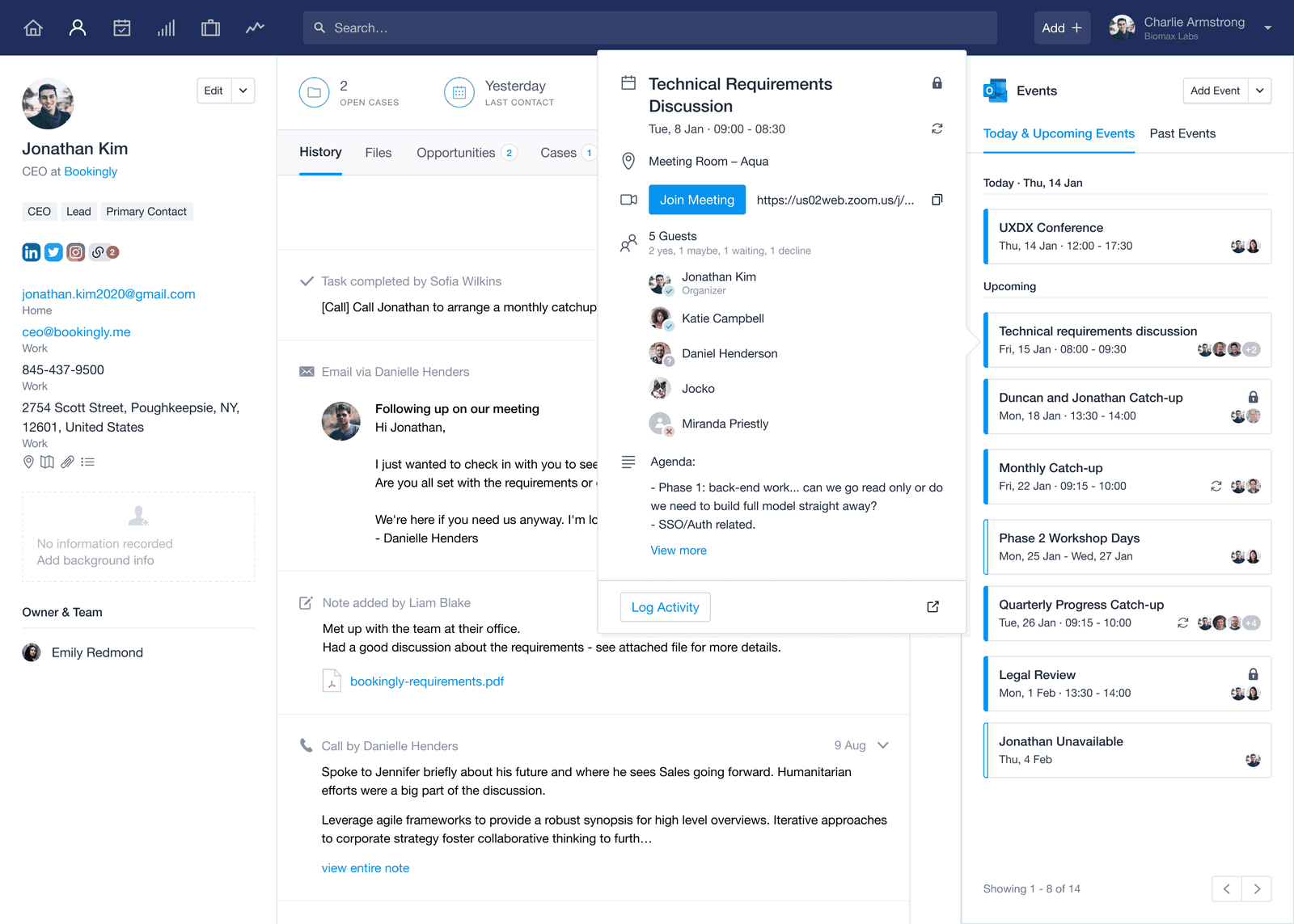
For a small business already living inside one suite, the integration removes an entire category of manual data entry. For a company split across both, running half the team on Google Workspace and half on Microsoft 365, Capsule doesn't publish anything suggesting the two integrations talk to each other; each connects to Capsule independently.
Google Workspace or Microsoft 365
Connect your inbox and calendar
Both suites connect with single sign-on and two-way calendar sync, and Gmail or Outlook email sync works on the Free plan.
Visit Capsule →
May earn a commission if you sign up through this link, at no extra cost to you. Full affiliate disclosure.
↑ FACT SHEETOther integrations and the API
Capsule's integrations marketplace lists around 75 to 80 apps, corroborated by G2's own listing of 76. The apps that integrate natively, meaning Capsule built and maintains the connection directly, include Xero, QuickBooks Online, FreshBooks, Mailchimp, Gmail, Outlook, Google Calendar, Zoom, and Transpond.
Most of the rest, including Slack, Shopify, Calendly, Docusign, and Klaviyo, integrate through Zapier, which means an extra Zapier subscription and an extra point of failure for any workflow depending on them.
The Zoom integration, one of the more recent additions, logs call activity, summaries, and transcripts against the contact record automatically, turning a call into a permanent note without anyone typing it up.
For a developer, Capsule's REST API v2 exposes Parties, Opportunities, Cases, Projects, Tasks, Tracks, Pipelines, Boards, and Goals as resources, plus REST Hooks for webhooks. Pagination defaults to 50 records a page and caps at 100 via the perPage parameter. Capsule's developer documentation doesn't publish a request-rate limit, where most CRMs state a specific calls-per-minute ceiling somewhere in their docs.
The API's real strength, per one reviewer, is automation: "Capsule's API allows for custom lead capture and automations." It enables a developer to wire a web form or another system straight into a Track without touching the UI, and lets a team integrate a homegrown tool Capsule's marketplace doesn't cover. Access isn't metered separately or quoted per contract, unlike Crunchbase, where the top API tier is quote-only.
↑ FACT SHEETEmail marketing with Transpond
Transpond, Capsule's own email marketing product, connects through a dedicated Transpond integration and sits outside the core CRM's feature set. Pricing starts from $11 a month, separate from whatever CRM tier a team already pays for.
The split matters for anyone comparing Capsule against a CRM that bundles marketing email for free at the entry tier. Capsule's core pricing buys pipeline and contact management, with send volume billed separately. A team that wants both has two subscriptions to track, even though both come from the same company.
↑ FACT SHEETReporting and what's basic about it
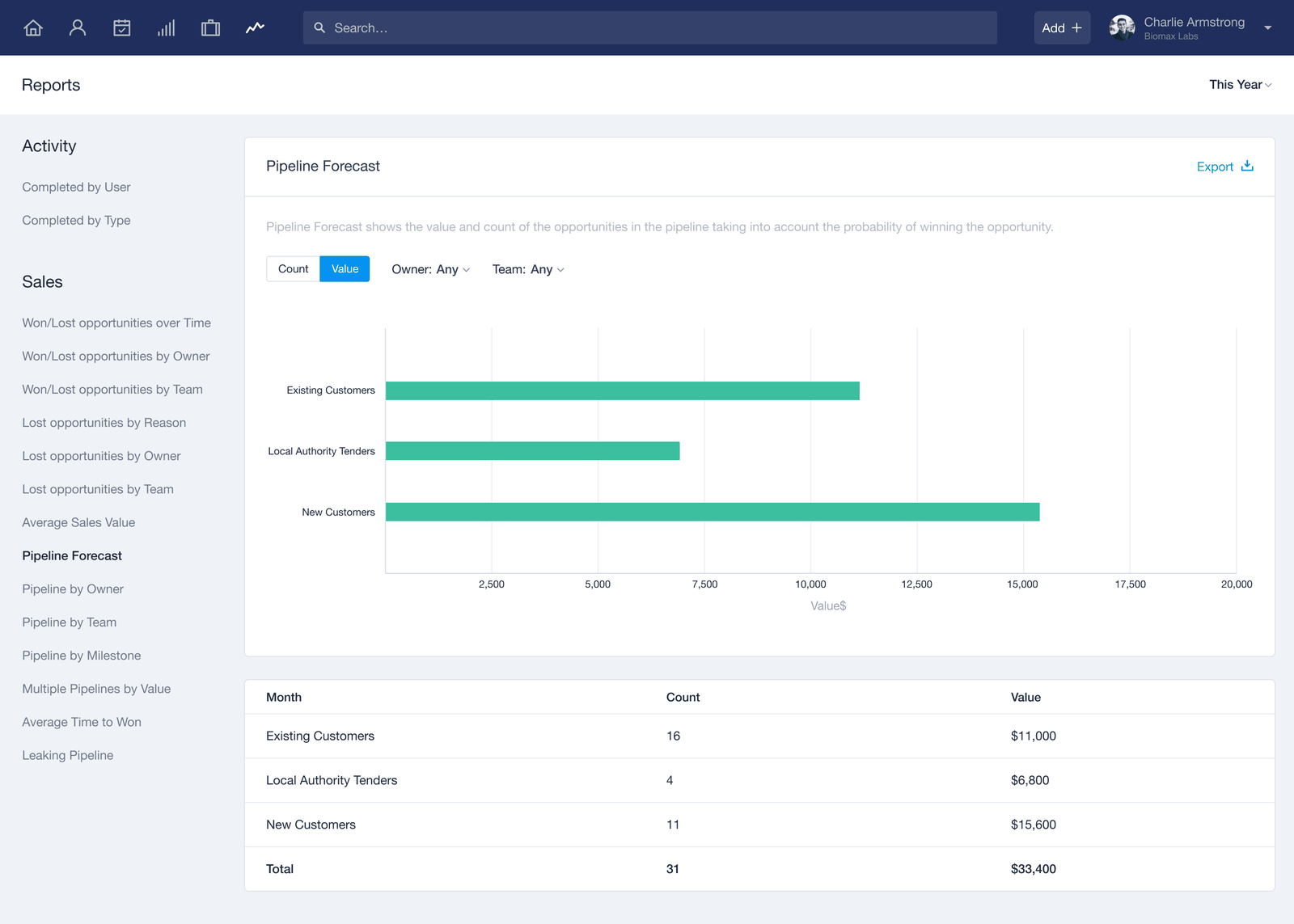
Reporting is where Capsule's tier structure shows up most sharply. Free and Starter customers get what Capsule's own pricing page labels "Basic Reporting," covering activity reporting and simple pipeline totals; the Advanced Sales Reporting, ten additional report types, and dashboard builder all require Growth or above. Capsule doesn't claim to be feature rich on reporting, and the tier structure says as much on its own.
Even at the higher tiers, reporting draws criticism. Robert J., a CEO who compared Capsule against Salesforce Starter (running "about half the price of Salesforce" by his account) after six to twelve months of use, wrote in an August 2022 Capterra review:
[Capsule] is comparatively underpowered in the reports you can generate (even when you upgrade to the higher tiers that have additional reporting functionality).
Capterra review, CEO, August 2022
That reviewer still rated Capsule 4 out of 5 overall, so reporting was a specific gap that buyer chose to live with.
Capsule does offer a Google Data Studio connector for teams that want to build their own dashboards outside the product. It works around the gap without closing it. That gap matters more given how bad CRM data quality already is industry-wide: CRM records run as much as 91% incomplete per G2 and Salesforce's own research, so a CRM's reporting is only as good as the records feeding it.
↑ FACT SHEETWhat users complain about most
G2's own aggregated pros-and-cons data, collected on a platform where vendors pay G2 for visibility through paid profile tiers and drawn from live reviews, puts missing features (mainly workflows and archiving) at the top of the complaint list with 20 reviews citing it. Limited customization follows at 15 reviews, and integration gaps, especially with Microsoft Teams and marketing tools, at 12 reviews.
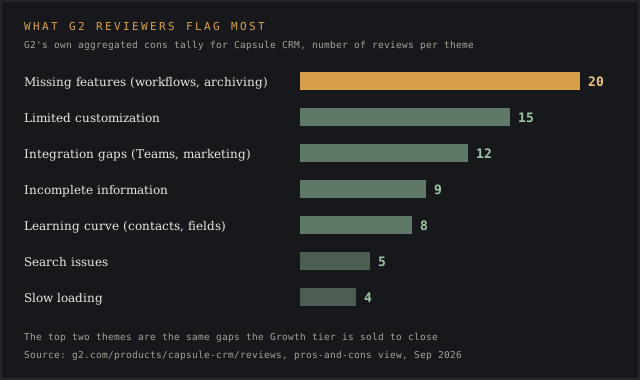
Incomplete information hindering sales decisions shows up in 9 reviews, and a learning curve specific to contacts and custom fields appears in 8. That's a nuance worth separating from the general "easy to use" praise Capsule gets elsewhere: the interface is simple, but setting up custom fields correctly is apparently not. Specific feedback like this, tied to a number and a named screen, tells a buyer which screen to test during a trial.
On Capterra specifically, two structural complaints recur outside G2's tally: Capsule's email connection works by BCC and forwarding with no true two-way sync, and support comes by email alone on every tier.
Lou K., an insurance business owner who used Capsule for under six months, described the support experience directly in a November 2023 Capterra review:
The customer support is bad, really bad. Unless you have an IT person in house, don't get this one. If you have an issue, you can't talk to anyone.
Capterra review, owner, insurance, November 2023
↑ FACT SHEETWhat users praise most
Ease of use and price both come up unprompted, usually alongside whatever the reviewer switched from. Mike W., comparing Capsule to two systems he'd used for nearly two decades combined, wrote in a February 2018 G2 review:
Competitively priced and cheaper and easier to use than Sales Force. Cloud based and superior to Act which I have been using between 1998 and 2016.
G2 review, February 2018
Peter R., an IT services director who switched after more than two years on the Act CRM, framed the switch in money terms in a November 2020 Capterra review: "We moved because we could use the software on all forms of devices... The result we made the switch, saved thousands of pounds on paying for updates and annual service charges."
Christopher R., a marketing agency CEO running Capsule across 17 separate client accounts, had the most specific praise in a January 2021 Capterra review:
I use 17+ systems (one for each client) and it makes it so easy to track progress... There are no cons to this software that I have identified.
Capterra review, CEO, marketing agency, January 2021
Gavin M., who switched from HubSpot CRM, reached the opposite conclusion most reviewers expect from that direction in a January 2025 Capterra review: "Very good and very easy to use... Capsule offered more features than Hubspot."
↑ FACT SHEETSupport quality and response times
Every tier, including Free, gets the same support channels: a web contact form and email, available Monday through Friday. There's no phone line and no live chat listed anywhere on Capsule's support pages, and no tier upgrade adds either.
Capsule's own Tasks & Calendar feature page states "80% of responses are within 12 hours" and describes its support model as human-run: "We use bots sparingly, and they're always managed by a human." That claim sits uneasily next to Lou K.'s account above. Capsule's public status page claims 99.99% uptime.
Both accounts are probably true for different customers. Support is pretty good for a message that lands inside that 12-hour window, and a company handling most tickets that fast can still leave an unlucky subset of users, especially those without in-house IT, feeling stuck. One Capterra reviewer credited Capsule's support quality as a strength, so the split runs in both directions.
↑ FACT SHEETSecurity and compliance
Capsule hosts on AWS and cites AWS's own certifications (ISO 27001 among them); it hasn't published an independent SOC 2 report of its own. Data is encrypted in transit and at rest, two-factor authentication is available, and single sign-on runs through both Google Workspace and Microsoft 365, keeping every communications channel tied to one company login.
Gating security features behind a paid tier isn't unique to Capsule's category; Cognism also locks compliance features behind its higher tiers.
For payment collection specifically, Capsule states PCI-DSS compliance and confirms it doesn't store card numbers directly. A published GDPR page and a Data Processing Agreement with a listed sub-processor roster cover the compliance paperwork a European buyer typically asks for during procurement.
What's missing, for a buyer running a formal vendor security review, is a SOC 2 Type II report issued in Capsule's own name. The certifications on file belong to AWS, its host.
↑ FACT SHEETWhat changed in the last 12 months
The largest change is Capsule MCP, a private-beta integration announced by Olivia MacCunn on Capsule's blog on 26 June 2026. It connects Capsule's data to Claude and Cursor through the Model Context Protocol, letting a user ask plain-language questions about contacts, pipeline value, or task status without building a report.
Access requires a Growth-tier subscription or above during the beta, the beta itself is free, and Capsule reviews access requests within what its blog post calls "a couple of business days." The MCP tools list tracks which other vendors have shipped a comparable server.
Alongside MCP, Capsule shipped a Zoom integration that logs call activity and summaries automatically, an AI Meeting Prep feature still in beta on the Growth tier, and a Goals feature that lets a manager set a revenue target against Opportunities, Tasks, or Activities and watch progress update as reps work the pipeline. Capsule was also named a finalist for Best CRM for Startups and Best Free CRM at the 2026 CRMMYs.
None of the AI additions are available below Growth, which keeps the free and Starter tiers exactly as basic as they were a year ago; the entire year of product investment visible on Capsule's blog targeted the $36-and-up customer.
Capsule MCP beta
Ask your CRM in plain language
Growth-tier accounts can request the free Capsule MCP beta, which lets Claude and Cursor answer questions about contacts, pipeline value and tasks.
Visit Capsule →
May earn a commission if you sign up through this link, at no extra cost to you. Full affiliate disclosure.
↑ FACT SHEETCapsule CRM alternatives
Pipedrive never offers a permanent free plan; its entry tier, Lite, runs $14 per seat a month billed annually, with a 14-day trial standing in for what Capsule gives away forever to a two-person team. Pipedrive pulls ahead once a team needs native e-signatures and automated lead routing, both bundled into its $59-a-seat Premium tier without a Zapier bridge. A team of two that wants to try before paying anything at all still has Capsule as the cheaper starting point.
HubSpot CRM matches Capsule's free tier at $0 for up to two users, but HubSpot's free plan carries a far larger marketing and CMS toolkit alongside the CRM itself. The gap shows up once a team needs HubSpot's Professional tier: $90 to $100 a seat a month, plus a mandatory one-time onboarding fee of $1,500 that lands before the first regular invoice.
Gavin M., who ran HubSpot CRM before switching, reached a verdict in the same January 2025 Capterra review cited above that cuts against HubSpot's reputation for feature depth: "Capsule offered more features than Hubspot."
Zoho CRM publishes euro pricing at Standard €14, Professional €23, Enterprise €40, and Ultimate €52 per user a month, billed annually, with a free tier stretching to three users against Capsule's two. Zoho wins on breadth: its Professional tier bundles inventory management and CPQ tools that Capsule doesn't offer at any price.
Capsule wins on the axis Christopher R. and Jesse J. both cited, being demonstrably simpler to learn, which matters more to a two-person consultancy than a CPQ module it will never touch.
Keap skips a free tier entirely, running a 14-day trial before billing starts at $299 a month monthly or an effective $249 a month annually, covering two users with additional seats at $39 each. Keap requires mandatory implementation and onboarding services on top of that, a structural cost Capsule never charges.
What a buyer gets for it is native payment processing and SMS marketing built into the CRM itself, features Capsule routes through separate integrations or doesn't offer at all. A solo operator priced out of Keap's $299 floor is exactly who Capsule's free tier exists for.
Two newer relationship CRMs reviewed alongside this one sit at different points on the same range. Folk starts at $24 a seat with no free plan and leans on LinkedIn and Gmail capture. Attio gives three seats away free but gates custom objects behind its $79-a-seat Pro tier.
Capsule pairs with Transpond for email marketing and with Zoom for call logging; neither one competes with the core CRM, and Capsule doesn't bundle either into a paid tier's price.
↑ FACT SHEETVerdict
Capsule CRM suits a consultant, agency, or small team of up to roughly ten people that wants one pipeline, tagged contacts, and Gmail or Outlook sync without a setup project or a sales call. Christopher R.'s 17-client workflow and Krum K.'s two-click contact lookup both describe that buyer directly.
It isn't for a team that needs workflow automation, multiple pipelines, or reporting deeper than a pie chart on day one; all three sit behind the $36-a-month Growth tier, and even Growth draws specific complaints about report depth from paying customers.
It also isn't a fit for a buyer running a formal security review that requires an independently audited SOC 2 report bearing the vendor's own name, or for a procurement team used to enterprise contracts negotiated behind closed doors, the kind of custom-quote process Capsule's flat rate card skips entirely.
A team that starts on Free or Starter and later needs automation might still suit Capsule once it accepts the Growth-tier price, since the underlying contact model and Tracks framework carry forward without a data migration. The caveat: G2's own complaint tally puts missing workflow features and limited customization at the top of what paying Growth-tier customers still flag, so the upgrade narrows the gap without closing it.