OnePageCRM review: the Next Action system, three plans from $9.95, and where it stops scaling
 By Jan Suski. I go deep on every review, checking every number against its source and digging up details other coverage misses, a habit from six years of SEO and link building for tech companies. Bylines at Surfer, Brand24, and Senuto. How the scoring works.
Best for
A consultant, freelancer or small business owner running 1 to 10 people who loses sales deals to forgotten follow-ups. Every contact carries one dated Next Action, the Professional plan costs $9.95 per user a month, and contacts, deals and custom fields are unlimited on every tier.
Not for
Sales teams that need multi-condition segments, recurring tasks or deep reporting on day one. G2 reviewers describe exporting to Excel to combine filters, and email sequences only exist on the $29.95 Max plan.
What it costs
$9.95, $19.95 or $29.95 per user a month (EUR 8.95, 17.95 or 25.95 for EU visitors), excluding VAT. Annual billing gives 4 months free. The 21-day free trial needs no card, and there's no free plan.
- Professional
- $9.95 per user a month (EUR 8.95)
- Business
- $19.95 per user a month (EUR 17.95)
- Max
- $29.95 per user a month (EUR 25.95), added March 2026
- Annual billing
- 4 months free, so a Professional seat runs $79.60 a year
- Free trial
- 21 days, no card, and no free plan after it
- Autoflows
- 15, 30, unlimited
- Bulk emails
- 250, 450, 1,000 a day
- Sales pipelines
- 1, 10, unlimited
- Historical email fetch
- None, 2 years, 10 years (1,000 emails per user a month)
- Restore deleted contacts
- 1, 30, 60 days
- Next Action
- One dated Next Action per contact, with Queued Actions behind it
- Autoflow
- 9 triggers, 9 operations, each trigger usable in one Autoflow
- Email sequences
- Max plan only, up to 5
- AI connector
- MCP connection to Claude and ChatGPT since June 2026
- Mobile CRM
- iOS version 5.2.0 with a "brand-new modern interface," "intuitive user flows" and "performance enhancements"
- Headquarters
- Galway, Ireland, with Michael FitzGerald as CEO and co-founder
- Reach
- Customers in over 80 countries
- Support
- Phone, chat and email on weekdays, email at weekends
- Hosting
- AWS North Virginia and Dublin, AES-256 at rest
- G2 rating
- 4.7 from 270 reviews
Capsule CRM
Not forA team that wants automations on day one, which start on the $36 Growth tier.
Attio
Not forA five-person services firm that would pay $2,100 a year for five Plus seats against $398 on Professional.
Pairs well with OnePageCRM
OnePageCRM is a sales CRM for small businesses that works on one idea: every contact gets exactly one next step with a date on it. The company, based in Galway, Ireland, sells three plans from $9.95 to $29.95 per user a month and says it's "helping small businesses in over 80 countries around the world." Buyers searching one page crm reviews, 1 page crm or onepage crm review land on the same product, and the name describes the design: a CRM, one page per contact.
This OnePageCRM review covers what each of the plans locks, how contact management and the Next Action method work day to day, where it constrains a growing team, and what 270 G2 reviewers praise and complain about. Every price comes from OnePageCRM's own pricing page, checked in October 2026, and every user quote links to the review it came from, with the reviewer's own words left intact.
The short version for small businesses and freelancers: the CRM works well for follow-ups and thinly for reporting. It makes the daily list easy to work through, and a two-person consultancy will get its money's worth at $9.95 a seat. A 10-person sales team with a sales ops lead will hit the reporting ceiling, and G2 reviewers have been saying so since 2017.
Timing matters too, because the product moved fast this year. In the last 12 months OnePageCRM added a Max tier, email sequences, an AI contact summary, WhatsApp capture and an MCP server for Claude and ChatGPT, so older one page crm review write-ups describe a smaller product than the one on sale today.
↑ FACT SHEETWhat OnePageCRM is, and who built it
OnePageCRM is a cloud CRM system that works in the browser and in iOS and Android apps, sold by a Galway company whose CEO and co-founder is Michael FitzGerald. The company's own timeline, written up on its about page, says its first paying customers arrived in 2010, the Action Stream went live on 22 March, and funding from Enterprise Ireland and private investors followed in 2013. It moved into a bigger Galway office in April 2014.
The vendor describes the product in simple terms for small businesses on its App Store listing, in two sentences that most competing reviews paraphrase:
"OnePageCRM is a unique combination of a simple CRM app and a productivity tool with follow-up reminders next to every contact. It helps you keep in touch with clients, prospects, and partners, and nurture business relationships."
OnePageCRM's own description, Apple App Store listing, October 2026
The same listing says the app was "Built for consulting and professional services businesses" and that "OnePageCRM adjusts to your needs" as "a personal CRM and a team collaboration tool." That pitch is accurate on scope. The features target small businesses and freelancers, and none of the plans adds enterprise controls.
The design borrows from the Getting Things Done method, and the about page says FitzGerald wanted a tool that would make him "get up in the morning and go at sales," a job Excel couldn't do.
Its order of priorities makes OnePageCRM different from other CRMs. Relationship management comes first, deals second, reports third, and the interface is built so the contacts that need calls today sit at the top of the screen. That's the clutter-free interface the vendor sells, with few tabs and no feature bloat. It keeps sales staff focused on contacts, and it's also the reason the reporting side stays thin.
↑ FACT SHEETHow the Next Action and Action Stream work
Every contact in OnePageCRM holds one Next Action, which makes the next step the unit of work: a task with a due date, such as a follow-up email, a second call or a pitch. The feature page says the Action Stream "sorts your contacts by the urgency of their assigned Next Action and arranges them into a color-coded list." ASAP items sit on top, then Today, then dated items, then contacts marked Waiting For.
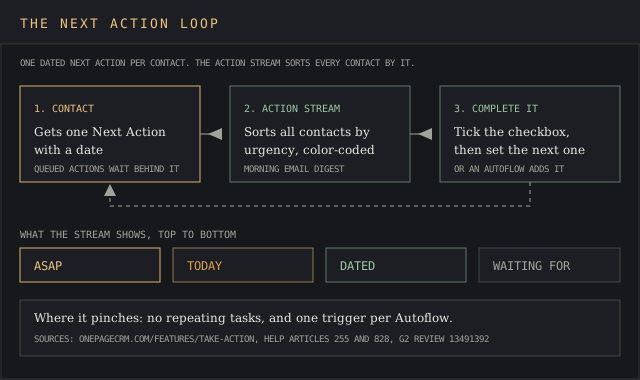
Completing an action is a checkbox. The help article on Actions says "Once you complete a Next Action, you are encouraged to add another one," and extra steps can wait behind it as Scheduled or Queued Actions. A morning email lists the day's to-dos, calls, meetings and upcoming interactions, and desktop and mobile push notifications fire when an item falls due.
A day in the app works like this. It helps a salesperson find the next job fast and keeps the day focused on calls:
- Open the Action Stream and work top-down from ASAP items, keeping the team focused on the same order.
- Make the calls, log notes, file attachments and call results on each contact, and the notes stay attached to the contact's history.
- Set one of the follow-ups as the next step before leaving the contact, so leads and clients never drop off the list and the information stays organized.
- The Stream re-sorts automatically as dates pass, keeping tomorrow's tasks out of today's view.
The method forces a proactive way of working focused on contacts, and keeping every contact dated makes the Action Stream useful. A contact with no Next Action shows up as a gap, so follow-ups and reminders can't silently lapse, and the whole team sees the same list of important tasks. A consultant who left for a larger platform and came back described it on G2 in July 2026:
"It is so nice to use, the video help is excellent and it has genuinely useful features designed by people who actually have to nurture contacts - the Action Stream is invaluable for that."
G2 review, verified user in consulting, small business, 1 July 2026
The constraint shows up when work repeats on a schedule. One Next Action per contact works for a sales process that moves one step at a time, and fits badly with a two-week outreach cadence. A management consultant on G2 in September 2026 spelled out the gap:
"For example, I want to set a task that occurs every two weeks, reminding me to conduct outreach to a set of Prospects. Currently, OPCRM cannot create a repeating task so I have to set a new task two weeks out after I complete one set of emails."
G2 review, verified user in management consulting, small business, 16 September 2026
Action Templates soften this and keep the workflow simple. A saved, reusable list of consecutive actions, designed for repeat work, can be applied to one contact or a hundred in a few clicks, which covers onboarding checklists, repeat tasks and standard sales actions without a recurring-task engine. Users schedule follow-ups in just a few clicks from the contact page, and the morning email helps the whole team stay on top of the day's follow-up actions.
↑ FACT SHEETOnePageCRM pricing and the limit that binds per tier
OnePageCRM publishes all three prices on its pricing page at www.onepagecrm.com, and they vary based on where the visitor sits: US visitors see dollars, EU visitors see euros. Prices exclude VAT, and EU buyers pay their member state's rate unless they supply a valid VAT number. The page makes every limit easy to find, tier by tier.
- Professional plan, $9.95 per user a month (EUR 8.95): unlimited contacts, one sales pipeline, 15 Autoflows, 250 bulk emails a day, one connected inbox, 10 GB of storage per user, 5 web forms.
- Business plan, $19.95 (EUR 17.95): adds IMAP/SMTP sync, email open tracking, scheduled emails, 2 years of historical emails, 10 pipelines, 30 Autoflows, 450 bulk emails a day, user groups and permissions.
- Max, $29.95 (EUR 25.95): adds email sequences (5), a second inbox, 1,000 bulk emails a day, unlimited pipelines and Autoflow automations, 10 years of email history, and 60-day contact restore.
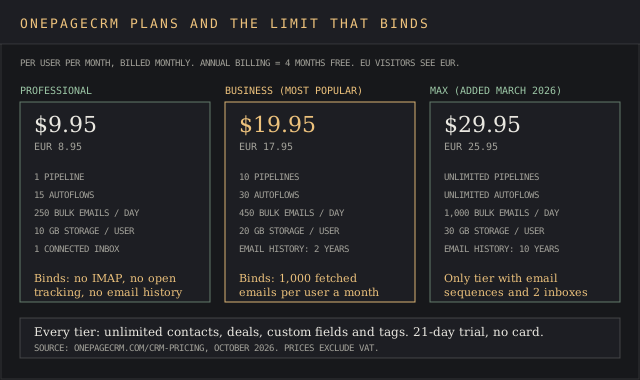
Annual billing gives "4 months free compared to paying monthly for a year," so a year costs eight months of list price.
That works out to $79.60 per Professional seat, $159.60 per Business seat and $239.60 per Max seat. That's affordable pricing by small business CRM software standards and next to the alternatives below. Every plan includes full access to the mobile app, the API, MCP and the AI features. The plans differ on email, pipelines and automations. The key features of the Next Action system are the same on all three.
The limit that binds on Professional is email. It syncs Gmail and Outlook and includes bulk sending, but has no IMAP, no open tracking and no email history fetch, so anyone on a custom mail server who needs those features starts at Business. On Business, the binding limit is 1,000 fetched emails per user a month. On Max, it's the five-sequence cap.
For context against the market, this site's CRM software cost report prices 11 vendors per seat, from $0 to $550. OnePageCRM's $9.95 entry sits near the bottom of that range with no paid add-ons: the pricing FAQ says Web Forms, Lead Clipper and Quick Quotes are free.
↑ FACT SHEETFree plan, free trial and cancellation terms
Every new OnePageCRM account starts with a 21-day free trial that includes all features and needs no credit card, so new users can test everything before they upgrade. After day 21, the account needs a paid plan. Billing is "pay-as-you-go," which makes leaving cheap and keeps the decision simple, and the FAQ says you "can cancel any time directly from within your account." Every plan sells from a single seat, billed monthly or yearly.
A G2 complaint centres on refunds, and it's worth a check before day 21. A founder reviewing in February 2026 said the trial converted to a paid charge he hadn't expected:
"On the day I was charged, I wasn't aware and asked them politely to make a refund for me because I wasn't going to use this software. They rejected, which is very unprofessional."
G2 review, Yavor S., founder, 3 February 2026, rated 2 of 5
The pricing page publishes no refund policy, so the safe move is to cancel from the OnePageCRM account settings before day 21 and send billing questions to support@onepagecrm.com in writing, so there's a written record. Nonprofits have a separate route. One nonprofit reviewer on G2 said they were "looking at their Power of Action Program" (G2, 10 July 2026), and a company president wrote that OnePageCRM supports nonprofits "with free software" (G2, 17 July 2026).
↑ FACT SHEETEmail sync, bulk emails and historical emails
Email sync is the feature set that separates the three plans and the main reason teams upgrade.
Every plan lets users send emails and keep in touch with contacts through Gmail, Google Workspace, Outlook.com or Hotmail with full email sync in both directions, and every message clients send or receive is stored against the contact, which makes the inbox and the CRM share one history. Business adds IMAP/SMTP, which brings in Yahoo, Apple iCloud, Exchange Server and custom domains, a change logged in the changelog on 11 December 2025.
Syncing only starts when the integration is switched on, which helps privacy but leaves old threads out. To pull previous email conversations, Business and Max fetch historical emails per contact: 2 years back on Business, 10 years on Max, capped at 1,000 past emails per user per month, per the help center. A fetch can't be undone, which makes a test on one contact the sensible first step.
A fine-art business owner on G2 in August 2026 named that fetch the best part of the product in the review's comments, and in the same review flagged an email tracking flaw: "Open tracking also counts the sender activity" (G2, 4 August 2026).
- Bulk emails: 250 a day on Professional, 450 on Business, 1,000 on Max, each sent individually so no recipient sees the others.
- Email templates: unlimited on every plan, with scheduled templates from Business up, helpful for repeat calls and check-ins.
- Email sequences: added 4 March 2026, Max only, up to 5 sequences.
- Connected inboxes: one on Professional and Business, two on Max.
Sequences arrived late. In October 2025, five months before they shipped, a solo consultant on G2 described the gap in a 3-star review:
"There is just one model of use for the pipeline : the evolution of a sales cycle from qualification to closing, but when you want to follow up a sequence of prospection like for example : email N°1 then 4 days later a call then 7 days later a second email etc ... something is missing with this CRM."
G2 review, verified user in consulting, small business, 13 October 2025
Max fixes that with five sequences built into the workflow, at triple the Professional price. A team that wants to send bulk emails and sequences as its main outbound engine should price a dedicated tool too, using this site's sales engagement pricing report.
↑ FACT SHEETAutoflow and the other automations
Autoflow is OnePageCRM's rule builder. The Autoflow help article says it "helps automate repetitive tasks in your sales process": pick a trigger, pick what follows, switch it on. It lists nine triggers and nine operations, and the automations run inside the CRM with no add-on fee, on all plans.
- Triggers: contact created, contact status updated, call added (log call results and the rule fires), deal created, deal stage updated, Next Action completed, sales cycle closed, tag added or removed, custom field updated.
- Operations: send email, insert email sequence, add Next Action, add contact note, change contact status, change contact owner, add or remove tags, show a pop-up notification, close the sales cycle.
A typical rule from the vendor's own example shows how the workflow helps: when a deal changes to Won, send the Thank You template and change the contact's status to Client. That automates follow-up emails as deals progress, and another rule can add the next action automatically. Professional allows up to 15 Autoflows, Business 30, Max unlimited automations.
Three limits narrow it. "Autoflow always requires your confirmation" before it runs, so it queues work for a human. It won't fire from Web Forms or from Zapier. Each trigger can be used in only one Autoflow, and each Autoflow carries one email sequence at most.
That makes Autoflow an assistant that cuts admin work on sales deals and sends emails automatically, with fewer advanced features than a marketing suite. Buyers who need custom workflows and more customization for advanced marketing automation, with scoring and branching paths, should budget for a dedicated platform next to the CRM.
↑ FACT SHEETKey features: contact management, deals and the sales pipeline
Contact management works with no caps, keeping every record in one place: unlimited contacts, tags, statuses, custom fields and filters on every plan, plus merge-duplicates, relationship links and file attachments up to 10, 20 or 30 GB per user. The contact card is the central hub, holding the complete client information on one page: call and meeting notes, emails, deals, files and the Next Action.
Teams organize contacts with tags and statuses, tagging customers, partners and prospects separately.
Managers assign contacts to other team members from the same card, which lets a team manage contacts without an admin screen. To add contacts, users import a CSV, type a new contact in, or clip one from a web page with Lead Clipper, which attaches a Next Action straight away and records the date of first contact. Notes, emails and calls stay organized under each contact, so the information teammates need sits on one screen and they share context without meetings.
A CX coordinator at a consumer electronics firm summed up the single-page layout on G2 in October 2026: "Every customer’s contact details, past conversations, follow-up tasks and outreach history sit right on one screen" (G2, 1 October 2026). The same reviewer then hit the filter ceiling:
"The system couldn’t handle combining all those conditions together. I could only filter by one or two rules at a time. I ended up exporting the full contact list into Excel, manually removing contacts that didn’t fit, then reimporting the cleaned group."
G2 review, verified user in consumer electronics, small business, 1 October 2026
To manage your sales pipeline, the deals side gives a Kanban board with customizable stages, a forecast view, Quick Quotes and a products catalog.
Users create and update deals from the contact page or the pipeline board (mobile users can create and update deals from the app too), build a new deal in a couple of clicks, and close deals by marking them Won. Won deals end the sales cycle and can trigger an Autoflow. Teams that update deals daily get a forecast view on every plan.
Professional gets one pipeline, Business 10, Max unlimited. A separate Delivery pipeline for work after the sale, released 17 May 2025, starts on Business.
Canadian users have a specific complaint. A business development consultant gave OnePageCRM 0.5 of 5 on G2 in October 2024 over address fields:
"In their CRM they have Zip Code and State; we are in Canada, we have postal code and province. They cannot change these fields to represent Canada and won't, so we have state and province showing up in the CRM as well as Zip and Postal code."
G2 review, Michael M., business development consultant, 15 October 2024
↑ FACT SHEETReporting and dashboards
Reporting is the weakest part of the feature set for teams that want to grow sales with data, and reviewers keep saying so in their comments and ratings. OnePageCRM offers a sales KPIs dashboard, custom reports on every plan, scheduled report emails, a target widget, team activity logs and a forecast view. Deal velocity and user groups, the features a manager uses to manage leads by rep, start on Business. The pricing table lists no advanced analytics module on any tier.
An HR operations user at a mid-market company found the reminder features helpful and rated the product 5 of 5 on G2 in June 2026, but still wrote:
"Sometimes the reporting features feel limited. The reporting section could offer more customization and detailed insights, which would make tracking team performance and sales progress easier."
G2 review, Khushbu B., HR operations, mid-market, 12 June 2026
The complaint is old. A sales operations director wrote in August 2017 that "Reporting features lacked the need requirements" and that the team needed "much more detailed reports in order to grow and scale our business" (G2, 1 August 2017). Nine years later, G2's own pros & cons summary still lists "Missing Features" in 15 reviews.
To manage your sales numbers by stage, work them outside the CRM with this site's win rate calculator, using the deal data that exports from every plan.
↑ FACT SHEETIntegrations, API and the MCP connector
OnePageCRM leans on other business apps and tools for depth, which keeps the core app simple. Its own review page claims integrations with "more than 40 business apps."
Contact data moves automatically through the marketplace, which lists Gmail, Outlook, Mailchimp, QuickBooks and Xero as native apps, with Zapier and Make.com covering the long tail. Xero and QuickBooks create invoices from a deal, and Mailchimp syncs contacts and leads into campaigns, which helps a team keep marketing tools and sales data in step.
- Lead Clipper: a free browser extension that captures leads from any web page or social profile with a Next Action attached. The version for Apollo and Lusha is Max only (see this site's Apollo.io review and Lusha review, and both appear in the sales intelligence tools ranking).
- WhatsApp: a website chat button and a WhatsApp Web clipper, added January and March 2026, plus message templates for WhatsApp, Telegram and iMessage.
- Click-to-call: call integrations on every plan to dial contacts from the contact page, and a 14 May 2026 update for one click calls, message and copy, which makes outreach from a phone quicker.
The API is open on every plan, with webhooks and developer documentation, and developer access needs no upgrade. Integrations OnePageCRM builds itself sit next to the API in the marketplace. The rate-limit documentation sets no per-day quota and publishes no fixed threshold. It returns HTTP 429 for too many connections and HTTP 403 with "Rate Limit Exceeded" for request throttling, and tells developers to back off exponentially to about 30 seconds.
The newest integration is AI. On 15 June 2026 OnePageCRM shipped a Model Context Protocol server so Claude or ChatGPT can read and update the CRM, and a 2 October 2026 update added search and filtering. Buyers who want to test that with their own AI tools can compare it with this site's Capsule CRM MCP review and MCP tools list, which show how far other CRMs have gone with the same protocol.
↑ FACT SHEETOnePageCRM mobile app
The mobile CRM is free with every plan on iOS and Android, works away from the desk, and carries the Action Stream, contacts and the sales pipeline. The iOS app, with its intuitive Action Stream view, rates 4.8 from 377 ratings on the App Store. The Android app rates 4.3 from 228 reviews on Google Play, with 10K+ downloads.
- Business card scanner: take photos of a card and it becomes a new contact, up to 100, 500 or 1,000 scans a month by plan.
- AI route planner: 10, 15 or 20 stops for in-person meetings, with travel time from live traffic.
- Speed dial: star a contact with a Next Action and a phone number to put it on the Speed Dialer, then log call results.
- Push notifications on any mobile device when a teammate @mentions you in notes.
- Both stores offer the latest version as a free download, with app updates included in every plan.
A full redesign shipped in 2026, and the latest version on both stores brings a brand-new modern interface, improved navigation, intuitive user flows and performance enhancements. The iOS version 5.2.0 release notes read: "Our iOS app has been fully redesigned to make your workflow faster and easier. Brand-new modern interface. Improved navigation and more intuitive user flows. New features and performance enhancements. Download the latest version and enjoy the upgrade."
On Android, the 24 September 2026 update reads: "Our latest update introduces Dark Mode, giving you a more comfortable viewing experience while keeping all the benefits of our redesigned app." It then lists "Brand-new modern interface," "Improved navigation and more intuitive user flows" and "New features and performance enhancements," and closes with "Download the latest version and enjoy the upgrade."
↑ FACT SHEETWhat users complain about most
G2 lists 270 reviews averaging 4.7, and only 14 sit at 3 stars or below, so complaints are thin in number, easy to find, and consistent in theme. OnePageCRM pros & cons on G2 line up with each other year after year.
Four themes come up across the low-rated reviews and their comments: reporting and segmentation depth, missing recurring tasks and sequences, refunds, and region-specific fields. A manager on G2 in July 2024 added stability to that list, citing "sometimes many glitches faced by my team, leads not updating on time, and the server taking more time" (G2, 5 July 2024).
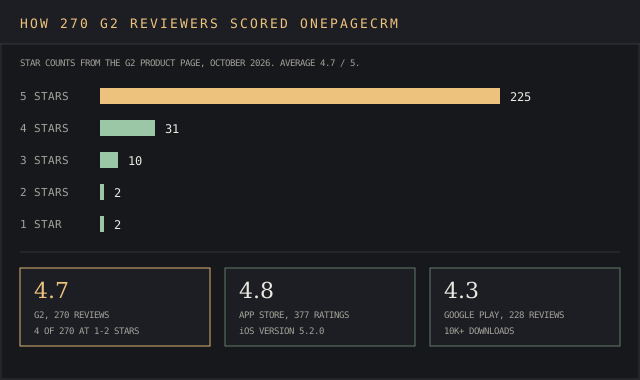
Price draws less heat than at most vendors. A reviewer in December 2022 wrote that OnePageCRM "is a little more expensive than some of its peers at the time of writing" (G2, 20 December 2022). Against the four alternatives priced below, OnePageCRM Professional is the cheapest paid seat at $9.95.
G2's reviews are a vendor-invited sample in part: several above carry "Source: G2 invite" tags. This site's reports asking is G2 legit and how Capterra collects reviews explain how much weight a 4.7 average deserves.
↑ FACT SHEETWhat users praise most
Ease of use leads G2's breakdown of pros & cons with 54 mentions across the ratings, and "Simple" follows with 33. Reviewers call it user friendly and easy to learn, and they pay for the simplicity. Reviewers who moved from heavier CRM software tend to quantify how easy the switch was in the ratings they leave. The same Canadian consultant who gave 0.5 stars over address fields opened his review with this:
"What I couldn't accomplish in a week with Salesforce and Zoho I managed to accomplish in 5 minutes with One Page. I was trying to upload a CSV file with 1500 records, Salesforce and Zoho could not map things properly and I kept getting error after error after a week of trying."
G2 review, Michael M., business development consultant, 15 October 2024
An engineer on G2 in September 2026 described the learning curve in one line: "It’s as simple to use as you want it to be, and as complex as you need it to be" (G2, Brad A., 9 September 2026). A company president put it against the two biggest names, writing that the app "looks and feels so much better than HubSpot or Salesforce" (G2, Jake P., 17 July 2026).
↑ FACT SHEETCustomer support and onboarding
Customer support works on email, phone and live chat for every plan, with no premium tier, and answers onboarding questions during the trial. The contact page lists phone lines in Ireland (+353 91 352 007), the UK (+44 203 322 9317) and the US (+1 646 762 1303), and support@onepagecrm.com for email.
- Hours: Monday to Friday, 9 a.m. to 8 p.m. GMT+1, which is 4 a.m. to 3 p.m. Eastern.
- Weekends: email only. There's no 24/7 line, so a Saturday problem waits for Monday's phone line.
- Self-help: a knowledge base at help.onepagecrm.com with helpful articles, video tutorials, and a live demo every Tuesday at noon ET.
- Response time: the contact page commits to hours only.
Reviewers rate the humans well and find the video tutorials helpful for learning the workflow. A management consultant on G2 in September 2026 wrote: "My team and I receive prompt helpful advice and feedback when we need it" (G2, 16 September 2026).
A nonprofit user in July 2026 said it "was easy to set up and we have received numerous follow-up emails making sure we feel prepared to use OnePageCRM" (G2, 10 July 2026). The vendor's homepage claims setup in 4 minutes. G2's user panel puts average implementation time at 1 month, the safer planning number and a better way to budget time for a team importing old data.
Getting started takes three steps for teams that moved from a spreadsheet or another CRM, and the help center has articles and videos for each:
- Import contacts and deals from a CSV or a previous CRM. The data maps to standard and custom fields, and a G2 reviewer who moved from another CRM said import was easy.
- Connect the email account so new emails sync to the right contacts automatically, keeping the history in one place.
- Give every contact a Next Action, then invite team members, create user accounts and assign leads.
Questions about any step go to support@onepagecrm.com or the in-app chat, which helps new users get started and find their way in the first week.
↑ FACT SHEETSecurity, data hosting and GDPR
OnePageCRM's security page says data sits on AWS servers in North Virginia and Dublin, encrypted in transit over HTTPS with TLS 1.2 or higher and encrypted at rest with AES-256. The CRM system's backups run nightly, replicate to a second AWS region, stay hot for two weeks and then sit in cold storage for 90 days.
For GDPR, international transfers rely on the Standard Contractual Clauses in AWS's data processing addendum, and the security page points to AWS's SOC 2 report for the data centres. Two-factor authentication is available on every plan. For larger buyers, the security page lists no single sign-on. Users can choose which AWS region stores their file attachments.
↑ FACT SHEETWhat changed in the last 12 months
- 11 December 2025: IMAP/SMTP sync for any email provider.
- 16 January 2026: capture leads from WhatsApp Web.
- 22 January 2026: Dark Mode.
- 4 March 2026: email sequences, multiple inboxes, WhatsApp chat button, and the AI Assistant's TL;DR contact summary.
- 5 March 2026: the Max plan launches at $29.95 per user a month.
- 14 May 2026: one-click call, message and copy from any contact.
- 15 June 2026: MCP server for Claude and ChatGPT.
- 24 September 2026: iOS app 5.2.0 and the Android update, both with a brand-new modern interface, improved navigation, intuitive user flows and performance enhancements.
- 2 October 2026: MCP search and filtering.
The feature updates point upmarket. Most of the year's updates, new products and features landed on Business or Max, while Professional kept its $9.95 price and gained AI summaries, MCP access and WhatsApp capture. Earlier updates in the same log include April 2025, when scheduled emails appeared next to Actions, and May 2025's email-open notifications.
↑ FACT SHEETOnePageCRM alternatives
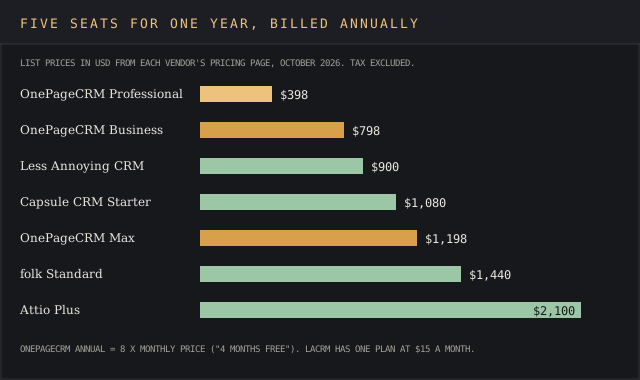
Four alternatives fit the same buyer, the same clients and the same needs: small businesses that want a simple CRM with follow-up reminders and published prices. Each one is a solid choice for a different team. The chart below prices five seats for a year on annual billing.
OnePageCRM vs Less Annoying CRM
Less Annoying CRM sells one plan at $15 per user a month with every feature included, unlimited pipelines, 25 GB of storage per user, a 30-day trial and free phone support. It works better for a team that needs several pipelines without paying $19.95 for OnePageCRM Business. It loses on email features: OnePageCRM's bulk sending, open tracking and Autoflow automations go further than the single Less Annoying CRM tier.
G2's comparison panel on the OnePageCRM listing shows Less Annoying CRM at 4.9 from 668 reviews.
OnePageCRM vs Capsule CRM
Capsule has a free plan for 2 users and 250 contacts, then Starter at $18 per user a month billed annually with 30,000 contacts. Workflow automation and multiple pipelines start at Growth, $36. Capsule wins for a two-person shop that wants to start free. It loses on price for automation: OnePageCRM gives 15 Autoflows at $9.95. Details are in this site's Capsule CRM review.
OnePageCRM vs folk
folk starts at $24 per member a month billed yearly ($288), with LinkedIn, WhatsApp and email sync and email campaigns. Sequences and dashboards need Premium at $48. It works best for a founder-led team that finds most of its leads on LinkedIn. It loses on the daily task loop and on price, where OnePageCRM's Action Stream is the whole design and the Professional seat costs under half. See the folk CRM review.
OnePageCRM vs Attio
Attio is free for up to 3 seats, then Plus at $44 per user monthly or $35 annually and Pro at $99 or $79. It wins for a team that wants custom objects, a self-designed data model and developer tools. It loses on cost, complexity and learning curve for a five-person services firm: five Plus seats cost $2,100 a year against $398 on OnePageCRM Professional. The Attio review covers what Pro gates.
Buyers comparing more than two of these tools can score them on one sheet with this site's vendor evaluation scorecard.
↑ FACT SHEETOnePageCRM FAQ
How much does OnePageCRM cost?
OnePageCRM offers three plans, and each one includes unlimited contacts: $9.95, $19.95 or $29.95 per user a month for Professional, Business and Max, or EUR 8.95, 17.95 and 25.95 in the EU, plus VAT. Annual billing gives 4 months free, and the 21-day trial includes every feature to test first.
Is OnePageCRM good?
It's good for follow-ups, since its key features work as advertised and it rates 4.7 on G2 from 270 reviews and 4.8 on the App Store. For reporting and segmentation, reviewers from 2017 to 2026 say it's thin.
What is a CRM page?
A CRM page is the single view of one contact: details, notes, emails, deals, calls and tasks. OnePageCRM's name refers to keeping all of that on one page per contact, with the Next Action on top.
What is the easiest CRM to use, or the simplest?
Among the small business CRM tools this site has reviewed, OnePageCRM and Less Annoying CRM have the shortest setup: one task list, one contact page, few menus. Both are easy to use as a simple CRM system for a first-time buyer, and reviewers call both user friendly. Less Annoying CRM has one plan, and OnePageCRM has three, with follow-up reminders on every contact.
Who is the CEO of OnePageCRM?
Michael FitzGerald, the Galway-based CEO and co-founder, who started the company after the CRMs he looked at proved too complicated for his own small business.
What is OnePageCRM used for?
Contact management, tracking follow-ups, logging calls and emails against contacts, and running a sales pipeline for small businesses, consultants and professional services firms. Teams that use OnePageCRM on the road run it from the OnePageCRM mobile app.
What is the best CRM software for small business?
It depends on what the business needs to manage and how many features it needs. For dated reminders under $10 a seat across small businesses, pick OnePageCRM. For a free start, Capsule fits, and for custom data models, Attio. This site's CRM cost report, linked in the pricing section, prices 11 vendors.
↑ FACT SHEETVerdict
OnePageCRM is for a small business such as a solo founder, consultant or professional services firm of up to about ten people whose deals die from forgotten follow-ups. The one-dated-Next-Action rule, the Action Stream and the $9.95 Professional plan with unlimited contacts earn the 86 for solo fit. Every price is published per tier in two currencies, which makes it easy to budget and earns 92 on price transparency.
It isn't for sales teams that report up to leadership or manage leads at volume. A services firm that delivers each won deal as a project fits Insightly, which converts the opportunity into a project on its $29 Plus seat.
Filters that combine only one or two rules, reporting complaints running from 2017 to June 2026, and user permissions gated to Business set the 62 for a 10-person team and the 48 on reporting and export. Teams that need recurring tasks or sequences on a budget will also fight the product, and owners trying to grow sales past ten reps will find the reporting tools and workflow controls behind the curve.
It might suit a growing team that lives in email, with caveats. Business at $19.95 adds IMAP, open tracking and 2 years of email history, and support answers by phone and chat on every plan, which earns 74 for support responsiveness. Contract flexibility scores 76 because cancellation is in-app, but the February 2026 refund refusal says to cancel before the 21-day trial ends.