Data architecture tools: 10 data modeling tools ranked for 2026
 By Jan Suski. I go deep on every review, checking every number against its source and digging up details other coverage misses, a habit from six years of SEO and link building for tech companies. Bylines at Surfer, Brand24, and Senuto. How the scoring works.
· Prefer this source on Google
Quick comparison of the top data modeling tools
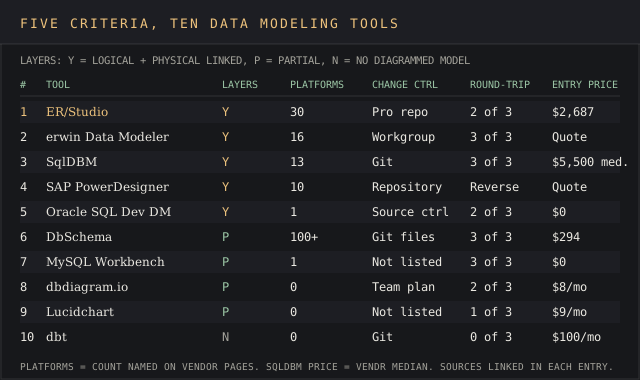
Ten data modeling tools in ranked order, with each one’s documented platform or plan coverage, its entry price and the buyer it fits.
| # | Provider | Documented coverage | Entry price | Best fit |
|---|---|---|---|---|
| 1 | ER/Studio | 30 named database platforms | $2,687 per user (subscription) | Enterprise data modeling on Windows |
| 2 | erwin Data Modeler | 16 named platforms | Quote only | Governed models tied to a metadata catalog |
| 3 | SqlDBM | 13 platforms and tools | Vendr median $5,500 a year* | Browser modeling for Snowflake and Databricks |
| 4 | SAP PowerDesigner | 10 DBMS families in 16.7 notes | Quote only | Enterprise architecture plus database design |
| 5 | Oracle SQL Developer Data Modeler | Oracle Database | $0 | Oracle shops on no budget |
| 6 | DbSchema | 100+ databases | $294 one-time | Small teams across SQL and NoSQL |
| 7 | MySQL Workbench | 1 database (MySQL) | $0 | MySQL-only schemas |
| 8 | dbdiagram.io | 10 diagrams on Free | $8 a month | Schemas written as code |
| 9 | Lucidchart | 3 editable documents on Free | $9 a month | ER diagrams for mixed audiences |
| 10 | dbt | 3,000 model builds a month on Free | $100 per user a month | Transformation models in the warehouse |
The figure marked * is an anonymized buyer-reported contract value published by Vendr. Every other price is the figure the vendor publishes on its own pricing or purchase page.
Where these figures come from
Platform counts are each vendor’s own published list: ER/Studio’s technical specification, Quest’s erwin Data Modeler product page, SqlDBM’s homepage, SAP’s PowerDesigner 16.7 release notes and DbSchema’s homepage. Plan limits for dbdiagram.io, Lucidchart and dbt come from their pricing pages. erwin, SqlDBM and SAP publish no list price for any edition, so no row claims one.
None of these ten tools appears in another ranking on this site. The data mining tools ranking covers software that analyzes the finished tables, and the catalog and BI rankings are linked from the data architecture section below.
A data model is the drawing a database gets built from. Data modeling tools hold that drawing as a file, generate the DDL that creates the tables, and read an existing database back into a diagram when nobody remembers why a column exists. That file is also the business context every downstream team reads.
This page ranks ten of the best data modeling tools, from ER/Studio’s $2,687 seat to two free downloads from Oracle. Each entry carries its price, its documented platform count, a user quote and the reason it sits where it sits.
It’s written for data architects, data engineers and data analysts picking one data modeling tool for a team that has to manage data models across complex data environments. The timing matters: MySQL Workbench 8.0 stopped getting releases in September 2026, and dbt merged into Fivetran on 1 June 2026, so two familiar names changed under their users this year.
Evaluation criteria for data modeling tools
Five criteria decide the data modeling shortlist, and the ranking below applies them in this order. A tie on one criterion passes to the next.
Conceptual, logical and physical layers in one file
The test: open the tool, draw a logical model, derive physical data models for two targets, and check the logical model updates when a physical column changes. Score yes (logical and physical linked), partial (physical only, or logical in one edition only) or no (no diagrammed model).
Documented target platforms
Count the database platforms the vendor names on its own product or spec page. ER/Studio’s tech spec names 30; a tool that names none scores on what its docs list, and a single-database tool scores 1.
Team change control
Two people edit the same model. Does the tool merge it through a repository or Git, and which tier carries that? Name the mechanism and the edition, then try it with a deliberate conflict.
Round-trip engineering
Three data modeling tasks: forward engineering to DDL, reverse engineering an existing database into a model, and comparing the model against a live schema. Score 0 to 3.
Published entry price
A dollar figure on the vendor’s page, or a Vendr median with its purchase count. “Contact sales” scores lowest, because a buyer can’t budget a number nobody publishes.
The 10 best data modeling tools, ranked
ER/Studio
Best fit
An enterprise data modeling team on Windows that models across many database platforms and wants a published price.
ER/Studio Data Architect, sold by Idera, covers logical & physical data modeling with forward and reverse engineering capabilities in its Standard edition, according to erstudio.com. Its technical specification names 30 database platforms, from Amazon Redshift and Databricks to IBM Db2 for z/OS and Snowflake, and lists 64-bit Windows as the only operating system.
The Pro edition adds version history and a central repository with check-in and check-out. Enterprise bundles Team Server Core, a business glossary and integrations with Microsoft Purview and Collibra, which is where the data governance work lands.
Key features
- 30 named target platforms, relational and NoSQL databases included (MongoDB, JSON)
- Forward engineering to DDL and reverse engineering of existing databases in every edition
- Central repository with check-in, check-out and version history in Data Architect Pro
- Business glossary and enterprise data catalog in Enterprise
- Integration with Microsoft Purview and Collibra in Enterprise
Pricing
ER/Studio’s pricing page lists Data Architect at $2,687 and Data Architect Pro at $3,693, each labelled a total subscription price per user. Enterprise is quote only. Vendr’s Idera page shows an average contract value of $3,174 across Idera products, from anonymised buyer data.
Pros
- The widest documented platform list among the data modeling tools on this page, at 30
- Two of three editions carry a price you can pay online
- Repository-based team modeling starts at the $3,693 Pro tier
Cons
- Windows only, per the spec page, so Mac-based teams need a VM
- The Standard edition has a local data dictionary with no shared repository
- Governance integrations sit behind the unpriced Enterprise tier
The repository is also where the most specific complaint lands. A Database Architect at UConn Health wrote on TrustRadius in October 2015:
“The repository can be slow when the model count gets larger. By large I mean 20 to 30 models.”
Jay Coppola, Database Architect, UConn Health, TrustRadius, 7 October 2015
Why it’s ranked #1. ER/Studio names 30 target platforms against erwin’s 16, the second criterion, and publishes a $2,687 seat price erwin won’t. It edges SqlDBM and everyone below on the same platform count.
erwin Data Modeler
Best fit
A governance-heavy enterprise that already runs erwin Data Intelligence or wants data modeling wired into a catalog to manage metadata in one place.
Quest bought erwin, Inc. in a deal that closed on 31 December 2020, and its announcement put erwin’s base at more than 3,500 customers. The product page names 16 platforms, Oracle, MySQL, SQL Server, PostgreSQL, MongoDB, Snowflake, Databricks, BigQuery and Neo4j among them, and lists reverse engineering capabilities for turning existing structures into reusable models. Quest’s own tagline on G2 calls it “the blueprints for trusted data”.
Quest pitches erwin Data Modeler as a data management and governance tool as much as a drawing tool. The page promises reduced risk and compliance, definitions and formats standardized across the whole estate, accurate mapping across “legacy systems and new platforms”, and clearer communication between the business and IT readers of a model. Those are vendor claims; the testable parts are the glossary link and the Git version control it lists.
Key features
- 16 named platforms, relational, NoSQL (MongoDB, Cassandra) and graph (Neo4j)
- Forward engineering (schema generation) and reverse engineering in Standard and Workgroup
- Model compare and synchronization, plus naming standards, in Standard
- Repository-based multi-user collaboration and version control in Workgroup only
- Enterprise glossary integration with erwin Data Intelligence; ER360 web portal as an add-on
Pricing
Quote only, which is par for the course at this end of the market. Quest publishes three editions on its versions page, Standard, Workgroup and a read-only Navigator, with no price on any.
Pros
- All three round-trip operations documented: generate, reverse engineer, compare and sync
- Glossary and catalog links for standardized data definitions
- A Navigator edition for reviewers who only browse and report
- Git version control listed on the product page
Cons
- No published price for any edition
- Repository collaboration exists only in Workgroup
- 16 named platforms, about half of ER/Studio’s 30
- A Data Admin on TrustRadius called the user interface “a little clunky, even on the 2020 version”
Cost is the recurring complaint. An IT employee at a 10,001+ person company put it in one line on TrustRadius in April 2021: “Cost is the single largest barrier to entry with this tool.” The import path draws the praise:
“I love the way we can import an SQL file containing schema meta data and generate ER diagram out of it.”
Ravinder Gupta, Senior Oracle Database Administrator, CGI, TrustRadius, 25 January 2019
Why it’s ranked #2. erwin names 16 platforms to SqlDBM’s 13 and documents all 3 round-trip operations, which keeps it above SqlDBM. It trails ER/Studio’s 30 platforms and publishes no price at all.
SqlDBM
Best fit
A data modeling team on cloud data warehouses such as Snowflake, Databricks or BigQuery that wants a browser tool tied to Git and dbt.
SqlDBM runs in the browser, so a new hire on a Mac or Linux laptop hits the ground running with nothing to install. Its homepage lists 13 platforms and tools (Snowflake, Databricks, SQL Server, Azure Synapse, BigQuery, Oracle, Redshift, MySQL, PostgreSQL, Microsoft Fabric, Teradata, plus Atlan and Collibra) and says more than 300 Snowflake clients use it. It covers conceptual, logical and physical modeling and carries SOC 2 Type II compliance.
Key features
- Conceptual, logical & physical data modeling in one browser project
- Reverse engineering, forward engineering and model-to-database sync against live environments
- Git and CI/CD connections plus a native dbt integration
- Column-level data lineage and impact analysis before deployment
- Naming standards, glossary and change approvals for data governance
- AI Copilot with bring-your-own-model support
Pricing
SqlDBM’s pricing page prices per user with every feature included and no published rate. Vendr’s SqlDBM page shows a median of $5,500 a year and a high of $14,582, from anonymised buyer data. AI credits, SSO and regional storage cost extra.
Pros
- Runs on any OS through the browser
- All 3 round-trip operations, plus sync to the live database
- Built in version control through Git, plus dbt and Jira connections
Cons
- No list price; the Vendr median is the only public number
- 13 platforms, weighted to cloud warehouses
- Copilot and AI credits billed outside the seat price
“I like that modelers in my company can work together on the same project in parallel.”
Michal P., Technical Architect, mid-market company, G2, 26 January 2026
A Data Architect at an enterprise account was blunter on the same G2 page in February 2026: “Automation and integration options are limited.”
Why it’s ranked #3. SqlDBM’s 13 documented platforms beat the 10 DBMS families in PowerDesigner’s release notes, and its $5,500 Vendr median beats PowerDesigner’s blank. It loses to erwin’s 16 platforms.
SAP PowerDesigner
Best fit
An SAP shop that needs enterprise architecture, business processes and database design for SAP systems in one repository.
PowerDesigner links application architecture to database design through what SAP calls link-and-sync technology. SAP’s product page describes it as a way to “build a blueprint of your current enterprise architecture and visualise the impact of change before it happens”, with impact analysis and a metadata repository that supports every model type.
The release cadence is slow. SAP’s 16.7 SP07 notes are dated 29 May 2023 and added SQL Server 2019, MySQL 8.x, Oracle 21c, PostgreSQL 14.x, Greenplum 6.x and Teradata 17. Across the 16.7 notes, SAP HANA, Redshift, Snowflake and IBM DB2 bring the named DBMS families to 10.
Key features
- Conceptual, logical and physical models kept in sync
- Link-and-sync between requirements, business glossary terms and data models
- Impact analysis across database structures before a change ships
- Enterprise architecture and business process modeling in the same metadata repository
- On-premise deployment
Pricing
Quote only through SAP. G2 lists 29 reviews at 4.3, and its AI summary flags license cost as a barrier for smaller organizations.
Pros
- Business processes, enterprise architecture and physical schemas in one tool
- Impact analysis that traces a column change downstream
- A shared metadata repository across model types
Cons
- No public price
- The latest service pack notes date from May 2023
- Reviewers report slow performance on large models
- The 9 newest G2 reviews, from September and October 2026, all call the user interface dated or ask for a more user friendly interface
“being able to move back and forth between conceptual, logical, and physical models without losing sync saves a lot of headaches.”
Amit M., Programmer, enterprise software company, G2, 1 October 2026
Why it’s ranked #4. PowerDesigner’s 16.7 notes name 10 DBMS families to Oracle Data Modeler’s one, so it clears #5. SqlDBM’s 13 platforms and Vendr median keep it above.
Oracle SQL Developer Data Modeler
Best fit
An Oracle Database team that wants logical and physical modeling with $0 spent.
Oracle SQL Developer Data Modeler is “a free graphical tool that enhances productivity and simplifies data modeling tasks”, according to Oracle’s product page. It creates and edits logical, relational, physical, multi-dimensional and data type models, provides forward and reverse engineering capabilities, and supports collaborative development through integrated source code control.
Oracle SQL Developer Data Modeler first shipped on 1 July 2009 and runs “in both traditional and in Cloud environments”. The download page carries version 24.3.1 under the Oracle Free Use License.
The product page says it connects to any supported Oracle Database and lists MySQL and SQL Server as targets planned for later releases, so the “supports Oracle and MySQL” line repeated across modeling roundups overstates the current scope.
Key features
- Logical, relational, physical, multi-dimensional and data type models
- Forward and reverse engineering against Oracle Database
- Integrated source code control enables users to share one model as a team
- Runs on-premise or in cloud environments
Pricing
$0 under the Oracle Free Use License, linked from the download page.
Pros
- A free data modeling tool with logical, relational and physical layers
- Multi-dimensional modeling for data warehouses
- Source control built in, no add-on fee
Cons
- Connects to Oracle Database only, per Oracle’s own page
- No conceptual layer in Oracle’s own list of model types
- The product page still shows release 20.3 while the download page is on 24.3.1
Beggars can’t be choosers on a $0 license, and file stability is the complaint that keeps surfacing. A Hacker News commenter called Oracle SQL Developer’s tooling okay “maybe apart from their data modeler functionality, which corrupts files and breaks” in a December 2022 thread.
Why it’s ranked #5. Oracle SQL Developer Data Modeler links logical and physical models for $0, a layer DbSchema reserves for its $470.40 Architect edition. It names 1 platform to PowerDesigner’s 10, so it sits below.
DbSchema
Best fit
A small team or consultant modeling data structures across relational and NoSQL databases on a one-time budget.
DbSchema’s homepage claims connections to 100+ databases over JDBC, PostgreSQL, Oracle, SQL Server, MongoDB, Snowflake and ClickHouse included. Models live in plain-text design files that work with Git branches and pull requests, and its schema comparison checks a live database against the design and shows each change as SQL before it runs.
Key features
- 100+ database management systems, relational databases and NoSQL alike
- Git-friendly design files with diffs and merges
- Schema compare and sync with SQL review before deployment
- HTML5, PDF and Markdown documentation in Pro
- Logical and conceptual design for creating models before the database exists, in Architect
Pricing
The purchase page lists Community free, Pro at $294 one-time and Architect at $470.40 one-time, each per developer. Maintenance after year one costs $75 a year for Pro and $120 for Architect.
Pros
- A perpetual license for $294
- The longest database list on this page at 100+
- Git-native model files with no repository server to run
Cons
- Logical and conceptual design only in the $470.40 Architect edition
- Community can’t save designs to files or work offline
- Six public reviews on G2, at 4.4, is a thin record
The praise that exists is plain. A Hacker News user wrote in a July 2015 thread: “I use DBSchema for ER diagrams, works well.”
Why it’s ranked #6. DbSchema reaches 100+ databases to MySQL Workbench’s 1 and adds logical design for $470.40. It falls below Oracle’s free tool because the base $294 Pro edition stops at physical models.
MySQL Workbench
Best fit
A MySQL-only team that needs database modeling with EER diagrams and live-server sync at no cost.
MySQL Workbench 8.0 builds EER diagrams, reverse engineers a live database to a model, forward engineers a model to a script or live server, and runs schema synchronization and comparison, per Oracle’s manual.
On 10 September 2026 Oracle announced that “MySQL Workbench 8.0 is no longer maintained and will have no new releases”.
Its replacement, Workbench 26, is an ElectronJS desktop app built on MySQL Shell. The announcement says “Some features found in Workbench 8 may not be available yet”, and the new product page covers development, administration, performance and backup with no modeling section.
The site’s guide to end-of-life software covers what an unmaintained tool means for a team still running it. A team modeling in 8.0 today is skating on thin ice until Oracle confirms which 8.0 modeling features Workbench 26 carries.
Key features
- EER diagram editor for MySQL schemas
- Reverse engineering from a create script or a live database
- Forward engineering to an SQL script or a live server
- Schema synchronization and catalog comparison reports
Pricing
$0. Oracle describes Workbench 26.7 as open source.
Pros
- All 3 round-trip operations for MySQL in 8.0
- Packages for Windows, macOS and Linux
- Free, with database performance reports and SQL editing in the same app
Cons
- Version 8.0, the release with the modeling features, gets no further releases
- One database platform
- Physical models only, with no logical layer
Users already treat it as a basic tool. An Operations Engineer at Dayspring Partners wrote on TrustRadius in August 2025: “For more complicated data modeling, I’ll use another tool.”
Why it’s ranked #7. Workbench documents 1 target platform and all 3 round-trip operations against a live MySQL server, where dbdiagram.io’s pricing page names no target database. DbSchema’s logical layer and 100+ databases keep it above.
dbdiagram.io
Best fit
A developer who wants database modeling as typed code, shareable in a browser.
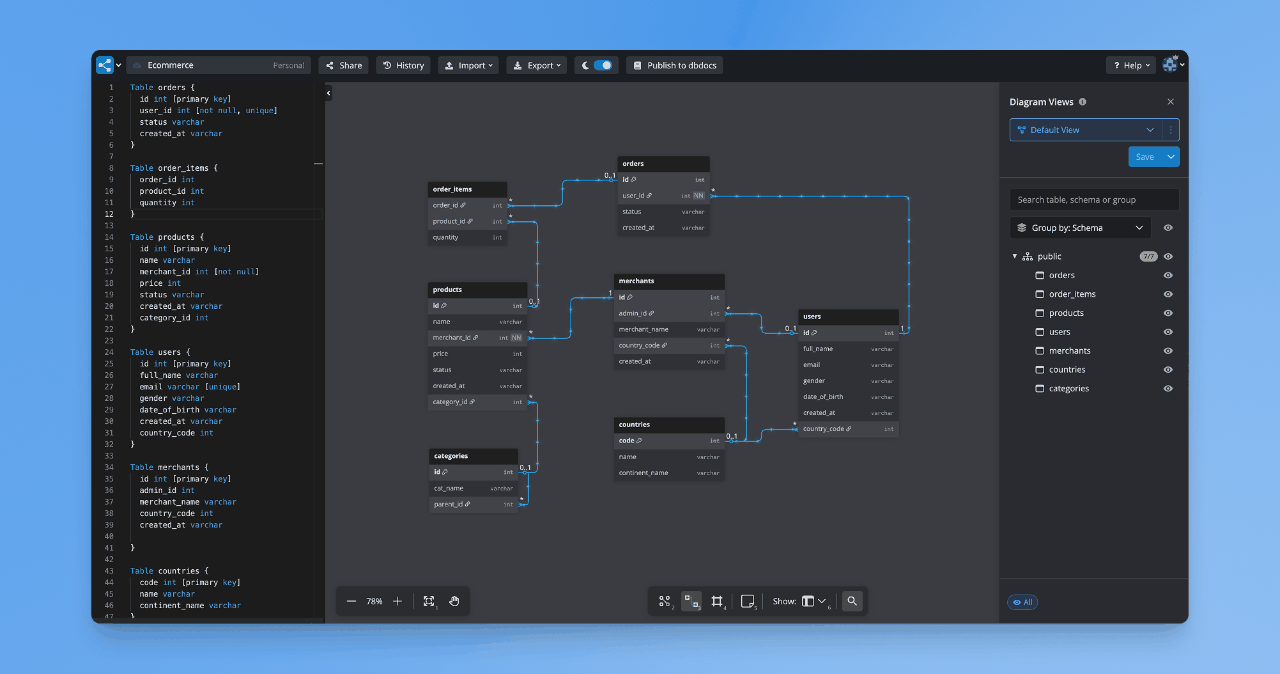
dbdiagram.io swaps drag and drop functionality for DBML, a short text syntax for tables and references, and renders the ER diagram from it. Its pricing page lists SQL import and export, PDF, PNG and SVG export, a CLI and published docs on every plan, with up to 10 diagrams on Free. It’s the quick and dirty route to a schema diagram a reviewer can open from a link.
Key features
- DBML text editor that renders the diagram as you type
- SQL import and export on every plan
- Published schema docs with a 14-day changelog on Free
- Version history and password-protected sharing on Personal Pro
Pricing
Free for up to 10 diagrams, Personal Pro at $8 a month, Team at $75 a month for 3 users plus $5 per extra user, and custom pricing for SAML SSO.
Pros
- A schema in DBML is a text file Git can diff
- $8 a month for unlimited diagrams
- 10 diagrams with SQL import and export on the Free plan
Cons
- Physical models only
- No connection to a live database for compare or sync
- AI assistant capped below the Custom plan
“I see dbdiagram.io listed which I find super easy to use and they’ve been adding features.”
karmakaze, Hacker News, 24 May 2025
Why it’s ranked #8. dbdiagram.io runs SQL import and export on all 4 plans, where Lucidchart’s ERD export drops the connections between tables. Workbench’s 1 documented platform and live-server sync put it one place higher.
Lucidchart
Best fit
A team that needs entity relationship diagrams business readers can open in the same tool as their flowcharts.
A picture is worth a thousand words to a business reader, and that’s the case for Lucidchart’s drag and drop interface. It imports a database schema through a DBMS dropdown and builds the ERD from it on every plan, Free included, per Lucid’s help center. The same article says you can export the ERD back to a DBMS “with the exception of connections between tables”, so relationships drawn in Lucidchart never reach the database.
Key features
- Schema import into an ERD through a DBMS dropdown
- ERD export to a DBMS, minus table connections
- Salesforce schema import on Enterprise
- ERD feature available on FedRAMP accounts
Pricing
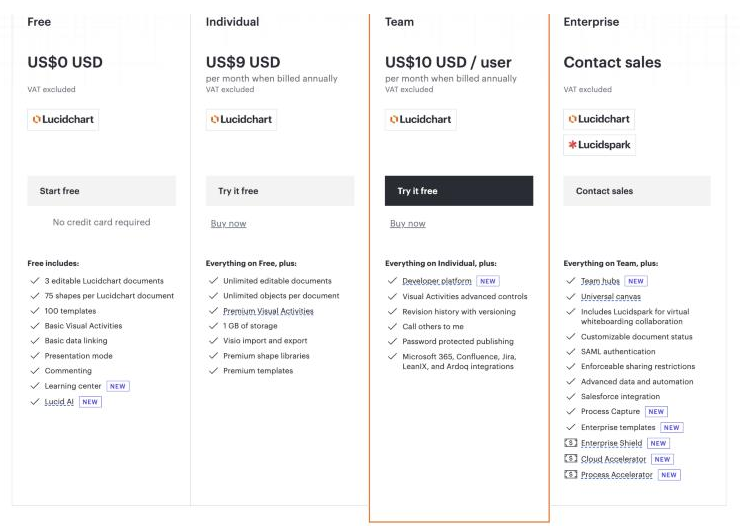
Lucid’s trial page lists Individual at $9 a month and a Free plan capped at 3 editable documents and 60 shapes per document. Vendr’s Lucid Software page shows a $18,790 median across 516 deals, ranging $4,900 to $77,039.
Pros
- Schema import on the Free plan
- 100 basic templates even on Free
- $9 a month for unlimited documents
Cons
- Exported DDL omits relationships
- Free stops at 3 editable documents
- No logical layer and no compare against a live schema
The document cap pushes small teams out. A Hacker News user wrote in an August 2025 thread that the team was using Lucidchart “until we reached the limit”, then moved to dbdiagram.io.
Why it’s ranked #9. Lucidchart imports a schema and draws a physical ERD on all 4 plans, which puts it above dbt with no diagram at all. Its export drops table connections, so dbdiagram.io’s 2 clean SQL operations sit above.
dbt
Best fit
An analytics engineering team that defines warehouse models as SQL files, beside a separate data modeling tool.
dbt is an open source framework for transforming raw data with modular SQL inside data warehouses. Fivetran completed its merger with dbt Labs on 1 June 2026 and said dbt Core v2.0 is being released under an Apache 2.0 license. A dbt model is a SELECT statement, so the tool covers the transformation layer of a data architecture and draws no entity relationship diagrams.
Key features
- SQL models with tests and documentation in Git
- CI checks for GitHub and GitLab on the free Developer plan
- dbt Catalog lineage and Semantic Layer metrics on Starter, which helps data analysts query one definition of each metric
- Column-level lineage and dbt Mesh multi-project setup on Enterprise
Pricing
Dbt’s pricing page lists Developer free for 1 seat and 3,000 successful model builds a month, Starter at $100 per user a month for up to 5 seats and 15,000 builds, and custom Enterprise tiers. Vendr’s dbt Cloud page shows a $27,930 median across 119 deals, ranging $14,560 to $102,800.
Pros
- Git and CI from the free tier up
- Column-level data lineage across models on Enterprise
- Open source core under Apache 2.0
Cons
- No ER diagrams, no logical model, no DDL generation for a new schema
- Starter caps at 5 seats
- The Vendr median of $27,930 is the highest on this page
Price changes are what users remember. A Hacker News commenter wrote in an August 2023 thread: “Given a year ago dbt cloud was $50 per seat without usage based pricing”. Starter now lists $100.
Why it’s ranked #10. dbt scores no on model layers, the first criterion, because a dbt model is a SELECT statement with no diagram. Lucidchart’s physical ERD import on all 4 plans ranks it one place above.
Where data modeling tools sit in a data architecture
Modern data stacks are built from a chain of single-purpose tools, and these tools are categorized by the function they serve in that data lifecycle. The data modeling tool sits upstream of all of them: it decides the data structures the rest of the chain fills.
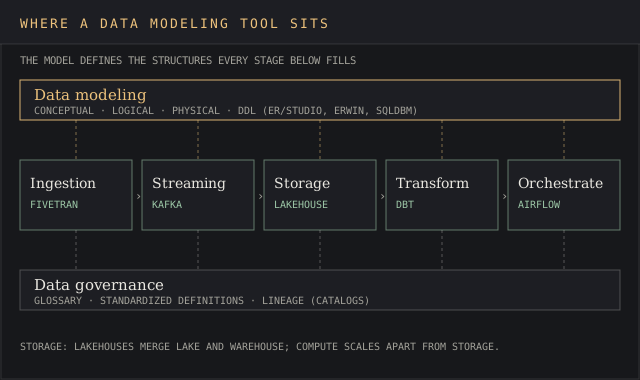
- Ingestion. Data ingestion and data integration tools automate extracting data from SaaS apps and existing databases and land it as standardized datasets. Fivetran is the named example after its dbt merger.
- Streaming. Event streaming platforms such as Confluent Kafka carry real-time ingestion and processing, and automated pipelines keep data flowing into central storage.
- Storage. Storage platforms house structured and unstructured data at scale. Lakehouses combine data lakes and data warehouses, and decoupling compute from storage lets each scale on its own.
- Transformation. dbt applies modular SQL transformations inside the warehouse.
- Orchestration. Orchestration tools such as Apache Airflow schedule and manage data workflows across the pipeline.
Governance runs across all five. A data governance framework sets standardized data definitions, ownership and quality rules so a customer record means the same thing in every table and data silos stop disagreeing, which reduces risk and makes trusted data easier to find. The catalogs that hold those definitions are ranked separately in the data intelligence tools ranking; the BI tools that read the finished tables are covered in the data analysis tools ranking.
In a nutshell, the modeler draws the plan, ingestion and storage fill it, and governance checks the labels.
Types of data models these tools build
Every data modeling tool on this list supports at least one layer of the conceptual, logical and physical stack. The conceptual model names entities for business readers. The logical model adds data elements, keys and data relationships with no database chosen. Physical models add data types, indexes and constraints for one database platform.
The modeling technique, a separate choice from the layer, decides how data structures relate:
- Entity-relationship modeling represents data as entities and the relationships between them. Every tool here draws entity relationship diagrams except dbt.
- Relational modeling organizes data into related tables with primary keys, foreign keys and constraints, the default for relational databases such as SQL Server, Oracle and PostgreSQL.
- Hierarchical modeling organizes data in a tree, one parent per child. JSON documents in NoSQL databases follow the same shape.
- Object-oriented modeling uses objects with properties and methods, usually drawn as UML class diagrams.
- Data vault modeling splits hubs, links and satellites to keep long-term history for auditing.
- Data warehouse (dimensional) modeling uses fact and dimension tables to support decision support systems. Oracle’s multi-dimensional models cover this.
Hackolade, which narrowly missed this list, built its data modeling product around the hierarchical case. Its pricing page lists the Workgroup edition at €1,750 a seat a year and claims 40+ targets, MongoDB, Cassandra and DynamoDB among them, for teams whose complex data models are mostly documents.
Pricing across data modeling software
The spread runs from $0 to a $27,930 Vendr median, and the price order flips depending on the billing unit. Three vendors publish no number at all: erwin, SqlDBM and SAP. Opaque pricing is common in enterprise data management, and it’s why the price criterion sits last.
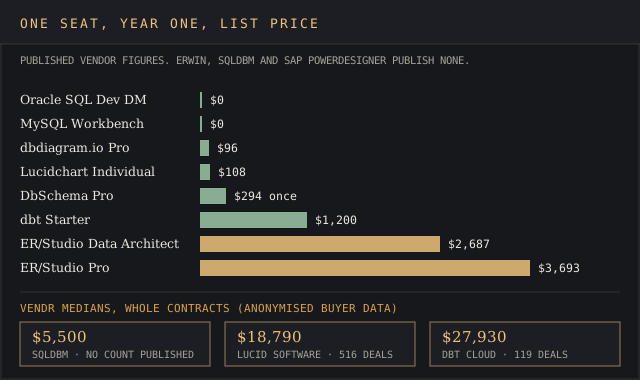
One seat for one year, using each vendor’s own figure:
- $0: Oracle SQL Developer Data Modeler, MySQL Workbench, DbSchema Community, dbt Developer
- $96: dbdiagram.io Personal Pro at $8 a month
- $108: Lucidchart Individual at $9 a month
- $294: DbSchema Pro, perpetual, then $75 a year for updates
- $1,200: dbt Starter at $100 a month
- $2,687 and $3,693: ER/Studio Data Architect and Pro
- Quote: erwin Data Modeler, SqlDBM, SAP PowerDesigner
dbt Cloud’s median contract across 119 deals on Vendr, the highest contract figure on this page. SqlDBM’s Vendr median is $5,500.
The hidden costs sit in the tiers. Team change control lives in erwin Workgroup, ER/Studio Pro, DbSchema’s paid editions and dbdiagram’s Team plan, so the cheapest seat on each vendor’s page usually can’t share a model. A buyer who prices Standard and then needs a repository goes back to the drawing board mid-procurement. The business intelligence cost report tracks the same tier pattern in BI licenses.
Free data modeling tool options and their limits
Four tools here cost nothing, and each stops at a specific wall. Oracle SQL Developer Data Modeler is the strongest free option for model layers, with logical, relational and physical data models linked, but it connects to Oracle Database only. Workbench 8.0 runs full round-trip engineering for MySQL and gets no more releases.
DbSchema Community reverse engineers 100+ databases into interactive diagrams, and it can’t save a design to a file. dbt Developer gives one seat 3,000 model builds a month with Git and CI, and it never draws a diagram.
Free tools are a fine place to start; the red flag is a team of five sharing one free seat because the paid tier wasn’t budgeted.
erwin Data Modeler vs ER/Studio
These two are the most compared enterprise data modeling tools, and the gap is measurable. ER/Studio names 30 database platforms and publishes $2,687 and $3,693 seat prices. erwin names 16 platforms and publishes nothing. Both run forward and reverse engineering and both put team collaboration in a mid tier: erwin Workgroup, ER/Studio Pro.
Database platforms named on ER/Studio’s technical specification and on Quest’s erwin Data Modeler product page.
erwin’s case is its catalog link. Quest sells it alongside erwin Data Intelligence, and the product page leads with governance and standardized definitions.
Pick erwin when the glossary already lives in erwin Data Intelligence and you’d keep all your eggs in one basket on purpose; pick ER/Studio when platform breadth and a known price matter more. Either way, score both on the vendor evaluation scorecard with a trial run against your own existing databases, so the whole team is on the same page before a contract.
Data modeling software FAQ
What tools does a data architect use?
A data architect designs database architectures and uses a data modeling tool (ER/Studio, erwin Data Modeler, SqlDBM or PowerDesigner on this list) for database design, a catalog for data governance, and the warehouse’s own SQL client. The modeling tool is the one that produces the DDL and the diagrams other teams build from.
Is SQL a data modeling tool?
SQL is the language a physical model compiles to. CREATE TABLE statements define database structures, but they carry no conceptual or logical layer. Tools like DbSchema and dbdiagram.io generate SQL from a model and reverse engineer SQL back into one.
What is ERwin Data Modeler?
erwin Data Modeler is a database modeling tool owned by Quest since the deal closed on 31 December 2020. It builds conceptual, logical and physical models for 16 named platforms and ships in Standard, Workgroup and Navigator editions.
What are the four types of data modeling?
Most lists of four pick conceptual, logical, physical and dimensional models. The techniques above cut across all four.
What is a data modeler?
A data modeler is the person who designs those models, and the word also names the software, as in erwin Data Modeler and Oracle SQL Developer Data Modeler. The job covers translating business processes into entities, keys and data integrity rules that the database enforces.
Bottom line
ER/Studio wins for an enterprise team on Windows that needs the widest platform list and a price it can see. erwin Data Modeler wins when data management, governance and a metadata catalog drive the purchase and the budget can absorb a quote. SqlDBM wins for cloud warehouse teams on Snowflake or Databricks who want a browser tool wired to Git and dbt.
For Oracle-only work, Oracle SQL Developer Data Modeler is the free pick with linked logical and physical layers. DbSchema is the $294 pick for a small team across many databases. MySQL Workbench, dbdiagram.io and Lucidchart cover narrower jobs, and dbt belongs beside a data modeling tool in the stack, after the schema is drawn. The right tool is the first one on this list that passes every criterion your team can’t compromise on.