Data extraction tools: the 10 best data extraction software options ranked for 2026
 By Jan Suski. I go deep on every review, checking every number against its source and digging up details other coverage misses, a habit from six years of SEO and link building for tech companies. Bylines at Surfer, Brand24, and Senuto. How the scoring works.
· Prefer this source on Google
Quick comparison of the best data extraction tools
All ten data extraction tools in final order. The coverage figure is the one number each vendor publishes about how much it can reach; the entry price is the smallest paid or free unit it lists.
| # | Provider | Coverage figure | Entry price | Best fit |
|---|---|---|---|---|
| 1 | Bright Data | 400M+ residential IPs, 195 countries | Free 5,000 requests/mo; $1.50 per 1,000 requests | Blocked or JavaScript-heavy public web pages at volume |
| 2 | Airbyte | 700+ connectors | Free self-hosted Core; Cloud from $20/mo | Data teams wanting open-source ELT |
| 3 | Fivetran | 700+ managed connectors | Free 500,000 MAR/mo; paid rates quoted | Hands-off SaaS-to-warehouse data pipelines |
| 4 | Apify | 94,517 Actors in Apify Store | Free $5/mo credit; Starter $19/mo | Developers buying or building scrapers |
| 5 | Firecrawl | 1,000 free credits/mo, AGPL-3.0 core | Hobby $16/mo billed yearly | LLM pipelines needing Markdown or JSON |
| 6 | Octoparse | 500+ preset templates | Free 10 tasks; Standard $69/mo billed yearly | Non-coders scraping point and click |
| 7 | Hevo Data | 170+ connectors | Free 1M events/mo; Starter $299/mo | Small data team, low-maintenance ELT |
| 8 | Amazon Textract | 6 languages for printed text | $1.50 per 1,000 pages (text) | AWS shops needing HIPAA-eligible OCR |
| 9 | Nanonets | $0.02 to $0.30 per block run | Free $50 credit; $100/mo for 100 credits | Pay-per-run invoice workflows |
| 10 | Rossum | 276 languages and handwriting | From $18,000/year | Accounts payable teams at high invoice volume |
Figures are each vendor’s own published page, read 22 October 2026. No price here is a Vendr median: all ten vendors publish a free tier or a paid rate of their own.
Where these figures come from
Coverage counts, free allowances and plan prices are each vendor’s own published figure, read on 22 October 2026 and linked in each entry. Units differ by family: requests, credits, compute units, monthly active rows, events, pages and block runs. Fivetran publishes no per-million-MAR rate, Firecrawl publishes no pass rate against bot-protected sites, and Nanonets publishes no per-page rate, so no row claims one.
Teams that would sooner buy the records than extract them can start with the data providers guide. Records that are already in your CRM and need missing fields filled sit in the data enrichment tools ranking.
Data extraction tools pull records out of places that were never built to hand them over: a competitor's product pages, a Salesforce instance, a folder of 40,000 scanned invoices. The data extraction process sits at the front of every data pipeline, turning raw data into records. Whatever it misses or mangles, every business intelligence report downstream inherits.
This page ranks the ten best data extraction tools across the three families buyers shortlist together: web scraping platforms, ELT connectors that move data between systems, and document extraction software built on optical character recognition. Every price and count below comes from the vendor's own page, read on 22 October 2026, and every one links to where it came from.
It's written for the analyst or ops lead picking a first data extraction tool, and for the data engineering team replacing a data extraction setup that broke. The timing matters because these numbers move. Apify's Store now lists 94,517 Actors, Fivetran's free plan covers 500,000 monthly active rows, and Firecrawl's paid plans start at $16 a month.
Gartner's research puts the cost of poor data quality at at least $12.9 million a year on average per organization.
Bad extraction, by automated methods or manual data extraction alike, is where a lot of that bad data starts, so the choice of tool deserves a test, and this page sets one.
Evaluation criteria for data extraction tools
Five criteria decide the data extraction software shortlist, and the ranking below applies them in this order. Each one is a test a buyer can run against a vendor's own site in under ten minutes and get a yes, a no or a number.
1. Published entry price
Does the vendor print a paid rate on its own pricing page, and what is it? A tool that answers "contact sales" at every tier fails. Usage rates count when they carry a unit: $1.50 per 1,000 pages is a price, "volume pricing" isn't.
2. Recurring free allowance
How much data extraction does the free tier allow every month, and does it renew? A 14-day trial scores below a monthly allowance, because a pipeline that runs for six weeks outlives the trial. The number is pages, requests, rows or events, as the vendor states it.
3. Source coverage count
How many sources can the data extraction tool reach out of the box, counted the way the vendor counts them: connectors, Actors, templates, proxy IPs or languages. A published count wins over an adjective, and a vendor that publishes none scores zero here.
4. Incremental and scheduled data extraction
Does the documentation describe incremental extraction, change data capture or scheduled runs? A yes means the tool can pull only changed data after the first load into the target system. A no means every run is a full extraction, and the bill and runtime grow with the source.
5. Unstructured input handling
Does the vendor document support for inputs without a predefined format, such as JavaScript-rendered web pages, PDF files or scanned documents? Structured data from an API is the easy case; this criterion tests unstructured data, and the proof is a named format or capability in the vendor's own documentation.
Ten data extraction tools pass the bar to appear here. The three families score differently on criteria 4 and 5 by design, so each entry's closing sentence names the criterion that separates it from its neighbours.
The 10 best data extraction tools, ranked
Bright Data
Best fit
Teams that need web data extraction from sites that block bots, at a volume where a hand-built scraper keeps breaking.
Bright Data runs one of the largest proxy networks in web scraping, with 400M+ residential IPs across 195 countries and more than 50,000 customers by its own count. On top of the proxies it sells a Web Unlocker, a SERP API, ready-made scraper endpoints for 800+ websites and pre-collected datasets covering 900+ domains. Our full Bright Data review tests the platform over 90 days and traces a $1,000 bill back to one unbounded scrape.
For large scale web scraping, the product to start with is the Unlocker API. It handles proxy rotation, CAPTCHA solving and JavaScript rendering and charges only for successful requests. Our Bright Data vs Oxylabs comparison measures it against its closest rival.
Key features
- Web Unlocker API: proxy rotation, fingerprinting and CAPTCHA handling, billed per successful request
- Scraper APIs for 800+ websites that extract structured data as JSON or CSV
- Datasets marketplace with pre-collected records from 900+ domains
- Residential, datacenter and ISP proxy pools across 195 countries
- Open-source MCP server for AI agents, on GitHub
Pricing
The Web Unlocker pricing page lists $1.50 per 1,000 requests pay-as-you-go, a $499-a-month Scale plan with 383,000 requests included and $1.30 per 1,000 after that, and a free tier of 5,000 requests a month.
Pros
- Every rate sits on a public pricing page, down to the per-request price
- Free 5,000 requests renew monthly, enough to test a target site before paying
- Pay-per-success billing on the Unlocker caps the cost of failed attempts
Cons
- Nine billing units across products make a monthly forecast hard
- New residential proxy zones require a company-only KYC review, which shuts out individuals
- An agent or job without a spend cap can run up a four-figure bill in one afternoon
"A bit tricky to understand pricing as we are being provided with different information. From 0$ to 250$ or even 200 000$."
Monika V., IT project manager, G2, May 2026
"I can say that it's the biggest residential network in the industry and pretty fast compared with other solutions for the same price."
Oleg B., founder, computer software, Capterra, November 2022
Why it’s ranked #1. Bright Data beats Airbyte on criterion 2: its 5,000 free requests renew every month, where Airbyte Cloud gives one 14-day, 400-credit trial. Its $1.50-per-1,000-requests rate also sits on a public pricing page.
Airbyte
Best fit
Data teams that want open-source data extraction and loading they can self-host inside their own data stack.
Airbyte is a data movement platform that pulls from databases, SaaS apps and APIs into a data warehouse or lake. Its pricing page lists 700+ connectors on every plan, and Airbyte Core is free to self-host. That makes it the cheapest serious way to stand up a data pipeline from scratch, as long as somebody on the team can run the servers.
It covers the gap the web scrapers above leave. A scraper reads web pages; Airbyte reads the internal system behind them, through API calls and database logs, and lands the source data in warehouse tables ready for data analysis.
Key features
- 700+ source and destination connectors, listed on every plan
- Free, self-hosted Airbyte Core, with a Terraform provider for config as code
- Incremental sync and CDC for relational databases such as Postgres and MySQL
- Connector Builder for APIs that have no prebuilt connector
- Cloud plans billed in credits, with about 1 GB of syncs per 5 credits on Standard
Pricing
Standard starts at $20 a month with 5 credits, about 1 GB of syncs. Plus starts at $189 a month for 40 credits and scales to $4,999 a month for 2,000. Pro and Enterprise Flex are quoted. New Cloud accounts get a 14-day trial with 400 credits and no card.
Pros
- Self-hosted Core costs $0 in licence fees at any volume
- 700+ connectors, the same count as Fivetran's managed library
- Published Cloud entry price of $20 a month
Cons
- Self-hosting moves upgrades, monitoring and connector fixes onto your own engineers, a cost you bite the bullet on to save the licence fee
- The credit-to-volume conversion is stated only as an approximation ("about 1 GB")
- Logging and debugging failed syncs takes practice, per user reviews
"Airbyte simplifies the ability to perform extract and load actions without having to get knee deep in python scripting."
Verified user, engineer, engineering firm of 51-200 employees, TrustRadius, April 2024
"We originally wanted to use the airbyte white-label platform, but the team said that it was being deprecated."
jscheel, Hacker News, May 2026
Why it’s ranked #2. Airbyte beats Fivetran on criterion 1, publishing a $20-a-month Cloud entry price where Fivetran publishes no plan price at all. It loses to Bright Data on criterion 2, offering a one-off 400-credit trial in place of a monthly allowance.
Fivetran
Best fit
Companies that want data extraction from SaaS apps and databases into a warehouse with no pipeline code and no one on call for it.
Fivetran is the managed version of what Airbyte does: moving data from SaaS apps into a warehouse as structured data tables. The Fivetran pricing page lists 700+ fully managed connectors and 200+ activation destinations, and the free plan covers 500,000 monthly active rows (MAR) for connections plus 5,000 model runs. Automated schema handling is the headline: when a source adds a column, Fivetran adds it to the extracted data downstream without a ticket.
Billing on monthly active rows means you pay only for changed data, the rows inserted, updated or deleted in a month. That rewards incremental extraction and punishes a source that rewrites a whole table nightly.
Key features
- 700+ fully managed connectors, plus 200+ reverse-ETL activation destinations
- Automated schema migration when a source table changes
- Incremental sync by default, with log-based change data capture for databases
- Built-in dbt transformations, 5,000 model runs a month free on all plans
- Hybrid deployment option for sensitive data that can't leave your network
Pricing
No per-million-MAR rate is published. The page states a $5 base charge on standard connections with 1 to 1 million MAR a month, and transformation rates from $0.01 down to $0.002 per model run after the first 5,000. A missing list price is par for the course for enterprise ELT, but it means the budget conversation starts on a sales call.
Pros
- Free plan covers 500,000 MAR every month, the second-largest recurring allowance here
- Schema changes propagate without manual work
- Connector maintenance is Fivetran's job, not your data engineering team's
Cons
- No published plan price, so a budget needs a sales call
- MAR bills spike when source data is rewritten or backfilled in large tables
- Requests for missing objects inside an existing connector are slow to land, per reviewers
"my biggest complaint is the prcicing [sic] models make it impossible to reasonably predict costs for my use-case"
skeeter2020, Hacker News, October 2022
"Fivetran is perfect for companies that want to quickly establish an ETL process to get more data for analytics."
Verified user, director, company of 51-200 employees, TrustRadius, May 2024
Why it’s ranked #3. Fivetran beats Apify on criterion 4 with incremental sync and automated schema handling across 700+ connectors, plus 500,000 free MAR monthly. It loses to Airbyte on criterion 1, since Airbyte prints a $20 entry price.
Apify
Best fit
Developers who want ready-made data extraction scrapers plus a cloud to run their own code.
Apify is a cloud platform for web scraping, where each scraper is called an Actor. The Apify pricing page advertises 94,517 Actors in its Store, for gathering data from social media platforms, Google Maps, Amazon product pages and job boards. Anything missing you write yourself in its open-source Crawlee library and deploy to the same infrastructure.
The quality of those Actors varies, since most are written by third parties. A popular Actor with recent updates usually works; an abandoned one is a needle in a haystack you'll find only after the first failed run.
Key features
- Apify Store with 94,517 public Actors, many priced per result
- Crawlee, Apify's open-source Node and Python scraping library
- Scheduler, webhooks and storage for extracted data in JSON, CSV or Excel
- Built-in proxy service, including residential IPs
- Integrations across multiple platforms: Zapier, Make, Google Sheets and an MCP server
Pricing
Free with a $5 monthly credit, Starter at $19 a month, Scale at $199 and Business at $999, each plus pay-as-you-go usage. Compute units cost $0.20 on Free and Starter, $0.16 on Scale and $0.13 on Business.
Pros
- The largest catalogue of ready-made scrapers among the ten
- $5 of free usage renews every month
- Same platform runs marketplace Actors and your own code
Cons
- Third-party Actors vary in maintenance and data quality
- Compute-unit billing makes per-run cost hard to predict before the first run
- Many Store Actors add their own per-result fee on top of platform usage
"The results are often incomplete, missing email addresses, names, or phone numbers."
Luca Palumbo, self-employed, customer service, TrustRadius, October 2026
"The costs are clear and predicable [sic] and starter tier is great for evaluation."
Verified user, company of 11-50 employees, TrustRadius, October 2026
Why it’s ranked #4. Apify beats Firecrawl on criterion 3 with 94,517 ready-made Actors against Firecrawl's single extraction API. It loses to Fivetran on criterion 4, where Fivetran's 700+ connectors sync incrementally by default.
Firecrawl
Best fit
Teams feeding web content into an LLM or RAG system that need extracted data as clean Markdown or JSON.
Firecrawl handles data extraction from web pages into LLM-ready text. Its /crawl endpoint walks a whole domain, /map returns every URL on a site in one call, and an extract mode returns structured data against a schema you define. Our Firecrawl review page covers the AGPL-3.0 core, which you can self-host, and its 166,200 GitHub stars.
Where it stops is the login screen and the hardest bot protection. Firecrawl publishes no pass rate against protected sites, and a team whose targets sit behind authentication should keep an eye on that gap before committing.
Key features
- Scrape, crawl, map, search and extract endpoints, one credit per page for most
- Output as Markdown, HTML, screenshots or JSON against a schema
- Self-hostable AGPL-3.0 core with MIT-licensed SDKs in eight languages
- Integrations with Zapier, n8n and an MCP server
Pricing
The Firecrawl pricing page lists a free plan of 1,000 credits a month with 2 concurrent requests, Hobby at $16 a month billed yearly ($19 monthly) for 5,000 credits, Standard at $83 for 100,000 credits and 25 concurrent requests, Growth at $333 for 500,000 and Scale at $599 for a million.
Pros
- Output arrives in the format an LLM pipeline needs, with no parsing step
- 1,000 free credits renew monthly
- Lowest paid entry price of the ten, $16 a month
Cons
- No published success rate against bot-protected sites
- Higher tiers show only billed-yearly prices
- Crawl depth needs tuning per site, per user reviews
"Sometimes it's hard to get the depth right or it still hits anti bot mechanisms."
Verified user, consulting, G2, May 2026
Why it’s ranked #5. Firecrawl beats Octoparse on criterion 1 with a $16 Hobby plan against Octoparse's $69 Standard, and its 1,000 free credits include API access. It loses to Apify on criterion 3, one API against 94,517 Actors.
Octoparse
Best fit
Marketers, researchers and ops staff who need to collect data from websites without writing code.
Octoparse is a no-code web scraping tool with a visual browser: you click the fields you want on a page, and it builds the extraction workflow. The Octoparse pricing page lists 500+ preset scraping templates on the Standard plan for sites such as Amazon, Google Maps and LinkedIn, and pay-per-result templates priced from $0.001 to $3 per thousand results.
The free plan runs locally on your own machine. Cloud extraction, which keeps tasks running and extracted data flowing while your laptop is closed, starts on Standard with up to 3 concurrent cloud processes.
Key features
- Point and click workflow builder with auto-detect for lists and tables
- 500+ preset templates on Standard
- Cloud extraction with scheduling, 3 concurrent processes on Standard and 20 on Professional
- Export extracted data to Excel, CSV, JSON, Google Sheets or a database
Pricing
Free with 10 tasks, 2 concurrent local runs and 50,000 exported rows a month. Standard starts at $69 a month and Professional at $249, both billed annually at 16% below monthly billing. Enterprise is quoted.
Pros
- No code required for most list and detail-page jobs
- Free plan allows 50,000 exported rows a month
- Scheduled cloud runs on every paid plan
Cons
- The free plan has no cloud extraction at all
- Pay-per-result templates bill on top of the plan, at $0.001 to $3 per thousand results
- Dynamic pages and protected sites still take trial and error
"If you only scrape data occasionally, it may feel like more tool than you need."
Jerrid, product management consultant, computer software, Capterra, August 2026
"Pre-built templates save a lot of time."
Emre, education management, Capterra, June 2025
Why it’s ranked #6. Octoparse beats Hevo Data on criterion 1, starting at $69 a month against Hevo's $299 Starter, and it handles web pages with no code. It loses to Firecrawl on price, $69 against $16, and on API access.
Hevo Data
Best fit
A small data team that wants managed data extraction with a published price and a free tier that renews.
Hevo Data is a no-code pipeline tool that moves data from multiple sources, SaaS apps and relational databases among them, into a warehouse. The Hevo pricing page lists 170+ connectors on paid plans and a free plan of up to 1 million events a month, with 1-hour scheduling and 5 users.
For databases, Hevo reads change logs. Its MySQL documentation covers BinLog pipelines, the log-based incremental replication that keeps a warehouse in step without full reloads.
Key features
- 170+ connectors across SaaS apps, databases and files
- Log-based replication for MySQL through BinLog pipelines
- Streaming pipelines on Professional and Business Critical
- In-flight transformations on extracted data, in Python or drag-and-drop
Pricing
Free up to 1 million events a month on limited connectors. Starter lists at $299 a month ($265 billed annually) and Professional at $849 ($750 annually). Events over quota bill on demand. Business Critical is quoted.
Pros
- 1 million free events a month, the largest recurring free allowance here
- Published prices on both self-serve tiers
- Log-based CDC for databases
Cons
- 170+ connectors, a quarter of Airbyte's or Fivetran's count
- The free plan names no connector count
- Support quality draws mixed reviews
"Support - their support teams try to be helpful, but often miss the mark"
Verified user, director of engineering, company of 51-200 employees, TrustRadius, October 2021
"Hevo Data handles all forms of data transformation, from the simplex to the complex ones."
Ricy Marko, computer and information systems manager, Elevate Consulting, TrustRadius, June 2022
Why it’s ranked #7. Hevo beats Amazon Textract on criterion 2: 1 million free events renew every month, where Textract's 1,000 free pages last three months. It loses to Octoparse on criterion 1, $299 against $69.
Amazon Textract
Best fit
Teams already on AWS that need OCR and form data extraction from PDFs and scans, including healthcare data.
Amazon Textract is AWS's document data extraction service. It reads printed text, tables, forms, receipts and IDs, and returns every field of extracted data with a confidence score. The Textract FAQ confirms it is a HIPAA eligible service and lists printed-text support in English, German, French, Spanish, Italian and Portuguese, with handwriting in English only.
The confidence scores matter more than the OCR. They let you route low-confidence fields to a human reviewer and auto-approve the rest, which is how teams automate data extraction without losing accuracy on the hard fields.
Key features
- Detect Document Text for raw data from scanned documents and images
- Analyze Document for tables, forms, layout and natural-language Queries
- Analyze Expense for invoices and receipts, Analyze ID for identity documents
- Confidence scores on all extracted data
- HIPAA eligible, with data staying inside your AWS account
Pricing
The Textract pricing page lists, in US West (Oregon), $1.50 per 1,000 pages for text detection, $15 for tables, $50 for forms, $15 for Queries, $10 for expenses and $25 for IDs. New AWS customers get 1,000 text pages and 100 analysis pages a month for three months.
Pros
- Per-page rates published for every API
- HIPAA eligible, so it fits regulated healthcare data
- Python SDK and docs praised by developers, one quoted below
Cons
- Forms extraction costs $50 per 1,000 pages, 33 times the text rate
- Handwriting works in English only
- Dense handwritten forms are a weak spot
"Textract did poorly because it was just too dense for their model (although I haven't tried recently)"
coredog64, Hacker News, August 2026
"AWS Textract because they have a great python library with the kind of documentation I expect from a python project."
infecto, Hacker News, August 2026
Why it’s ranked #8. Textract beats Nanonets on criterion 1 with a published $1.50 per 1,000 pages, where Nanonets prices per block run with no per-page rate. It loses to Hevo on criterion 2, a three-month free tier against a permanent 1 million events.
Nanonets
Best fit
Finance and ops teams that want AI document data extraction on a monthly plan, no annual contract.
Nanonets builds document workflows out of blocks: capture, extract, validate, export. The Nanonets pricing page bills each block run at $0.02 for simple operations, $0.10 for standard AI and $0.30 for complex AI, and says a typical invoice workflow runs 4 to 6 blocks per document. It extracts unstructured data from layouts it hasn't seen before, so there's no template to build per supplier.
Our document intelligence ranking places Nanonets against nine IDP platforms, where its pay-per-run model is the main reason to pick it.
Key features
- Template-free document parsing for invoices, receipts, bills of lading and custom documents
- Block-based workflow builder with validation rules and human review
- Exports extracted data to ERPs, accounting tools, Google Sheets and databases
- Email and cloud-folder ingestion for incoming documents
Pricing
Every account starts with $50 in free credits and no card. Starter is $100 a month for 100 credits. Growth is quoted with up to a 40% volume discount; Enterprise is custom.
Pros
- No annual contract on Starter
- Template-free extraction across supplier layouts
- Published per-run prices for each block type
Cons
- No per-page rate, so cost per document depends on workflow design
- Data quality complaints in 2026 reviews, a red flag worth testing on your own documents
- The $50 free credit is one-off
"Accuracy degraded until the product was unusable from July"
Shannon B., operations, apparel and fashion, Capterra, August 2026
"Nanonets helped us save almost 300 man hours a month right off the bat."
Vijay S., analyst, computer software, Capterra, September 2022
Why it’s ranked #9. Nanonets beats Rossum on criterion 1, starting at $100 a month against Rossum's $18,000 a year. It loses to Textract on the same criterion, because Textract prints a $1.50-per-1,000-pages rate.
Rossum
Best fit
Accounts payable and logistics teams running invoice, purchase order and bill of lading data extraction at high volume.
Rossum is an intelligent document processing platform built on its own transactional LLM, which the Rossum homepage says supports 276 languages and handwriting.
Customer case studies on the Rossum homepage cite Adyen at 93.4% average accuracy and the Port of Rotterdam at 90% accuracy after 10 documents.
It's narrow on purpose. Rossum covers transactional documents and the validation screen around them, where a clerk confirms or corrects the extracted data field by field.
Key features
- Transactional LLM supporting 276 languages and handwriting
- Validation interface for human review of extracted data
- Workflows for invoices, purchase orders, sales orders and bills of lading
- Coverage for customs clearance, order management and quality assurance documents
Pricing
The Rossum pricing page lists Starter from $18,000 a year. Business, Enterprise and Ultimate are quoted. A 14-day free trial is available.
Pros
- 276 languages, against 6 for Textract's printed text
- Learns a layout from 10 to 20 documents, per its case studies
- Published starting price
Cons
- $18,000 a year is the highest entry price on this page, and the quoted tiers can cost an arm and a leg at renewal
- Three of four tiers are quote-only
- Renewal price increases draw critical reviews
"The Rossum pricing increased exorbitantly"
Robert M., CEO, real estate, Capterra, October 2024
Why it’s ranked #10. Rossum covers 276 languages against Textract's 6, the widest document coverage here. It ranks below Nanonets on criterion 1, because $18,000 a year is 15 times Nanonets' $1,200 annual Starter cost.
What a data extraction tool does
A data extraction tool retrieves data from a source and hands the extracted data to a target system in a usable shape. The source can be a website, a SaaS app's API, a relational database or a PDF file. The target is usually a data warehouse, a spreadsheet or another business system.
Data extraction is the first step in ETL, which stands for extract, transform, load. Gathering data from multiple sources happens during data extraction; the data is cleaned and reshaped during transformation, then loaded into a central repository where analysts can analyze data from one place. ELT tools such as Airbyte and Fivetran swap the last two steps and transform inside the warehouse. What runs on the data after that is covered in our data mining tools ranking.
The use cases follow the source. Ecommerce teams collect data on competitor prices and product pages. Finance teams pull financial data from invoices and bank statements. Data teams centralize customer data from a CRM, a billing tool and a support desk so business intelligence dashboards stop disagreeing with each other. The valuable insights come later; extraction decides if they rest on complete records.
Research teams use the same tools for competitor and market work; our guide on how to gather market intelligence shows where extraction fits.
Tools that automate data extraction replace manual data entry, manual data extraction and the manual tasks around them: copy-paste work that eats hours and adds errors.
Vijay S.'s Nanonets review above puts a number on it: about 300 hours a month saved. That's the operational efficiency case in one figure, and it's why the category exists.
Three types of data extraction tools
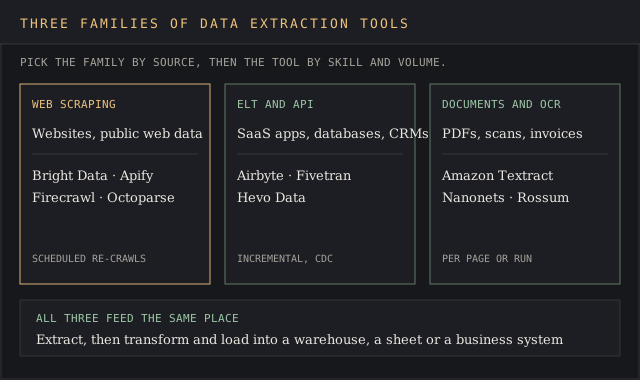
Data extraction tools vary widely, from no-code visual scrapers to programming libraries, but they fall into three families. Each one is built for a different kind of source, so the right tool depends first on the data source.
Web scraping data extraction tools
Web scraping extracts data from websites automatically, built for live collection of public web data: prices, listings, reviews. Bright Data, Apify, Firecrawl and Octoparse sit here, alongside free libraries such as Scrapy and Crawlee from our web scraping tools ranking. No-code web scrapers give you a visual browser to define the fields; programmatic scripting libraries give maximum control but require programming experience.
ELT and API data extraction tools
API tools extract data using web requests to applications. Data integration platforms such as Airbyte, Fivetran and Hevo specialise in pulling structured data from APIs, CRM systems and databases into a central data warehouse. They focus on moving data between systems you already have access to, with connector coverage as the main buying metric for data movement. Open-source tools such as Apache NiFi automate data flows across complex systems.
Document data extraction and OCR tools
Document data extraction tools read PDFs, scanned images and emails and turn them into structured data. Optical character recognition turns pixels into text; intelligent document processing adds machine learning and LLMs to work out which text is an invoice total and which is a footer. Modern AI-powered tools such as Rossum and Nanonets offer template-less processing and handle complex layouts, which older template-based OCR couldn't.
Most companies need two of the three. A pricing team scrapes competitor web pages and also moves its own sales data out of Salesforce, and those are different jobs. Putting all your eggs in one basket with a tool built for the other job is how pipelines end up held together with custom code.
Data extraction techniques: full, incremental and change data capture
The data extraction techniques a tool supports decide how much each run of the data extraction process costs to keep data fresh. There are two basic types of data extraction, full and incremental, plus several ways to run each.
- Full extraction retrieves every record from the source each time. It's the simplest method and the only one some sources allow, but data volume and cost grow with every run.
- Incremental extraction pulls only new or modified records since the last extraction, usually tracked by a timestamp or ID column.
- Incremental batch extraction runs on a schedule, hourly or nightly, and collects the changed data in one batch.
- Incremental stream extraction pushes changes as they happen, for real-time insights on dashboards that can't wait for the next batch.
- Change data capture reads a database's transaction logs, such as MySQL's BinLog, to capture each insert, update and delete without querying the tables themselves.
Batch processing still covers the lion's share of data extraction for business reporting. Stream extraction and CDC earn their cost where valuable insights expire in minutes, such as inventory, fraud or pricing. Fivetran's MAR billing, Hevo's events and Airbyte's credits all reward incremental loads: a connector that falls back to full extraction can multiply the bill overnight, so check which mode each source supports before you sign.
Web scraping data extraction tools handle this differently. A scraper has no transaction log to read, so "incremental" means scheduled re-crawls that compare output against the last run. Apify, Octoparse and Bright Data all schedule runs; the diff is up to you.
Pricing across data extraction software
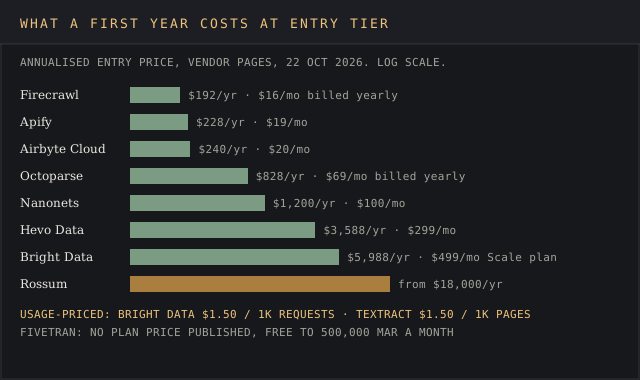
Entry prices across the ten data extraction tools run from $16 a month (Firecrawl Hobby) to $18,000 a year (Rossum Starter). That spread is wide because the units differ: requests, credits, compute units, monthly active rows, events, pages and block runs. Comparing them means converting each to your own volume and reading between the lines of what each unit counts.
Three pricing patterns cover data extraction:
- Per request or per page: Bright Data at $1.50 per 1,000 requests, Textract at $1.50 per 1,000 text pages. Predictable per unit, open-ended on large datasets.
- Per changed row or event: data movement billed as Fivetran's MAR and Hevo's events. Cheap for incremental loads, expensive for sources that rewrite tables.
- Subscription plus usage: Apify, Firecrawl, Octoparse and Airbyte Cloud. A monthly fee buys a base allowance and overage bills on top.
The devil's in the details on the overage side. Bright Data's own review on this site traces a $1,000 bill to one scrape left unbounded, and Fivetran users on Hacker News describe MAR bills they couldn't predict. A stitch in time saves nine here: set a spend cap or usage alert on day one.
Our web scraping pricing report compares per-unit rates across scraping vendors if your shortlist is web-only.
Common challenges in the data extraction process
Data extraction tools face the same handful of problems across all three families.
- Inconsistent formats. Few sources follow a predefined format: the same invoice field moves between suppliers, the same product page changes layout after a redesign, and APIs return JSON and XML in different shapes. Formatting inconsistencies are the main reason scrapers break and OCR fields come back empty, which sends a scraper back to square one after every redesign.
- Data volume. Volume grows faster than budgets. A process that handled 10,000 rows a day hits API limits and rate limiting at a million, so plan a scalable extraction process for large datasets before the data volume grows.
- Multiple sources. Integrating data from multiple sources requires careful planning: matching keys, time zones and definitions across systems. Data teams can spend more hours on this than on the data extraction itself.
- Sensitive data and privacy. Regulations such as GDPR and HIPAA require access controls on extracted data. Textract's HIPAA eligibility and Fivetran's hybrid deployment both exist because of this.
- Accuracy and edge cases. Data extraction accuracy decides if you capture the exact fields you need, including the edge cases: a null price, a two-page invoice, a table split across columns. Missing values that slip through become wrong numbers in a dashboard.
Data quality checks on extracted data, such as row counts, null rates and schema diffs, catch most of them before they reach the warehouse. Governance after that point is the job of the platforms in our data intelligence tools ranking.
How to choose the best data extraction tool for your source
The choice of data extraction tool depends on two things before anything else: technical skill level and data source. Zero in on those and the shortlist shrinks from ten to two or three data extraction software options.
- Name the data source type. Websites point to the scrapers, internal systems and SaaS apps to ELT tools, PDFs and scanned documents to the OCR and IDP group.
- Name the skill on hand. Teams with no engineer can still automate data extraction with Octoparse, Hevo or Nanonets. One engineer opens up Apify, Firecrawl and Airbyte Cloud. A data engineering team can self-host Airbyte Core and write its own scrapers.
- Estimate volume. Pages, rows or documents a month decide which pricing model is cheapest. Run your real number through each pricing page.
- Check maintenance needs. Ask who fixes a connector or scraper when the source changes. Fivetran and Bright Data take that job; self-hosted Airbyte and your own scrapers leave it with you.
- Check support for structured data and unstructured data. Teams with both kinds of input need a tool for each, or one that documents both.
- Read user feedback for your exact source. Reviews on G2, Capterra and TrustRadius name the connectors and sites that break.
- Look for automatic schema evolution. A tool that adds new columns downstream on its own saves a ticket every time a source changes.
Industry and existing data ecosystems change the weighting. Healthcare organizations have different data extraction requirements from ecommerce companies: a hospital needs HIPAA eligibility and audit trails on scanned forms, while a retailer needs proxy coverage and scraping volume on product pages.
Don't jump the gun on a contract before a trial on your own documents or target sites, because vendor demos run on the vendor's best examples.
Free data extraction tools and what they can't do
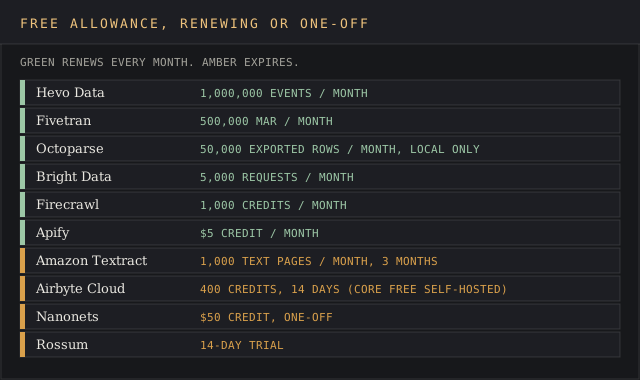
Every tool on this list offers some free data extraction, and four renew monthly with no strings attached: Bright Data's 5,000 requests, Fivetran's 500,000 MAR, Hevo's 1 million events and Firecrawl's 1,000 credits. Apify adds a $5 monthly credit, and Octoparse's free plan exports 50,000 rows a month from local runs.
Open-source data extraction software goes further. Airbyte Core, Scrapy, Crawlee and Firecrawl's self-hosted core cost nothing in licence fees. Google's LangExtract, a Python library for extracting structured information from unstructured text with LLMs, is free under the Apache 2.0 licence and carries 39,000 GitHub stars, though cloud models such as Gemini need a paid API key at production volume.
What free tiers can't do is keep gathering data unattended at scale. Octoparse's free plan has no cloud extraction, Textract's free tier ends after three months, and self-hosted tools need a server and someone to patch it. For a quick and dirty one-off pull, manual extraction or a free tier is enough; for a data extraction process your reporting depends on, budget for the paid tier from the start.
Frequently asked questions about data extraction tools
Is data scraping illegal?
Scraping public web data isn't illegal in itself in the US, and courts have sided with scrapers in high-profile cases: Meta dropped its suit against Bright Data after a January 2024 ruling in Bright Data's favour, covered in our Bright Data review. Scraping behind a login, collecting personal data under GDPR, or breaching a site's terms can still create legal exposure. Get legal advice for your specific use case.
Can AI do data extraction?
Yes. AI-powered tools handle unstructured data well: Rossum's transactional LLM covers 276 languages, Nanonets extracts from layouts without templates, and Firecrawl's extract mode returns JSON from web pages against a schema. Most still return confidence scores, and user-friendly dashboards let staff verify extracted data before it posts.
Can ChatGPT extract data from a PDF?
For a single PDF file, yes: upload it and ask for the fields as a table. For hundreds of documents a month, a dedicated tool wins, because it returns extracted data in the same structure every time, logs confidence per field and feeds the system that runs your data analysis.
Bottom line
Among data extraction tools for public web data, Bright Data is the pick: the widest proxy network on this page, a published per-request price and a monthly free tier to test against. Apify suits developers who want a marketplace of ready-made scrapers, Firecrawl suits LLM pipelines, and Octoparse suits anyone who won't write code.
For moving data out of SaaS apps and databases into a data stack, Airbyte wins on price transparency and open source, Fivetran on hands-off maintenance and schema changes it handles on its own, and Hevo on a free tier that renews at 1 million events.
For documents, Amazon Textract is the AWS default with published per-page rates, Nanonets fits teams that want a monthly plan, and Rossum fits accounts payable departments with invoice volume to justify $18,000 a year. Pick the family first, then the tool that will automate data extraction at your volume.