Eisenhower Matrix Template
 By Jan Suski. I go deep on every review, checking every number against its source and digging up details other coverage misses, a habit from six years of SEO and link building for tech companies. Bylines at Brand24 and Senuto. How the scoring works.
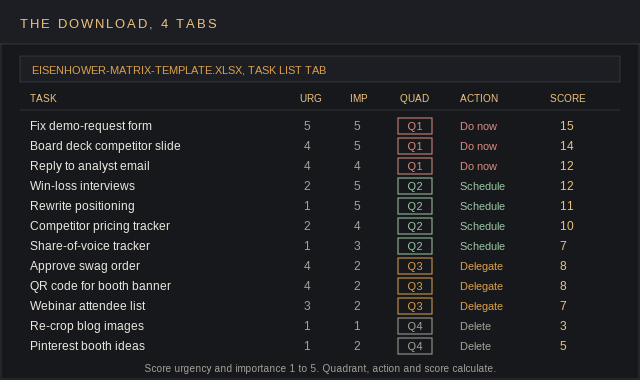
Get the Eisenhower matrix template
An Excel workbook that scores every task from 1 to 5 on urgency and importance, assigns it to one of the four quadrants with an action attached, and lists the whole week on a two-by-two matrix with task counts and hours per box.
Download XLSXAn Eisenhower matrix template is a two-by-two grid that sorts a to-do list by two scores, urgency and importance. Each pair of scores puts the task in one of four quadrants, and each quadrant carries one action. You do it now, schedule it, delegate it or delete it.
This article gives you a free Eisenhower matrix Excel template with live formulas, then covers where the matrix came from, how to score urgency and importance on a 1-to-5 scale, a step-by-step guide, an Eisenhower matrix example built on a product marketer's week, the common mistakes, and how the grid compares with other priority matrices.
It's built for anyone who has to prioritize tasks across a week that's already full: a product marketer juggling launch work and sales requests, a team lead deciding what to hand off, a founder with 30 open items and one calendar. It works for a personal list and for a team's shared backlog, and it puts you back in control of what gets the calendar's best hours.
The reason to run one is that urgency wins by default. Meng Zhu of Johns Hopkins and two co-authors ran five experiments, published in the Journal of Consumer Research in 2018, in which people picked urgent tasks with lower payoffs over important tasks with higher ones. The matrix puts the importance question to every task before a deadline answers it for you.
Download the free Eisenhower matrix template
Download the Eisenhower matrix template (XLSX)Four tabs covering instructions with both scoring scales, a task list that assigns each quadrant by formula, a matrix view with counts and hours, and a weekly review log, pre-filled with the 12-task worked example.
The workbook is a free Eisenhower matrix template with no macros to enable. Select an urgency score and an importance score for each task from the dropdowns, and the Task List tab fills in the quadrant, the action and a priority score. The Matrix tab then lists every task inside its box, with the task count and planned hours for each quadrant.
The file opens in Microsoft Excel, Google Sheets, LibreOffice Calc and Apple Numbers. Its formulas use COUNTIF, SUMIF, INDEX and MATCH, which all four apps support, so the scoring survives a trip between them.
What the Eisenhower matrix is
The Eisenhower matrix, also sold as the Eisenhower decision matrix or the urgent-important matrix, is a prioritization grid named after Dwight D. Eisenhower, the 34th US president. The idea traces to his address to the World Council of Churches in Evanston, Illinois, on 19 August 1954, where he said, "I have two kinds of problems, the urgent and the important." He credited the line to a former college president, according to the American Presidency Project transcript.
The four-box grid came later. Stephen Covey popularized it as a time management matrix in his 1989 book The 7 Habits of Highly Effective People, numbering the quadrants I to IV and naming Quadrant II, important but not urgent, as the home of long-term planning and development, per a University of British Columbia handout adapted from the book. Most templates, this one included, follow Covey's layout.
Organizing tasks by deadline alone sorts them on one axis. Two definitions carry the method. Urgent means the task demands attention now, because a deadline or a person is waiting on it. Important means the task moves one of your goals forward, so it matters to an outcome you've written down. The two scores are independent, and a task can sit high on one and low on the other.
The four quadrants: do, schedule, delegate, delete
The horizontal axis carries urgency, with urgent tasks on the left. The vertical axis carries importance, with important tasks on top. That puts Quadrant 1 in the top-left corner and Quadrant 4 in the bottom right.
| Quadrant | Urgent | Important | Action | Typical tasks |
|---|---|---|---|---|
| Q1 Do | Yes | Yes | Do it first, today | Crises, hard deadlines, a broken checkout page |
| Q2 Schedule | No | Yes | Book a time slot for it | Planning, research, prevention, relationship building |
| Q3 Delegate | Yes | No | Hand it to someone else | Interruptions, routine requests, meetings you're optional in |
| Q4 Delete | No | No | Eliminate it | Busywork, low-value admin, time wasters |
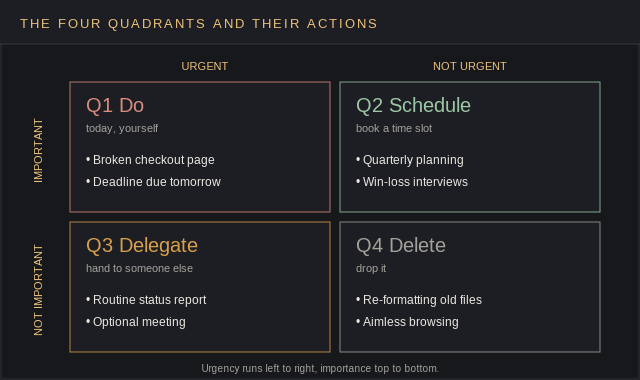
Quadrant 2 is the box the matrix exists to protect. Nothing in it comes with a deadline, so it loses every head-to-head with a ringing phone and ends up on the back burner. A stitch in time saves nine, and an hour spent on prevention in Quadrant 2 removes a crisis from next month's Quadrant 1. Covey's own results list for a week lived in Quadrant 1 reads stress, burnout and crisis management, according to a Georgia DFCS summary of the book.
Quadrant 3 is where most delegation happens, and passing the buck is the point of it. Quadrant 4 tasks get eliminated outright, and the template's status dropdown carries a Dropped value for it. Cutting your losses on a task you'd already started is easier said than done, so the dropdown makes it one click.
Why urgent tasks crowd out important ones
Zhu's team called it the mere urgency effect. Across five experiments, participants chose tasks with short completion windows and objectively lower payoffs over tasks with longer windows and better payoffs, according to the study abstract in the Journal of Consumer Research, volume 45, issue 3.
Two findings matter for anyone setting up a priority matrix. The effect was stronger among people who described themselves as busy. It shrank when the payoff of each task was put in front of people at the moment they chose.
That second finding is the design case for scoring importance in writing. A number in the importance column, next to every task, is the payoff reminder the researchers tested, and the template keeps it on screen while you decide what to do next.
What's inside the Eisenhower matrix Excel template
The Eisenhower matrix Excel template has four tabs, and each one does a single job.
- How to Use. The six steps below, the two 1-to-5 scoring scales, and the threshold rule that turns scores into quadrants.
- Task List. Room for 60 tasks. You enter the task, owner, due date, estimated hours, urgency score and importance score. Formulas fill in the quadrant, the action and a priority score. One more column holds the person you delegate to or the date you scheduled, and a status dropdown sits beside it.
- Matrix. The four boxes laid out as a grid, each listing up to 15 tasks pulled from the Task List, with the task count and total hours per quadrant and Quadrant 2's share of the week's hours.
- Weekly Review. One row per week logging the four quadrant counts, the Quadrant 2 hour share and a notes field, so you can see if the mix is shifting.
The quadrant formula is a plain nested IF. With urgency in column E and importance in column F, it reads =IF(OR(E5="",F5=""),"",IF(AND(E5>=3,F5>=3),"Q1",IF(F5>=3,"Q2",IF(E5>=3,"Q3","Q4")))), so any score of 3 or more counts as urgent or important.
How to score urgency and importance
The template scores both axes from 1 to 5. Urgency is tied to the deadline, so two people scoring the same task land on the same number. Importance is tied to your written goals.
| Score | Urgency: the deadline | Importance: the goal link |
|---|---|---|
| 5 | Overdue or due today | Moves one of this quarter's top three goals |
| 4 | Due within 3 days | Supports a stated goal |
| 3 | Due within 7 days | Required obligation: a contract, a legal duty or a promise to your team |
| 2 | Due within 30 days | Useful, with no goal attached |
| 1 | No deadline | No link to any goal or obligation |
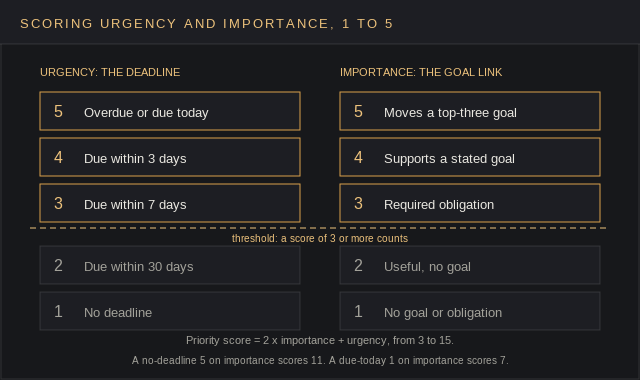
The priority score is two times importance plus urgency, so it runs from 3 to 15. Importance counts double on purpose. A task scoring 5 on importance with no deadline scores 11, and a task due today with an importance of 1 scores 7.
Write the goals down before you score. If your team runs quarterly objectives, the list in an OKR tracker template is the importance scale's reference point, and any task that touches none of them can't score above 3.
Download the Eisenhower matrix template (XLSX)
How to use the Eisenhower matrix template, step by step
- List every open task. Clear the 12 sample tasks on the Task List tab and replace them with your own, one per row. Include the requests sitting in your email and chat.
- Add the due date and an hour estimate. Rough is fine. Half-hour steps are enough.
- Score urgency for every task, then importance for every task. Work one column at a time so one score doesn't anchor the other. Select each number from the dropdown.
- Read the quadrant and action columns. Continue to the Matrix tab to see the week as four boxes and decide where to focus first.
- Act by quadrant. Quadrant 1 goes into today's plan. Quadrant 2 gets a calendar date in the Delegate / Scheduled column. Quadrant 3 gets a named person in the same column. Quadrant 4 gets the status Dropped.
- Review weekly. Rescore what's left, since a task due in 30 days today is due in 23 next week, then log the counts on the Weekly Review tab and continue with the new list. The benefits show up there as a rising Quadrant 2 share.
With the goals written down, the weekly re-sort only touches new tasks and changed deadlines, and you keep an eye on the full list every Monday.
Eisenhower matrix example: a product marketer's week
A product marketing manager at a 60-person B2B software company opens Monday with 12 tasks and 25 planned hours. Her quarter has three goals: lift demo requests, prepare the board's competitive review, and reposition for mid-market buyers. The template ships pre-filled with this exact list.
| Task | Urgency | Importance | Quadrant | Priority score | Hours |
|---|---|---|---|---|---|
| Fix broken demo-request form on the pricing page | 5 | 5 | Q1 Do | 15 | 1.5 |
| Finish competitor slide for Wednesday's board deck | 4 | 5 | Q1 Do | 14 | 3 |
| Reply to an industry analyst's briefing request email | 4 | 4 | Q1 Do | 12 | 0.5 |
| Run quarterly win-loss interviews | 2 | 5 | Q2 Schedule | 12 | 6 |
| Rewrite positioning statement for mid-market | 1 | 5 | Q2 Schedule | 11 | 4 |
| Build competitor pricing tracker | 2 | 4 | Q2 Schedule | 10 | 3 |
| Set up a share-of-voice tracker in Google Sheets | 1 | 3 | Q2 Schedule | 7 | 2 |
| Approve trade show swag order | 4 | 2 | Q3 Delegate | 8 | 0.5 |
| Generate QR code for the booth banner | 4 | 2 | Q3 Delegate | 8 | 0.5 |
| Pull webinar attendee list for sales | 3 | 2 | Q3 Delegate | 7 | 1 |
| Re-crop header images on old blog posts | 1 | 1 | Q4 Delete | 3 | 2 |
| Browse Pinterest for booth design ideas | 1 | 2 | Q4 Delete | 5 | 1 |
The Matrix tab totals the week. Quadrant 1 holds 3 tasks and 5 hours. Quadrant 2 takes the lion's share, 4 tasks and 15 hours, or 60% of the 25 planned. Quadrant 3 holds 3 tasks and 2 hours, and Quadrant 4 holds 2 tasks and 3 hours.
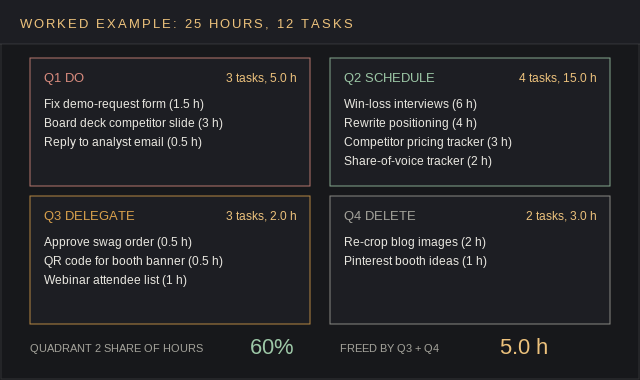
The swag order and the QR code go to the events coordinator, who already holds the booth banner's final URL that the QR code points to, and the attendee list goes to sales operations. Deleting Quadrant 4 and delegating Quadrant 3 frees 5 hours, which is enough to book the win-loss analysis interviews for Thursday and Friday.
Two Quadrant 2 tasks feed the board work later in the quarter. The positioning statement template covers the mid-market rewrite, and the share-of-voice numbers can come from the share of voice calculator once the tracker exists. Sort the Task List by the priority score column to set the order inside each quadrant. In this week, the win-loss interviews (12) come before the pricing tracker (10).
Download the template with this example (XLSX)
Examples of urgent but not important tasks
Quadrant 3 is the hardest box to see, because its tasks feel like work. The test is what happens to your goals if the task disappears. If none of them slip, the task is urgent and unimportant.
- A same-day request from a colleague that touches none of your goals
- A meeting invite where you're listed as optional
- A routine status report someone else could compile from the same data
- Approving a small purchase inside a budget that's already signed off
- Reformatting a file that another team will reformat on arrival
- An email thread where you're copied for information and asked to sign off by noon
Each has a person waiting on it, so each scores as urgent. None moves a goal forward, so each lands in the delegate box.
Common mistakes with the Eisenhower matrix
- Scoring importance by who asked. A request from a senior person is urgent more often than important. Score it against the goal list.
- Filling Quadrant 1 with everything. If Quadrant 1 holds more hours than you have today, you've bitten off more than you can chew or the urgency scale is loose. Re-check each 3 against the 7-day rule.
- Parking Quadrant 3 under your own name. The action is delegate, with a named person in the Delegate / Scheduled column. Keeping the task yourself drops the ball twice, once on the task and once on the Quadrant 2 work it displaces.
- Keeping Quadrant 4 on the list. A task that sits in the delete box for two weekly reviews belongs in the Dropped status.
- Skipping the weekly review. Deadlines move, so a 2 on urgency becomes a 4 within four weeks. Stale scores send Quadrant 2 work back into Quadrant 1.
Eisenhower matrix vs other priority matrices
Several grids answer a prioritization question, and each takes different inputs.
| Method | Inputs | Output | Use it for |
|---|---|---|---|
| Eisenhower matrix | Urgency, importance | Do, schedule, delegate, delete | Sorting a personal or team task list |
| Covey time management matrix | Urgency, importance | Quadrants I to IV | The same grid under Covey's numbering |
| Weighted decision matrix | Criteria, weights, scores | A ranked list of options | Choosing between options, such as vendors |
| Risk assessment matrix | Likelihood, impact | A risk rating | Ranking project or business risks |
| MoSCoW | Must, should, could, won't | Four scope buckets | Cutting a release or project scope |
A decision matrix ranks alternatives against weighted criteria, and the vendor evaluation scorecard is one built for software purchases. Risk work goes on a risk assessment matrix. Product portfolios have their own two-by-two in the BCG matrix template.
Download the free Eisenhower matrix template (XLSX)
Excel, Google Sheets or a printable matrix
A spreadsheet wins once the list passes about a dozen tasks, because the scores, the hours and the history stay attached to each task. Paper wins for a five-minute morning sort of today's list.
In Google Sheets, upload the .xlsx file and open it with File, then Import, and the dropdowns and formulas carry over. Share it with edit access when a team scores a shared backlog together. To build an Eisenhower matrix in Excel from scratch, add two score columns with Data Validation set to whole numbers from 1 to 5, paste the nested IF from the section above, and count each quadrant with =COUNTIF(G5:G64,"Q1").
To print, set the Matrix tab to fit one page wide. Each box shows up to 15 tasks.
Pinterest boards hold plenty of printable Eisenhower matrix excel ideas, and pins with ideas like color-coded quadrants or a weekly planner layout are worth a look if you explore design options. Most are images, so every task gets retyped by hand. A working Eisenhower matrix Excel file keeps the scores live, and after a month you'll discover a welcome side effect, since the Weekly Review tab logs where your hours went.
FAQ
What is the Eisenhower matrix used for in time management?
It sorts tasks by urgency and importance into four quadrants so you can decide what to do now, what to schedule, what to delegate and what to drop. Its main use is protecting time for important work that has no deadline.
How do you do a priority matrix?
List every task, score each one on two axes, and place it in the quadrant those scores point to. This template uses 1-to-5 scores for urgency and importance, with 3 or more counting as urgent or important.
What are the 5 priority levels for tasks?
The five levels in this template are importance scores: 5 moves a top-three goal, 4 supports a goal, 3 is a required obligation, 2 is useful with no goal attached, and 1 links to nothing. Urgency runs on its own five levels keyed to the deadline.
What's the difference between an Eisenhower matrix and a decision matrix?
An Eisenhower matrix sorts tasks into four actions using two fixed questions. A decision matrix ranks several options against criteria you choose and weight yourself, and it ends in a single winner.
How do I set up an Eisenhower matrix in Excel?
Create columns for the task, an urgency score and an importance score, then add a nested IF that returns Q1 to Q4 from the two scores. COUNTIF per quadrant gives the totals, and the free Eisenhower matrix template here has all of it built.
What is similar to the Eisenhower matrix?
Stephen Covey's time management matrix is the same grid with numbered quadrants. MoSCoW sorts scope into must, should, could and won't, and a weighted decision matrix ranks options against criteria. A team backlog scored on several criteria at once fits the prioritization matrix template, which adds an impact effort quadrant to the ranking.
Bottom line
Reach for this template when your list holds more work than your week and the urgent items keep winning. Scoring both axes in writing puts the payoff of each task on the page at the moment you pick what to do, and the Matrix tab shows in one view how many hours the important, unscheduled work is getting.
For choosing between options, use a weighted decision matrix. For ranking threats, use a risk matrix. Run this one every Monday, and the share of hours in Quadrant 2 tells you if the week went to the goals or to the inbox.