Financial Plan Template
 By Jan Suski. I go deep on every review, checking every number against its source and digging up details other coverage misses, a habit from six years of SEO and link building for tech companies. Bylines at Brand24 and Senuto. How the scoring works.
Get the financial plan template
An Excel workbook that turns one tab of assumptions into a 12-month cash flow, a three-year income statement, a balance sheet, a break-even point and a budget-vs-actual tracker.
Download XLSXA financial plan template is a spreadsheet that turns a business's assumptions about prices, costs and growth into the three numbers lenders, investors and owners ask about: how much cash the business will have each month, when it turns a profit, and what it will be worth on paper at year end.
This page covers what goes into a business financial plan, the seven tabs of the free Excel download, how to fill them in starting from the assumptions tab, and a worked example: a 12-month plan and three-year projection for a five-person research consultancy that breaks even in month eight and hits its lowest cash balance the same month.
It's built for entrepreneurs and startup founders writing the financial section of a business plan, small business owners preparing for a bank meeting, and finance leads who want a clearer picture of cash before the next hire. A short section covers personal and family financial plan templates too, since plenty of people searching for a free financial plan template want one for a household.
Cash is the reason to bother. A business can post a profit for the year and still run short of money in month five, because customers pay on 30-day terms while rent and salaries leave on the first. The template shows that gap before it happens.
Download the free financial plan template
Download the financial plan template (XLSX)Seven tabs: assumptions, 12-month cash flow, 3-year income statement, balance sheet, break-even, and budget vs actual, pre-filled with the Brightpath worked example.
The financial plan template file opens in Excel, Google Sheets and LibreOffice Calc as soon as you download it. Every output cell in the Excel template is a formula that reads from the Assumptions tab, so changing one input updates all seven tabs at once. The formulas use only SUM, IF, MAX and basic arithmetic, so nothing breaks when you upload the file to Google Drive. It's free, with no email or website account needed to access it.
What a financial plan template is
A financial plan is a forward-looking set of financial statements for a business: projected income, projected cash flow and a projected balance sheet, built from stated assumptions. A financial plan template is the structured spreadsheet that holds those statements and links them, so the numbers keep their consistency from tab to tab. The content is a framework: you bring the data, the template does the arithmetic.
The US Small Business Administration's guidance on writing a business plan asks for a five-year outlook covering forecasted income statements, balance sheets, cash flow statements and capital expenditure budgets, with quarterly or monthly projections for the first year.
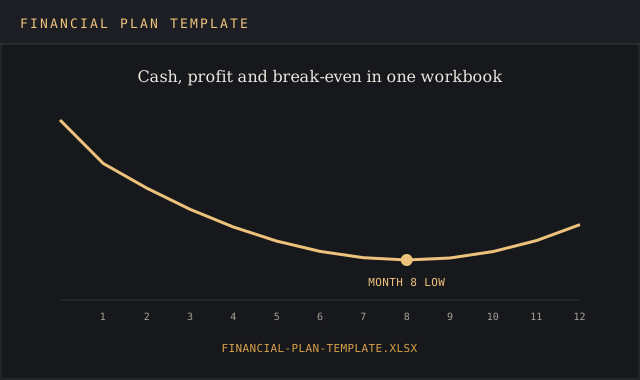
Established businesses add three to five years of historical statements. The financial plan template follows that shape: monthly detail for year one, annual totals for years one to three, and charts of cash and profit you can paste into the plan document.
Understanding the difference between a financial plan and a budget saves a lot of rework. A financial plan differs from a budget in purpose. A budget sets a spending limit for each category and gets checked against actuals. A financial plan answers if the business is viable at all, how much funding it needs, and when. This template includes a budget-vs-actual tab, so the plan becomes the budget once the year starts.
The seven tabs of the financial plan template
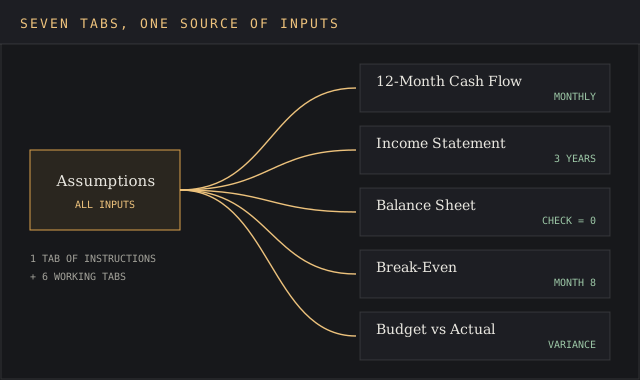
| Tab | What it holds | Inputs or formulas |
|---|---|---|
| 1. Instructions | The fill-in order, the colour code (blue cells are inputs, black are formulas), and a glossary | Text only |
| 2. Assumptions | Starting cash, first-month revenue, monthly growth rate, direct cost percentage, payment terms, fixed costs by line, years 2 and 3 growth, tax rate | Inputs |
| 3. 12-Month Cash Flow | Revenue, cash collected, direct costs, fixed costs, net cash flow and closing balance for each month | Formulas |
| 4. Income Statement | Three years of revenue projections, gross profit, gross margin, operating expenses, operating profit, tax, net profit and net margin | Formulas |
| 5. Balance Sheet | A year-end snapshot of assets, liabilities and equity, with a check cell that must read zero | Mixed |
| 6. Break-Even | Monthly fixed costs, contribution margin, break-even revenue, the month the plan crosses it, and months of cash cover | Formulas |
| 7. Budget vs Actual | Planned and actual figures by month, with variance in dollars and percent | Mixed |
Separating assumptions from outputs is the design choice that matters most in any financial plan template. When every growth rate and cost sits on one tab, testing a worse scenario takes one edit, and nobody hunts through 200 cells for a hard-coded 4%. Each tab has one job assigned to it, which gives the plan clarity when a lender asks where a number came from.
How to fill in the financial plan template, step by step
The first step in filling in the free financial plan template is the Assumptions tab, and every later step reads from it. Work in this order.
- Enter starting cash and receivables. Use the bank balance on the day the plan starts, plus any invoices customers still owe.
- Set first-month revenue and a monthly growth rate. Base the starting figure on signed contracts or last quarter's average. A startup with no history should build it bottom-up: customers per month times average order value, or for a services business, billable hours times the rate you're charging.
- Set direct costs as a percentage of revenue. These are costs that rise with each sale: materials, freelancers, payment processing, panel fees.
- List fixed costs line by line. Salaries, rent, insurance, utilities, software and marketing, grouped into the categories your bookkeeping already uses. Fixed costs don't move with revenue, so they set the break-even point.
- Enter payment terms. If customers pay 30 days after invoice, cash arrives one month after revenue. This one input separates the cash flow analysis from the profit figure.
- Review the cash flow projections. Find the lowest closing balance. If it goes negative, the plan needs funding, a cost cut, or faster collections before it's viable.
- Check the balance sheet. The check cell should read zero. If it doesn't, an assumption was typed into a formula cell.
- Each month, fill in Budget vs Actual. Variances over 10% get a one-line explanation and, where the patterns hold for two months, adjustments to the assumptions. Adjust the plan; don't rewrite history in the actual column.
Steps five and six are where most first drafts go wrong. A plan that ignores payment timing reads as rosy on paper and runs short in practice, which is why lenders read the cash flow projections before the income statement. Getting this right gives the owner a clearer picture of cash and the ability to act a quarter early.
Worked example: a 12-month financial plan for a research consultancy
The financial plan template ships filled in with this example, so you can discover how each tab behaves before entering your own numbers. Brightpath Analytics is a fictional five-person market research consultancy starting its second year with $40,000 in the bank and $15,000 of December invoices still to collect. Every figure below is an input you replace with your own.
| Assumption | Value |
|---|---|
| Starting cash | $40,000 |
| Receivables at start | $15,000 |
| Month 1 revenue | $18,000 |
| Monthly revenue growth | 4% |
| Direct costs (fieldwork, survey panels, freelancers) | 30% of revenue |
| Payment terms | Collected one month after invoicing |
| Fixed costs per month | $16,000: salaries $11,500, rent $1,800, marketing $1,200, software $900, insurance $350, utilities $250 |
Cash flow projections, month by month
| Month | Revenue | Cash in | Cash out | Net cash flow | Closing cash |
|---|---|---|---|---|---|
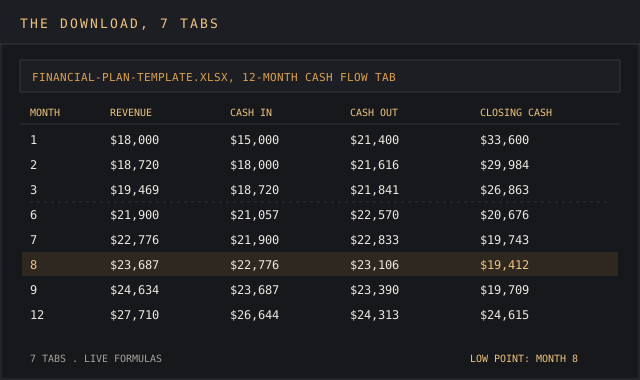
| 1 | $18,000 | $15,000 | $21,400 | -$6,400 | $33,600 |
| 2 | $18,720 | $18,000 | $21,616 | -$3,616 | $29,984 |
| 3 | $19,469 | $18,720 | $21,841 | -$3,121 | $26,863 |
| 4 | $20,248 | $19,469 | $22,074 | -$2,605 | $24,258 |
| 5 | $21,057 | $20,248 | $22,317 | -$2,070 | $22,188 |
| 6 | $21,900 | $21,057 | $22,570 | -$1,512 | $20,676 |
| 7 | $22,776 | $21,900 | $22,833 | -$933 | $19,743 |
| 8 | $23,687 | $22,776 | $23,106 | -$330 | $19,412 |
| 9 | $24,634 | $23,687 | $23,390 | $296 | $19,709 |
| 10 | $25,620 | $24,634 | $23,686 | $948 | $20,657 |
| 11 | $26,644 | $25,620 | $23,993 | $1,626 | $22,284 |
| 12 | $27,710 | $26,644 | $24,313 | $2,331 | $24,615 |
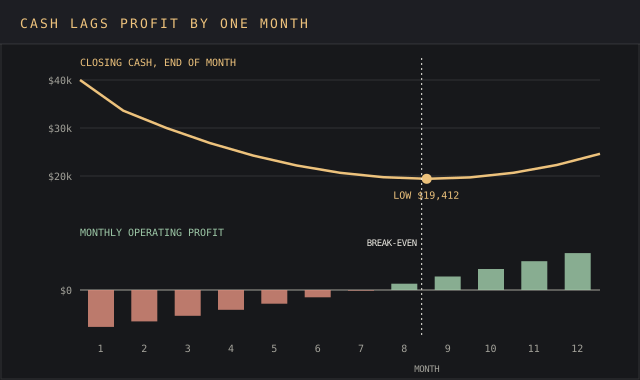
Three numbers from these cash flow projections go into any conversation with a lender:
- Break-even month: 8. Fixed costs of $16,000 divided by a 70% contribution margin gives break-even revenue of $22,857 a month. Revenue passes it in month 8 at $23,687.
- Cash low point: $19,412, also in month 8. Cash keeps falling until the month after break-even, because each month's revenue arrives 30 days late.
- Year-end cash: $24,615. That's $15,385 below the starting balance.
Why profit and cash disagree
The income statement shows a year-one operating loss of $2,675 on revenue of $270,464. The bank balance fell by $15,385. The $12,710 difference is money customers owe: receivables grew from $15,000 to $27,710 as monthly revenue rose.
That's the cash management lesson the template is built to show, and one of the benefits of monthly cash flow projections over an annual figure: a growing services business funds its customers' payment terms out of its own resources.
A formal cash flow statement groups cash into operating, investing and financing activities. The 12-month tab carries all three: operating lines for collections and costs, a row for equipment purchases, and a row for loans or owner funding. Brightpath's example leaves the last two at zero.
Brightpath's $19,412 low point, the key figure on the cash flow tab, covers 1.2 months of fixed costs, about five weeks. Net margin tracks profitability and months of cover tracks liquidity; the template calculates both.
A consultancy that wins one large project with 60-day terms in month 6 could see that cushion halve, and the template shows how far with one change to the payment-terms cell. The working capital calculator runs the same check outside the spreadsheet, and the burn rate calculator shows how many months the cash lasts while the business is still loss-making.
Three-year projection
| Line | Year 1 | Year 2 (+25%) | Year 3 (+20%) |
|---|---|---|---|
| Revenue | $270,464 | $338,081 | $405,697 |
| Gross profit (70%) | $189,325 | $236,656 | $283,988 |
| Fixed costs | $192,000 | $210,000 | $240,000 |
| Operating profit | -$2,675 | $26,656 | $43,988 |
| Tax at 21% | $0 | $5,598 | $9,237 |
| Net profit | -$2,675 | $21,059 | $34,750 |
Discover the effect of hiring sooner by moving the year 2 cost line. Year 2's fixed costs include a part-time analyst; year 3's add a sixth full-time hire. The 21% tax rate is the US federal corporate rate and stands in for whatever rate applies to your entity, so check it with an accountant before the plan goes to investors.
Revenue grows 50% from year 1 to year 3, a compound annual growth rate of 22.5%; the CAGR calculator checks that figure for your own projection.
Personal and family financial plan templates
A personal financial plan uses the same logic at household scale: money in, money out, what's left, and where it goes. Personal financial plan templates differ from business templates mainly in the categories. The structure that works connects day-to-day spending with long-term goals, so a monthly budget feeds a savings target, investments and a net worth figure. A personal plan should be easy to adjust when income or rent changes.
| Component | What it tracks | Rule of thumb, with source |
|---|---|---|
| Monthly cash flow | After-tax income against spending, by category | The 50/30/20 rule from Elizabeth Warren and Amelia Warren Tyagi's 2005 book All Your Worth: 50% needs, 30% wants, 20% savings and debt repayment |
| Emergency fund | Cash set aside for job loss or a large bill | Vanguard suggests three to six months of expenses for an income shock |
| Net worth statement | Assets such as savings, investments and property, minus liabilities such as a mortgage and credit card accounts | Net worth = total assets minus total liabilities, recorded once a year as a baseline |
| Debt payoff schedule | Each debt's balance, minimum payment and interest rate | List debts by interest rate to see which one costs most each month |
| Savings goals | Named goals with a target amount and date | Savings entered as a fixed line item, paid first each month |
A family financial plan template adds two things: columns for more than one income, and shared household expenses split from personal ones, so two earners can see who covers rent, utilities and insurance.
On a take-home income of $5,000 a month, the 50/30/20 split gives $2,500 for needs, $1,500 for wants and $1,000 for savings, and three months of $2,500 essential costs puts the first emergency fund target at $7,500. Bank transactions exported to a CSV file can fill the actual column in a few minutes.
Excel, Google Sheets and other financial plan tools
Excel is the default for a business financial plan template, because banks, accountants and investors open .xlsx files without conversion and Excel handles complex formulas without add-ons. Google Sheets opens the same Excel file and adds real time updates when two or three users edit at once, which suits a startup founding team creating the plan together. Google also lists free budget templates in the Sheets template gallery.
Neither costs extra if you already pay for Microsoft 365 or Google Workspace.
Other free templates and tools fit different users, depending on the plan and the level of detail needed:
- SCORE's free download, its financial projections template, an Excel workbook covering startup expenses, payroll, sales forecast, cash flow, income statement, balance sheet, break-even, ratios and depreciation. Its Excel templates suit a startup preparing a loan application.
- Microsoft's personal monthly budget in Excel, which compares projected and actual costs for a household.
- Vertex42, which publishes free personal finance spreadsheets for budgets, debt payoff and net worth.
- Canva and Notion planner templates, which favour layout and habit tracking over formulas; Canva's family planners are customizable page by page, and Notion's include investment trackers and monthly spending logs.
- Printable PDF budget worksheets, for a household that wants to fill numbers in by hand.
- Google Sheets templates from the built-in gallery, which suit a shared household budget with real-time editing.
Structured planning software makes sense once a business has monthly accounts in a bookkeeping tool and wants the plan to pull actuals automatically. Before that point, a free Excel or Google Sheets financial plan template with clear formulas gives the same answers at no cost. The ideal choice is the one your accountant and your co-founder can both open.
Common financial plan mistakes
Five mistakes make a financial plan hard to defend in a lender meeting, and each one has a cell in the template that catches it. These strategies for avoiding them cost nothing but time.
- Revenue that starts at full speed. Month-one revenue at the target rate is a guess unless contracts are signed. Start from signed work and grow from there.
- Cash treated as profit. Without payment terms, the cash flow tab mirrors the income statement and hides the month-8 dip in the example above.
- Annual costs entered monthly, or not at all. Insurance, software renewals and tax payments often land in one month. Enter them in the month they're charged.
- No owner's salary. A plan that shows a profit only because the founder works for free is a plan for an unpaid job.
- Plan never compared with actuals. The Budget vs Actual tab exists so the plan gets better each month; a forecast nobody checks drifts further from reality every quarter.
Survival data puts the stakes in numbers, and you'll discover the first year is the hardest. Of US private-sector establishments born in March 2013, the Bureau of Labor Statistics found that 34.7% were still operating in 2023, and the steepest drop, 20.4 percentage points, came in the first year.
FAQ
How do you create a financial plan?
Write down your assumptions for revenue, growth, costs and payment terms, build a 12-month cash flow from them, roll the months up into an annual income statement, add a balance sheet, then compare the plan with actual results every month.
How do I write the financial part of a business plan?
Include projected income statements, balance sheets and cash flow statements, with monthly or quarterly detail for year one, plus a break-even point and the funding you're asking for. Explain the main assumptions in a short paragraph each.
What is the format for financial projections in Excel?
One assumptions sheet with all inputs, then one sheet per statement, with months or years across the columns and line items down the rows. Every output cell should be a formula that points back to the assumptions sheet.
How do you make a cash flow forecast?
Start with the opening bank balance, add the cash you expect to collect each month, subtract the cash you expect to pay out, and carry the closing balance into the next month. Date each receipt by the day the cash lands, which for invoiced work is the collection date.
Is there a free financial plan template in Excel?
Yes. The download on this page is free, needs no email, and works in Excel and Google Sheets. SCORE and Microsoft also publish free Excel templates for business projections and personal budgets.
What are the 5 steps of financial planning?
For a household: assess your current position, set goals, build a plan to reach them, carry it out, and review it at least once a year. A business follows the same loop with assumptions, projections, funding, execution and monthly variance checks.
What should a financial plan template include?
A complete financial plan template for a business includes an assumptions tab, 12 months of cash flow projections, a three-year income statement, a balance sheet, a break-even analysis and a budget-vs-actual tracker. A personal one swaps the last four for a net worth statement, savings goals and a debt payoff schedule.
What is the 50-30-20 rule for personal finance?
It splits after-tax income into 50% for needs such as rent and utilities, 30% for wants, and 20% for savings and debt repayment. Elizabeth Warren and Amelia Warren Tyagi set it out in their 2005 book All Your Worth.
Is there a free template for a basic business plan?
The SBA's website walks through a traditional and a lean business plan format, and SCORE publishes free business plan and financial projection templates. Pair either with the free financial plan template here for the numbers section.
Can ChatGPT do financial modelling?
It can draft a structure and write formulas, which saves time on a blank sheet. Check every formula it produces, since a formula can calculate without error and still point at the wrong row.
Bottom line
Use this free financial plan template when a business or startup needs to know how much cash it'll have each month, when it breaks even, and how much funding to ask for. The worked example is there to copy: replace Brightpath's inputs with yours, discover where your own cash low point falls, and every tab updates. Key figures for a lender sit on the first two tabs.
When the question is a single investment inside an existing business, a business case template fits better. For the written sections of the plan, a one-page business plan template pairs with this workbook. For the market side, a market sizing template gives the revenue assumption something to stand on, and the break-even calculator checks the break-even tab in a browser.
Nonprofits that need donated revenue split by source can pair this workbook with a fundraising plan template.