Databox review: a $399-a-month KPI platform with a split verdict from users
 By Jan Suski. I go deep on every review, checking every number against its source and digging up details other coverage misses, a habit from six years of SEO and link building for tech companies. Bylines at Brand24 and Senuto. How the scoring works.
Best for
Marketing agencies and small marketing or RevOps teams that want HubSpot, Google Analytics and ad data in shared dashboards and recurring reports, with 130+ integrations and no data warehouse required.
Not for
Solo founders looking for a free plan, which the pricing FAQ says does not exist, or buyers who need phone customer support. Trustpilot shows 35% one-star reviews, most of them about billing and refunds.
What it costs
Business is $399 a month billed annually ($4,788 a year) or $499 monthly. Agency starts at $79 a month plus $20 per account pack. Custom starts from $15,000. Add-ons run $14 to $200 a month.
- Business
- $399 a month annual, $499 monthly
- Agency
- $79 a month base, $20 per account pack
- Custom
- From $15,000, fixed quote
- Trial
- 14 days on Business, no card
- Annual discount
- 20% against monthly billing
- Business users
- Up to 10
- Business data sources
- Up to 30
- AI credits
- 1,500 a month on Business
- Manual refreshes
- 1 dashboard refresh per user per day
- Capterra
- 4.6 of 5, 206 reviews
- G2
- 4.4 of 5, 195 reviews
- Trustpilot
- 3.2 of 5, 26 reviews
- Trustpilot one-star share
- 35%
- Customers
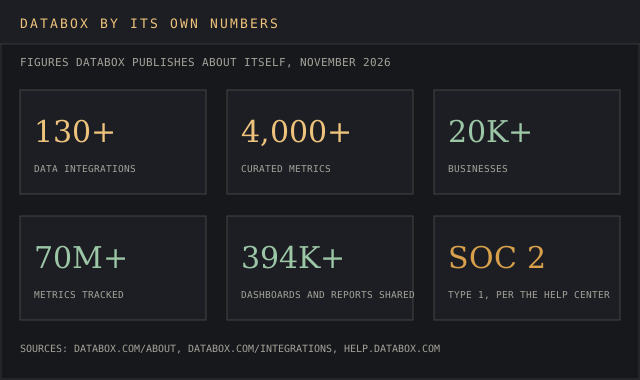
- 20,000+ businesses, per Databox
- Headquarters
- Boston, Massachusetts
- CEO
- Peter Caputa IV
- Security
- SOC 2 Type 1, AES-256 at rest, TLS 1.2+ in transit
AgencyAnalytics
Not forA team reporting warehouse or accounting data.
Microsoft Power BI
Not forA marketing team with no analyst on staff.
Databox is a business intelligence and reporting tool for marketing data that pulls key metrics and performance data from the apps a company already runs, such as HubSpot, Google Analytics 4, Facebook Ads and Stripe, into dashboards, scheduled reports and goal tracking. Databox says 20,000+ businesses use it and that its 130+ integrations come with 4,000+ curated metrics.
This review covers what each plan includes, the free plan the pricing page contradicts itself about, what the add-ons cost, how data sources are counted, what agencies get, and why Databox reviews split so sharply between Capterra and Trustpilot. It closes with three alternatives and a verdict.
It's written for agency owners, marketing leads and RevOps managers choosing a reporting tool for 2027 budgets. The timing matters because Databox rebuilt its pricing around three plans and AI credits, and buyers quoting older Professional, Growth or Premium prices from third-party write-ups are working from a rate card that no longer appears on databox.com.
What Databox does in 2026
The product started as a KPI dashboard and now sells itself as an AI analytics layer on top of that. The pricing page lists the key features on the Business plan.
Integrations. Cloud apps, databases and warehouses, Google Sheets and Excel, Zapier and Make, plus a no-code builder for REST APIs.
Metrics. Prebuilt metrics and templates, custom metrics with filters and dimensions, and calculated metrics that combine numbers from multiple data sources.
Dashboards and reports. Databoards, scheduled reports, Scorecards and goals.
AI. Genie, the AI Analyst that answers questions in plain language, plus skills, routines and an MCP connection for Claude and ChatGPT.
Governance. A semantic layer that defines each metric once, and datasets that merge data before it reaches a chart.
The core loop has stayed the same for years. Connect data sources, pick or build metrics, drop them onto custom dashboards, and send automated reports to whoever needs them, the same job a recurring business report does on paper. Pre built dashboard templates handle the first step for common tools, so a HubSpot or Google Analytics board starts from a template in a few clicks.
A managing director on Trustpilot, August 2025, described the outcome the product sells:
"Highly recommend for SME's trying to create 'one source of truth' from multiple data points."
Martin Saunders, Trustpilot review, 30 August 2025, 5 stars.
The same reviewer called Databox "Quick to set up and minimal maintenance once set up." Recurring reporting is the job the product does best, and most of the praise in databox reviews comes back to it.
↑ FACT SHEETDatabox pricing and the limit that binds on each plan
The pricing page lists three plans in US dollars. Annual billing saves 20% on plans and add-ons.
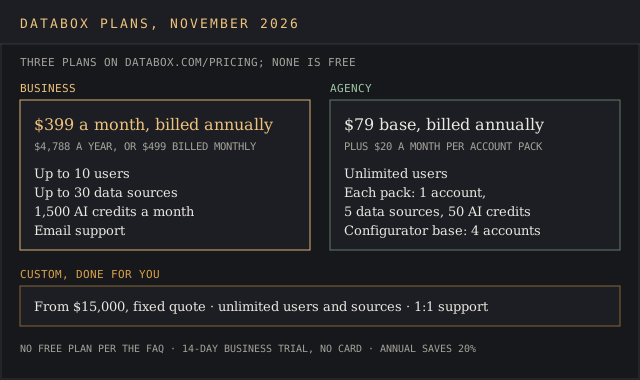
Business, $399 a month billed annually or $499 monthly. Up to 10 users, up to 30 data sources, 1,500 AI credits a month and email support.
Agency, $79 billed annually plus $20 a month per account pack. Unlimited users. Each pack adds 1 client account, 5 data sources and 50 AI credits.
Custom, from $15,000 with a fixed quote. Databox's engineers build the setup, with unlimited users and data sources and hands-on 1:1 support.
On Business, the limit that binds is the data source count, and the devil's in the details of how Databox counts. The pricing FAQ defines a data source as "a specific dataset, account, property or view", so one Google Analytics login covering five properties uses five of the 30. A team with three GA4 properties, two ad accounts, HubSpot and Stripe has used seven before it connects anything else.
The page names no price for an extra data source on Business. Pricing write-ups that still quote $7 per additional source, $5.60 on annual billing, or plans named Professional, Growth and Premium at $199, $499 and $999 a month, with 100 data sources on Premium, describe an older rate card. The current page lists only Business, Agency and Custom.
Costs climb as data needs grow, since each new property counts as a source and every AI answer draws on the credit pool. Users have felt the price climb. A founder on Capterra, April 2025, rated Databox 1 of 5 and wrote: "Just about every basic feature, data integration, reporting, or branding will cost you additional $$$$$$$." An accounting firm owner on Capterra, January 2024, listed "The price and they lock certain features behind a paywall" as the main con.
The free plan Databox does and doesn't offer
The pricing page answers the free plan question two ways, and on this point it is at sixes and sevens. Its meta description, the text Google can show in search results, reads "Free plan available." The FAQ on the same page asks "Do you offer a free plan?" and answers "No. Every account starts with a 14-day trial of the Business plan instead."
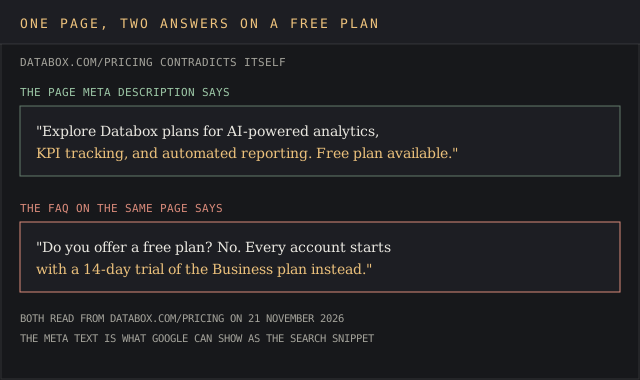
That FAQ answer matches the plans on the page, so the trial is the real offer, and no free forever plan sits in the plan list. It needs no card, and if no payment details are added by day 14, data stops syncing and scheduled reports pause without a charge. Reviews as recent as June 2026 still describe a free plan. A CEO of a 2-10 person marketing agency on Capterra wrote that "The free plan now includes less databoards," which dates the change to the second half of 2026.
The free tier history also sits behind one of the sharpest complaints. A Trustpilot reviewer in April 2026 wrote that Databox "auto-renewed my account after 6 months of inactivity" and that "I have paid Databox $1,910 to use their "free" plan through March of 2027." Whatever plan that account sat on, the lesson is the same. A stitch in time saves nine, so put the renewal date in a calendar the day the contract starts.
Add-ons and what a fully loaded plan costs
Six add-ons sit on top of the plans, priced per month on annual billing. The 15-minute sync add-on has no price on the page.
AI credit top-up: $200
Fiscal calendar: $160
Branding and white-labeling: $80
Advanced security with SSO, 2FA and activity logs: $40
OKRs: $14
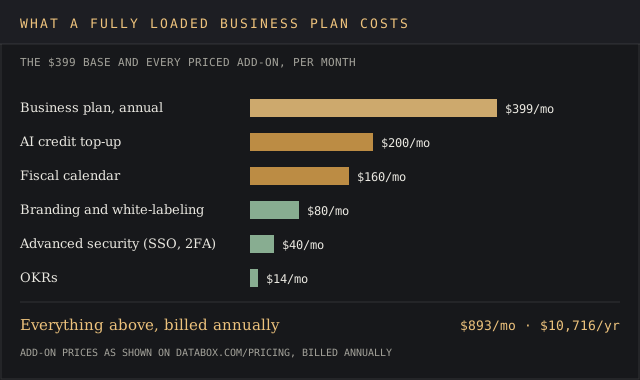
A Business account with every priced add-on costs $893 a month, or $10,716 a year. That is more than double the $4,788 headline. SSO sits in the $40 security add-on, so a company with an identity policy pays $5,268 a year as a floor. The $14 OKR module is a drop in the bucket next to the $200 AI top-up. Teams tracking objectives in a spreadsheet can compare it with our free OKR tracker template.
For context on where that lands, our business intelligence cost report breaks down what BI platforms charge per seat and per deployment.
↑ FACT SHEETData sources, integrations and sync
The integrations page lists 130+ tools. Google Analytics 4, HubSpot, Google Sheets, Facebook Ads and Excel lead the popular list, with Shopify, Stripe, QuickBooks, SEMrush, Salesforce CRM, Pipedrive and Klaviyo behind them. Databases and warehouses include MySQL, PostgreSQL, BigQuery, Snowflake and Redshift. Custom metrics need the metric builder, which the help center says works only on select integrations.
That breadth lets marketing data from ads and analytics, revenue data and pipeline numbers share one reporting environment. Databox also publishes benchmark data from its users, which our average bounce rate report cites. Datasets merge data from multiple platforms before it reaches a chart, and custom metrics slice a source by multiple dimensions. Calculated metrics combine numbers into a formula, such as cost per lead from ad spend and CRM data.
Users report the most trouble with sync. The help center says sync frequency depends on the plan, provider limits and account activity, and that inactive accounts may see refresh rates "gradually reduced". Manual refreshes are capped at 1 dashboard refresh and 3 dataset refreshes per user per day.
Data connections that break are the most common technical complaint. A Trustpilot reviewer in July 2026 wrote: "We have been trying to configure it for over a year, but it breaks constantly." The same review added: "There is no support for actual issues and the data connections fail constantly."
A marketing agency owner on Capterra, June 2024, gave Databox 1 of 5 and wrote: "Their templates break, individual metrics stop working." That review added that "One issue with them took two months to fix." A long-time user on Trustpilot, August 2025, put the cost of a broken board in hours: "I've been using it for years, spend hours crafting my dashboard, and now it stopped working." For a long-time user, that is the last straw.
Dashboards, reports and the learning curve
The building blocks are drag-and-drop Databoards with flexible layout controls, a library of templates, and reports that refresh on a schedule. Customizable dashboards and customizable reports can be shared by link, embedded in a portal or sent as automated reports to Slack and email. Clients open them as live, interactive dashboards, and agencies create reports and custom dashboards per client from the same templates.
Reviewers who like it praise the speed of setup. A managing partner on Capterra, December 2022, wrote: "The templates are great and the dashboards are easy to build or customize." A Trustpilot user in Germany, March 2026, credited a customer success manager who "helped me set up my account and build my first dashboards in just 2 hours."
The learning curve is real but short, and teams starting from a template hit the ground running. A Trustpilot reviewer, September 2025, wrote:
"Although Databox has a learning curve, it's quite intuitive and easy to use."
Rusty Shores, Trustpilot review, 10 September 2025, 5 stars.
The ceiling shows up for analysts. An online marketing consultant on Capterra, November 2022, rated it 4 of 5 and wrote: "I find the reporting options to be somewhat limited." Databox's own FAQ draws the same line. Where a company already runs Power BI, Tableau or Looker Studio, it says "those stay for your analysts while Databox serves the rest of the business", which leaves heavy data visualization work with the BI tool.
The AI layer is new for 2026. Genie is built to deliver insights in plain language about your numbers, and the MCP server lets Claude or ChatGPT query governed metrics. Reviews featured on Databox's site also mention Data Story and an AI Performance Summary for written commentary on a board. The site links a mobile app download for checking KPIs on a phone. Each AI answer spends credits from the monthly pool, so heavy use pushes toward the $200 top-up.
Databox for agencies and multiple clients
The Agency plan is built for multiple client accounts under one login. It includes unlimited users, bulk actions, custom templates and cross-client reporting with AI. Each $20 account pack adds one client account with 5 data sources. White-labeling for client-facing logins, colors and domains costs $80 a month extra.
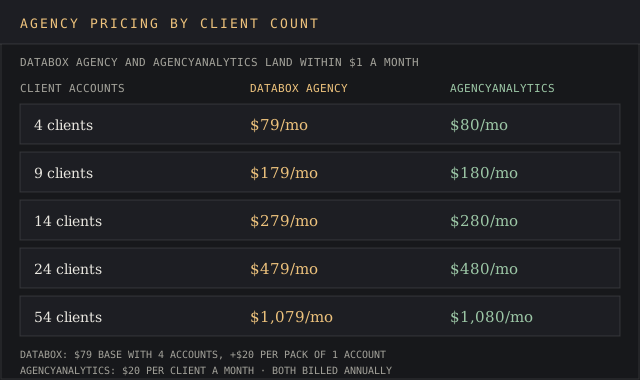
From an agency perspective, the math lines up almost exactly with AgencyAnalytics, a level playing field on price. Databox's configurator shows 4 accounts in the $79 base, and each pack adds one more for $20. AgencyAnalytics charges $20 per client a month billed annually. At 9 clients that is $179 against $180, and at 24 clients it is $479 against $480.
The difference is in the bundle. AgencyAnalytics includes its white-labeled client portal, while Databox charges $80 for branding. An agency of 24 clients that needs its own logo on every board pays $559 a month at Databox and $480 at AgencyAnalytics, so the client reporting decision turns on features more than seat math.
Clients notice the live links. A CEO of a small marketing agency on Capterra, June 2026, wrote: "We WOW our clients with databox. They LOVE having a custom link they can go to for live analytics." The agency account lets one team track key metrics for every client from one login, with each client kept in its own account, which works as separate client workspaces. Reviews on Databox's site describe Scorecards that automatically send weekly to Slack or a client's inbox.
↑ FACT SHEETDatabox's customer service and support team
Business and Agency include email customer support, and the customer support team answers by email on both. The FAQ says Custom adds "hands-on 1:1 support from a dedicated team", which is the only place the pricing page promises anything close to a dedicated customer success manager. The pricing page lists email as the support channel on every self-serve plan, with no phone line.
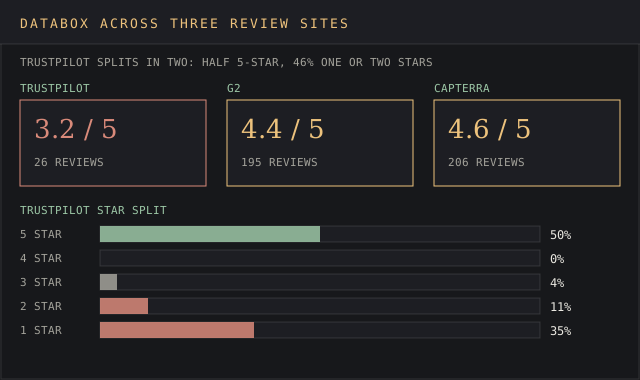
Ratings split by platform. Capterra scores customer service at 4.5 of 5 and G2 lists 4.4 overall from 195 reviews. Trustpilot sits at 3.2 from 26 reviews, with half of them 5 stars and 46% at one or two stars. The one-star reviews cluster on billing.
Positive reviews name names and fixes. A Trustpilot reviewer in September 2025 wrote that "Databox's support team is excellent", and positive reviews keep describing a helpful team. Another in the same month said: "They are extremely quick to diagnose and fix any problems." A Trustpilot user in India, June 2026, called the team "customer centric and always there to support us."
Negative reviews are just as concrete. A reviewer on Trustpilot, August 2025, wrote that "Customer support was unhelpful and their billing and refund policies made things worse." An Australian reviewer on Trustpilot in October 2026 wrote in a one-star review: "Terrible Customer Service and Plans designed to get you trapped with pricing with no communication." That review reads as a complaint about upselling into larger plans.
A founder on Capterra, November 2023, wrote: "Auto renewed for double the price I initially paid." For reviewers in that spot, the refund answer added insult to injury. The FAQ's own terms explain the friction. Cancellations "take effect at the end of your current billing period", so an annual contract cancelled in month two still runs for ten more months.
Review sites carry their own biases, which our reports on how far to trust Trustpilot and how Capterra rankings are funded cover in detail.
What the Databox reviews page shows
Databox runs its own wall of love, a page of real user reviews it has picked from LinkedIn and Trustpilot. Every review on the page is positive, since Databox chose them for its own marketing.
Its longest entry is a Trustpilot review praising the reporting functionality. It describes cloning last month's leadership report so all the charts update on their own, then adding a Data Story, an AI Performance Summary and a few bullet points before sending it.
That reviewer credits Databox with saving hundreds of hours and turning recurring reporting into a five-minute task. The review says it cuts reporting stress for marketers who aren't full time data analysts and handles last-minute reporting requests beyond just recurring reports.
It also says all those polished dashboards improve client retention, and praises partner management, the team's genuinely helpful insight and the AI support bot's surprisingly great responses. It calls the result an end to the spreadsheet wrestling match.
Another featured Trustpilot review describes a customer success manager booked within 12 hours who helped the reviewer confidently create dashboards, and calls it "Truly exceptional support." A third calls the staff one of the best support teams the reviewer has dealt with.
Meanwhile, the 1-star Trustpilot reviews stay on Trustpilot. Read between the lines and the curated page tells you what Databox makes easy when it works. The independent databox reviews above tell you what happens when a sync breaks or a renewal lands.
↑ FACT SHEETSecurity and data handling
The help center states that data in transit uses TLS 1.2 or higher, and data at rest uses AES-256 data encryption with keys managed in AWS Key Management Service. Databox runs on AWS servers in the United States. The company is based in Boston, Massachusetts, with Peter Caputa IV as CEO, according to its about page.
The certification wording differs by page. The pricing page footer says "SOC 2 certified", while the help center article says "Databox is also SOC 2 Type 1 certified" and mentions no Type 2 report. A Type 1 report checks control design at one point in time. Procurement teams that require a Type 2 report should keep an eye on that wording and ask for one before signing.
Is Databox worth it?
Databox makes sense where its strengths line up with the buyer. An agency with 10 to 50 clients pays about what AgencyAnalytics charges and gets AI querying, calculated metrics and 130+ integrations. A marketing team of up to 10 people that wants customizable dashboards and wants to analyze performance across multiple data sources without hiring an analyst gets a faster start than Power BI.
It makes less sense for one person. A solo founder pays $4,788 a year at minimum on Business, and a Looker Studio account costs nothing. For GA4-heavy teams, our web analytics pricing report shows what the data sources themselves cost. Databox makes the case for itself on time saved, and the Trustpilot reviews show that time savings disappear when data connections fail.
Ongoing improvements are steady, and the public feature requests board shows shipped items such as sync intervals of 24 hours, 8 hours, 4 hours and 60 minutes chosen per data source. Users can submit and vote on feature requests there. That roadmap transparency is a point in Databox's favor for teams that want to see what's coming.
Databox questions buyers ask
Does Databox have a free plan?
The pricing page lists Business, Agency and Custom, and the FAQ answers the free plan question with a 14-day Business trial that needs no card. The page's meta description still says a free plan is available.
How much does Databox cost?
Business costs $399 a month billed annually ($4,788 a year) or $499 monthly. Agency starts at $79 a month plus $20 per account pack, and Custom starts from $15,000 with a fixed quote.
Is Databox SOC 2 certified?
The help center says Databox is SOC 2 Type 1 certified. The pricing page footer says SOC 2 certified without naming a type, so a buyer who needs a Type 2 report should ask for one.
Can I cancel Databox at any time?
Yes. Cancellations take effect at the end of the current billing period, so an annual plan runs to its end date, and upgrades or downgrades apply at once with the difference prorated.
↑ FACT SHEETDatabox alternatives
Three alternatives cover the situations where Databox loses. The data dashboard tools ranking scores ten platforms side by side, Databox among them.
AgencyAnalytics
AgencyAnalytics wins for agencies that want a branded client portal in the base price. It charges $20 per client a month billed annually with 90+ marketing integrations and white-labeling included. It scores 4.7 of 5 across 465 reviews on G2. Our AgencyAnalytics review covers it in full, and the AgencyAnalytics alternatives page lists the wider field.
It loses where data lives outside marketing tools. Databox connects to Snowflake, BigQuery, PostgreSQL and accounting tools such as QuickBooks and Xero, which suits an agency reporting revenue alongside ad spend.
Microsoft Power BI
Power BI wins for teams with an analyst and a Microsoft stack that want a full business intelligence suite. Power BI Pro costs $14 per user a month paid yearly, so ten users cost $1,680 a year against Databox Business at $4,788. A free account exists, though sharing reports needs Pro. Power BI scores 4.5 of 5 across 1,671 reviews on G2.
It loses on time to first dashboard for non-technical teams. Databox's templates and native marketing connectors get a HubSpot board running in a few clicks, where Power BI expects someone to model the data, which is easier said than done for a team with no analyst. Our piece on market intelligence versus business intelligence covers where each kind of tool fits.
Looker Studio
Looker Studio wins on price. Google's page says it is available at no charge for creators and viewers, connects to more than 1,400 data sources, and charges $9 per user per project a month for Pro. For a team living in Google Analytics, Google Ads and Sheets, that beats $399 a month.
Looker Studio loses on alerts, goals and AI features for teams that want them built in. Databox ships goal tracking, metric alerts, Scorecards and an AI Analyst in the Business plan, and Looker Studio users build those habits by hand. The data analysis tools ranking covers it among the free options.
Verdict
Databox is for agencies managing multiple clients and for marketing or RevOps teams of up to 10 people who want HubSpot, Google Analytics, ad and revenue numbers in one place without a data team. Agency pricing matches AgencyAnalytics within $1 a month, Capterra users score it 4.6, and its templates, calculated metrics and AI Analyst cut the time from login to first dashboard and keep recurring reporting on autopilot.
It isn't for solo founders who want a free plan, since the FAQ says there is none and Business starts at $4,788 a year. It's also a poor fit for buyers who need phone support, a SOC 2 Type 2 report on day one, or easy exits, given the end-of-period cancellation rule and the refund complaints on Trustpilot.
It might suit a 10-person team with caveats named: budget for the $40 security add-on if SSO is required, count data sources per property before you buy, check the sync status weekly, and put the renewal date in a calendar the day you sign.