Best conjoint analysis tools in 2026: 10 platforms ranked by method, simulator and price
 By Jan Suski. I go deep on every review, checking every number against its source and digging up details other coverage misses, a habit from six years of SEO and link building for tech companies. Bylines at Surfer, Brand24, and Senuto. How the scoring works.
· Prefer this source on Google
Quick comparison of conjoint analysis software
The table lists the ten tools in ranked order. The middle column carries the methods each vendor documents, since that decides which studies you can run at all.
| # | Provider | Conjoint methods documented | Entry price for conjoint | Best fit |
|---|---|---|---|---|
| 1 | Sawtooth Software | 4 types: CBC, ACBC, MBC, ACA | Free to 50 respondents, paid tiers by quote | Consultancies running advanced choice modeling |
| 2 | Conjointly | Generic and brand-specific CBC, HB estimation | $2,895 a year per team | Teams that want published pricing and a built-in panel |
| 3 | Qualtrics | Choice-based conjoint, HB in the background | $5,040 a year (1,000 responses) | Organisations already on Qualtrics surveys |
| 4 | 1000minds | PAPRIKA partial-profile pairwise method | $4,500 per survey (5,000 participants) | Health, policy and academic preference studies |
| 5 | OpinionX | Conjoint and MaxDiff on every plan | $900 a year, unlimited participants | Startups and product teams on a small budget |
| 6 | Displayr | MNL, latent class, HB, multi-class HB | $3,359 per user a year | Analysts modeling choice data collected elsewhere |
| 7 | QuestionPro | Choice-based and adaptive conjoint | Research Suite by quote, 10+ users | Large survey programs that need a panel |
| 8 | Alchemer | Choice-based conjoint question | $1,895 a year per user | Small teams of up to 3 users |
| 9 | Pollfish | Choice-based conjoint question | $0.95 per response + $1.00 conjoint surcharge | One-off consumer studies with no license |
| 10 | XLSTAT | Full profile conjoint analysis and CBC with HB | $1,410 a year (Standard) | Excel users analysing their own survey data |
Every price in the table is the vendor’s own published figure for the cheapest plan that runs a conjoint study, read on 14 October 2026. Vendr’s buyer data appears only in the Qualtrics entry, for contracts above the self-serve tier.
Where these figures come from
Method lists, respondent caps and plan prices come from each vendor’s own pricing, product and documentation pages, read on 14 October 2026. The one contract median on this page is from Vendrfrom Vendr’s anonymised buyer data#8217;s anonymised buyer data. Sawtooth and QuestionPro publish no dollar price for their paid conjoint tiers, so their rows state the quote model and no figure.
Qualtrics also ranks on our customer satisfaction survey software ranking and the customer feedback management platforms ranking, where it is scored on CSAT, NPS and survey programs.
Conjoint analysis tools build the experiment, field it and turn the answers into numbers you can price against. A respondent sees two to four product concepts, picks one, and repeats the task a dozen times. The software then estimates part-worth utilities, the preference scores that say how much each attribute level adds to a product’s appeal, and feeds them into a market simulator.
This page ranks ten platforms that run that full loop, or a documented part of it, in 2026. Every price below comes from the vendor’s own pricing page or from Vendr’s anonymised buyer data, and every figure carries a link to where it came from.
It’s written for product managers, pricing leads and market researchers choosing conjoint analysis software for the first time, and for research teams weighing a move off a desktop license. The timing matters because the floor price has collapsed. A full conjoint survey with unlimited respondents now starts at $900 a year, while the category’s best-known desktop suite still sells by quote only.
Evaluation criteria for conjoint analysis software
Five criteria decide the shortlist, and the ranking below applies them in this order. Each one is a test a buyer can run against the conjoint analysis features listed on the vendor’s own pages and get a yes, a no or a number.

1. Number of conjoint methods documented
Count the conjoint variants the vendor names on its own product or documentation pages: choice based conjoint (CBC), adaptive choice-based conjoint (ACBC), adaptive conjoint analysis (ACA), menu based conjoint analysis (MBC), full profile conjoint analysis, or a proprietary method such as PAPRIKA. A tool that documents one method can only run studies shaped like that method.
2. Individual-level estimation with hierarchical Bayes
Check for a documented hierarchical Bayes (HB) estimation, the method that returns utilities per respondent. Aggregate multinomial logit gives one set of preference scores for the whole sample, which hides the segments a pricing decision turns on. The test is a yes or a no on the vendor’s own docs.
3. A market simulator inside the product
Look for market simulations that run in the product, where you change a price or a feature and read the predicted share. Some tools export utilities to a spreadsheet template, which works but breaks the loop every time the data changes. Score built-in market simulators as yes, an Excel template as partial.
4. Published price for a full conjoint study
Find the lowest published dollar figure that lets you field a conjoint survey without a small respondent cap. A published price puts every buyer on a level playing field before the first sales call. A vendor that prices by quote scores lowest here, and a Vendr median counts when the vendor publishes nothing.
5. Respondent caps and panel cost
Record the free-tier respondent cap and the price per complete response from the vendor’s own panel, if it sells one. A conjoint study typically needs several hundred completes, so a $1.55 average bid against a $0.95 base rate changes the research investment more than the license line does.
The 10 best conjoint analysis software tools, ranked
Each entry follows the same shape: who it suits, what it is, key features, pricing, pros, cons, a user quote and the reason for its rank.
Sawtooth Software
Best fit
Insight departments and consultancies that run adaptive and menu-based studies and need the deepest market simulations available.
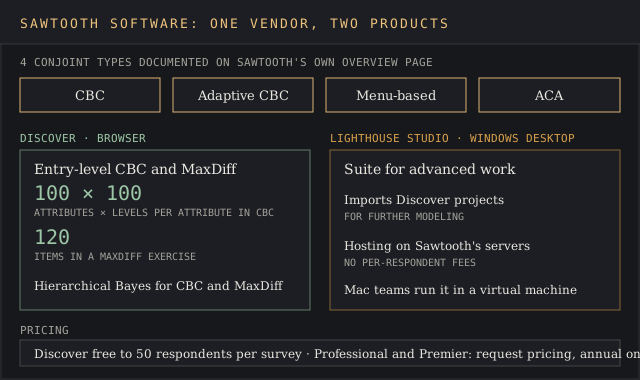
Sawtooth was founded in 1983 by Rich Johnson and now works out of Provo, Utah and Leeds, UK, according to its about page. Its customers field more than 17,000 conjoint analysis studies every year, a figure Sawtooth publishes on its conjoint analysis overview. That page lists four types it supports: discrete choice-based conjoint (CBC), adaptive CBC, menu-based conjoint and adaptive conjoint analysis.
The product line splits in two. Discover is the browser platform for entry-level CBC and MaxDiff, and Lighthouse Studio is the Windows desktop suite for advanced work, where a project built in Discover can be imported for further modeling.
Key features
- Four conjoint analysis methods: CBC, adaptive CBC, menu-based conjoint and ACA
- Discover handles up to 100 attributes and 100 levels per attribute in a CBC exercise, and up to 120 items in MaxDiff, per its tech specs
- Hierarchical Bayes estimation for CBC and MaxDiff in Discover
- A simulator with confidence intervals, segmentation and multiple market scenarios
- Lighthouse Studio hosting on Sawtooth’s servers “with no per respondent fees,” per the Lighthouse Studio page
Pricing
Discover’s free plan allows up to 50 respondents per survey with CBC and MaxDiff. Professional (Discover) and Premier (Lighthouse Studio) both say “Request Pricing” on the pricing page, and the FAQ there states that Sawtooth only sells annual subscriptions. Teams that need adaptive CBC have to bite the bullet and request a quote.
Pros
- The only vendor here documenting adaptive CBC and menu-based conjoint side by side
- 17,000+ studies a year, backed by more than 20 research conferences for market researchers since 1987
- Free Discover tier runs CBC and MaxDiff at 50 respondents per survey
Cons
- Every paid tier sits behind a sales quote
- Lighthouse Studio authoring runs on Windows, so Mac teams need a virtual machine
- Reviewers report a steep learning curve beyond basic surveys
“I have a Mac, so I have to use Parallels to get it to run.”
Catherine W., Manager of Market Research, computer software, Capterra review, March 2020
A Director of Marketing Sciences gave it 3 stars on Capterra in March 2020 and called it “Expensive and few usability improvements over the years.” An analyst reviewing the same month wrote “Simulator is excellent for analyzing conjoint output.” Lighthouse Studio holds 4.6 across 168 reviews on Capterra.
Why it’s ranked #1. Sawtooth documents 4 conjoint types, including adaptive CBC and menu-based conjoint, where Conjointly names two choice-based products, so it wins criterion 1 outright. Its one weak criterion is price transparency, since every paid tier is quoted.
Conjointly
Best fit
Product and pricing analysts who want a published annual price, HB estimation and a panel bought inside the same tool.
Conjointly started in 2016 as “a simple online tool for conjoint analysis” and is run by Analytics Simplified Pty Ltd in Sydney, per its about page, which counts 10,000+ projects on the platform. Its pricing page lists Generic Conjoint and Brand-Specific Conjoint alongside MaxDiff, TURF, Gabor-Granger, Van Westendorp, Kano and Brand-Price Trade-Off.
Estimation runs on Markov Chain Monte Carlo hierarchical Bayes for both conjoint methods, according to Conjointly’s technical limits page, which caps a generic study at 107 attributes and 966 attribute levels in total and recommends staying under 10,000 complete responses per study.

Key features
- Generic and brand-specific CBC, with brand-specific designs supporting up to 40 brands
- MCMC hierarchical Bayes estimation and a conjoint preference share simulator on every plan
- MaxDiff, TURF, Gabor-Granger and Van Westendorp for price sensitivity work beyond conjoint
- Self-serve sample at a $0.55 minimum bid and a $1.55 average bid per complete response
- Up to 50 segments per report for market segmentation of the results
Pricing
Basic is free but caps advanced methods at 20 responses. Professional costs $2,895 per team per year with full access to every method, and Ultimate starts at $10,000 a year, per the Conjointly pricing page. Billing is annual, and Professional is paid by credit card only.
Pros
- A published $2,895 team price with no per-seat charge
- Panel, design, fielding and simulator in one account
- The widest pricing-method menu on this list, Van Westendorp and Gabor-Granger included
Cons
- The free tier’s 20-response cap is too small to read a real study
- Extras stack up: $0.15 per complete for AI text analytics, from $800 per language for professional translation
- Annual billing only, by card, on Professional
A market research director wrote on Capterra in November 2023 that “it made doing a conjoint a breeze.” A student reviewer put the free-tier limit in seven words in May 2017: “Don’t get full results with free software.”
Why it’s ranked #2. Conjointly publishes $2,895 a year for every method with no plan-level response cap, which beats Qualtrics’ $5,040 for 1,000 responses, and it loses to Sawtooth’s 4 documented conjoint types against its own 2.
Qualtrics
Best fit
Organisations already running surveys on Qualtrics that want conjoint and MaxDiff without a second vendor.
Qualtrics sells conjoint for product optimization and pricing inside its Strategic Research plan, which lists Conjoint and MaxDiff among 20+ guided solutions on the buy-online page. Its conjoint landing page says the tool runs “complicated hierarchical Bayesian estimation for utility scores” in the background and shows price sensitivity in a simulator, and claims over 11,000 brands as users, per the Qualtrics conjoint page.
Our Qualtrics XM review covers the wider platform. Silver Lake and CPP Investments took Qualtrics private in June 2023 at $18.15 a share, per Qualtrics. Its support docs recommend three to eight features and two to seven levels for a choice-based project.
Key features
- Choice-based conjoint with automatic hierarchical Bayes utilities
- A simulator that finds the optimal product configuration and benchmarks competitor products
- Segment-by-segment attribute importance through a custom segmentation tool
- MaxDiff, concept testing and 23 question types on the same plan
Pricing
Strategic Research costs $420 a month, or $5,040 billed annually, for 1,000 responses shared across unlimited users. The self-serve plan is a drop in the bucket next to Qualtrics’ enterprise deals. Above it, Vendr’s anonymised buyer data puts the median Qualtrics contract at $30,000 a year across 322 purchases, ranging from $7,020 to $138,884, per Vendr. Our Qualtrics pricing report breaks down the tiers.
Pros
- Unlimited users on the $5,040 plan
- HB estimation and a simulator run with no manual setup
- Conjoint data sits next to every other survey data set the team already owns
Cons
- The self-serve plan caps at 1,000 responses
- A recommended ceiling of 8 features, against Conjointly’s 107-attribute technical limit
- Contracts above the self-serve tier carry a $30,000 Vendr median
“For the time being there better tools for Conjoint Analysis and Max Diff analysis.”
Verified reviewer, Marketing Intelligence Coordinator, Capterra review of Qualtrics Strategy & Research, February 2018
A UX researcher put the cost side plainly on the same Capterra page in January 2023: “Extremely pricey. They offer discounts if you ask, especially for smaller companies.”
Why it’s ranked #3. Qualtrics covers unlimited surveys up to 1,000 responses for $5,040 a year, where 1000minds charges $4,500 for a single survey. It loses to Conjointly, whose $2,895 plan carries no plan-level response cap.
1000minds
Best fit
Health economists, policy researchers and academics who need a peer-reviewed method and price valuation per feature.
1000minds runs on the patented PAPRIKA method, short for “Potentially All Pairwise RanKings of all possible Alternatives,” invented by founders Paul Hansen and Franz Ombler. PAPRIKA asks pairwise questions about partial profiles, roughly 25 of them for four criteria with three or four levels each, according to the PAPRIKA method page.
The same page counts 440+ peer-reviewed articles or abstracts using it since 2006 and 940+ universities and research organisations. 1000minds also sells a separate health decision-making package.
Key features
- The patented PAPRIKA method for pairwise rankings of partial profiles
- Participant-level utilities for segmentation and cluster analysis
- Real-time attribute rankings, relative importance, market shares and price elasticities
- A market simulator and willingness-to-pay estimates
- Multi-language translation and response quality filtering
Pricing
The conjoint analysis and DCE subscription costs $25,000 a year for up to 5,000 people per survey, per 1000minds. Self-service conjoint for market research costs $4,500 per survey, up to 5,000 participants, on the market research pricing page. Both come with a 15-day free trial.
Pros
- 440+ peer-reviewed publications behind the method
- Price elasticity and dollar value per feature reported automatically
- Subscribers invite as many colleagues as they like, each with an individual login
Cons
- $25,000 a year is the highest published subscription on this list
- Partial-profile pairwise questions differ from the full choice tasks most commercial teams expect
- Specialised consulting costs extra on the $4,500 per-survey package
“It is a premium tool and may not be affordable for smaller organizations or individuals.”
Priyanshu, computer software, Capterra review, February 2023
A hospitality reviewer on the same page, in November 2023, praised its “ease of use and intuitive features.”
Why it’s ranked #4. 1000minds backs its method with 440+ peer-reviewed articles and handles 5,000 participants per survey, which beats OpinionX’s 3-product simulator. It loses to Qualtrics on price, $4,500 per survey against $5,040 for a year.
OpinionX
Best fit
Startups and product teams that need conjoint, MaxDiff and pricing questions for under $1,000 a year.
OpinionX puts conjoint analysis, MaxDiff, Van Westendorp and Gabor-Granger on every plan, the free one included, per its pricing page. Its own conjoint tools guide lists automatic part worth utilities, a scenario simulator that estimates market share and revenue for up to three competing products, a marginal willingness to pay chart, and ranked concepts with a rejection rate.
Key features
- Conjoint and MaxDiff blocks inside the same conjoint analysis survey as multiple choice and open-text questions
- Scenario simulator for up to 3 competing products
- Marginal Willingness To Pay chart and ranked concepts
- Profile logic that blocks implausible combinations of different attributes
- Unlimited researcher seats on every plan, 5 editor seats per survey
Pricing
Free covers every method at 25 participants per survey. Analyze costs $900 a year, billed annually, with unlimited participants and seats. Accelerate adds SAML SSO and consulting at a quoted price.
Pros
- $900 a year for unlimited participants, the lowest published price here
- Pricing methods and conjoint in one survey
- Free tier returns full results up to 25 participants
Cons
- The simulator compares 3 products at most
- 2 reviews on Capterra, a thin public track record
- SAML SSO and private team folders sit on the quote-only Accelerate tier
One UX researcher reviewing it on Capterra in November 2023 said the trial “hooked us in with a solid offer and great analytics output,” then added: “Limited survey tools and control compared to industry leaders but serves its niche well still I would say.”
Why it’s ranked #5. OpinionX fields and analyses a conjoint survey for $900 a year, which beats Displayr’s $3,359 per user for analysis alone. It loses to 1000minds, whose simulator and 440+ published studies outweigh a 3-product scenario cap.
Displayr
Best fit
Analysts who already collect choice data in another survey platform and need serious data analysis and automated reporting.
Displayr and its sister product Q are built by the same company. Q’s conjoint analysis software page lists random, efficient, prior-based and partial-profile experimental designs, and models from MNL to latent class, HB, multi-class HB and random parameters logit, and says Displayr “handles the full workflow online, from experimental design to choice simulator.”
Q’s documentation also covers converting Alchemer conjoint data for analysis, which is the typical route in, with fielding done elsewhere and modeling done here.
Key features
- Experimental designs: random, efficient, priors and partial profile
- Choice modeling with five model types, including latent class and multi-class HB
- Choice simulator built in Displayr
- Automated reports exported to PowerPoint, Excel and PDF
Pricing
Professional starts at $3,359 per user and Enterprise at $4,199 per user, both billed annually, per the Displayr pricing page. Extra server time sells in blocks of 1,000 hours for $1,340, and there’s a 14-day free trial.
Pros
- Five estimation models, the widest statistical menu on this list, which keeps analysts in the driver’s seat on model choice
- Latent class and multi-class HB expose segments that one aggregate model hides
- Report automation into PowerPoint cuts manual reporting work
Cons
- $3,359 per user adds up fast for a team of five
- Reviewers flag processing speed on large data sets
- Conjoint exports from Alchemer and similar platforms need a conversion step, per Q’s documentation
On Capterra, where Displayr holds 4.8 from 21 reviews, an analytics manager listed a “Steep learning curve for some of the advanced features” in March 2023, and a senior research director in health care praised the “Possibility to update report with layout on power point.”
Why it’s ranked #6. Displayr publishes $3,359 per user and documents 5 choice models, which beats QuestionPro’s quote-only Research Suite. It loses to OpinionX, which fields and simulates a study for $900 a year.
QuestionPro
Best fit
Enterprises with large survey programs that want conjoint, a respondent panel and a dedicated success manager under one contract.
QuestionPro’s conjoint feature page describes choice-based and adaptive conjoint analysis questions, an algorithm that builds an optimal design for the tasks per respondent and sample size, and a simulator to “forecast the market share of new products that don’t exist today.” Conjoint sits in the Research Suite, which lists “Conjoint, MaxDiff and A/B testing” and access to “22+ million respondents” on the QuestionPro pricing page.
Key features
- Choice-based and adaptive conjoint analysis questions
- Optimal design generation for tasks per respondent and sample size
- Market share simulator for new product concepts
- 52 question types and a 22+ million respondent panel on Research Suite
Pricing
Research Suite is custom-priced and starts at 10 users. The plans below it, Advanced at $99 per user a month and Team Edition at $83 per user a month for 5+ users, don’t list conjoint. Our survey software pricing report compares those tiers with Pollfish and SurveyMonkey.
Pros
- 22+ million respondents reachable from the same account
- Adaptive conjoint analysis alongside CBC
- 4.8 from 545 Capterra reviews, with 4.7 for customer service
Cons
- Conjoint requires the quote-only Research Suite with a 10-user floor
- Team Edition buyers at $83 per user a month must upgrade to Research Suite for conjoint
- Reviewers report training time for the more detailed tools
“Pricing may also be a concern if advanced features are only available on higher-tier plans.”
Natasha M., Outreach Coordinator, Capterra review, June 2026
Another reviewer on the same page wrote in December 2025 that QuestionPro “has a fantastic and immediate support team that is always on standby to answer questions.”
Why it’s ranked #7. QuestionPro pairs adaptive conjoint with a 22+ million respondent panel and an in-product simulator, which beats Alchemer’s Excel template. It loses to Displayr, which publishes a $3,359 price where QuestionPro quotes a 10-user minimum.
Alchemer
Best fit
Small research teams of up to three users who want conjoint inside a general survey tool at a published price.
Alchemer, formerly SurveyGizmo, makes its conjoint question available only on Full Access, which carries 43 question types against 27 on Professional, per its question type cheatsheet. The conjoint help article recommends showing 6 product attributes at most and returns a utilities chart with a relative importance percentage per attribute.
Key features
- Choice-based conjoint analysis question with at least 2 levels per attribute
- Standard Report with utility charts and attribute stats
- Market simulator as an example Excel spreadsheet fed by the exported report
- 43 question types on Full Access, against 25 on Collaborator
Pricing
Full Access costs $1,895 a year per user, or $275 a month, with up to 3 users, per Alchemer’s pricing page. More than 3 users requires a custom-quoted Business Platform account.
Pros
- A published $1,895 annual price for conjoint
- Monthly billing at $275 for a short project
- Utilities and importance appear in the standard report automatically
Cons
- The simulator lives in an Excel template outside the product
- Recommended ceiling of 6 attributes
- Team size caps at 3 users before a custom quote
“even the more advanced ones like max-diff or conjoint analysis are baked into the product.”
Bart M., Founder, market research, Capterra review, March 2021
A self-employed marketer on the same page in June 2023 noted that “some of the custom reports and advanced analytics tools cost extra, which I didn’t like.”
Why it’s ranked #8. Alchemer’s $1,895 covers unlimited conjoint studies, which beats Pollfish’s per-response charge at $1,950 for 1,000 responses. It loses to QuestionPro, whose simulator runs inside the product.
Pollfish
Best fit
Marketers running one consumer conjoint study who want a general consumer target audience and analysis on a per-response bill.
Pollfish is owned and operated by Prodege and says 13,673 businesses use it, per the Pollfish homepage. Its conjoint question shows a different set of product alternatives on each screen and returns an attribute relative importance graph, level utilities, a ranked list of product alternatives and willingness-to-pay charts when a price attribute is present, per its conjoint analysis software guide.
Key features
- Choice-based conjoint analysis question fielded to Prodege’s respondent communities
- Attribute relative importance and level utilities graphs
- Dollar-value charts tied to a price attribute
- Real-time cost calculator as targeting filters change
Pricing
Responses start at $0.95 each, conjoint adds $1.00 per response, and screening questions add $0.50 to $5.75 per response, per the Pollfish pricing page. A 1,000-response conjoint survey with no screeners costs $1,950. Keep an eye on screeners, since six of them add $5.75 to every response. Enterprise packages start at a $10,000 annual commitment.
Pros
- Sample, fielding and analysis bundled per response
- Pay per response for a single study
- Utilities and importance graphs arrive with the results
Cons
- Six screening questions add $5.75 to every response
- Advice caps designs at 6 to 7 attributes
- Reviewers report low-effort mobile responses
“sometimes the responses feel like a person is just quickly clicking through on their phone”
Verified reviewer, Lead, consumer institute, Capterra review, December 2021
A CMO and co-founder on the same page in February 2022 said “I’m able to collect a lot of responses in a short period of time at an honest price.”
Why it’s ranked #9. Pollfish delivers respondents and conjoint results for $1.95 a response, which beats XLSTAT, an Excel add-in that leaves fielding to another tool. It loses to Alchemer, whose $1,895 year costs less than 1,000 Pollfish responses.
XLSTAT
Best fit
Analysts and academics who collect conjoint data in any survey tool and want to model it inside Excel.
XLSTAT is a statistical add-in for Excel. Its conjoint analysis feature page covers full profile conjoint analysis estimated by ordinary least squares or monotone analysis of variance. Its CBC module analyses choices with a multinomial logit model and also offers hierarchical Bayes, which returns utilities and importances per respondent, per XLSTAT’s HB CBC tutorial.
Key features
- Full profile conjoint analysis with OLS and monotone ANOVA
- CBC with conditional logit or hierarchical Bayes estimation
- Fractional factorial or D-optimal designs for CBC profiles, per its design of experiments page
- Market share simulation listed on the Standard solution
Pricing
XLSTAT Standard, which lists conjoint analysis among its top 10 features, costs $1,410 a year commercial or $625 academic, per the Standard solution page. XLSTAT Advanced costs $1,995 a year commercial.
Pros
- $625 academic license with conjoint included
- Runs inside the spreadsheet analysts already use
- 4.7 from 398 reviews on Capterra
Cons
- Data collection happens in another tool
- Large data sets strain Excel, per reviewers
- CBC design and analysis need statistics knowledge to set up
A senior research assistant in food and beverages wrote on Capterra in March 2022: “Some functions have bugs that cause Excel collapse.” A news editor reviewing it in January 2023 added that “The software can be a bit expensive, particularly for small businesses with limited budgets.”
Why it’s ranked #10. XLSTAT’s $1,410 Standard license adds HB-estimated CBC to Excel, which keeps it on the list. It loses to Pollfish, which supplies respondents and fielding along with the analysis.
What conjoint analysis software does
Conjoint analysis tools help businesses understand how customers value the different features of a product or service. The experiment shows respondents product concepts built from attributes and attribute levels, with product features such as a price of $9 or $12 and a battery life of 10 or 20 hours. Respondents choose preferred options in each choice task, and the software works backward from those trade-offs.
Analysing those choices lets researchers statistically isolate the value consumers place on individual features. The output is a set of part-worth utilities, one per attribute level, and attribute importance scores that rank the key features.
Sawtooth notes on its conjoint overview that importances sum to 100% across attributes and reflect the relative impact each attribute has on product choices.
Statistical analysis sits at the center of the category. Statistical models quantify consumer preferences, then a simulator turns them into a forecast and actionable insights, such as the share a product keeps at $12 against $9. Market simulators test product configurations and prices, and the same utilities predict market share for new products that don’t exist yet. Our guide to market research methods places conjoint among the other primary research methods.
Types of conjoint analysis and which tools run them
The conjoint analysis methods differ in how they ask the question, and that decides how many product attributes one design can carry before respondents tire of the trade-offs.
- Choice-based conjoint analysis (CBC). Respondents pick one concept from a set, which QuestionPro describes as asking them to imitate their purchasing behavior. Every tool on this list runs some form of CBC, also called discrete choice conjoint analysis, which is why most pricing and market share models start here.
- Adaptive conjoint analysis (ACA) and adaptive CBC. The survey changes later questions based on earlier answers, which customises the respondent experience and narrows down preferences faster. Sawtooth and QuestionPro document adaptive methods.
- Menu based conjoint analysis (MBC). Respondents build their own bundle from a menu, which models complex choices such as add-ons and configurators. Sawtooth documents it.
- Full profile conjoint analysis. Respondents rate or rank complete product profiles. XLSTAT runs this from Excel.
- PAPRIKA. 1000minds asks pairwise questions about two attributes at a time, roughly 25 questions for four criteria.
Design generation sits under all of these. XLSTAT uses fractional factorial or D-optimal designs to generate CBC profiles, and a D-optimal design minimises the variance of the estimated utilities for a given number of choice tasks. QuestionPro builds an optimal design per respondent and sample size.
How to run a conjoint analysis survey step by step
Five steps cover most conjoint analysis studies, from a pricing test to a feature roadmap. The devil’s in the details at step one, because every later step inherits the attribute list.
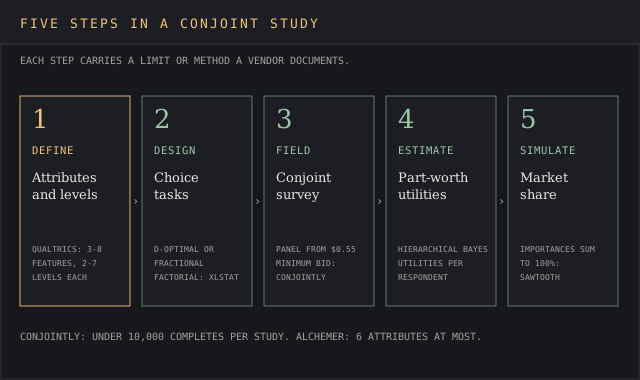
- Define product attributes and levels. Pick the essential features buyers make trade-offs between, and the attribute levels each can take. Qualtrics recommends three to eight features and two to seven levels for a choice-based project, and Alchemer recommends six attributes at most.
- Generate the experimental design. The software decides which combinations of various attributes appear in which task. Profile logic, as OpinionX calls it, blocks implausible product configurations.
- Field the conjoint analysis survey. Invite respondents from your own list of target customers, or buy them inside Conjointly, QuestionPro or Pollfish. Plan the data collection around your target audience and quotas, using a user persona template to pin down who should answer.
- Estimate utilities. Hierarchical Bayes returns preference scores per respondent. Conjointly recommends staying under 10,000 completes per study.
- Run market simulations. Change a price or a feature and read the predicted share against competitor products, which turns respondent preferences into a pricing strategy.
For a first study, experienced researchers keep the design inside Qualtrics’ three-to-eight feature range and hit the ground running with a pilot on a free tier. The survey results arrive in a timely manner when the attribute list is short, and the conjoint analysis results read cleanly when the levels are realistic.
Conjoint analysis software pricing: the spread and the hidden costs
Published entry prices for running a conjoint study range from $900 a year at OpinionX to $25,000 a year at 1000minds, with Sawtooth and QuestionPro behind sales quotes. The license is only the first line.

Respondents can take the lion’s share of a small budget. At Pollfish, a conjoint response costs $1.95 before screening, and Conjointly’s self-serve sample averages $1.55 per complete. Our market research cost report prices panels and agencies line by line, and the focus group cost breakdown shows what the qualitative alternative runs.
A 500-complete study therefore adds roughly $775 to $975 in sample alone.
Seats are the second trap. Displayr charges $3,359 per user, Alchemer $1,895 per user with a 3-user ceiling, and QuestionPro’s Research Suite starts at 10 users. Conjointly, OpinionX and Qualtrics’ self-serve plan charge per team, so a five-person research team pays one fee.
At Displayr, the same five seats cost an arm and a leg: $16,795 a year.
The third cost is expertise. Conjointly sells professional translation from $800 per language, and 1000minds charges extra for specialised consulting. A study designed badly at step one wastes the whole research investment, so budget for an expert review before the first fielding.
Where conjoint analysis gets used
Conjoint analysis is used widely in healthcare for treatment preferences. Sawtooth cites the FDA-linked Patient Preference Initiative, which recommends conjoint analysis and MaxDiff for “creating quantitative assessments of the relative desirability or acceptability to patients.” 1000minds sells a dedicated health decision-making package for the same work.
In commercial work, the main jobs are product and pricing research that feeds a marketing strategy. Conjoint helps determine optimal product features and pricing strategies, measures price elasticity and price sensitivity, and puts a dollar figure on each upgrade.
GfK’s Consumer Price Lab pitches survey-based conjoint for exactly this, as our GfK pricing report documents, and the pricing intelligence guide covers the observational side of the same question. Sawtooth’s overview names pricing research and product development among its main applications, both direct inputs to a marketing strategy.
Conjoint analysis results can also identify hidden customer segments with different consumer preferences for features. Aggregate models turn a niche segment into a needle in a haystack. Latent class models in Displayr or participant-level utilities in 1000minds feed directly into market segmentation, the topic of our market segmentation guide and the segmentation tools ranking.
Conjoint analysis versus cluster analysis
Conjoint analysis measures how much each attribute level drives a choice. Cluster analysis groups respondents who answer alike. The two work in sequence, with conjoint producing individual-level utilities and a clustering step on those utilities finding the segments.
1000minds lists cluster analysis among its automatic outputs, and Displayr’s latent class models do both at once. A buyer comparing market share across segments can sanity-check the simulator’s output against a market share calculator.
Common mistakes when buying conjoint analysis software
Buying a general survey platform for its conjoint checkbox is the first mistake. Alchemer’s simulator is an Excel template, and Pollfish advises 6 to 7 attributes at most, which suits a quick test and misses the mark for a multi-product pricing study with a dozen trade-offs.
Ignoring the respondent bill comes second. A $900 license with 500 bought completes costs more than the license line suggests, and research projects aimed at B2B audiences carry their own recruiting fees, priced in the cost report linked above.
Skipping the free tier is the third. Sawtooth Discover allows 50 respondents, OpinionX 25 and Conjointly 20, enough to pilot the attribute list before paying. Buyers who cut corners on the pilot end up back at the drawing board after fielding.
For a broader view of survey platforms beyond conjoint, our market research tools ranking covers ten options across six research jobs.
Conjoint analysis FAQ
What is conjoint analysis in simple terms?
Conjoint analysis is a survey experiment that shows people product versions with different product features and prices, asks which they’d pick, and calculates how much each feature is worth to them. The output tells you which attributes matter and how a price change moves predicted market share.
Can you give an example of a conjoint analysis survey?
A streaming service tests three attributes: price at $8, $12 or $15, ads or no ads, and one or four screens. Each conjoint analysis question shows three plans and asks which the respondent would buy. After 12 such tasks per person, the software reports how many dollars the ad-free option is worth.
How much is Sawtooth Software?
Sawtooth’s Discover free plan costs $0 for up to 50 respondents per survey. Its Professional and Premier plans are quoted on request and sold as annual subscriptions only, per its pricing page.
How can I perform conjoint analysis in Excel?
XLSTAT adds full profile and choice-based conjoint to Excel from $1,410 a year. Alchemer’s report also exports utilities to an Excel market simulator template. Either way, the conjoint experiment itself gets fielded in a survey tool first.
What is the best free conjoint analysis software?
Sawtooth Discover gives the most respondents free, at 50 per survey. OpinionX gives full results for 25 participants, and Conjointly caps free advanced methods at 20 responses.
Bottom line
Sawtooth is the best conjoint analysis software for research teams that need adaptive or menu-based designs, since it documents four methods and its customers run 17,000+ studies a year. Conjointly is the pick for teams that want a published price, at $2,895, plus HB estimation and an in-house panel.
Qualtrics fits organisations already on its survey platform, and 1000minds fits health and academic work that needs a peer-reviewed method. On a tight budget, OpinionX at $900 a year is the cheapest full conjoint survey stack of the ten, and Pollfish suits a single study paid per response.