Inventory Analytics Software: 10 Tools Ranked (2026)
 By Jan Suski. I go deep on every review, checking every number against its source and digging up details other coverage misses, a habit from six years of SEO and link building for tech companies. Bylines at Surfer, Brand24, and Senuto. How the scoring works.
· Prefer this source on Google
Quick comparison of inventory report software
Ten inventory report tools in ranked order, with each vendor's documented report count, the reorder or forecasting math it sells, the entry price and the buyer each fits.
| # | Provider | Documented reports | Reorder or forecast math | Entry price | Best fit |
|---|---|---|---|---|---|
| 1 | Fishbowl | 150+ | Reorder points; forecasting add-on $50/mo | $229/mo | Manufacturers on QuickBooks or Xero |
| 2 | Zoho Inventory | 60+ in 11 categories | Replenishment report; Zoho Analytics on the $249 plan | Free; $29/mo | Small ecommerce sellers |
| 3 | inFlow Inventory | 50 named | Recommended reorder point report, every plan | $99/mo | Wholesale and distribution |
| 4 | Cin7 Core | Count unpublished | ForesightAI add-on on all four plans | $349/mo | Multichannel brands |
| 5 | Unleashed Software | Count unpublished | Forecasting add-on $149/mo on Core | $99/mo | Wholesalers wanting a BI module |
| 6 | NetSuite | Count unpublished | Seasonal demand-based replenishment | $74,817/yr median* | ERP buyers |
| 7 | Odoo Inventory | Count unpublished | Min-max rules and a master production schedule | Free for one app; EUR 11.90*/user/mo | Teams wanting one suite |
| 8 | Katana | Count unpublished | Planning, forecasting and AI replenishment listed | Free; $299/mo | Small manufacturers |
| 9 | Ordoro | Count unpublished | Custom Forecasting Report on the $499 plan | $349/mo | Shopify and Amazon shippers |
| 10 | Sortly | Count unpublished | Low stock reports and alerts | $24/mo in year one | Supplies and asset tracking |
Medians marked * are anonymized buyer-reported contract values published by Vendr, here NetSuite's median annual contract. Every other price is the vendor's published list price on 1 October 2026.
* Odoo's prices are the euro figures odoo.com shows European visitors, billed yearly, and US visitors are quoted separately in dollars. At the European Central Bank reference rate of 1 EUR = 1.1403 USD, published 25 September 2026 and refreshed weekly, EUR 11.90 is about $13.57, EUR 22.90 is about $26.11 and EUR 14.90 is about $16.99.
Where these figures come from
Report counts, plan prices, location limits and add-on fees are each vendor's own published figure, read on 1 October 2026. NetSuite's median is Vendr's anonymized buyer data. Cin7, Unleashed, NetSuite, Odoo, Katana, Ordoro and Sortly publish no report count, Cin7 publishes no ForesightAI price, and Fishbowl publishes no implementation price, so no row claims one.
Planning suites such as Kinaxis and Blue Yonder sit on the demand forecasting software ranking. Network-level supply chain planning sits on supply chain intelligence tools, POS or panel data on retail analytics software, and storefront traffic and conversion on ecommerce analytics tools.
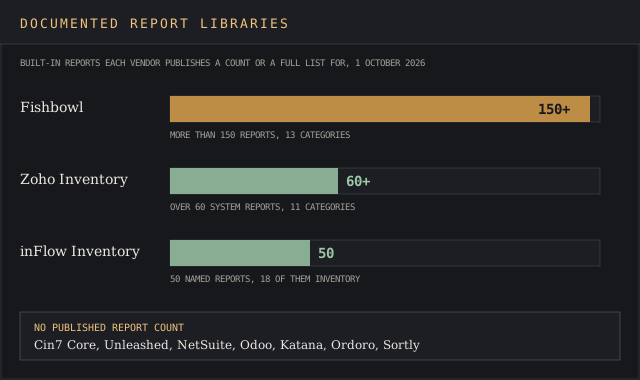
Inventory analysis software reads the stock movements, sales orders and purchase orders your inventory management system already records, then turns them into aging, turnover, valuation and reorder reports for every SKU. Zoho's help center counts over 60 system-generated reports across 11 categories in Zoho Inventory. Fishbowl advertises more than 150.
This page ranks ten of the top inventory management software companies on five tests a buyer can run inside a 14-day trial. Prices run from Sortly's $24 a month in year one to NetSuite's $74,817 Vendr median. Every price, report count and add-on fee links to its source, and every entry quotes at least one Capterra or G2 reviewer.
The ranking is for small businesses and medium-sized businesses that sell through multiple sales channels, hold multi-location stock, or build products from raw materials. The ten below are systems of record whose own reports answer stock questions.
Five of the ten now put an AI layer over those reports: inFlow's AI Report Assistant, Fishbowl AI Insights, Unleashed's Access Analytics, NetSuite's AI-generated report narratives and Cin7 ForesightAI. Cin7 says ForesightAI "has supported several hundred small-to-medium (SMB) businesses" since launch. Talk is cheap, though, so the criteria below test the report library and the reorder math underneath the chat box.
Evaluation criteria for inventory management analysis tools
Five criteria decide the shortlist of inventory management software, and the ranking below applies them in this order. Each one returns a yes, a no or a number a buyer can check on the vendor's site or during a trial.
1. Size of the documented report library
Count the built-in inventory control reports the vendor names in its documentation. Three of the ten inventory management systems publish a figure or a full list, and the spread runs from inFlow's 50 to Fishbowl's 150-plus.
The devil's in the details, so ask the sales rep to open four specific reports on your own data: inventory aging, turnover, valuation by FIFO and stock by location.
2. Reorder and forecasting math, and its monthly price
Reorder math is the first step of inventory optimization, because it decides when optimal stock levels get topped up. Does the product calculate a reorder level or a forecast from your sales history, and what does that cost per month? inFlow includes it on every plan, Fishbowl charges $50 a month, Unleashed $149 on Core, and Zoho holds forecasting back for Zoho Analytics on its $249 Enterprise plan.
3. Locations on the cheapest paid plan
Multi-location support is the limit cheap plans hit first, so count the warehouses the entry plan includes. Fishbowl, Cin7 Core and Ordoro include unlimited warehouses at entry, Zoho Inventory's $29 plan includes 2, and inFlow Lite, Unleashed Lite and Katana Core each include 1.
4. Published entry price
A buyer should see a number before booking a demo. Eight of the ten inventory management systems cut to the chase and publish a dollar list price, Odoo publishes a per-user rate, and NetSuite publishes none, so its row carries the Vendr median for 647 to 1,512 purchases.
5. Data access for outside reporting tools
Sooner or later a finance team wants the inventory data in its own reporting tools. Check for an API or analytics connector on the entry plan and its documented limit: Unleashed gives Lite 125,000 API calls a month, Katana opens its API on the Free plan, and Odoo reserves its External API for the EUR 22.90* Custom plan.
The 10 best inventory management software tools for reporting, ranked
Fishbowl
Best fit
Manufacturers and distributors on QuickBooks Online or Xero that want a large stock report set from the first login.
Fishbowl's homepage says it's "Trusted by over 6,000 Businesses for Inventory Management" (source), and its reporting page counts more than 150 reports across 13 categories, from Bill of Materials and Picking to Receiving, Vendor and Work Order. Fishbowl says its AI Insights layer delivers "on-demand business data, analytics, and actionable insights."
Every plan includes multi-warehouse support with unlimited sub-locations, according to the pricing table. The same table lists ABC inventory analysis for inventory control and a forecasting and planning add-on at $50 a month.
Key features
- More than 150 built-in reports, plus custom reports from the Fishbowl Store.
- Reorder points, plus lot and serial traceability on the $729 Scale plan.
- Mobile barcode scanning and a mobile app on every plan.
- QuickBooks Online and Xero sync for accounting software users.
- Order fulfillment, shipping tools and job costing in the plan table.
- Demand Forecasting/Planning add-on at $50 a month.
Pricing
Essentials is $229 a month billed annually with 2 users, Growth $429 with 5 users and Scale $729 with 10. Fishbowl Advanced starts at $595 a month for warehousing and $675 for manufacturing.
Every buyer has to bite the bullet on an implementation package, which Fishbowl requires with every purchase and doesn't price publicly.
Pros
- 150+ reports, the largest count any of the ten publishes.
- Unlimited warehouses from the $229 plan.
- Forecasting at $50 a month, the cheapest priced forecasting add-on here.
Cons
- Mandatory implementation package, priced on request.
- Transfer orders and AI manufacturing carry "Coming soon" labels in the plan table.
- Users want more freedom to customize reports.
A Machinery general manager running Fishbowl Advanced wrote on Capterra on 14 April 2026:
"They could use an upgraded custom reporting tool, current stock report set is great, but ability to customize is somewhat lacking."
Andrew B., General Manager, Machinery, Capterra, 14 April 2026
Why it's ranked #1. Fishbowl publishes 150+ reports against Zoho Inventory's 60+, and sells forecasting for $50 a month, where Zoho needs the $249 Enterprise plan. That wins criteria one and two outright.
Zoho Inventory
Best fit
Small e-commerce businesses selling on Shopify, Amazon, eBay or Etsy that want valuation and aging reports at a $29 entry price.
Zoho lists over 60 system-generated reports for inventory control and accounting, and its valuation category covers FIFO, weighted average, ABC classification and landed costs. The inventory category alone holds 13 reports, including Inventory Aging Summary and Inventory Turnover by Quantity.
Reports can run on a schedule, with frequency, recipients and file format set per report, and custom builds land in a My Reports folder. The pricing page names Amazon, Etsy and Shopify connectors, and Zoho runs a separate eBay integration. The $29 Standard plan is a drop in the bucket next to Fishbowl's $229.
Key features
- 60+ reports across 11 categories, including Replenishment Task Details.
- ABC classification and FIFO valuation reports.
- Scheduled reports emailed in a chosen file format.
- Serial number tracking and batch tracking from the $79 Premium plan.
- Zoho Analytics bundled on the $249 Enterprise plan.
Pricing
A free plan covers 50 orders, 1 user and 1 location. Paid plans, billed annually, run Standard $29 a month (500 orders, 3 users, 2 locations), Premium $79 (3,000 orders, 4 locations), Plus $129 (7,500 orders, 6 locations) and Enterprise $249 (15,000 orders, 10 locations).
Pros
- $29 entry with 2 locations and 3 users.
- A free plan for one location.
- ABC classification included with the standard report set.
Cons
- Forecasting waits for Zoho Analytics on the $249 plan.
- Standard caps orders at 500 a month, so business growth means a plan change.
- Custom reports take work to build.
An administrator and accountant at a small business wrote on G2 on 30 October 2025 that "The reports are clear and help us make better business decisions." A small manufacturing reviewer on the same page saw it differently on 17 June 2026: "Customized reports are difficult to produce".
Why it's ranked #2. Zoho's 60+ reports and $29 entry beat inFlow's 50 reports at $99, with 2 locations to inFlow's 1. It trails Fishbowl's 150+ reports, and forecasting needs the $249 plan.
inFlow Inventory
Best fit
Wholesale and distribution businesses that want reorder math on the cheapest plan.
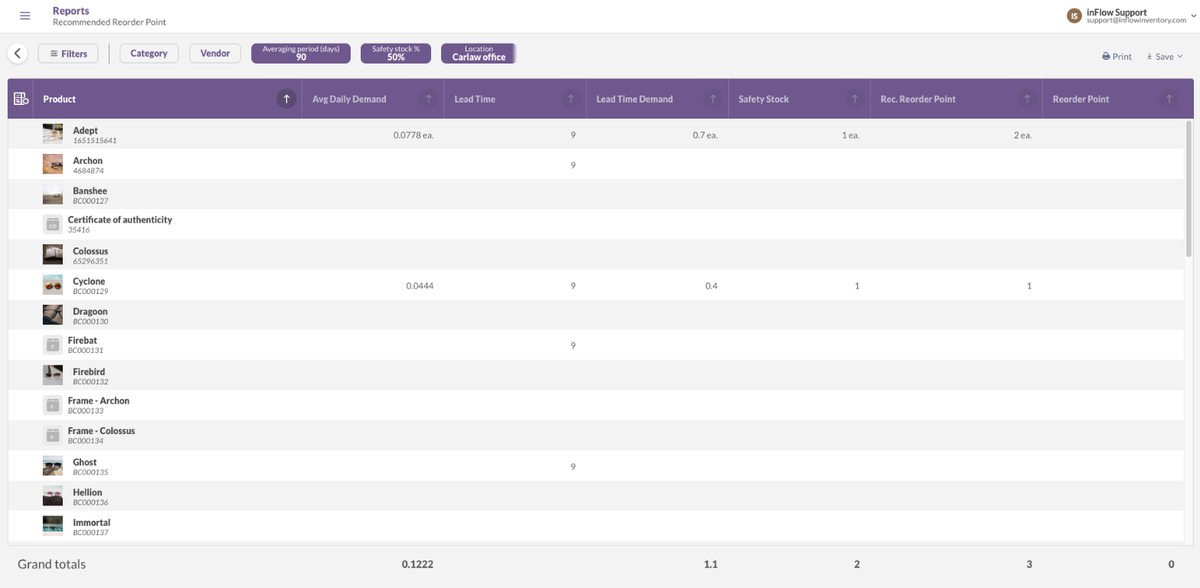
inFlow's report selection tool names 50 reports, 18 of them inventory reports such as Inventory Aging, Inventory By Location, Estimated Inventory Duration and Recommended Reorder Point. Archon Systems, the developer, says 50K+ businesses use it, and the selection tool lets a buyer zero in on the columns each report carries.
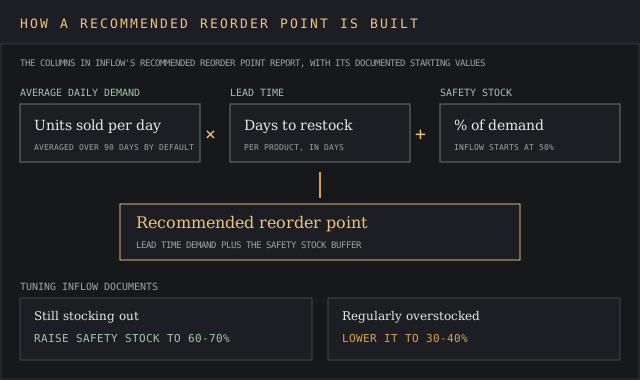
inFlow's reorder report goes by the book for inventory control. It works from average daily demand over an averaging period, lead time and a safety stock percentage. inFlow's help article recommends 90 days as the starting period and safety stock at 50% of demand, raised to 60% or 70% after stockouts and lowered to 30% or 40% for overstock.
Key features
- 50 named reports with selectable columns.
- Lead time demand and safety stock columns in the reorder report.
- AI Report Assistant on Inventory and Manufacturing plans.
- Lot Expiry Report, with lot and serial numbers as add-ons.
- Over 95 integrations, plus Windows, web, iPhone and Android apps.
Pricing
Billed annually, Lite costs $99 a month for 2 team members and 1 location with no sublocations. Core is $299 for 5 members and 5 locations, Pro $499 and Max $699 with unlimited locations. A $499 onboarding package is marked required on most plans.
Pros
- Reorder recommendations included from the $99 plan.
- All 50 reports listed by name before you buy.
- Unlimited products, sales, purchases and integrations on every plan.
Cons
- Lite covers 1 location.
- API access and the Showroom B2B portal are paid add-ons.
- Saved reports differ between the web and app versions.
A small-business director of operations wrote on G2 on 12 February 2025 that "the customizable reporting functions let our administrative team find and show the exact information we need with a few clicks." The same review added a limit:
"I wish that we could save reports in the web version, as well as having indicators of what needs ordering in the app version."
Victoria F., Director of Operations, G2, 12 February 2025
Why it's ranked #3. inFlow lists 50 reports and includes reorder math at $99, where Cin7 Core sells ForesightAI as an add-on above $349. It loses to Zoho on report count, entry price and its single Lite location.
Cin7 Core
Best fit
Multichannel brands, retailers and medium-sized businesses that need unlimited inventory locations and AI forecasting on one subscription.
Cin7 reports 8,500+ customers, 125+ million orders a year and over 700 app partners, and syncs stock levels across Shopify, Amazon and WooCommerce. It pitches Core as "Robust out of the box features to streamline operations".
ForesightAI runs algorithmic sales forecasting and automatic inventory replenishment, recalculates once a day, and adds a Winners, Losers and Chasers analysis, a purchase budget planner and a sales forecast graph. The pricing table marks it as an add-on on all four plans without a published price.
Key features
- Unlimited inventory locations on the $349 Standard plan.
- ForesightAI forecasting with daily recalculation.
- Material requirements planning for raw materials from the $599 Pro plan.
- Advanced warehouse management on the $1,199 Advanced plan.
- EDI and third-party logistics connections through the API or a partner.
Pricing
Core Standard is $349 a month for 5 users, 2 ecommerce and app integrations and 6,000 sale orders a year. Pro costs $599 for 10 users and 24,000 orders, and Advanced $1,199 for 15 users and 120,000 orders. Cin7 Omni is quote-only.
Pros
- Unlimited multi-location stock from the entry plan.
- Forecasts refresh every day.
- 700+ app partners for e-commerce platforms, accounting and shipping.
Cons
- Standard cuts corners on connectors, with 2 integrations included.
- ForesightAI's price is unpublished.
- Add-on subscriptions cancel only at annual intervals, per one buyer.
An apparel and fashion owner wrote on Capterra on 17 July 2025: "I am thrilled with the reporting capabilities." A medical devices buyer on the same page reported a contract problem:
"The software does what it says on the tin, but the ecosystem of partners is rubbish and Cin7 was wholly unsympathetic to the customer experience and refused to make an exception to their policy that subscriptions to add-ons can only be canceled at annual intervals."
David M., General Counsel, Medical Devices, Capterra, 12 March 2025
That annual cancellation rule is a red flag for anyone testing add-ons month to month.
A small-business reviewer on G2 added on 14 August 2026: "It is overwhelming to setup and initial learning curve is there."
Why it's ranked #4. Cin7 Core includes unlimited locations at $349, where Unleashed's $99 Lite plan covers one warehouse. It ranks below inFlow because it publishes no report count and costs $250 more a month at entry.
Unleashed Software
Best fit
Wholesalers and manufacturers that want a BI module, batch control and an open API.
Unleashed Software belongs to The Access Group and says companies in over 100 countries use it for real-time inventory tracking across multiple warehouse locations. It connects to 30+ applications, including Xero, QuickBooks, Shopify, Amazon and WooCommerce, and offers open API access for custom connections. The pricing page pitches Core as a way to "Connect your entire supply chain" from purchasing to final sale.
Reporting depth follows the plan. Lite gets Standard Reporting, Core and Pro add a Business Intelligence module for advanced reporting, and Access Analytics costs $69 a month for dashboards and KPIs built from plain-English prompts. The Advanced Inventory Manager, which carries forecasting, costs $149 a month on Core and comes with Pro.
Key features
- Business Intelligence module on Core and Pro.
- Access Analytics at $69 a month.
- Inventory tracked in batches, with expiry monitoring.
- 125,000, 250,000 or 500,000 API calls a month by plan.
- Xero and QuickBooks accounting sync.
Pricing
Unleashed Software's pricing page lists Lite at $99 a month, Core $399 and Pro $729, or $1,089, $4,389 and $8,019 a year. Each includes 3 users (5 on Pro), and extra users cost $69 a month ($89 on Pro). Onboarding runs $449 self-service, $799 standard or $5,549 full, and teams that know the ropes can take the cheapest.
Pros
- API access on every plan.
- Every plan, add-on and onboarding fee is published.
- BI module included from Core.
Cons
- Lite covers a single warehouse with standard reports.
- Forecasting adds $149 a month on Core.
- Production module automation draws complaints.
A construction sales manager summed up Unleashed on Capterra on 5 January 2025 as "Excellent reporting tools for data-driven decisions." A mining and metals CEO on the same page wrote in July 2026:
"We also experienced ongoing issues with the Production module, particularly around BOMs and assemblies, where automation was unreliable and often required manual intervention or workarounds."
Sara W., CEO, Mining and Metals, Capterra, 9 July 2026
Why it's ranked #5. Unleashed publishes every price from $99 against NetSuite's quote-only model, and its $149 forecasting add-on carries a number. It trails Cin7 because the $99 plan covers one warehouse and BI starts at $399.
NetSuite
Best fit
Companies replacing QuickBooks with a full ERP that need inventory operations, orders and financial data in one database.
NetSuite, Oracle's cloud ERP, claims 44,000+ customers. Its inventory module runs demand-based replenishment from historical and seasonal sales data, average lead time and days of supply. It shows stock levels in one real-time inventory tracking view across warehouses, a retail store network, pop-up shops, drop shippers and 3PLs.
An Item 360 Dashboard gathers everything about one SKU, AI-generated narratives summarise existing inventory reports, and NetSuite Smart Count handles cycle counting for inventory control. Lot-numbered items carry the cost of each lot.
Key features
- Demand-based replenishment using seasonal sales history.
- Item 360 Dashboard per SKU.
- AI-generated narratives on inventory reports.
- Smart Count cycle counting.
- Lot numbers and serial numbers, with cost tracked per lot.
Pricing
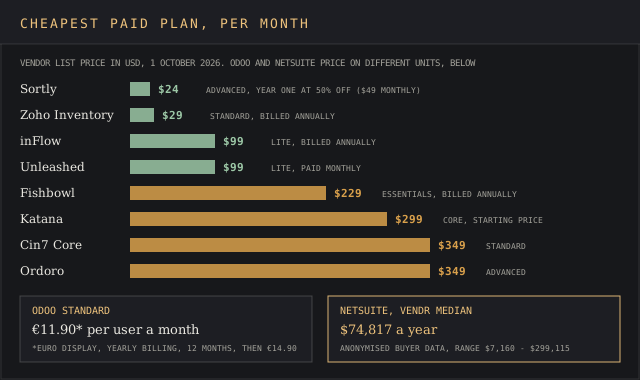
NetSuite prices by quote. Vendr's anonymised buyer data puts the median at $74,817 a year, range $7,160 to $299,115, with buyers saving 16% on average. At that median NetSuite can cost an arm and a leg for a team that only needs stock reports.
Vendr's page cites 647 deals in its header and 1,512 purchases below it.
Pros
- Seasonal, history-based replenishment as standard.
- Inventory, finance and orders in one ledger.
- One view across warehouses, stores and 3PLs.
Cons
- A $74,817 median contract.
- Extra licenses get expensive.
- Needs a dedicated administrator over time.
A logistics and supply chain CFO wrote on Capterra on 21 January 2026 that "Additional licenses are very costly." A construction manager on the same page, on 22 September 2026, gave the upside:
"NetSuite gives solid visibility across finance and operations once it's set up right, which makes it useful for tracking job costs and reconciling data across departments."
Verified Reviewer, Manager, Construction, Capterra, 22 September 2026
Why it's ranked #6. NetSuite plans replenishment from seasonal sales history, where Odoo's min-max rules need thresholds typed in by hand. It trails Unleashed on criterion four, a $74,817 Vendr median against published plans from $99.
Odoo Inventory
Best fit
Teams that want inventory, accounting, ecommerce and CRM in one open-source suite and have time to configure it.
Odoo says 12 million users run its apps. Inventory supports four valuation methods (FIFO, average price, LIFO and standard price), real-time reports on stock, moves and production, and replenishment through min-max rules, make-to-order or a master production schedule.
Odoo is the jack of all trades on this list, and inventory control is one app among dozens. The pricing page promises "no limit on features or data," and the Standard plan bundles Inventory with Accounting, Sales, eCommerce, POS and customer relationship management.
Key features
- Four valuation methods, FIFO and LIFO included.
- Min-max replenishment, make-to-order and a master production schedule.
- Barcode scanning with QR code and GS-1 support.
- Multiple warehouses or multiple companies in one database.
- Shipping label printing through carrier integrations.
Pricing
One App Free gives a single app, Inventory included, to unlimited users at EUR 0. Standard is EUR 11.90* per user a month billed yearly for 12 months, then EUR 14.90*. Custom costs EUR 22.90* and adds the External API, Studio and multi-company.
* Odoo shows euro prices to European visitors and dollar prices to US visitors. At the European Central Bank reference rate of 1 EUR = 1.1403 USD, published 25 September 2026 and refreshed weekly, EUR 11.90 is about $13.57, EUR 22.90 is about $26.11 and EUR 14.90 is about $16.99.
Pros
- Inventory free for unlimited users as a single app.
- Four valuation methods documented.
- CRM, accounting and stock share one database.
Cons
- The External API needs the EUR 22.90* Custom plan.
- Heavy customization raises upgrade costs.
- Partner implementation is billed separately.
A construction vice president wrote on Capterra on 11 June 2026 that "The interconnection between applications is flawless: when a sale is validated, the inventory updates automatically, and the invoice is generated in a single click." An automotive president disagreed on 11 May 2026:
"Over time, however, the platform became increasingly difficult and expensive to maintain and upgrade due to the amount of customization required for real-world business use."
Brian B., President, Automotive, Capterra, 11 May 2026
Why it's ranked #7. Odoo runs multiple warehouses on any plan, where Katana's $299 Core plan includes one location. It trails NetSuite on criterion two, because its min-max rules work from thresholds you set and NetSuite reads seasonal sales history.
Katana
Best fit
Small manufacturing businesses that want to test with their own SKUs on a free plan before paying.
Katana says it's trusted by 1,500+ businesses. Its Free plan covers 30 SKUs with all core features and add-ons, unlimited users, integrations and locations, plus API access, and Core starts at $299 a month with unlimited SKUs and users. Katana's own case study credits it with $40k+ in recovered inventory at Found Surface.
The feature table splits into order management, inventory management and manufacturing management, and lists a real-time inventory planner, planning and forecasting, AI replenishment and Insights. Custom dashboards and reports, plus custom automations and workflows, belong to the Advantage plan, priced per contract, and Katana's onboarding program promises initial setup within 6 weeks. A manufacturer can hit the ground running on the free plan first.
Key features
- Free plan with 30 SKUs and unlimited locations.
- Real-time inventory planner, barcode scanning and AI replenishment.
- Batch and serial traceability add-on.
- Manufacturing management add-on at $199 a month.
- API access on every plan.
Pricing
Free for 30 SKUs. Core starts at $299 a month with 1 location included and sales orders billed on volume. Add-ons run $199 for manufacturing, $249 for traceability and $149 for warehouse management, and onboarding on Core costs $2,000, optional.
Pros
- A free plan with real data and the API.
- Unlimited users on Core at one starting price.
- Forecasting and replenishment screens listed in the base table.
Cons
- Core includes 1 location.
- Order-based billing makes cost track volume.
- Custom reports need the Advantage contract.
A health and wellness owner who used Katana for more than two years wrote on Capterra on 5 February 2026:
"The company has become increasingly difficult to work with, shows little understanding of small manufacturers' realities, enforces punitive order-based pricing, changes terms mid-contract, and prioritizes larger customers over long-time users."
Andrew M., Owner, Health, Wellness and Fitness, Capterra, 5 February 2026
Why it's ranked #8. Katana's free plan includes the API and its planning screens, where Ordoro gates its forecasting report behind the $499 Premium plan. It trails Odoo because Core includes one location.
Ordoro
Best fit
E-commerce businesses shipping from Shopify, Amazon and other carts that need stock sync and a forecasting report.
Ordoro's Advanced inventory plan costs $349 a month and includes Advanced Analytics, automation rules, API access and unlimited warehouses, sales channels and users. Premium, at $499, adds purchase orders, bills of materials, manufacturing orders, stocktakes and a Custom Forecasting Report. Its automation capabilities include automation rules, allocation and warehouse transfers.
Its integrations page lists e-commerce platforms such as Shopify, BigCommerce and WooCommerce, marketplaces such as Amazon, eBay, Etsy and Walmart, plus QuickBooks Online and Inventory Planner. Shipping alone starts at $0 a month, which gets the ball rolling for sellers who add inventory plans later.
Key features
- Advanced Analytics on the $349 plan.
- Custom Forecasting Report on the $499 plan.
- Kitting, bundling and warehouse transfers.
- Unlimited warehouses, users and sales channels.
- QuickBooks Online integration and API access.
Pricing
Advanced costs $349 a month and Premium $499, both with 1,000 orders a month. Order caps are par for the course in this category, and Ordoro charges $100 for each extra 1,000.
Pros
- Multi-location stock with unlimited warehouses at entry.
- A free shipping plan.
- Integrates with Inventory Planner for deeper forecasting.
Cons
- Forecasting needs the $499 plan.
- Overage of $100 per 1,000 orders.
- Users have asked for a custom report builder.
A sporting goods growth analyst wrote on Capterra on 16 November 2021: "Custom reporting has been a bit of a pain point since we are unable to build our own reports."
Why it's ranked #9. Ordoro includes unlimited warehouses and offers a forecasting report, and Sortly's plans list neither. It trails Katana because forecasting starts at $499 and inventory plans start at $349, against Katana's free tier.
Sortly
Best fit
Small businesses, clinics and field teams tracking supplies, tools and assets on phones.
Sortly says over 15,000 businesses use it to track inventory, and its inventory control works item by item. Reporting scales with the plan. Low stock reports and an inventory summary start on Advanced, saved reports on Ultra, and activity history runs 1 month on Free, 1 year on Advanced, 3 years on Ultra and unlimited on Premium.
Stock management covers items, folders and user histories, reports export to PDF or CSV, and the mobile app scans barcodes and QR codes, even offline. Low stock levels trigger alerts from the Advanced plan, which Sortly pitches as "Best for maintaining optimal inventory levels."
Key features
- Low stock alerts from the Advanced plan.
- In-app barcode and QR code scanner.
- Offline mobile app.
- PDF and CSV report export.
Pricing
Free covers basic inventory features for 100 unique inventory items. Advanced is $24 a month, billed $288 for year one under a 50% first-year discount, then a 20% yearly discount applies. Ultra is $74 a month in year one with 2,000 items, Premium $149 with 5,000.
Month to month it's $49, so don't count your chickens before they hatch on the $24 rate.
Pros
- The lowest entry price on this page.
- Low stock alerts on the cheapest paid plan.
- Offline scanning.
Cons
- Advanced caps at 500 unique items.
- The $24 rate rises after year one.
- Reporting stays basic, per one IT manager's review.
A medical practice clinical lead wrote on Capterra on 3 February 2025 that "One of the standout features is the detailed reporting, which helps us analyze usage trends and optimize our ordering process." An IT security manager at a firm of 5,001 to 10,000 employees wrote on 28 May 2026:
"Tracking lacks real-time updates in some scenarios, and reporting capabilities are fairly basic, limiting deeper analysis and insights"
Sal J., ICT Security Manager, Information Technology and Services, Capterra, 28 May 2026
Why it's ranked #10. Sortly's $24 year-one price is the lowest of the ten, and low stock alerts start there. It ranks last because its plans stop at low stock alerts and Advanced caps at 500 items, against Ordoro's unlimited warehouses.
What inventory analysis software does with inventory data
Every inventory management software tool above starts from the same three ledgers, covering what came in, what went out and where it sits now. An inventory analytics layer adds time to those ledgers. Inventory aging shows how long each item has sat on the shelf, turnover shows how fast it sells, and valuation puts a cost on what's left. Without aging reports, one slow SKU among thousands is a needle in a haystack.
Real-time inventory tracking across multiple locations stops overselling. NetSuite describes a "single, real-time view of inventory across all sales channels" on its inventory page, and Cin7 syncs stock levels across multiple channels so a unit sold on Amazon disappears from Shopify. Stock counts that stay accurate protect customer satisfaction, because an order accepted for stock that isn't there becomes a refund.
Barcode scanning replaces manual tasks like keying counts, and it cuts the manual errors that creep in at receiving, which lifts count accuracy. Fishbowl, Katana, Odoo and Sortly all ship barcode scanning in their mobile apps or base plans.
Aging and stock-movement reports also locate supply chain bottlenecks. A product with stock in transit for weeks, or a raw material sitting 90-plus days in inFlow's aging buckets, points to suppliers or a reorder rule worth fixing. The same reports lower carrying costs, because excess stock gets spotted before it's paid for twice in storage and write-offs.
Inventory control reports worth running every month
Five reports cover most inventory control questions:
- Inventory aging. inFlow buckets stock into 0-30, 30-60, 60-90 and 90-plus days, with the cost in each bucket.
- Turnover. Zoho's Inventory Turnover by Quantity shows how often stock cycles in a period.
- Valuation. FIFO, weighted average or standard cost, depending on what your accounting tools expect.
- ABC classification. Zoho and Fishbowl rank items by value so counting time goes to the few SKUs that carry most of the money.
- Stock by location. inFlow's Inventory By Location and Zoho's warehouse category answer where each unit sits.
To generate reports that hold up, set the valuation method once and leave it alone, because switching between FIFO and average cost mid-year changes every margin figure after the switch. Then schedule the five reports monthly. Zoho emails scheduled reports to named recipients in a chosen format, which saves time over exporting by hand.
Demand planning inside an inventory app
The reorder level is the first piece of demand planning inside an inventory app. inFlow's version multiplies average daily demand by lead time and adds a safety stock buffer, and its help article documents the starting values.
Automated reordering features exist to maintain optimal stock levels without someone checking a spreadsheet every morning.
Low stock alerts are the first rung, and they nip a stockout in the bud. Sortly sends them from its $24 plan. Automated purchase orders are the second rung and the plainest form of inventory optimization. Unleashed and Cin7 turn reorder suggestions into purchase orders, which folds supplier management into the same screen and removes the manual tasks and manual errors of retyping quantities.
Demand forecasting is the third rung, and price splits the field there. Cin7 ForesightAI and NetSuite forecast from sales history. Fishbowl sells forecasting at $50 a month and Unleashed at $149. Above that sits dedicated planning software, ranked separately on the demand forecasting software page.
Batch tracking, serial numbers and expiration dates
Food, cosmetics and medical device makers need lot control with expiry dates, and six of the ten support batch tracking or lot numbers in some form.
Zoho includes batch tracking from its $79 Premium plan, Fishbowl lists lot traceability on its $729 Scale plan, and NetSuite carries the cost of each lot. inFlow sells lot and serial numbers as add-ons.
Katana charges $249 a month for traceability, Fishbowl's plan table lists expiration date tracking, and Unleashed tracks inventory in batches with expiry monitoring. A stitch in time saves nine on recalls, because a lot report names every customer who received a batch.
Connecting ecommerce platforms, accounting and customer relationship management
Inventory software earns its keep when it integrates with your existing systems. A sale on Shopify should drop stock in every channel, post to accounting tools such as QuickBooks or Xero or to an ERP, and update the customer record without anyone retyping it. The connector counts differ by vendor:
- Cin7: over 700 app partners, but 2 integrations included on Standard.
- inFlow: over 95 integrations, unlimited on every plan.
- Fishbowl: QuickBooks Online and Xero sync on every plan.
- Unleashed: 30+ applications, including Xero and QuickBooks.
- Odoo: CRM, accounting and ecommerce built into the Standard bundle.
Shipping carriers, third-party logistics providers and their logistics tools are the other half. Ordoro's integration list includes carriers, fulfilment services and FBA, and Cin7 connects to EDI and 3PL partners through its API, so warehouse systems outside your building still report into the same stock count across the supply chain.
Pricing across inventory management systems
List prices for inventory management cluster in two bands: $24 to $99 a month for small-team tools, and $229 to $349 for the larger systems. Read between the lines of each pricing page, because onboarding, add-ons and volume caps all sit outside the plan price. Add them up for the total cost of year one and year two.
The fees that sit outside the plan price:
- Onboarding. inFlow $499, required on most plans. Unleashed $449 to $5,549. Katana $2,000 on Core. Fishbowl's mandatory implementation, priced on request.
- Forecasting add-ons. Fishbowl $50 a month, Unleashed $149 on Core, Cin7 ForesightAI unpublished.
- Analytics add-ons. Unleashed Access Analytics $69 a month, Zoho Analytics only on the $249 plan.
- Volume caps. Zoho Standard's 500 orders a month, Cin7 Standard's 6,000 sale orders a year, Ordoro's $100 per extra 1,000 orders.
- Year-two pricing. Sortly's 50% discount covers year one only.
Run the working capital calculator on your own stock value before and after a trial, then set the cash tied up in slow stock next to the subscription line.
Inventory analytics tools versus BI, forecasting and retail analytics
The boundary matters because the same vendor names show up on four rankings. This page covers the inventory management system's own reports. Planning engines that forecast across a network belong to the demand forecasting and supply chain intelligence rankings. Data from shoppers and panels belongs to retail analytics and to ecommerce analytics tools, which measure storefront traffic and conversion.
When the built-in reports run out, teams export to a BI tool. The self-service BI tools ranking covers Power BI, Qlik and ThoughtSpot, and the guide to market intelligence versus business intelligence separates the two disciplines. For sector context, see the supply chain and retail industry guides.
How to run a trial of inventory report software
Most inventory software here comes with a free plan or a 14-day free trial. Before you put all your eggs in one basket, load real data into two tools at once. Score each inventory management software trial on the vendor evaluation scorecard template as you go:
- Import 90 days of sales and purchase history, the same window inFlow recommends for averaging demand.
- Run the five monthly reports above and compare the totals with your accounting software.
- Set a reorder rule on your 20 fastest SKUs and check what the tool suggests.
- Connect your busiest sales channel to the inventory system and sell one unit to confirm the sync.
- Price year two in writing, add-ons and onboarding included.
Read the reviews with one eye on how they're collected, and see our reports asking if Capterra is legit and if G2 is legit.
Inventory management software FAQ
What is the best software to track inventory?
The best inventory management software for report depth is Fishbowl, with more than 150 built-in reports. For price, Zoho's $29 Standard plan covers 2 locations with over 60 reports, and Sortly suits teams that need simple inventory tracking on a mobile app.
How do I create an inventory report?
Pick the question first (aging, turnover, valuation or stock by location), choose the date range, filter by location, and export. inFlow's report selection tool lists the columns in each of its 50 reports, and Zoho lets you save a custom build to My Reports.
Can I use Excel to track inventory?
Yes, for managing inventory with a few dozen items and one location. Spreadsheets break when two people edit stock at once or when sales channels need live counts. Dedicated inventory software such as Zoho's free plan or Katana's free 30-SKU plan costs nothing and handles both.
What are the top 10 inventory management software?
By the five criteria on this page, the top inventory management software for reporting is Fishbowl, Zoho Inventory, inFlow, Cin7 Core, Unleashed, NetSuite, Odoo, Katana, Ordoro and Sortly. For a top 5, the top inventory management software shortlist is the first five: Fishbowl, Zoho, inFlow, Cin7 Core and Unleashed.
Is there a free software for inventory management?
Four of the ten offer one, enough for small businesses starting out. Zoho Inventory's free plan covers 50 orders a month, Katana's 30 SKUs, Sortly's 100 items, and Odoo gives Inventory to unlimited users as its One App Free plan.
What is the 80/20 rule in inventory?
It's the idea behind ABC analysis, the oldest inventory control shortcut, in which a small share of SKUs carries most of the stock value. Zoho and Fishbowl both list ABC classification, which sorts items into A, B and C bands so counting and reorder attention go to the A items, which hold the lion's share of stock value.
What is the best software for inventory management?
The best software for inventory management depends on the job. Fishbowl leads on reports, NetSuite on ERP-wide planning, and Zoho on price for small businesses that want 60-plus reports from $29 a month.
Which software is most commonly used for inventory management?
By the vendors' own counts, Odoo reports 12 million users across its apps, NetSuite 44,000+ customers, inFlow 50K+ businesses, Sortly 15,000+, Cin7 8,500+, Fishbowl 6,000+ and Katana 1,500+. The counts measure different things, users against customers, so treat them as a rough guide to inventory management adoption.
What are some tools used in inventory management?
Barcode scanners, a mobile app for counts, reorder reports and an accounting sync are the standard kit for inventory management. Together they keep stock levels visible between counts.
What is the best software for inventory and order management?
Cin7 Core and Ordoro both handle orders across multiple sales channels with unlimited warehouses at $349 a month. NetSuite does the same inside a full ERP at a $74,817 Vendr median.
Bottom line
In a nutshell, Fishbowl wins on reporting depth, with 150-plus reports and the cheapest priced forecasting add-on, for buyers who can absorb a mandatory implementation. Zoho Inventory is the best inventory pick for small and medium-sized businesses that want 60-plus reports at $29, and inFlow is the choice when inventory control math has to come included.
Cin7 Core and Unleashed suit growing businesses that need unlimited locations or a BI module and will pay add-on fees for forecasting. NetSuite and Odoo belong to buyers replacing their inventory management systems and ERP together, Katana to manufacturers who want a free start, and Ordoro and Sortly to shippers and supply rooms with modest reporting needs.