Wiza pricing: plans, credits and the real monthly cost in 2026
 By Jan Suski. I go deep on every review, checking every number against its source and digging up details other coverage misses, a habit from six years of SEO and link building for tech companies. Bylines at Surfer, Brand24, and Senuto. How the scoring works.
· Prefer this source on Google
The numbers Wiza pricing, checked 11 August 2026
Annual billing cuts the per-seat rate by roughly 16% to 17% on both paid tiers, but list exports stay capped at 2,500 a month no matter which plan a buyer holds.
The 3+ seat floor on the Team plan means a two-person team can't reach Wiza's best per-seat pricing at all.
Overage at $0.15 an email and $0.35 a phone number turns a light month's $49 Starter bill into something bigger fast.
Wiza's 4.5/5 G2 average still sits against pricing as the single most-cited complaint category in its own review data.
Wiza pricing starts with a per-seat rate, but per-credit overage pushes the real bill well past the number listed on the pricing page. A Starter user pays $49 a month for 100 valid emails and 100 phone numbers, then $0.15 for every extra email and $0.35 for every extra phone number once that allotment runs out. An annual Email + Phone subscriber pays $166 a month, billed at $1,990 a year, for unlimited email and phone reveals capped at 2,500 list exports a month.
This report breaks down every published Wiza plan, the free tier, the overage rates, and the difference between what monthly and annual billing buy. It covers how much Wiza costs at each usage level, how Wiza's credit system resets, what "unlimited" excludes, and where the LinkedIn Sales Navigator dependency that built Wiza's reputation as an outreach tool for sales teams still applies now that the company sells its own 850-million-profile database.
It's written for a sales, marketing or recruiting team sizing up Wiza against a monthly budget, and for anyone who has searched "how much does Wiza cost" and landed on five different answers. Every figure below comes from wiza.co/pricing, the Wiza help center, or G2's aggregated review data, dated to when it was pulled.
How much does Wiza cost
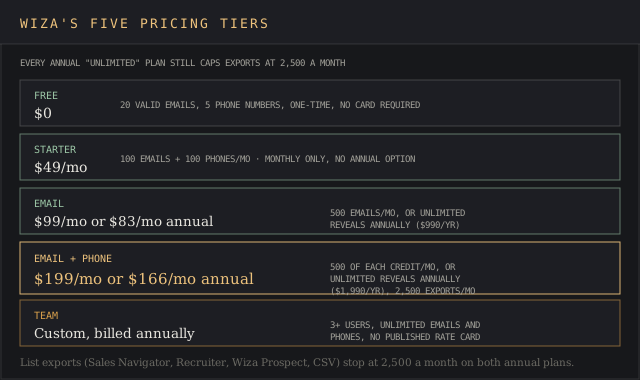
Wiza runs five pricing tiers: a free plan, two monthly self-serve plans, an annual "unlimited" track for the same two products, and a custom-pricing Team plan. The plan that fits depends on how many contacts a team pulls per month on average, not on team size alone: a 3-person team pulling 2,000 contacts a month needs a bigger plan than a 10-person team pulling 200.
| Monthly volume | Best-fit plan | Approximate monthly cost |
|---|---|---|
| Under 20 contacts, one-off | Free | $0 |
| 100-150 emails, occasional phone | Starter + light overage | ~$49-65 |
| 500+ emails, steady phone use | Email + Phone, monthly | $199/user |
| High-volume, predictable each month | Email + Phone, annual | $166/user |
| 3+ users, unlimited across the team | Team | Custom quote |
Approximate monthly costs are calculated from Wiza's own published overage rates ($0.15 per email, $0.35 per phone number) applied to each volume band; Wiza does not publish these blended figures itself.
A team pulling 700 emails a month on the Starter plan pays $49 plus 600 emails of overage at $0.15 each, or $90 in overage alone, for a total of $139 a month. The Email plan's monthly tier costs $99 flat and covers 500 email credits before overage starts. The email finder pricing report prices 1,000 found emails on Wiza at $174 a month, against $39 on Skrapp.
Past roughly 550 emails a month, the annual Email plan's unlimited reveals beat every pay-as-you-go option Wiza sells, and the annual plan's flat per-user cost stops climbing with volume the way the monthly plan's overage does.
Wiza pricing plans
The site splits its paid plans into monthly and annual toggles, so it's easy to compare the wrong two columns. Each plan offers a different balance of email data, phone data, Wiza credits and export volume, and the two mid-tier plans split cleanly into email-only versus a combined email and phone allotment, summarized below.
| Plan | Monthly price | Annual price | What's included |
|---|---|---|---|
| Free | $0 | not offered | 20 valid emails, 5 phone numbers, one-time |
| Starter | $49/mo per user | not offered | 100 valid emails/mo, 100 phone numbers/mo, $0.15/$0.35 overage |
| $99/mo per user | $83/mo ($990/yr) | Monthly: 500 emails/mo. Annual: unlimited email reveals, 2,500 exports/mo | |
| Email + Phone | $199/mo per user | $166/mo ($1,990/yr) | Monthly: 500 emails + 500 phones/mo. Annual: unlimited reveals, 2,500 exports/mo |
| Team | Custom, billed annually | Custom | 3+ users, unlimited emails and phones, API access, dedicated success manager |
Prices are Wiza's own published list rates from wiza.co/pricing, checked 11 August 2026. Wiza publishes no third-party contract-value data for this report to cite against them.
Free plan
Not a trial of the paid product, Wiza's free plan is built for occasional prospecting. It ships 20 valid emails and 5 phone numbers, no card required, and doesn't reset monthly the way the paid tiers do. It won't run a campaign, but it's enough to test data accuracy on a short list.
Starter plan
At $49 a month, Starter is for someone with small but consistent usage: 100 valid emails and 100 phone numbers included, team analytics, and CRM integrations. It has no annual discount option on Wiza's own pricing page, which makes it a monthly commitment with no lower tier to fall back on besides Free, and the one tier where monthly is the only way to buy.
Email and Email + Phone plans
The Email plan runs $99 a month billed monthly or $83 a month billed annually ($990 a year), and covers only email credits: 500 a month on the monthly plan, unlimited reveals on the annual one. The Email + Phone plan adds phone credits to the same structure, $199 a month or $166 a month annually ($1,990 a year), with 500 of each credit type on the monthly tier and unlimited reveals annually.
Both monthly plans work as pay-as-you-go once the included credits run out, at the same $0.15 and $0.35 overage rates as Starter.
Every annual plan, regardless of tier, carries the same 2,500-export monthly ceiling once a user moves past one-by-one lookups into list exports.
Team plan
Custom pricing, three-user minimum, billed annually only. The Team plan adds CRM integrations, team analytics, AI Research, Wiza Prospect access, advanced data fields, CSV import, API access and a dedicated success manager on top of unlimited emails and phone numbers for teams with multiple users. Wiza doesn't publish a rate card for this tier; buyers get a quote after a sales call.
How the Wiza credit system works per month
How a credit is spent
A Wiza credit is spent the moment an email or phone number resolves, one email credit per valid address, one phone credit per contact with a number attached.
Email verification runs before a credit is charged: risky or unresolved emails don't cost a credit, according to Wiza's own help documentation, and a failed phone lookup on some monthly plans has been refunded automatically per user reports on G2.
That live email verification step is also why Wiza's Enterprise page claims 99% accuracy on the verified emails it does charge for, and why a second, separate email verification pass rarely finds anything left to catch, since Wiza never bills for an address it couldn't confirm.
Why credits don't roll over
Credits reset with the billing period and don't carry forward. A Starter subscriber who uses 40 of their 100 monthly emails loses the other 60 at renewal; there's no rollover pool to draw down in a slower month.
Wiza states this plainly in its help center: unused credits do not roll over to the next month or year, on monthly billing or annual, and remaining credits from a light month never apply to a heavier one. Wiza's support team recommends upgrading a plan once usage patterns show consistent overages, since unused credits are the clearest sign a lower tier no longer fits.
Key features included in the subscription
CRM integrations at every paid tier
Every Starter tier and above ships with CRM integrations built for lead generation workflows: Salesforce, HubSpot, Pipedrive, Outreach and Zoho CRM are the named native syncs, with Zapier covering anything not built directly. Wiza offers these integrations at every paid tier, so a lead generation team syncing contacts on a daily schedule gets them below the Team plan's 3-user floor.
The Chrome extension
The Chrome extension is the primary interface for one-by-one lookups and carries a 4.85 rating on the Chrome Web Store, pulling verified emails and phone numbers straight into a synced CRM record.
API access
API access is Team-plan-only for a subscription seat, though one-off API credits are open to any account regardless of plan, priced at $0.025 per credit with a 2,000-credit ($50) minimum.
Add-ons priced outside the platform fee
Three costs sit outside the plan price entirely. API credits are sold separately at $0.025 each with a 2,000-credit minimum purchase ($50), and never expire. LinkedIn Sales Navigator, where a team chooses to run it alongside Wiza, is billed by LinkedIn, not Wiza, starting at $119.99 a month. And the Team plan's per-seat rate is invisible until a sales call produces a quote, so budgeting for a growing team means guessing at a number Wiza won't publish.
What drives a Wiza quote
The Team plan is the only tier without a published number, and three variables set it: seat count above the three-user floor, if the buyer wants API access built in (not separate credits), and volume needs agreed on a sales call. Everything below Team is a fixed rate card; everything at Team is negotiated.
Hidden costs that sit outside the subscription
Overage rates
The overage rate is published, not hidden: $0.15 per email and $0.35 per phone number past a monthly plan's included credits.
What catches new users off guard is how fast that adds up on the lower tiers, and how quickly overage billing kicks in mid-cycle once credits run out. Reading the credit table before signing up is the simplest way to avoid unexpected costs, since Wiza's own support article treats unexpected costs as the customer's responsibility once a card is on file.
No hard spending cap
Wiza's own support article on overages is direct about where responsibility sits: the customer's payment method gets charged automatically once credits run out, and refunds for accidental overage are granted case by case as a courtesy. There's no hard spending cap on monthly plans unless a team disables overages entirely, which also blocks further exports until the next renewal.
Annual billing vs monthly billing
What annual buys
Annual billing buys two things a monthly plan doesn't: a lower headline rate, and unlimited one-by-one reveals with no fixed monthly credit count. Wiza's own help center describes the annual plan as granting immediate unlimited access to reveals the moment a buyer switches billing cycles, which is accurate for single lookups and misleading for anyone reading unlimited access as unlimited exports.
The 2,500-export ceiling
Both billing cycles cap list exports at 2,500 a month once a user moves past single-profile lookups, so the "unlimited" plan name describes credits, and 2,500 contacts a month is the most a team can export in practice.
The annual commitment
The annual commitment is a full year up front on Wiza's Email and Email + Phone plans; there's no month-to-month option once a buyer picks annual pricing. For a team still validating if Wiza fits its workflow, that's a $990 or $1,990 annual bet made before a second billing cycle proves the fit, against the $1,188 or $2,388 an equivalent annual plan would cost paid month to month.
Sales Navigator export and the LinkedIn dependency
One-by-one lookups vs bulk exports
Wiza launched as a tool for LinkedIn Sales Navigator export, pulling search results into a usable contact list, and the Wiza extension for Chrome still layers a side panel onto LinkedIn profile pages to reveal an email or phone number in place.
That kind of one-by-one LinkedIn prospecting doesn't require a paid LinkedIn subscription on Wiza's side; it works on any of the LinkedIn profiles a user can already view, pulling the underlying data without touching Sales Navigator search.
Bulk list exports are a different case. Wiza's plan-limits documentation names Sales Navigator searches, Recruiter projects, Wiza Prospect lists and CSV uploads as the four sources that draw against the 2,500 monthly export-credit cap, without stating a Sales Navigator subscription is required to use the other three.
For a team that wants Sales Navigator's own search filters and its integration into Wiza's export flow, LinkedIn prices Sales Navigator Core at $119.99 a month per license, or $1,079.88 a year with the 25% annual discount, on top of whatever Wiza plan the team already pays for.
Wiza Prospect as an alternative
The dependency has loosened since Wiza's earliest years. The company now sells Wiza Prospect, a standalone database of more than 850 million B2B professionals searchable by job titles, seniority, company data and industry, positioned as an alternative that never touches a LinkedIn session at all.
A buyer evaluating Wiza today isn't locked into paying LinkedIn twice, and Sales Navigator is not required to reach Wiza's contact database. Teams weighing that trade-off against a broader ZoomInfo or Apollo.io subscription can check our ZoomInfo alternatives comparison, which tracks Wiza against 17 other contact-data vendors on the same pair of metrics.
Who Wiza is priced for
The five tiers sort buyers by how often they pull contacts, not by company size: a 3-person team and a 300-person team can land on the same tier.
- The Free plan fits someone testing data accuracy once.
- Starter fits a person with small but steady monthly usage who doesn't want to commit to a year.
- The Email and Email + Phone plans fit a solo rep or small team running enough volume to justify a monthly seat.
- The Team plan's 3+ user floor exists because Wiza prices unlimited access per group of 3 or more seats and won't quote a rate for 1 or 2.
A two-person team sits in an awkward gap: too small for Team, too heavy in usage for Starter's monthly overage math to stay cheap.
How to negotiate Wiza pricing
The clearest lever on Wiza's rate card is the one it publishes outright: switching an Email or Email + Phone plan from monthly to annual cuts the per-seat rate by 16% to 17% and removes the overage bill entirely, in exchange for a year paid up front. A team unsure it will stay past the first billing cycle should run one full month on the monthly plan first and let the actual credit usage decide if the $990 or $1,990 annual commitment pays off.
For the Team plan, the only lever available is the sales call itself, since Wiza publishes no rate card to negotiate against.
Requesting a quote before assuming a per-seat annual price scales linearly to three or more seats is the only way to find out if the custom rate undercuts stacking three annual Email + Phone seats instead. Cognism and LeadIQ run the same quote-only structure at their top tiers, and buyers comparing multiple quote-only vendors gain more negotiating power requesting them in the same week than one at a time.
What Wiza users say about the price
Wiza's G2 profile carries 1,247 reviews at a 4.5 average, and pricing shows up as the single most common complaint category in Wiza review data: 110 reviews cite the cost as expensive, 97 cite limited Wiza credits, and 59 specifically flag credit limitations on larger campaigns.
"Pricing is also a sticking point. At around $83/month, it can feel expensive if you're not using it consistently. For me, it really only feels worth it when I'm running high volumes."
Luka G., Small-Business, G2 review, 13 March 2026
"The main issue for me is the price point for monthly users. The annual plan is a good deal, but for someone just getting started, the upfront commitment can be a bit of a pain point."
Nara G., Founder & Principal, Small-Business, G2 review, 24 March 2026
"The pricing feels restrictive because there are not enough tiered options for users who only need basic features. I find myself paying for a full suite of tools that I do not actually use."
Verified User in Consulting, Small-Business, G2 review, 25 April 2026
"I'm not a huge fan of the pay-per-contact model. Pricing separately for each email, phone number, and enrichment field can start to feel like nickel-and-diming, especially when those data points are core to getting value from the product."
A verified user in Financial Services, Small-Business, G2 review, 14 May 2026
"What I dislike most about Wiza is its pricing and credit system, many users find it expensive (especially for startups/light users or inconsistent usage), with credits depleting quickly (even on failed verifications), no rollover on monthly plans, and occasional complaints about misleading 'unlimited' claims, auto-renewal surprises, and cancellation difficulties."
Verified User in Civil Engineering, Mid-Market, G2 review, 20 February 2026
Every quote traces to a named reviewer segment and a dated G2 submission; none of the dollar figures inside them come from Wiza's marketing copy.
Wiza pricing against competitors
Sales Navigator sells access to LinkedIn's own network and search filters; Wiza sells verified emails and phone numbers, sourced in part from LinkedIn profiles and in part from its own database. Teams weighing Lusha, UpLead or Seamless.AI against Wiza's per-credit model can check our sales intelligence rankings for the wider field.
Try it yourself
Sign up for Lusha
Free plan available, credit-based pricing after that.
 Visit Lusha →
May earn a commission if you sign up through this link, at no extra cost to you. Full affiliate disclosure.
| Tool | Entry price | Contact database | Export limit |
|---|---|---|---|
| Wiza Starter | $49/mo | 850M+ (Wiza Prospect) | 100 emails, 100 phones/mo |
| Wiza Email + Phone (annual) | $166/mo ($1,990/yr) | 850M+ | 2,500 exports/mo |
| LinkedIn Sales Navigator Core | $119.99/mo | LinkedIn's own network | No export credits; manual/CSV only |
| LinkedIn Sales Navigator Advanced | $159.99/mo | LinkedIn's own network | CRM sync included |
LinkedIn Sales Navigator prices are LinkedIn's own published list rates from business.linkedin.com, checked 11 August 2026. Wiza's entry prices are its own published rates from wiza.co/pricing, checked the same date; neither vendor publishes a third-party contract-value figure for this comparison.
The two aren't full substitutes: a team that needs LinkedIn's InMail and account-level research still pays LinkedIn separately, and a team that only needs verified contact data can run Wiza's own Wiza Prospect search without a LinkedIn subscription at all.
Frequently asked questions
How much does Wiza cost?
How much does Wiza cost depends on the plan: $0 for the free plan, $49 per month for Starter, $83 to $199 per month for the Email and Email + Phone plans depending on billing cycle, and a custom quote for the 3+ seat Team plan. Overage credits push the real number higher for any team that outgrows its included allotment mid-cycle.
Does Wiza have a free plan?
Yes. The free plan includes 20 valid emails and 5 phone numbers with no credit card required, though it doesn't renew monthly the way paid plans do.
Do Wiza credits expire or roll over?
No. Wiza's help center states unused credits do not roll over to the next month or year, on either monthly or annual billing.
Can you use Wiza without LinkedIn Sales Navigator?
Yes. Wiza Prospect is a standalone 850-million-profile database with its own search filters, and the Chrome extension's one-by-one lookups work on any LinkedIn profile without a Sales Navigator subscription. A Sales Navigator subscription is only relevant to a team that wants Sales Navigator's own search filters and InMail features alongside Wiza.
Is Sales Navigator required to use Wiza?
No. Sales Navigator is required for only one export path, not the whole product: a paid $119.99-a-month Sales Navigator subscription is only needed to export search results built inside Sales Navigator itself. Wiza's Chrome extension, Wiza Prospect database and CSV import all work without one.
Which Wiza plan should I choose based on my prospecting volume?
Under 500 emails a month favors the Email plan's monthly tier; above that, the annual unlimited-reveal plans usually cost less than paying per-credit overage. Teams of three or more evaluating a full year of use should request a Team quote before defaulting to per-seat annual pricing.
What to budget
Wiza's list price is straightforward, but the number that matters is the one a team's actual usage produces after overage, export caps and the LinkedIn dependency get factored in. The $49 Starter plan and the $199 monthly Email + Phone plan both look approachable until overage at $0.15 and $0.35 a contact turns a light month into an expensive one.
Annual billing solves the overage problem and not the export-cap problem: every Wiza plan, no matter how "unlimited" its marketing copy, stops list exports at 2,500 a month. A buyer who prices Wiza against that ceiling gets a number that survives contact with a real prospecting month.
Sources, and what Wiza doesn't publish about its own rate card
Plan prices, credit allotments and Team plan feature lists are Wiza's own, read off wiza.co/pricing. Credit-verification behaviour, overage billing terms and the rollover policy are documented at help.wiza.co. The Chrome extension rating is from the Chrome Web Store listing.
G2 review counts, the 4.5 average and the five quotes above are from Wiza's G2 profile, each quote dated to its original submission. LinkedIn Sales Navigator's Core and Advanced prices are from business.linkedin.com. All figures were checked 11 August 2026.
Wiza publishes no rate card for the Team plan's per-seat price, no third-party median-contract data of the kind Vendr tracks for other vendors in this category, and no changelog date for when its credit or overage policy last changed.
Disclaimer
This page includes one or more affiliate links. If you sign up for a product through one of them, this site may earn a commission at no extra cost to you.