Email Finder Tools: 12 Ranked by Cost per Verified Email (2026)
 By Jan Suski. I go deep on every review, checking every number against its source and digging up details other coverage misses, a habit from six years of SEO and link building for tech companies. Bylines at Surfer, Brand24, and Senuto. How the scoring works.
· Prefer this source on Google
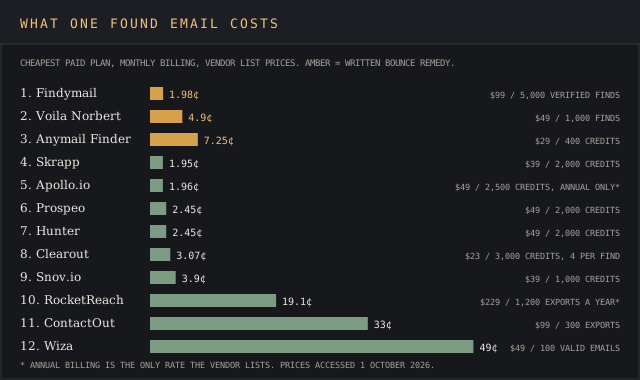
Quick comparison of email finder tools
| # | Provider | Written bounce remedy | Cost per found email | Entry price | Best fit |
|---|---|---|---|---|---|
| 1 | Findymail | Credits back if bounces pass 5% | 1.98 cents | $99 a month | Cold email teams sending to verified lists |
| 2 | Voila Norbert | Credits back per bounced email | 4.9 cents | $49 a month | Solo founders and recruiters |
| 3 | Anymail Finder | 97%+ guarantee, credit back per bounce | 7.25 cents | $29 a month | Bulk email finder runs up to 100,000 rows |
| 4 | Skrapp | None on pricing page | 1.95 cents | $39 a month | LinkedIn and Sales Navigator prospecting on a budget |
| 5 | Apollo.io | None on pricing page | 1.96 cents* | $49 a seat a month, annual* | Teams that want data plus sequences |
| 6 | Prospeo | "Or it's on us", no terms | 2.45 cents | $49 a month | Free email finder testing at 100 credits a month |
| 7 | Hunter | None on pricing page | 2.45 cents | $49 a month | Company-wide lookups and Google Sheets workflows |
| 8 | Clearout | None on pricing page | 3.07 cents | $23 a month | Teams that verify more than they find |
| 9 | Snov.io | None on pricing page | 3.9 cents | $39 a month | Finder plus built-in cold email sequences |
| 10 | RocketReach | None on pricing page | 19.1 cents per export* | $229 a year* | High-volume one-off lookups |
| 11 | ContactOut | None on pricing page | 33 cents per export | $99 a month | Recruiters working inside LinkedIn |
| 12 | Wiza | None on pricing page | 49 cents | $49 a month | Sales Navigator list exports |
Cost per found email divides the cheapest paid plan's monthly price by the emails it includes. * Annual billing is the only rate the vendor lists. Vendor list prices, accessed 1 October 2026.
Where these figures come from
Prices, credit counts, billing rules, bounce remedies and free allowances are each vendor's own published figure, read on its pricing, FAQ or help page on 1 October 2026. Accuracy rates and database sizes are self-reported by the vendor selling the tool, and reviewer quotes come from Capterra and G2. None of the 12 vendors publishes an independently audited bounce rate, so the table carries the written remedy in its place.
Contact databases sold on annual contracts sit in the B2B data providers ranking and the data enrichment tools ranking. Platforms that bundle email search with prospecting are ranked in the sales intelligence ranking and the lead intelligence software ranking.
Email finder tools take a person's name and a company domain, or a LinkedIn profile URL, and return business email addresses that have passed an SMTP check, often with contact details like job title attached. The good ones charge nothing when an email search comes back empty.
Prices on this page run from 1.95 cents an email at Skrapp to 49 cents at Wiza's Starter tier, a 25x spread for the same job.
This ranking covers 12 tools whose core job is email discovery, built to find email addresses for lead generation. That means name and company lookup, domain search, a bulk email finder for CSV files, a Chrome extension and an email finder API. It's written for SDRs, founders, recruiters & agencies buying their first or second email lookup tool.
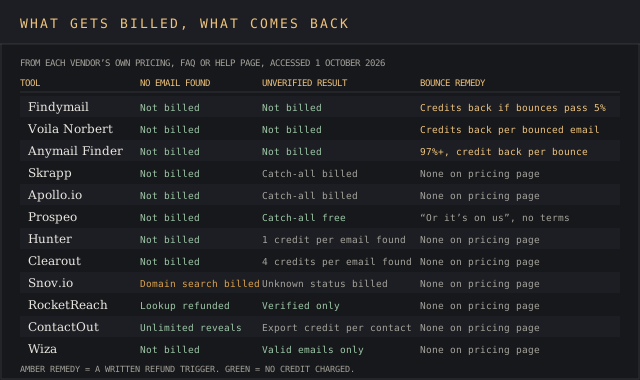
Bounce rates make the choice expensive. Every invalid email address a team sends to counts against sender reputation, and a finder that bills for catch-all guesses passes that risk to the buyer. Three of the 12 vendors put a bounce refund in writing for the verified email addresses they return.
Evaluation criteria for email finder tools
Five criteria decide the shortlist, and the ranking below applies them in this order. Each one is a test a buyer can run against the vendor's own pricing or help pages and get a yes, a no or a number.
1. A written bounce remedy with a trigger
The vendor's pricing or FAQ page states what comes back when a verified email bounces, and when. A threshold ("under 5% bounce rate") or a per-email refund counts. Accuracy percentages earn nothing here on their own, since every accuracy figure on this page is self-reported by the vendor that sells the tool.
2. Cost per found email on the cheapest paid plan
Monthly list price divided by the email addresses or credits it buys, at month-to-month billing. Where a plan meters exports separately from lookups, the export count is the divisor, since an email that can't leave the app can't be sent to.
3. What a miss and an unverified result cost
A search with no result should cost zero credits. The stricter test is the catch-all or unknown result: some vendors bill it as a find, others charge only for verified emails. This criterion breaks ties on criterion 2.
4. Find modes covered
Count five: name and company lookup to search email addresses one person at a time, domain search for all the email addresses at a company, bulk upload of a CSV file, a Chrome extension that works on LinkedIn profiles, and an API. Google Sheets add-ons are noted where they exist.
5. Free allowance that resets
A free plan that renews every month lets a buyer test verification status against known email addresses before paying. Free email finder credits granted once at signup score lower than credits granted monthly.
The 12 best email finder tools, ranked
Findymail
Best fit
Outbound sales teams running cold email who want a refund in writing when verified email addresses bounce.
Findymail finds an email from a full name plus a company domain or company name, or from a pasted LinkedIn profile URL, and verifies it at the moment of the request with syntax, spam traps, SMTP handshake and catch-all checks, per its homepage. Its pricing page reads "Only pay for verified results," and the Starter plan bundles 5,000 finder credits with 5,000 verifier credits.
Key features
- Email finder by name and company, bulk CSV upload, and a Chrome extension on LinkedIn.
- Email verifier for lists from other tools, with catch-all deliverability calls.
- Phone finder for the decision makers you want to reach, at 10 credits a number, outside the EU only.
- Native pushes to Instantly, Smartlead, lemlist & Woodpecker, CRM tools including HubSpot, Salesforce, Pipedrive, Zoho, Close and Copper, plus Zapier, Make and an API.
Pricing
Starter costs $99 a month for 5,000 email credits, or 1.98 cents a found email, with two months free on annual billing. Unused credits roll over up to 2x the monthly allowance. The trial is 10 credits with no card. Datacare, its CRM enrichment product, starts at $500 a month billed annually.
Pros
- "Under 5% bounce rate, guaranteed" with credits refunded past it.
- Lowest cost per verified email among the three tools with a written remedy.
- Rollover up to two months of credits.
Cons
- $99 entry price ties ContactOut for the highest monthly entry on this list.
- 10 free credits, so 10 email addresses, is the second smallest trial here.
- A company-wide lookup isn't among the find modes its homepage lists, so 4 of 5.
The devil's in the details on match rate. A founder wrote on Capterra in January 2024:
"Sometimes, findymail doesn't scrape a ton of the data. For example, out of an 1,000 person list, sometimes it only gets 300 or so emails."
Chase K., Founder, Capterra review, 23 January 2024
A marketing and growth ops reviewer on the same page called it "always one of the best performers in finding European emails" in October 2023.
Why it's ranked #1. Findymail and Voila Norbert both put a bounce refund in writing, and Findymail returns a verified email address for 1.98 cents against Norbert's 4.9 cents. It tops the list on criteria 1 and 2 together.
Voila Norbert
Best fit
Solo founders, consultants and recruiters who look up a few hundred contacts a month.
Voila Norbert needs a name and the company website. "One credit is one correct email address," its homepage says, and a failed search costs nothing, so billing runs by the book. The same page reports 58,897 customers and 1,456,234,098 emails found.
Key features
- Single search, bulk CSV upload and a Chrome extension.
- API with documentation for Node.js, PHP, Python and Ruby.
- Integrations with Zapier, Salesforce, Pipedrive, HubSpot and Close, plus Mailshake and Drip for marketing automation.
- Pay-as-you-go email verification at $0.003 an email up to 500,000.
Pricing
Valet costs $49 a month for up to 1,000 leads ($39 billed yearly), Butler $99 for 5,000, Advisor $249 for 15,000 and Counselor $499 for 50,000. New accounts get 50 free credits once.
Pros
- Refunds credits for any found email that bounces, per its homepage.
- Charges only for correct email addresses.
- Four plan sizes from 1,000 to 50,000 leads.
Cons
- 4.9 cents a find, 2.5x Findymail's rate.
- A company-wide lookup isn't among the modes its homepage lists.
- Its "up to a 98% success rate" claim is the vendor's own.
A director at an architecture firm wrote on Capterra in August 2024:
"It is extremely easy to use and I would say 95% of the time, it is able to find the email address and that address is accurate."
Kathleen W., Director, Architecture & Planning, Capterra review, 15 August 2024
A founder on the same page flagged the integration side in February 2023: "API was also buggy, it took the devs a month to fix it."
Why it's ranked #2. Norbert refunds per bounced email and costs 4.9 cents a find, 2.35 cents under Anymail Finder. Findymail clears the same remedy test at 1.98 cents, so it ranks one place higher.
Anymail Finder
Best fit
Teams running bulk email finder jobs on large CSV files who want a deliverability guarantee.
Anymail Finder verifies each address "in real time against the recipient's mail server," per its homepage, and claims to confirm catch-all addresses other verifiers flag as risky. Its pricing page states the rule plainly: "No verified email found? You don't pay."
Key features
- Person search, company and domain search, and a decision maker search that finds the right decision makers by role.
- Bulk upload of a CSV file or Excel sheet up to 100,000 rows to find email addresses in one bulk search.
- REST API with no rate limits and results in 2 to 5 seconds.
- Chrome extension for finding verified emails while browsing.
Pricing
Starter is $29 a month for 400 credits, or 7.25 cents a credit. Rates fall to $0.008 at the $799 Maximum plan's 100,000 credits. A person's email address costs 1 credit, a decision maker 2. Credits roll over while subscribed, and 100 free credits come at signup.
Pros
- "97%+ delivery guarantee," and bounced verified emails are credited back after review.
- All five find modes covered.
- Unlimited rollover while the subscription runs.
Cons
- 7.25 cents an email at entry, the highest of the three tools with a remedy.
- Credit-back requires reporting the bounce and waiting for a review.
- Credits expire at the end of the billing period after cancelling.
The devil's in the details on that refund too. Two Capterra reviewers split on billing. An AI developer wrote in September 2024 that "It only charges for fully verified emails, and is super easy to use." A telecom founder wrote in April 2025:
"I asked for a refund on day 1 of the subscription (even asked them to subtract all my trial usage) and they refused"
Youssef A., Founder, Telecommunications, Capterra review, 30 April 2025
Why it's ranked #3. Anymail Finder's 97%+ guarantee beats Skrapp, which publishes no bounce remedy. It loses to Voila Norbert on cost, 7.25 cents a credit against 4.9 cents.
Skrapp
Best fit
SDRs doing lead generation from LinkedIn and Sales Navigator on the lowest per-credit budget.
Skrapp reports "3B+ Searches processed," a 200M+ lead database and "97% Email verification accuracy" on its email finder page, which also claims a 92% average search success rate. All three numbers are Skrapp's own. Every result carries one of four verification status labels: Valid, Catch-All, Invalid or Unknown.
Key features
- Chrome extension for LinkedIn and Sales Navigator.
- Bulk email lookup from a CSV file or Excel upload.
- Domain and company search plus an Email Finder API.
- Two users on Professional, 15 on Enterprise.
Pricing
Professional costs $39 a month for 2,000 credits, $29 billed annually, so 1.95 cents a credit. Enterprise runs $349 a month for 50,000 credits. Free is 50 credits a month. Paid credits roll over.
Pros
- 1.95 cents a credit, the lowest month-to-month rate on this page.
- Invalid and Unknown results cost nothing, so the bill tracks verified emails and catch-alls.
- Free plan resets every month.
Cons
- Catch-all results are billed as finds, the red flag on its pricing page.
- Bounce refunds go unmentioned on the pricing page.
- Free plan credits don't roll over.
A self-employed CEO on Capterra wrote in January 2024: "Well the customer service not replying is pretty annoying." An inside sales reviewer said in April 2024 that "it is fast, and it delivers good data for the price it has."
Why it's ranked #4. Skrapp's 1.95 cents a credit beats Apollo's 1.96 cents without Apollo's $588 annual commitment. It loses to Anymail Finder because Skrapp publishes no bounce remedy and bills catch-alls.
Apollo.io
Best fit
Small sales teams happy to put all their eggs in one basket, with email search, a contact database & sequences in one seat.
Apollo is a sales platform with an email finder inside it, reviewed in full in the Apollo.io review. Every email search draws on the same credit pool. Its email status guide says it "doesn't charge you any email credits for contacts without known, valid email addresses," while catch-all emails cost 1 credit, the same as verified ones.
Key features
- Prospecting, Gmail and Salesforce extensions on the free plan.
- API access and CRM enrichment of 100 records a month on Free, with contact and company data points attached.
- Email sequences: 2 on Free, unlimited on Basic.
- Waterfall enrichment that queries outside providers.
Pricing
Free gives 900 credits a year, granted monthly. Basic is $49 a seat a month billed annually with 30,000 credits a year, 1.96 cents a credit. A 14-day trial is offered on Basic.
Pros
- 75 free credits a month, the second largest recurring free tier here.
- Email addresses, sequences and call recording in one account.
- Unavailable email addresses cost zero credits.
Cons
- Basic is listed on annual billing only, $588 a seat upfront.
- Catch-all emails cost the same credit as verified ones.
- The pricing page is silent on refunds for bounced emails.
A database executive wrote on Capterra in July 2026: "Some contact information is outdated and credit can runs out quickly with heavy usage that need to be improve." A director of sales support on the same page valued "being able to find contacts, verify emails, and manage outreach in one system" in March 2026.
Why it's ranked #5. Apollo's 1.96 cents a credit beats Prospeo's 2.45 cents. It sits below Skrapp because that rate needs a $588 annual seat, and Apollo bills catch-all results.
Prospeo
Best fit
Buyers who want the largest free email finder allowance that resets monthly.
Prospeo's email finder page promises users will "never pay for catch-all or emails you already found," and lists a 63% average match rate and 98% email accuracy, both self-reported. One credit buys one verified business email address, and a mobile number costs 10. Its free plan lists 50+ AI data fields, the data points beyond the address itself.
Key features
- Domain search by company name or company website.
- Chrome extension on every plan, including Free.
- CSV and API enrichment from Starter up.
- 28 search filters on Free, 32 on Starter.
Pricing
Free is 100 credits a month. Starter costs $49 a month, $37 billed yearly, for 24,000 credits a year, 2.45 cents a credit. Credits reset on renewal and don't roll over.
Pros
- Catch-all results cost nothing, so credits go to verified emails only.
- 100 free credits every month.
- All five find modes on paid plans.
Cons
- "We guarantee email validity and deliverability, or it's on us" names no refund terms.
- Unused credits expire at renewal.
- CSV and API enrichment locked out of Free.
A managing director who trialled it wrote on Capterra in July 2026:
"The credit-burn rate can feel incredibly steep, especially since complex tasks like bulk domain searches or deep verifications consume multiple credits per lead, causing entry-tier plans to vanish quickly."
Priyank J., Managing Director, Capterra review, 13 July 2026
A telesales reviewer on the same page found "the coverage and accuracy to be reliable for most of my prospecting needs" the same month.
Why it's ranked #6. Prospeo ties Hunter at 2.45 cents and wins on criterion 3, since it never bills catch-all results. It loses to Apollo's 1.96 cents a credit.
Hunter
Best fit
Marketers and link builders who pull whole companies' addresses and want an email finder inside their existing workflow in Google Sheets.
Hunter searches "more than one hundred million professional email addresses" found publicly on the web, then falls back to likely permutations of the person's name on that domain, per its Email Finder page. Each result carries a confidence score and the public sources where the address was found, with discovery dates. Keep an eye on anything that comes back short of verified.
Key features
- Domain search, Email Finder and an email verifier.
- Chrome extension Hunter says has 600,000+ users.
- Google Sheets add-on for enrichment inside a spreadsheet.
- Email Finder API.
Pricing
Free gives 50 credits a month. Starter costs $49 a month, $34 billed yearly, for 2,000 credits, 2.45 cents a credit. A Bulk Domain Search credit returns up to 10 emails. Failed searches are free, and duplicate searches count once per billing period, so only new contacts draw credits.
Pros
- All five find modes plus Google Sheets.
- Bulk Domain Search at up to 10 emails a credit.
- Credits usable up to 12 months from purchase.
Cons
- Bills "1 credit = 1 email found," with no verified-only rule on the pricing page.
- Refunds for bounced emails are missing from the pricing page.
- Finds email addresses alone, so phone numbers need a second tool.
A sonographer at a small business wrote on G2 in May 2026 after a bulk run with no refund: "In the end, only about 7% of the results were actually usable." A sales lead on G2 described the email search in August 2026: "You can query a company and contact name and instantly get a working email."
Why it's ranked #7. Hunter's 2.45 cents a credit beats Clearout's 3.07 cents a find. It ties Prospeo on price and loses the tie, since Hunter's pricing page bills per email found and states no catch-all exemption.
Clearout
Best fit
Teams that validate emails in bulk and want an email finder in the same account as their verification tools.
Clearout says it reaches 99% accuracy with "20+ validation checks, including SMTP verification, MX record checks, and domain filtering," per its email finder page. "You will not be charged if the result shows 'email not found'," and a successful find costs 4 credits, a role-based email address 2.
Key features
- Single and bulk email finder, two parallel bulk jobs on Starter.
- Google Sheets add-on and a LinkedIn Chrome extension.
- Email finder API, rate limited per minute by plan.
- ISO and SOC 2 Type II certification.
Pricing
Starter is 3,000 credits for $23 a month, $16 billed annually. At 4 credits a find that's 750 emails, 3.07 cents each. Credits never expire. 100 credits come free.
Pros
- Credits roll over with no expiry date.
- The same credits verify and find email addresses.
- Lowest monthly entry price here.
Cons
- 4 credits a find cuts 3,000 credits to 750 emails.
- Company-wide lookup is missing from its listed find modes.
- Its 99% email verification accuracy is Clearout's own figure.
A marketing manager wrote on Capterra in January 2026: "The verification is fast and accurate and the results are easy to understand." An operations manager on the same page wrote in 2022 that "sometimes clearout fails to get the acqurate [sic] results."
Why it's ranked #8. Clearout's 3.07 cents a find beats Snov.io's 3.9 cents, and it charges nothing for a miss. Hunter beats it at 2.45 cents a credit and covers one more find mode.
Snov.io
Best fit
Small teams that want an email finder and drip campaigns on one bill.
Snov.io bundles prospect search for email addresses, an email verifier and cold email sequences. Its credit guide says "Each domain search costs 1 credit" and that "each prospect with a green (valid) or yellow (unknown) email address costs 1 credit," so empty searches and unverified results both draw down the balance. On a 30-day credit clock that adds insult to injury.
Key features
- Domain search results, an email finder and a LinkedIn Chrome extension.
- Bulk email verification and prospect search.
- Email sequences: 5,000 recipients a month on Starter.
- Enrichment tokens: 75 a month on Starter.
Pricing
Starter is $39 a month for 1,000 credits, $29.25 billed annually, 3.9 cents a credit. The trial plan gives 50 credits and 100 recipients, renewing monthly. Unused credits expire every 30 days unless the plan is annual or renewal is on.
Pros
- Finder, verifier and sequencer in one account.
- Free trial plan renews monthly.
- All five find modes.
Cons
- A domain search costs 1 credit with or without results.
- Unknown-status emails are billed.
- 30-day credit expiry on monthly plans.
A marketer on Capterra put the billing complaint in one line in November 2022: "Capturing and verification of leads should not be charged separately since everyone is interested in leads that would be delivered." A food engineer on the same page called it "a great tool for verifying emails you already have in your internal database" in 2024.
Why it's ranked #9. Snov.io's 3.9 cents a credit beats RocketReach's 19.1 cents an export. It trails Clearout's 3.07 cents and fails criterion 3 by billing empty domain searches.
RocketReach
Best fit
One researcher running hundreds of one-off lookups who exports a fraction of them.
RocketReach claims 98% accuracy, 30 million users and customers at 95% of the S&P 500's leading companies on its pricing page, which also states "A lookup is used if we find and verify email or phone, otherwise it is refunded." The RocketReach review covers its registered data broker status under Texas law and its billing complaints.
Key features
- Unlimited verified personal and professional email lookups on every paid plan.
- LinkedIn Chrome extension.
- Salesforce, Outreach, HubSpot, Salesloft and Bullhorn integrations from Pro, plus technographics so a rep sees a prospect's tech stack.
- Autopilot jobs: 10 on Pro, 25 on Ultimate.
Pricing
Essentials is $229 billed annually with 1,200 exports a year, 19.1 cents an export. Pro is $619 a year for 3,600 exports with phones, Ultimate $1,379 for 20,000. Free accounts get 5 lookups. The full tier breakdown sits in the RocketReach pricing report.
Pros
- Lookups refunded when no email addresses verify.
- Verified emails, personal and professional, on Essentials.
- Unlimited lookups for research-heavy roles.
Cons
- Exports capped at 1,200 a year on Essentials, and per-export pricing costs an arm and a leg next to Skrapp's 1.95 cents a credit.
- Annual billing is the rate the pricing page leads with.
- 5 free lookups, the smallest free allowance here.
A project manager wrote on Capterra in March 2026 that its weak points were "Its high pricing and occasional data inaccuracies." A sales reviewer added in April 2025: "Unfortunately, currently my company has a limit with the amount of contacts that we can export so I often reach my limit."
Why it's ranked #10. RocketReach's 19.1 cents an export beats ContactOut's 33 cents. Snov.io ranks above it at 3.9 cents a credit, a fifth of RocketReach's rate. RocketReach vs ZoomInfo covers its enterprise rival.
ContactOut
Best fit
Recruiters who work inside LinkedIn and need emails plus phone numbers.
ContactOut sells unlimited email reveals and meters exports, so read between the lines of "unlimited," since the $99 plan exports 300 contacts a month. Its pricing page lists a Team and API plan with a "Bulk license 700million+ profiles," and every self-serve plan carries a "1 user per company limit."
Key features
- Chrome extension and search portal.
- Email addresses and phone numbers from the same reveal.
- Email campaigns and a list builder on the Email plan.
- API, Salesforce and ATS integrations on the Team plan.
Pricing
Free gives 5 emails, 5 phones and 5 exports a day. The Email plan with US and UK data costs $99 a month for 300 exports, 33 cents each. Email and Phone costs $199 for 600 exports. Plans excluding US and UK data start at $25.
Pros
- Free plan resets daily.
- Unlimited email address reveals on paid plans.
- A regional plan for prospecting outside the US and UK at $25.
Cons
- One user per company on self-serve plans.
- 300 exports a month on the $99 plan.
- Personal-data complaints from the people inside the database.
A CEO left this on Capterra in July 2026:
"Anti-privacy; shared my personal phone number on the internet causing endless phone calls to my private number."
Joseph T., CEO, Capterra review, 17 July 2026, 1 of 5
A membership manager on the same page wrote in April 2026: "The free tier is pretty limited so you'll hit the ceiling fast if you're prospecting regularly."
Why it's ranked #11. ContactOut's 33 cents an export beats Wiza's 49 cents a valid email. It loses to RocketReach's 19.1 cents an export and carries 1 seat per company.
Wiza
Best fit
Reps exporting Sales Navigator searches who can commit to an annual seat.
Wiza bills only for valid email addresses, per its pricing page. The Wiza review covers its 2,500-export monthly cap and its Trustpilot billing complaints, and the Wiza pricing report breaks down the tiers.
Key features
- LinkedIn and Sales Navigator list exports straight from search results.
- CSV export and CRM sync.
- Overage at $0.15 a valid email and $0.35 a phone number.
- Team plan for 3+ users with API access.
Pricing
Starter costs $49 a month for 100 valid emails and 100 phones, 49 cents an email. Email is $99 a month for 500 valid emails. On annual billing Email drops to $83 a month with unlimited reveals and 2,500 exports. Free gives 20 valid emails and 5 phones.
Pros
- Valid emails only are billed.
- Annual Email plan cuts the export price to 3.3 cents.
- Published overage rates.
Cons
- 49 cents an email on Starter, the highest monthly rate here.
- Wiza's pricing page sets a billing rule for valid emails and stops short of a bounce refund.
- Monthly plans cap valid emails at 100 or 500.
A founder wrote on Capterra in October 2025: "At $83 per month it is a little pricey unless you are using consistently." A staffing account executive rated it 2 of 5 in October 2024: "Not enough emails and phones, so many times I've seen there is no data."
Why it's ranked #12. Wiza's monthly Starter works out to 49 cents a valid email, 16 cents above ContactOut's 33-cent export. Its annual plan is cheaper, but criterion 2 compares month-to-month rates.
How email finder tools find and verify email addresses
Email discovery starts with a pattern. Most professionals at a company share one of a few email formats on the email domain, such as first.last@ or f.last@. Email finder tools exploit that, because guessing blind across a domain is a needle in a haystack. Hunter checks its store of publicly found addresses first, then "considers the likely permutations of the person's name on that domain," per its Email Finder page.
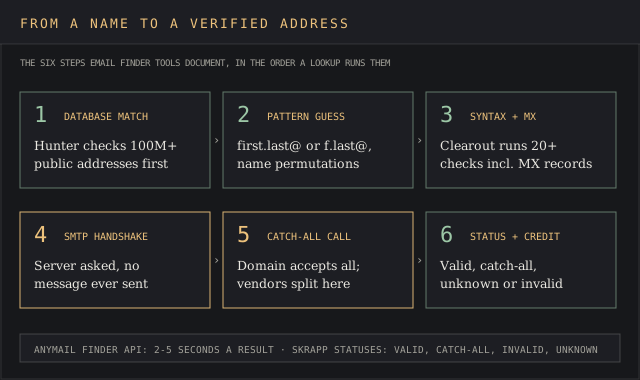
Hunter returns the public sources for each address, such as a company website page a search engine can index, along with discovery dates.
The guess then goes through email verification. Clearout lists SMTP verification, MX record checks and domain filtering among its 20+ checks. Findymail adds checks for spam traps and an SMTP handshake, a real-time verification step that asks the mail server if the mailbox exists without sending a message. Anymail Finder says its API returns verified email addresses in 2 to 5 seconds, a lookup a person would otherwise run by hand against corporate email addresses.
Vendors split on catch-all domains. A catch-all mail server accepts every address at the domain, so the SMTP check can't confirm the mailbox. Skrapp labels these "Catch-All" and bills them. Prospeo and Findymail say they resolve catch-alls and charge only for the ones they pass.
The verification status that comes back drives the credit. A confidence score, as Hunter shows, estimates the odds an address is right, and only a refund-on-bounce policy puts money behind it. Buyers who confuse the two find out at send time, when the bounce rate lands on their own domain's sender reputation.
Accuracy claims and bounce guarantees from email finder vendors
Every accuracy figure in this category comes from the vendor selling the tool. Read them as marketing until a refund policy backs them.
- Clearout: 99% accuracy with 20+ checks, its email finder page. Its pricing page promises credits that never expire.
- Prospeo: 98% email accuracy and a 63% average match rate, its email finder page.
- RocketReach: 98% accuracy and 30 million users, its pricing page.
- Skrapp: 97% email verification accuracy and 3B+ searches processed, its email finder page.
- GetProspect: "GetProspect guarantees 98% data accuracy or gets your credits back," its homepage, with 50 valid emails a month free, $49 a month for 1,000, a promise to "Pay only for verified contacts," and a LinkedIn extension built for one-click export.
- Anymail Finder: "97%+ delivery guarantee" with credit back on reported bounces, its pricing page.
- Findymail: "Under 5% bounce rate, guaranteed," or credits refunded, its homepage.
Talk is cheap, and only the last three name a remedy. GetProspect's guarantee and 4.9-cent rate would put it level with Voila Norbert on criteria 1 and 2. A 97% deliverability promise measures if email addresses exist as mailboxes. A live mailbox belonging to someone who left the company still passes it, so accurate data on job title and company matters as much as the SMTP check.
Vendor-run comparisons are a dime a dozen. Prospeo publishes its own email finder rankings "by accuracy", and Findymail's homepage cites "23% more valid emails than competitors." A 50-contact test of your own beats both.
What email finder tools cost
Email finder cost runs on credits, and the price per credit hides three variables: how many email addresses a credit buys, when it expires, and what a failed or catch-all search costs. Monthly entry prices on this page run from Clearout's $23 to Findymail's and ContactOut's $99.
A penny saved is a penny earned, and credit rollover decides how many pennies survive the month.
- Clearout: credits never expire.
- Anymail Finder: unlimited rollover while subscribed.
- Findymail: rollover up to 2x the monthly allowance.
- Hunter: credits usable up to 12 months from purchase.
- Prospeo: credits reset at renewal.
- Snov.io: credits expire every 30 days on monthly plans with renewal off.
Annual billing cuts the rate by 20% to 30% at most vendors here, with Hunter dropping from $49 to $34, Skrapp from $39 to $29 and Prospeo from $49 to $37. It also locks in a year.
Apollo's Basic plan is listed on annual billing only, so a single seat costs $588 before the first email search.
Contact databases price differently again. Lusha's free plan gives 40 credits a month, and a phone number costs 5 credits against 1 for an email, per Lusha's pricing page. The Lusha pricing report and the Seamless.AI pricing report cover the contract terms.
Free email finder options and their limits
A free email finder plan is a test bench. Every email finder free tier on this list runs from RocketReach's 5 lookups to Prospeo's 100 credits a month, plus ContactOut's 5 emails a day. Six of the 12 ranked tools reset a free allowance every month, and the other six grant credits once.
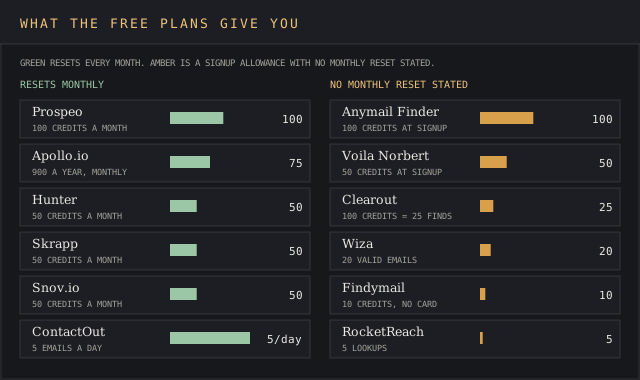
Prospeo's 100 credits a month is the largest recurring free tier to find email addresses. Apollo grants 900 a year, 75 a month. Hunter, Skrapp and Snov.io each give 50. ContactOut gives 5 emails a day. A free account at RocketReach gets 5 lookups in total, and Findymail's trial is 10 credits with no credit card required.
The limits show up fast. Hunter's 50 credits cover one small campaign. Prospeo blocks CSV and API enrichment on Free. Skrapp's free credits don't roll over. Beggars can't be choosers on a free plan, and 50 searches is enough to measure a bounce rate on email addresses you already know.
LinkedIn email finder extensions and Sales Navigator exports
All 12 ranked tools ship a Chrome extension, and most work as a LinkedIn email finder. Install the browser extension from the Chrome Web Store, open a LinkedIn profile, and it will find email addresses for that person. Each browser extension listing in the Chrome Web Store shows its user count. Hunter says its extension has 600,000+ users. Skrapp's works on Sales Navigator too.
Sales Navigator exports are a separate job. Wiza exports email addresses for a whole Sales Navigator search list, and Skrapp's extension works inside Sales Navigator. Wiza caps exports at 2,500 a month even on its annual plans. Sales Navigator vs ZoomInfo compares the seat itself with a full database.
Contact databases that also find emails
Several lead generation vendors sell email addresses inside a larger contact database. They're ranked in the sales intelligence ranking and the lead intelligence software ranking, and the documented problems travel with them.
The elephant in the room is affiliate money. This site earns commission from four of the vendors below, flagged on each line, and that changes none of the facts.
- Lusha: contact data with 40 free credits a month and a LinkedIn email finder extension. Its review documents four US lawsuits since 2022 and a €2 million Italian fine it's contesting. The site runs a Lusha affiliate link.
- Seamless.AI: 50 free credits a month and Credit Back Protection on bounced emails. Pro pricing is unpublished, and Trustpilot reviewers report 60-day cancellation notice and surprise auto-renewals. Affiliate.
- BookYourData: a "97% deliverability guarantee or refund the credits," 10 free credits and credits that never expire, per its pricing page. Its review finds the guarantee counts only hard bounces past 3%, and entry packs cost 40 cents a contact. Affiliate.
- lemlist: a 650M+ contact lead database inside a cold email tool that can personalize emails at send time, with enrichment credits sold separately. Affiliate.
- ZoomInfo: the enterprise reference point. ZoomInfo alternatives covers the switch.
Try it yourself
Try Lusha's free plan
40 free credits a month and a LinkedIn email finder extension. An email costs 1 credit, a phone number 5.
 Visit Lusha →
May earn a commission if you sign up through this link, at no extra cost to you. Full affiliate disclosure.
BookYourData has a written remedy, which would put it in the top group on criterion 1. At 40 cents a contact on its $99 entry pack it would land below Anymail Finder's 7.25 cents. FullEnrich and Clay run waterfall searches across several email finders at once, covered in the data enrichment ranking.
Try it yourself
Sign up for BookYourData
Pay-as-you-go packs from $99, 10 free credits to start, and credits that never expire.
 Visit BookYourData →
May earn a commission if you sign up through this link, at no extra cost to you. Full affiliate disclosure.
Personal email addresses and the legal line
Business email addresses and personal email addresses carry different risk. B2B senders in the EU usually rest on legitimate interests under GDPR Article 6(1)(f), and Article 21 gives every recipient the right to object. RocketReach's Essentials plan sells "verified personal & professional emails," and that balance is hardest to defend for personal emails.
The complaints come from the people in the database. ContactOut's 1-of-5 Capterra review above, about a personal phone number, is one example. Lusha's Trustpilot page, documented in its review, is mostly people who found their own number. Tools should follow applicable laws on outreach, and so should the sender. The FTC's CAN-SPAM guide requires a working opt-out and a physical postal address in every commercial email.
Reverse email lookup and other email lookup tool jobs
A reverse email lookup runs the other way, starting from one of the email addresses in your inbox to find who it belongs to. ContactOut lists an Email Lookup feature in its product menu. Hunter's Email Verifier answers a narrower question, if the mailbox exists, for 0.5 credit.
OSINT email lookup sits outside this ranking, since the 12 tools here search business data. For a lost personal inbox, the provider's account recovery page is the tool.
How to run an email finder trial
Running a trial is easier said than done when every vendor's free tier measures something different. Use the same contacts on every tool, inside the prospecting process your team already runs.
- Pull 50 contacts whose verified email addresses you already hold, split across 10 company domains, two of them catch-all.
- Run all 50 through each free email finder by name and company. Record found, verified, catch-all and unknown.
- Count credits used, including for misses.
- Compare each found email address to the one you hold. Count mismatches as errors.
- Send nothing to unverified results. Run the rest through one independent email verifier.
- Price the winner at your monthly volume, with rollover and annual terms.
That test takes an afternoon and costs nothing on tools with a free account. It also shows which vendor's verified emails hold up in your industry, measured on your own 50 contacts.
Email finder tools FAQ
Is there a free email finder?
Yes. Prospeo gives 100 credits a month, Apollo 75 and Hunter 50, all on free plans that find email addresses every month. Anymail Finder and Voila Norbert grant one-time credits at signup.
How do I find an email address with just a name?
Email finder tools need the name plus a company, a company domain or a LinkedIn profile URL. With a name and company name, Findymail, Voila Norbert and Hunter guess the email format and verify it, and the same tools search email addresses in bulk from a list.
Can AI find email addresses?
The finding is pattern matching and SMTP verification. Tools use algorithms to find email addresses and data aggregation to verify them. AI features in these tools write outreach or filter leads. Prospeo lists AI Search and AI Lookalikes on its free plan, and both run on the same verified data.
What's the best email finder?
Findymail ranks first here for its written under-5% bounce remedy at 1.98 cents a verified email address. For the largest recurring free tier, Prospeo. For Google Sheets and domain search, Hunter.
How do I look up who an email address belongs to?
Use a reverse email lookup. ContactOut lists an Email Lookup feature for that job, and Hunter's Email Verifier confirms the mailbox exists for 0.5 credit.
How much does an email finder cost?
Between 1.95 and 49 cents a found email on the cheapest paid plans ranked here, with entry prices from $23 to $99 a month.
Bottom line
Findymail is the pick for outbound teams, the best of both worlds with a written bounce threshold and a sub-2-cent verified email. Voila Norbert suits a solo founder who wants a per-email refund and a $49 plan. Anymail Finder fits the bulk email finder job, 100,000 rows at a time, with a guarantee attached.
Buyers who'll accept no remedy for a lower bill should start with Skrapp at 1.95 cents, or Prospeo for its 100 free credits a month and no charge on catch-alls. Hunter stays the easiest way to pull all the email addresses at a domain from Google Sheets. RocketReach, ContactOut and Wiza cost the most per exported email on monthly plans and fit high-volume lookups, LinkedIn recruiting and Sales Navigator exports.