Competitor research tools: 10 competitor analysis tools ranked for 2026
 By Jan Suski. I go deep on every review, checking every number against its source and digging up details other coverage misses, a habit from six years of SEO and link building for tech companies. Bylines at Surfer, Brand24, and Senuto. How the scoring works.
· Prefer this source on Google
Quick comparison of the best competitor analysis tools
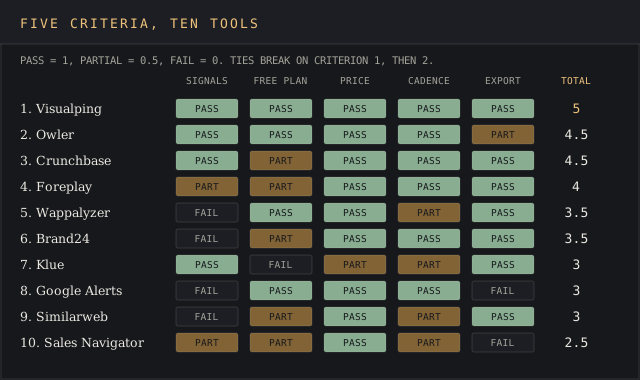
Rows follow the ranked order below. The signal column counts how many of the nine competitor signals in the criteria section each tool watches on its cheapest competitor-tracking plan; the score is the total against the five criteria.
| # | Provider | Signals watched (of 9) | Score (of 5) | Entry price | Best fit |
|---|---|---|---|---|---|
| 1 | Visualping | 4: pricing, product, messaging, hiring pages | 5 | $0 for 5 pages; $10 a month billed yearly | PMMs tracking competitors' pricing pages |
| 2 | Owler | 3: funding, launches, leadership news | 4.5 | $0 for 5 companies; Pro $468 a year | Founders following 5 to 50 competitors |
| 3 | Crunchbase | 3: funding, headcount, product news | 4.5 | $0 account; Pro $49 a month billed yearly | Analysts mapping private competitors |
| 4 | Foreplay | 2: ad creative, landing pages | 4 | $149 a month, Workflow plan | Performance marketers and creative teams |
| 5 | Wappalyzer | 1: technology stack | 3.5 | $0 for 50 lookups; Pro $250 a month | Product teams checking competitors' tech |
| 6 | Brand24 | 1: review and social sentiment | 3.5 | $199 a month billed yearly | Teams tracking brand mentions of competitors |
| 7 | Klue | 3: public changes, messaging, G2 reviews | 3 | Quote; Vendr median $30,000 a year* | PMMs running battlecards and win-loss |
| 8 | Google Alerts | 1: news and web mentions | 3 | $0 | Anyone starting with no budget |
| 9 | Similarweb | 1: web traffic and audience | 3 | $125 a month billed yearly | Analysts benchmarking market share |
| 10 | LinkedIn Sales Navigator | 2: headcount, company news | 2.5 | $119.99 a month, Core | Hiring signals on named competitors |
The median marked * is an anonymised buyer-reported contract value published by Vendr. Everything else is the price the vendor publishes itself.
Where these figures come from
Entry prices and free-plan limits come from each vendor's own pricing page, linked in that tool's entry below. Klue publishes no rate card, so its row carries Vendr's anonymised buyer median. Signal counts and scores apply the five criteria in the next section to the cheapest plan that tracks competitors. Crunchbase publishes no limits for its free account and Wappalyzer publishes no cadence for its website alerts, so neither row claims one.
Competitor research tools watch what rival companies do in public and tell you when it changes: a pricing page that drops a tier, a careers page that adds 14 sales roles, a Series B, a new ad angle, a wave of one-star reviews. The cheapest serious option on this page costs $10 a month billed annually. The most expensive one has a $30,000 Vendr median.
Speed is the reason to set one up now: six of the ten alert you within a day of a change, before a rival's new price turns up in your sales calls.
This page ranks ten competitor analysis tools for the person doing the research by hand: a product marketer building a battlecard or a competitive analysis, an analyst sizing up three new competitors, a founder checking what one of their competitors charges before a pricing call. Six of the ten have a free plan or a free account, and the section on free competitor analysis tools covers six more sources that cost nothing.
It's a different page from our competitive intelligence tools ranking, which is the buying guide for an enterprise CI program: AlphaSense, Crayon and Contify, budgets in the tens of thousands, a curator on staff. Three tools appear on both lists. Here they're judged on what one person can buy and use this week, which makes this the hands-on end of competitor intelligence.
Keyword and backlink suites sit out of the ranking on purpose. SEO competitor analysis is a separate job with its own competitive intelligence for SEO ranking, and the section near the end explains where the two overlap.
Evaluation criteria for competitor research tools
Five criteria decide the shortlist, and the ranking below applies them in this order. Each tool earns a pass (1), a partial (0.5) or a fail (0) on each. Tools sort by total; a tie goes to the tool that does better on criterion 1, then criterion 2, and down the list.
Every test below fits inside a free plan or a seven-day trial run against 3 of your own competitors. None needs a sales call to run.
1. Competitor signals watched natively
Count how many of these nine signals the tool tracks on its cheapest plan that tracks competitors: pricing and packaging, product releases, positioning and messaging, hiring and headcount, funding and firmographics, ad creative, review and social sentiment, web traffic and audience, technology stack. Three or more passes, two is a partial, one or zero fails. Win-loss interviews and battlecards are outputs, so they don't count as signals.
2. A free plan with published limits
A free plan whose limits are printed on the pricing page (pages, companies, lookups) passes. A free account with unstated limits, or a time-boxed trial, is a partial. Demo-only access fails.
3. A price you can check before a sales call
A self-serve price on the vendor's own page passes. A Vendr marketplace median built from anonymised buyer contracts is a partial, since it benchmarks a quote without letting you buy at it. A custom quote with no public benchmark fails.
4. Alert cadence of one day or faster
Find the documented check frequency or alert schedule. Daily or faster passes. Alerts that exist with no published cadence get a partial. No alerts fails, because a monitoring tool you have to remember to open turns into a quarterly chore.
5. Export or API on the entry plan
CSV, Excel or API access on the cheapest paid plan passes. API access gated to an enterprise tier is a partial, and email-only output fails. Competitor data that can't leave the tool can't feed a battlecard, a board deck or a competitive analysis template.
The 10 best competitor analysis tools, ranked
Visualping
Best fit
A product marketer or founder who needs to know the day one of their competitors edits its pricing, packaging, homepage or careers page.
Visualping is competitor website analysis reduced to one job: flagging what changed since the last check. It watches any web page and emails you when it changes, with a screenshot of the old and new versions and the changed area highlighted. That one mechanism covers four of the nine signals, because pricing, release notes, positioning and job openings all live on pages a competitor publishes.
Its pricing page lists a free plan with 5 pages, 150 checks a month and an hourly check, and paid plans that check as often as every 2 minutes.
Every plan, the free one included, carries Visualping's REST API and MCP server access, an AI summary of what changed, and a flag marking each change as important or trivial. That flag is the feature that keeps a 40-page watchlist readable when you track competitor pricing pages, changelogs and careers pages for 10 rivals at once.
Key features
- Page monitoring from 5 pages (Free) to 500 pages (Business 50K), with check frequency from 60 minutes down to 2 minutes
- AI change summaries and an important-or-not flag on every plan
- REST API, MCP server and webhooks (Zapier via webhook) on every plan, including Free
- Slack, Microsoft Teams and Google Sheets delivery on Business plans
- Area selection, so a check can skip a rotating banner and watch only the price table
Pricing
Free covers 5 pages and 150 checks a month. Personal 1K is $14 a month or $120 a year (10 pages, every 15 minutes), Personal 10K is $70 a month or $600 a year (40 pages, every 2 minutes), and Business 20K is $140 a month or $1,200 a year for 200 pages and 5 users.
Pros
- The free plan is enough to watch the pricing pages of five competitors
- API and MCP access from $0, which no other tool on this list offers
- Covers pricing, product, messaging and hiring pages with one setup
Cons
- Sees only what's on the page: no funding, traffic, ad spend or review data
- Layout shifts and rotating ads on watched pages trigger false alerts until you narrow the watched area
- Slack and Teams delivery wait until the $100-a-month annual Business tier
G2 lists 501 reviews at 4.6 out of 5, and the false-alert complaint recurs in them. A decision support director at a mid-market company wrote on G2 in September 2025:
Sometimes, there may be false notifications if a page layout changes slightly, even when the main content remains the same.
G2 review, Saeed A., decision support director, mid-market, September 25, 2025
Cost draws the second recurring complaint. A full-stack engineer at a small business told G2 in June 2026 that "[t]hey charge a lot for their pricing packages especially when i want to check the pages every hour."
Why it’s ranked #1. Visualping passes all 5 criteria. Owler at #2 gates its API behind an Enterprise quote, a partial on criterion 5, while Visualping ships REST API and MCP access on a $0 plan watching 5 pages.
Owler
Best fit
A founder or strategy lead who wants a daily email on 5 to 50 named competitors without building a monitoring setup.
Owler follows competitors and sends you their news: funding rounds, acquisitions, executive hires, product launches, sorted into over 20 news event types. Its pricing page claims 20 million companies, 3.5 million active community members and 500,000 database updates a month. The community supplies much of the private-company data, including revenue estimates, and users can submit corrections. Owler is now part of Meltwater, per the same page's footer.
Key features
- Owler Daily Snapshot emails plus Instant Insights alerts on significant events for every followed company
- A competitor graph that suggests direct and indirect competitors for a followed company
- 20+ news event types for sorting the newsfeed (funding, acquisitions, leadership, launches)
- Firmographics API, Competitor API and News & Key Events API on Enterprise
- Chrome extension on Pro and Enterprise
Pricing
Community is $0 forever for up to 5 followed companies, 1 company profile a month and 1 Daily Snapshot a month. The Pro card reads "$39 per month, billed annually", and the checkout page totals $468 and says the subscription renews annually, so the charge is $468 a year. Enterprise is quoted.

Pros
- A free plan that names its limit: 5 competitors
- Daily cadence with no setup beyond typing a company name
- The competitor graph surfaces new competitors you weren't following
Cons
- Revenue estimates for small private competitors come from the community and miss often
- The free plan's 1 profile view a month runs out in the first session
- API access only on a quoted Enterprise plan
G2 lists 484 Owler reviews at 4.3. A small-business operations manager in food and beverages hit the accuracy limit during a product launch, writing on G2 in August 2026:
Owler’s estimated revenue figures for smaller craft beverage brands are frequently inaccurate, which created confusion during our sparkling‑tea launch planning. We also ran into inconsistent update timelines; some competitor retail announcements showed up weeks late.
G2 review, Damon S., operations & client partnership manager, food & beverages, small business, August 28, 2026
The free tier draws the other theme. An IT services reviewer praised the "quick alerts and notifications of the announcements we want to follow closely" and added that the team "had to upgrade within a week" (G2, October 2024).
Why it’s ranked #2. Owler scores 4.5 and wins the tie with Crunchbase on criterion 2: its free plan prints a 5-company limit where Crunchbase says only that limits apply. It trails Visualping because its API needs an Enterprise quote.
Crunchbase
Best fit
An analyst or business-development lead researching private competitors: who funded them, how fast they're hiring, who else sits in the same market.
Crunchbase is the funding and firmographics layer. The Crunchbase pricing page lists company firmographics, funding data, growth and heat scores, a "competitors and similar companies" module, valuation estimates and funding forecasts, and claims 80 million users. Our Crunchbase review covers where the data comes from; private-company figures lean on self-reporting and Form D filings, so smaller profiles run thin.
Key features
- Real-time alerts on funding, acquisitions and news for saved companies, searches and lists
- Competitors and similar-companies module on each profile
- Up to 1,000 results per search and up to 100 saved lists and searches on Pro
- 2,000 exported rows a month on Pro
- Crunchbase MCP plus ChatGPT and Claude integrations
Pricing
A free account gets profiles, search results, AI research and MCP access, with "usage limits" the page doesn't quantify. Pro is $49 a month billed annually for the first year (38% off $79) or $99 month to month, with a 7-day trial. Business starts at $199 a month billed annually. The Crunchbase pricing breakdown has the export caps by tier.
Pros
- The cheapest funding and headcount data a single person can buy without a demo
- Similar-companies lists surface competitors you hadn't named
- Exports on the entry paid plan
Cons
- Profiles for small or little-known competitors carry missing or wrong base data
- Free-account limits aren't published
- The 2,000-row export cap binds fast for anyone building market maps
G2 lists 413 reviews, and the two sides are consistent. An enterprise project engineer wrote in May 2026: "I especially value the “similar companies” feature, which helps surface competitors and potential leads that weren’t even on my radar yet." A mid-market vice president serving investment banking clients flagged the weakness:
We’ve noticed that, in many cases, some base-level information is missing or incorrect, especially for companies that aren’t very well known.
G2 review, Amitoj S., vice president, mid-market, April 14, 2026
Why it’s ranked #3. Crunchbase scores 4.5, the same as Owler, and loses the tie on criterion 2 because its free limits go unstated. It beats Foreplay at #4 on criterion 1, watching 3 signals to Foreplay's 2.
Foreplay
Best fit
A performance marketer or creative strategist who needs to track competitor ads on Meta, TikTok and LinkedIn and save each one before it disappears.
Foreplay started as a swipe file for ads and grew a competitor tracker called Spyder. Its pricing page lists a 200 million ad database, round-the-clock tracking of competitor Meta ads, landing page insights and competitor ad history up to 3 years back. That last figure matters, because the Meta Ad Library drops a commercial ad from view once it stops running outside the EU. For ad spend estimates on competitors, see our ad intelligence software ranking.
Key features
- Spyder: 15 tracked brands on monthly Workflow, unlimited on annual
- Competitor ad history up to 3 years, with creative timeline and media mix views
- Saving from the Meta Ad Library, TikTok Ad Library, LinkedIn Ad Library, Instagram and YouTube Shorts
- Landing page insights and automated transcription of video ads
- MCP plus Claude and ChatGPT integrations
Pricing
Foreplay calls it flexible pricing with no contracts. Basic is $49 a month for one user and the ad database, without the Spyder tracker. Workflow, the first plan that analyses competitor ad libraries, is $149 a month for 5 users. Agency is $389 a month. Annual billing saves $310 a year on Workflow, and every plan starts with a 7-day trial.
Pros
- Keeps ads after they stop running, the ad history a free library loses
- Five seats on the $149 plan
- Covers TikTok and LinkedIn as well as Meta
Cons
- No ad spend estimates for competitors' paid campaigns; that needs a tool from the ad intelligence ranking
- Google ads support is listed as coming soon
- The trial now asks for a card
G2 lists 129 reviews. A higher-education reviewer named the core use in May 2026: "Being able to save ads from the Meta Ad Library with one click before they get deleted or expire is a lifesaver." A founder writing the same month didn't like that "now you have to put your card to use it."
Why it’s ranked #4. Foreplay scores 4, half a point under Crunchbase, because it watches 2 signals where Crunchbase watches 3. It tops Wappalyzer's 3.5 on criteria 1 and 4: two signals and 24/7 ad tracking against one signal and an unpublished alert cadence.
Wappalyzer
Best fit
A product manager or sales engineer checking which CMS, analytics, payments or chat software competitors run.
Wappalyzer handles the technical side of competitor website analysis: it reads a site's code and lists the technology behind it. The browser extension does it for the page you're on; the platform builds lead lists of every site running a given technology and sends website alerts. The Wappalyzer pricing page gives a free account 50 technology lookups a month.
For full technographic datasets, the technographic data providers ranking covers BuiltWith and the rest. The Wappalyzer review is in progress.
Key features
- Browser extension for one-click tech-stack lookups
- Technology lookups: 50 a month free, 5,000 on Pro, 20,000 on Business
- Lead lists filtered by technology, 2 technology targets on Pro and unlimited on Business
- API credits included in paid plans (5,000 on Pro), expiring after 60 days
- Website alerts and CRM enrichment
Pricing
Free gives 50 lookups a month and sample lead lists. Pro is $250 a month, Business $450, Enterprise from $850. Annual billing saves 17%.
Pros
- A published free allowance of 50 lookups
- API credits on the entry paid plan
- Answers "what did they build it on" in a second
Cons
- One signal: it says nothing about pricing, funding or customers
- Detection misses server-side tools and goes stale after migrations
- Alert cadence for website alerts isn't published
A business growth strategist summed up the accuracy limit in a February 2026 G2 review: "the technology data is sometimes incomplete or outdated, so it requires additional validation." A small-business director on the same platform called it "the best UX for technographic lead generation" (G2, March 2025). G2 lists 59 reviews in total.
Why it’s ranked #5. Wappalyzer scores 3.5 and wins the tie with Brand24 on criterion 2, a printed 50-lookup free allowance against Brand24's 14-day trial. It sits under Foreplay because it watches 1 signal to Foreplay's 2.
Brand24
Best fit
A marketing or PR team that wants to know what customers say about competitors on social media, review sites, Reddit and news.
Brand24 monitors mentions of any keyword, so competitors' brand names work the same way your own does. The Brand24 pricing page lists sources from X, Instagram, TikTok, Reddit and YouTube through news, podcasts, newsletters and review sites, with AI sentiment analysis on every plan. The site's author has written for Brand24's blog; our Brand24 review keeps its criticisms in, including the 30-day history limit. For broader options see the social listening tools ranking.
Key features
- AI sentiment analysis on all five plans
- Review sites, Reddit, news and podcasts among the monitored sources
- Update frequency from every 12 hours (Individual) to real time (Pro and up)
- Storm alerts, Slack and Microsoft Teams integrations
- Excel, PDF and PowerPoint reports; API access for an extra fee
Pricing
Individual is $199 a month billed annually for 3 keywords and 2,000 mentions. Team is $299 (7 keywords, hourly updates), Pro $399 (12 keywords, real time), Business $599, and Enterprise starts at $1,499 a month. A 14-day free trial needs no card. The Brand24 pricing report breaks down the mention caps.
Pros
- Tracks competitors' review and social sentiment with the same setup as your own brand
- All prices published
- Unlimited users from the Team plan up
Cons
- 3 keywords on Individual leaves room for two competitors at most
- Common brand names pull in unrelated mentions
- Sentiment watches one signal and nothing structural about the company
G2 lists 367 Brand24 reviews, most collected through seller invites. A small-business marketing manager hit the keyword cap from the other side in August 2026: "One challenge is the limitation on the number of keywords, especially in our case, as our company name is not unique and often appears in unrelated conversations." A mid-market head of marketing liked that "Brand24 includes all the important review websites" (G2, September 2026).
Why it’s ranked #6. Brand24 scores 3.5 and loses the tie with Wappalyzer on criterion 2, a 14-day trial against a 50-lookup free plan. It beats Klue's 3 on criteria 2 to 4: a trial, a $199 published price and 12-hour updates.
Klue
Best fit
A product marketing team that owns battlecards and win-loss against named competitors for a sales team, and has a five-figure budget for it.
Klue is the one competitor intelligence and compete-enablement platform on this list, there for the PMM whose research ends in a battlecard. The Compete Agent page describes automated collection from public competitor sources, AI competitor profiles, Klue Insights pulled from G2 reviews and win-loss interviews, and Ask Klue answering questions in Slack and Salesforce.
Klue's homepage claims 250,000 users. The Klue review goes deeper, and Crayon vs Klue covers its closest rival.
Key features
- Battlecards with consumption analytics
- Win-Loss Suite with buyer interviews and win-loss clips
- Klue Insights extracting themes from G2 reviews and interviews
- Ask Klue in Slack, Salesforce and Klue; Klue access from Claude
- Email digests and deal tips sent to sellers
Pricing
Klue publishes no rate card. Vendr's buyer data shows a $30,000 median a year across 106 purchases, from $16,000 to $60,000, with buyers saving 18% on average against the first quote. Crayon, which automates competitor website monitoring for the same buyer, lands on the same $30,000 median across 93 purchases.
Pros
- Turns raw competitor insights into battlecards sellers open inside Salesforce
- Win-loss and competitive intelligence in one product
- G2 reviews read as a competitor signal, built in
Cons
- No free plan and no published price
- Alert rules need tuning before the feed is usable
- Battlecards don't export to PowerPoint or PDF for people outside Klue
Klue's pitch is that a current battlecard gives sellers a competitive edge and keeps competitive positioning consistent across a sales team.
G2 lists 444 reviews at 4.7, and alert noise is the standing complaint. An enterprise reviewer wrote in February 2026: "Alert refinement needs to be simpler, as lots of noise comes through." An enterprise marketing analytics manager asked for "a feature to export battlecards into PPT or PDF formats for non-Klue users" (G2, April 2025).
Why it’s ranked #7. Klue scores 3, trailing Brand24's 3.5 because its $30,000 Vendr median replaces a published price. It wins the three-way tie at 3 with Google Alerts and Similarweb on criterion 1, watching 3 signals to their 1.
Google Alerts
Best fit
Anyone starting to track competitors with no budget, as the first layer under every paid tool.
Google Alerts emails you when new Google Search results match a query. The Google Alerts page offers three frequencies (as it happens, at most once a day, at most once a week), source filters for news, blogs, web, video, books, discussions and finance, and a choice between the best results and all results. One alert per name for each of your competitors costs nothing. Our Google Alerts review is in progress.
Key features
- As-it-happens, daily or weekly delivery
- Source type, language and region filters
- Search operators in the query, so "acme" -jobs drops job board noise
- Free with any Google account
Pricing
$0.
Pros
- Costs nothing and runs indefinitely
- As-it-happens delivery catches competitors' press releases on the day they publish
- Covers news and discussion sites a page monitor won't watch
Cons
- Misses results that Google indexes late or ranks low
- Email only, with no export or structured data
- Broad names flood the inbox with unrelated pages
Capterra lists 315 reviews at 4.7. A communications consultant at a 10,001+ employee insurer uses it for "the latest updates on competitors" (Capterra, January 2026). A construction district manager wrote the same month that "[t]here have been times in the past where Google alerts has missed something or been a little off on the information provided."
Why it’s ranked #8. Google Alerts scores 3 and beats Similarweb at #9 on criterion 2, free with no limits against a sample. It loses to Klue on criterion 1, watching 1 signal to Klue's 3.
Similarweb
Best fit
An analyst who needs traffic, audience and channel-mix estimates for competitor websites, the closest thing to market share most private companies leave in public.
Similarweb estimates how many people visit competitors' sites and which traffic sources send them, which makes it the market position and competitor performance tool on this list. Its data methodology page names four sources (website and app owners, a contributors network, public data and partnerships) and says it collects 10 billion digital signals a day. The competitive analysis page claims 100 million websites across 190 countries.
Our Similarweb review runs the accuracy tests.
Key features
- Traffic and engagement, customer demographics and marketing channels overview on the entry plan
- Alerts on tracked competitors on the entry plan
- Audience overlap and competitive benchmarking
- Excel downloads on most reports, some metered by data credits
- Free Chrome extension and free site lookups
Pricing
The Similarweb packages page lists Competitive Intelligence at $125 a month billed annually or $199 monthly, with 1 user and 3 months of historical data. Adding SEO and AI search tracking costs $333 a month billed annually; adding ad intelligence costs $542. Business plans are quoted. Our Similarweb pricing report covers the enterprise tiers.
Pros
- The only tool here that estimates competitor traffic and audience at market level
- Self-serve entry plan with a published price
- Excel export on most reports
Cons
- Traffic figures are modeled estimates, weakest on small sites
- 3 months of history on the $125 plan
- Ad creative and paid search data cost $542 a month billed annually
G2 lists 1,179 reviews. A mid-market partner wrote in September 2026:
The cost can be considerable, especially to access conversion rate data. It's less obvious when it is scaling sampled data and to what degree, so smaller sites can have quite erroneous data.
G2 review, Martin J., partner, mid-market, September 29, 2026
Why it’s ranked #9. Similarweb scores 3 and loses the tie with Google Alerts on criterion 2, where its free data is a sample with unstated limits. It beats LinkedIn Sales Navigator's 2.5 on criterion 5, Excel exports against none.
LinkedIn Sales Navigator
Best fit
A researcher who needs hiring and headcount signals on named competitors, such as which function one of your competitors is staffing up.
Sales Navigator is a prospecting tool, ranked here for one competitor signal LinkedIn owns. LinkedIn's help page on premium insights says Sales Navigator and Premium Business subscribers see a company's total employee count over time, headcount growth by function, notable alumni who left at VP level or above in the last 24 months, and total job openings by seniority and function.
Pages with under 30 employee profiles show none of it. Our Sales Navigator review covers the sales side.
Key features
- Headcount growth by function and job openings by function on company insights
- Account IQ AI summaries of company news
- 50+ advanced search filters
- Saved accounts and alerts
- CRM sync with Salesforce, HubSpot and Dynamics on Advanced
Pricing
The compare-plans page lists Core at $119.99 a month or $1,079.88 a year, Advanced at $159.99 a month or $1,799.88 a year, and Advanced Plus by quote. See the Sales Navigator pricing report for team math.
Pros
- First-party headcount data by function, which no other tool here has
- Job openings by function show where competitors are investing
- Free trial before the first charge
Cons
- No export of competitor data on Core
- Built and priced for selling, so most of the seat goes unused for research
- Counts depend on employees keeping profiles current
G2 lists 2,211 reviews. A mid-market account director liked "[t]he new AI capabilities that not only summarise a company's recent developments but also marries them to how it can help me pitch my product to them" (G2, May 2026). A small-business sales administrator wrote the same week that "the price isn’t cheap by any means."
Why it’s ranked #10. Sales Navigator scores 2.5, half a point under Similarweb, because Core has no export, a fail on criterion 5. It makes the list for headcount growth by function, a signal no other tool here reads, shown for competitors with 30 or more employee profiles.

What competitor analysis tools do, and what they can't see
A competitor analysis tool collects public evidence about competitors and turns it into alerts, profiles or reports, the narrowest and most hands-on layer of market intelligence. Every tool above watches a different slice of that public evidence, which is why the signal column tops out at 4 of 9.
The nine signals map onto the four P's of competitor analysis: price (pricing pages), product (releases, tech stack), promotion (ads, messaging, sentiment) and place (traffic, channels).
Competitor analysis software doesn't see private data. Similarweb's traffic numbers are modeled from a panel and partner data; they aren't competitors' Google Analytics data. Owler's revenue figures for private companies come from its community. LinkedIn's headcount is what employees put on profiles.
Read every figure as an estimate with a known source, and check two tools against each other before a number about competitors goes into a board deck, a competitive analysis or a competitive landscape slide.
Most competitors leave the same five things in plain sight: a pricing page, a changelog, a careers page, ads and customer reviews. Those five cover 6 of the 9 signals, and free tools watch all five. A paid competitor intelligence tool earns its fee by watching more competitors, more often, with less manual checking.
Competitor benchmarking: performance metrics each tool reports
Competitor benchmarking compares your numbers with competitors' numbers on the same metric over the same period, so competitor performance reads as a gap against yours. The tools above report different quantitative data, and only some of it benchmarks cleanly against your own analytics. Similarweb's $125 plan keeps 3 months of historical data, enough to spot traffic shifts after one of your competitors launches and short for seasonal market trends.
- Competitor traffic and market share: Similarweb visits, channel mix and audience overlap
- Audience analysis: Similarweb audience demographics and audience behavior across competitors' sites, the closest public read on market position
- Competitor visibility in ads and search: Foreplay's saved ads, the Google Ads Transparency Center, and SEO suites for keyword rankings
- Brand performance: Brand24 mention volume, reach, audience engagement and audience sentiment on competitor mentions
- Hiring momentum: LinkedIn headcount growth by function
- Funding and growth: Crunchbase growth and heat scores
Competitive benchmarking holds up best on shares measured inside one tool, such as competitors' share of brand mentions in Brand24 against yours, because two vendors count with different collection methods. The goal of competitor benchmarking is to identify gaps and growth opportunities: a channel three competitors use and you don't, or a review complaint that recurs across all of them.
Trend analysis over 3 months will identify trends inside a single launch cycle. Industry trends need a year or more, which on Similarweb means a business plan with up to 37 months of history, and on Crunchbase means reading a company's full funding history on its profile.
Free competitor analysis tools and their real limits
A free competitor analysis tool covers one signal well and stops there, which is enough for a first competitive analysis. Stacked, the ten free sources below reach 8 of the 9 signals for a team tracking under ten competitors. The free market analysis tools ranking covers the market analysis side; this table covers the competitor side, with the limit each vendor publishes.
| Free tool | Competitor signal | Free limit | What it can't do |
|---|---|---|---|
| Visualping Free | Pricing, product, messaging, careers pages | 5 pages, 150 checks a month, hourly | No Slack delivery |
| Owler Community | Funding, launches, executive news | 5 companies, 1 profile view a month | No API, 1 Daily Snapshot a month |
| Crunchbase free account | Funding and firmographics | Usage limits unpublished | No exports |
| Wappalyzer free account | Technology stack | 50 lookups a month | No lead lists beyond samples |
| Google Alerts | News and web mentions | No stated cap | Email only |
| Meta Ad Library | Active ads on Facebook and Instagram | Free | Commercial ads vanish when they stop, outside the EU |
| Google Ads Transparency Center | Search, display and YouTube ads | Free | No spend or performance data |
| Wayback Machine | Past pricing pages and messaging | Free | Gaps between captures |
| SEC EDGAR full-text search | Filings of public competitors | Free, filings since 2001 | Public companies only |
| G2 and Capterra | Review sentiment | Free to read | No alerts or export |
Meta Ad Library and Google Ads Transparency Center
The Meta Ad Library lets anyone search all active ads running across Meta's products. Ads about social issues, elections or politics stay visible for 7 years, and ads delivered in the EU are archived for one year after their last impression. A US commercial ad leaves the library when it stops, which is the gap Foreplay's 3-year ad history fills.

Google launched the Ads Transparency Center on March 29, 2023 as a searchable hub of ads from verified advertisers, filterable by region, with the last date each ad was shown and its format. Together the two libraries cover competitors' ad history on the two largest ad platforms for $0, minus spend figures and anything older than the archive keeps.
Wayback Machine, EDGAR and Google Trends
The Wayback Machine passed one trillion archived web pages in October 2025. Pull competitors' pricing pages from 12 and 24 months ago and you have their pricing history without paying anyone. Pricing intelligence tools automate the same comparison across thousands of SKUs.
For public competitors, EDGAR full-text search covers every electronic SEC filing since 2001, so competitors' 10-K risk factors and 8-K press releases are a keyword search away. Earnings calls add the commentary; AlphaSense sells transcript search, which sits on the competitive intelligence ranking. Google Trends compares search interest for competitors' brand names side by side, a rough proxy for brand demand at $0.
Competitor tracking by job: which tool answers which question
A product marketer gets asked "what did they change?" and "how do we beat them?", which is Visualping plus Klue or a free competitor battlecard template. A founder gets asked "who funded them and how big are they?", which is Crunchbase and Owler. An analyst writing a market position memo needs traffic share from Similarweb and hiring data from LinkedIn.
- Pricing and packaging changes: Visualping on the pricing page, Wayback Machine for history
- Product releases: Visualping on the changelog, Owler and Google Alerts for launch news
- Positioning and messaging: Visualping on the homepage, Foreplay for ad angles
- Hiring and headcount: LinkedIn premium insights, Visualping on the careers page
- Funding and firmographics: Crunchbase, Owler
- Ad creative and paid campaigns: Meta Ad Library, Google Ads Transparency Center, Foreplay
- Review and audience sentiment: Brand24, G2 and Capterra pages, Klue Insights
- Web traffic, audience demographics and audience overlap: Similarweb
- Technology stack: Wappalyzer
Win-loss analysis is the exception, since the evidence comes from your own buyers. Klue's Win-Loss Suite automates the interviews, and Clozd, #1 in the win loss analysis software ranking, does the same. A spreadsheet and a win-loss analysis template work at low deal volume, with one interview per lost deal.
How to run a competitive analysis in 5 steps
A competitive analysis maps the competitive landscape with a fixed list of competitors, a fixed set of signals and a cadence, in that order. Tools come last. The five steps below fit a one-person team and a two-week trial window.
- Name 3 to 7 rivals: direct competitors, one adjacent player, and one new entrant from Crunchbase's similar-companies list or Owler's competitor graph.
- Pick the signals that matter to your next decision. A pricing change needs competitors' pricing pages; a hiring decision needs headcount by function.
- Set up collection: Visualping on pricing and careers pages, Google Alerts on each name, a saved search in the Meta Ad Library.
- Write findings into one document per rival, using a SWOT analysis template for the structure.
- Review monthly and date every entry, so competitor moves and market shifts show as market trends over time.
Each step should end in competitive reporting someone acts on. A monthly one-page summary of competitor moves, market shifts and emerging threats gives a leadership team dated evidence for strategic decisions such as a price change or a bet on growth opportunities competitors left open. The same log is where new competitors show up first, usually as a Crunchbase funding alert or an Owler competitor-graph suggestion.
Teams focused on one launch can stop at step 3. The data points that matter most are the dated ones, because a price change with a date on it tells a sales team when competitors moved and by how much.
Competitor analysis software pricing compared
The spread runs from $0 to a $30,000 median, and the steepest jump sits between self-serve tools and quoted platforms. Eight of the ten publish a self-serve price a single person can pay with a card, and Google Alerts is free. The chart shows first-year cost for the cheapest plan on each that tracks competitors.

Three costs hide behind the entry price. Export caps (Crunchbase's 2,000 rows a month on Pro) push a heavy user to Business at $199 a month. Keyword caps (Brand24's 3 on Individual) push a team watching four competitors to Team at $299. Seat counts push Similarweb buyers toward custom plans, since the $125 tier holds one user. The competitive intelligence pricing report covers the enterprise contracts above this range.
SEO competitor analysis is a separate job
Search results for competitor analysis tools mix two categories, and the SEO one dominates them. Semrush, Ahrefs, SpyFu and SE Ranking measure competitors' keyword rankings, organic traffic, backlinks and paid search. They answer "why does their site outrank ours on Google search?", a question about SEO performance and content strategy. This page ranks tools that answer questions about the competitor as a business.
The two toolsets meet in digital marketing. Paid search and content strategy show up in both: Foreplay and the ad libraries show the creative, while the SEO suites show the bids, the content gaps and the pages that win the clicks. Marketing efforts aimed at competitors' search traffic belong with the SEO suites; digital marketing work aimed at competitors' offers starts on this page.
The SEO suites carry the largest datasets in the space. Semrush's stats page lists 29.2 billion keywords and 43 trillion links. Ahrefs' big-data page lists 35 trillion external backlinks in its history, 29 billion filtered keywords, and an index refreshed every 15 to 30 minutes. SE Ranking's competitor research page offers 14 days free with no card and says 40,000+ agencies use it.
Generative engine optimization adds a third layer: how often AI answers cite a competitor. Semrush sells this as the AI Visibility Toolkit at $99 a month, tracking prompts on Google AI Mode and ChatGPT. Keyword research, rank tracking, content gaps and competitor domains in Google Search Console exports all belong to that toolset; the SEO competitive intelligence ranking covers them, and Semrush vs Similarweb covers the overlap with traffic data.
How this ranking differs from the competitive intelligence tools ranking
The two pages answer different buyers. The competitive intelligence tools ranking ranks AlphaSense, Crayon, Contify, Klue, Similarweb, Semrush, Brandwatch, Crunchbase, SpyFu and Exploding Topics for a CI program with a budget line and a curator. This page ranks for one person with a card, a week and a short list of competitors.
Three tools overlap, each for a stated reason. Crunchbase ranks on both because its Pro seat costs $49 a month. Klue ranks here as the single battlecard and win-loss pick, since no self-serve tool does that job. Similarweb ranks lower here (9th) because its entry plan watches one of nine signals. Crayon, AlphaSense and Contify sit only on the CI page, because none publishes a self-serve price.
Competitor intelligence is one slice of market intelligence. Market research measures the broader market through surveys, panels and category sizing; competitor analysis measures the named competitors inside it. AlphaSense, with its filings and earnings calls search, sits on the market intelligence side of that line, and market research tools sit beside it.
Valona is in the same enterprise group. Its competitor analysis page claims 200,000+ sources and continuously updated competitor profiles, and Valona has joined forces with A-INSIGHTS. It publishes no price, which is why it isn't ranked here.
Competitor analysis tools FAQ
Is there a free website that can do competitor analysis?
Yes, several. Visualping's free plan watches 5 competitor pages, Owler's follows 5 competitors, Wappalyzer gives 50 tech lookups a month, and the Meta Ad Library and Google Ads Transparency Center show active ads at $0. Google Alerts covers news.
What is the best tool for competitor analysis?
Visualping scores highest on this page's five criteria at 5 of 5, because it watches pricing, product, messaging and careers pages from a free plan with API access. The best competitor analysis tools for a given team depend on the signal they need: Crunchbase for funding, Similarweb for traffic, Foreplay for ads.
What are the four P's of competitor analysis?
Product, price, place and promotion, the marketing mix reused as a competitive analysis checklist. Wappalyzer and changelog monitoring cover product, Visualping and the Wayback Machine cover price, Similarweb covers place through traffic and channels, and Foreplay and the ad libraries cover promotion.
Which AI tool is best for competitive research?
Klue's Compete Agent builds AI profiles of rivals and answers seller questions in Slack and Salesforce, at a $30,000 Vendr median. On a smaller budget, Visualping's AI change summaries and Crunchbase's MCP access feed competitor data into Claude or ChatGPT on plans from $0 and $49 a month.
What is a free tool that can research competitor keywords?
SE Ranking gives 14 days free with no card, and Semrush and Ahrefs carry 29 billion-plus keyword databases on paid plans. Keyword research belongs to the SEO toolset covered in the SEO competitive intelligence ranking.
Bottom line
Start free. Visualping on five competitors' pricing and careers pages, Owler on five competitors, Google Alerts on every name and a weekly look at the Meta Ad Library cover most of what a one-person team needs, at $0.
Pay when a signal outgrows the free tier or a quarterly competitive analysis needs more history. Crunchbase at $49 a month covers funding and headcount, Foreplay at $149 covers ad history, Brand24 at $199 covers sentiment, and Similarweb at $125 covers traffic, audience analysis and audience behavior. LinkedIn Sales Navigator earns its $119.99 only when hiring is the signal.
Klue earns its $30,000 median when sellers open the battlecards in every competitive deal. For a full CI program, the competitive intelligence ranking picks up where this page stops, and for market research on the broader market the market research tools ranking covers surveys and panels.